
Topbar
Add a thin strip above the header for contact info and social links, and control how it behaves on mobile.
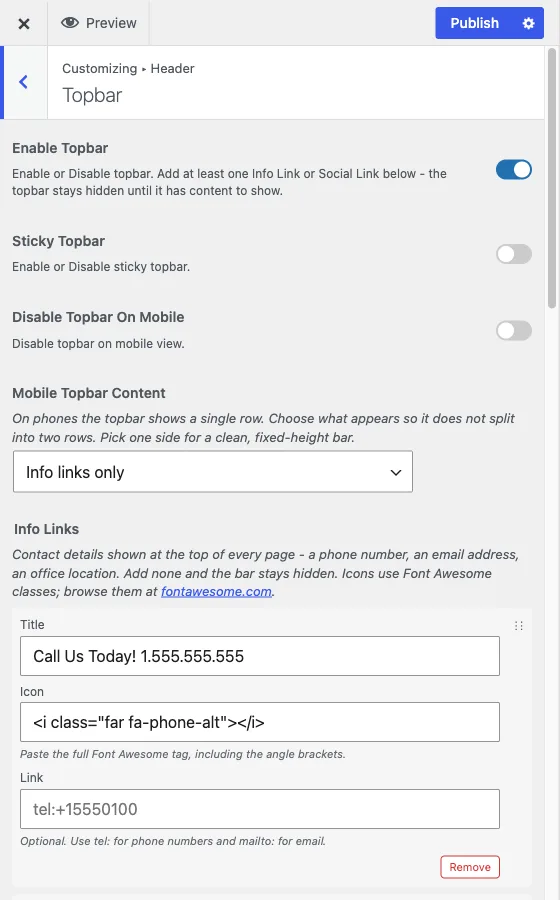
Customize > Header > Topbar
The topbar is a thin strip that sits above the main header, typically used for a phone number, an email address, business hours, and links out to your social profiles.
It stays hidden until it has content
Enable Topbar turns the topbar on, but the topbar itself renders nothing until you add at least one Info Link or Social Link below. This is intentional: it stops a fresh install from shipping an empty colored strip above the header. If you enable the topbar and nothing appears, that is expected, add a link first.
Info links and social links
Both are repeater fields, add as many rows as you need:
- Info Links are for contact details: a phone number, an email address,
an office location. Each row has a title, an icon (paste a full Font
Awesome tag, such as
<i class="fas fa-phone-alt"></i>), and an optional link, usingtel:for phone numbers andmailto:for email. - Social Links are for your social profiles. Each row has a title, a Font Awesome icon tag, and the full URL to your profile.
Info links show before social links. The topbar always renders info links first, then social links, regardless of which one you set up first in the Customizer.
Sticky and mobile behavior
Sticky Topbar keeps the topbar pinned to the top of the viewport along with the header when a visitor scrolls, off by default.
Two controls manage the topbar on phones, where there is only room for a single row:
- Disable Topbar On Mobile removes the topbar entirely on small screens.
- Mobile Topbar Content, shown when the topbar is not disabled on mobile, picks what that single row shows: Info links only, Social links only, or Both (may wrap on small screens). Picking one side keeps the bar a clean, fixed height on phones; choosing both risks the row wrapping if you have several links.
When to use it
Add a topbar when you have a small number of high-value contact or social details that deserve to be visible on every page without taking up header space. If you find yourself adding many links to either repeater, prioritize: a topbar with a dozen icons crowded into one strip is harder to scan than one with three.