
Footer
Set the widget area's typography and spacing, then the copyright bar's text, alignment and colors.
Customize > Footer
Two sections cover the footer: Footer Area, the widget region above the very bottom of the page, and Copyright, the thin bar underneath it. Footer colors themselves - background, text, links - are not set here. They come from your active palette, and if you need to override one, that’s in Color Options > Individual Colors (and its dark-mode twin), not in this panel.
Footer Area
Covers the typography and spacing of the widget area where your footer widgets sit:
- Widget Title Typography. The font used for each widget’s heading.
- Content Typography. The font used for the widget area’s body text and links.
- Footer Padding Top (px), Footer Padding Right (px), Footer
Padding Bottom (px) and Footer Padding Left (px). Space around the
widget area as a whole. Defaults: 70px top, 0px right, 70px bottom, 0px
left. Enter a value such as
40px.
If your footer widgets look cramped or overly spaced, this is the section to adjust rather than a specific widget’s own settings.
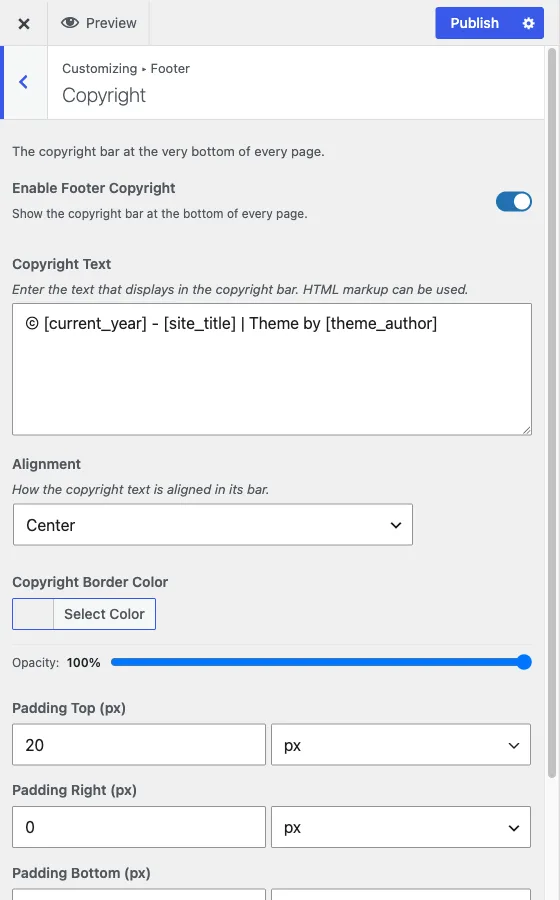
Copyright
Covers the bar at the very bottom of every page:
- Enable Footer Copyright. Turns the whole bar on or off. Every other setting in this section only applies while it’s on.
- Copyright Text. The text shown in the bar. It accepts HTML, so you can
add a link or basic formatting, and it ships with placeholders you can keep
or remove:
[current_year],[site_title]and[theme_author]. - Alignment. Left, right or center.
- Copyright Border Color. The color of the bar’s top border, separate from the palette’s general border color.
- Padding Top (px), Padding Right (px), Padding Bottom (px) and Padding Left (px). Space inside the bar. Defaults: 20px top, 0px right, 20px bottom, 0px left. They show only while Enable Footer Copyright is on.
A note on the copyright text field
Because Copyright Text accepts HTML, it’s a common place to add a privacy
policy link or a designer credit alongside the automatic copyright line. Keep
in mind this field is plain HTML, not a rich-text editor - write markup
directly (<a href="/privacy/">Privacy Policy</a>) rather than expecting a
toolbar.
If the footer doesn’t look right after a change
Check that you’re editing the section you think you are: Footer Area only affects the widget region, and Copyright only affects the bottom bar - a change to one never touches the other. If a color looks unchanged after a palette switch, see how the color system works - footer colors follow the same palette-then-override rules as the rest of the site.