
Reign Tutor LMS Addon
Adds a styled course shortcode, a course category grid, and a community profile tab on top of Tutor LMS, and requires Tutor LMS to be active.
This page covers Reign Tutor LMS Addon version 2.2.0. Its plugin folder is named reign-tutorlms-addon; the plugin itself and this page use “Tutor LMS.”
What it needs
The add-on checks two things in code before it will run:
- Reign theme
- Tutor LMS, active
If either is missing, the add-on deactivates itself and shows an admin notice. It declares WordPress 6.5 and PHP 8.0 as its floor. There is no minimum Tutor LMS version pinned, only that it is active.
This is the lightest of Reign’s four LMS add-ons. It ships no template overrides; everything it does works through shortcodes and hooks on top of Tutor’s own templates.
What it adds
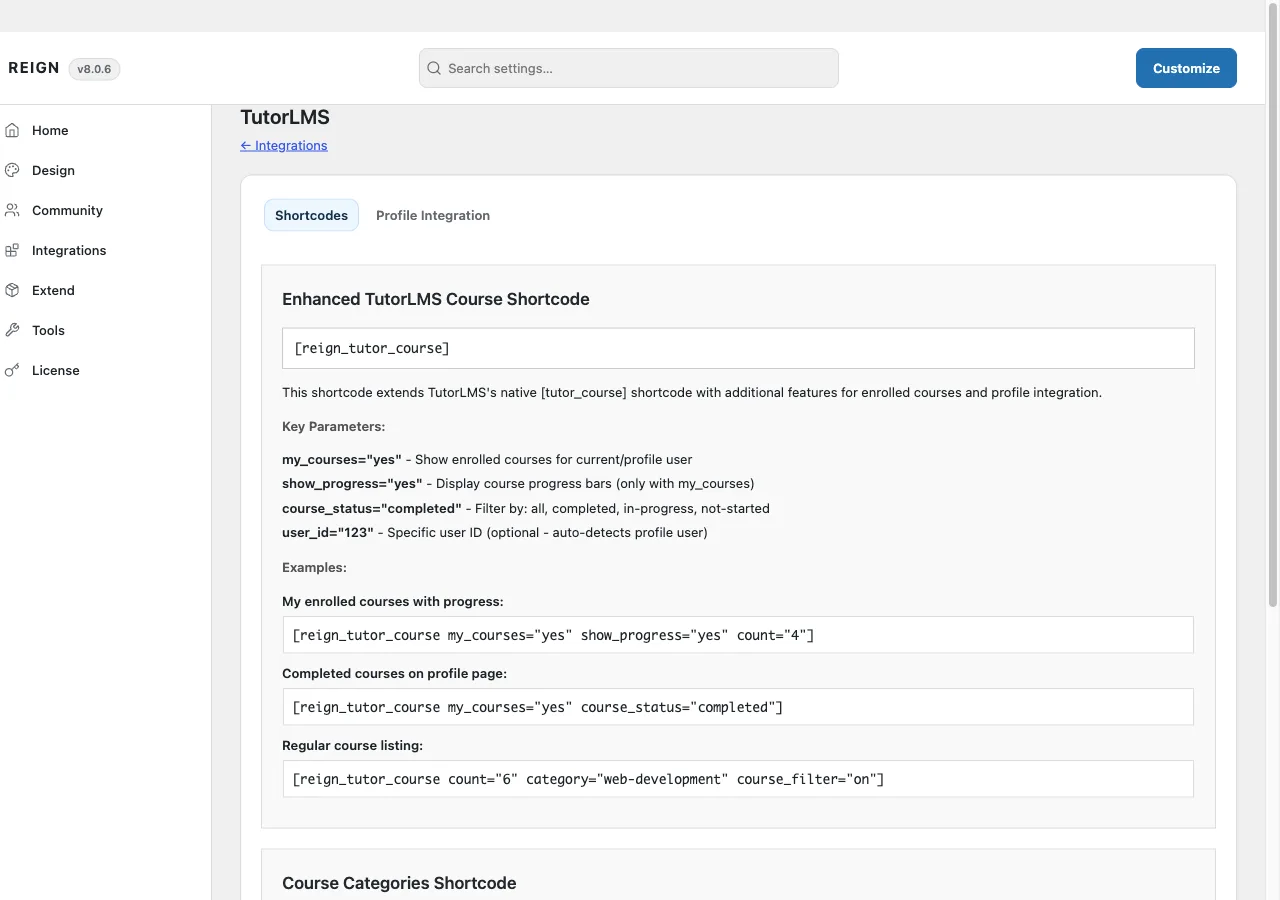
An enhanced course shortcode. [reign_tutor_course] wraps Tutor’s own course grid in Reign’s styling, with per-element toggles for the instructor, category, duration, student count, and lesson count, a choice of layout styles, and column counts that adapt automatically on a BuddyPress, BuddyBoss, or PeepSo profile page. The same shortcode has a “my courses” mode that shows the current, or a specified, user’s enrolled courses, filterable by status, with an optional progress bar.
A course category grid. [reign_course_categories] renders Tutor’s course category taxonomy as a grid of thumbnails with course counts.
A “My Courses” community profile tab, when BuddyPress, BuddyBoss Platform, or PeepSo is active, listing the courses that member is enrolled in.
Colour-matched styling. A body class switches on Reign’s colour treatment automatically when Tutor’s own colour preset is left at its default, so the two don’t compete over which colours the course pages use.
Where its options live
There is no dedicated admin page. Settings sit on a TutorLMS tab inside Reign Settings, with two sub-tabs: Shortcodes, a reference page listing shortcode syntax and examples with nothing to save, and Profile Integration, which holds the one real setting, a checkbox to turn the community profile tab on. That tab also shows which of BuddyPress, BuddyBoss, or PeepSo it has detected on your site.
The add-on’s own license key is activated from its panel inside Reign’s license manager, separate from the theme license.
How to install
- Install and activate Tutor LMS first. The add-on has nothing to attach to without it.
- Install Reign Tutor LMS Addon from your account download, same as any other plugin.
- Activate its license on the panel Reign Settings adds for it.
- Set your options on the TutorLMS tab in Reign Settings, and turn on Profile Integration if you want the community course tab.
If you have not committed to an LMS yet, Wbcom’s in-house Learnomy plugin covers the same ground natively, without a third-party tool or this add-on. That is a stack choice for a fresh site, not a reason to avoid this add-on if you already run Tutor LMS.