
Blog archive layout
Set the blog listing layout, grid columns, excerpt length and pagination, including the order you must pick them in for the grid options to appear.
Customize > Content Layouts > Blog: Archive
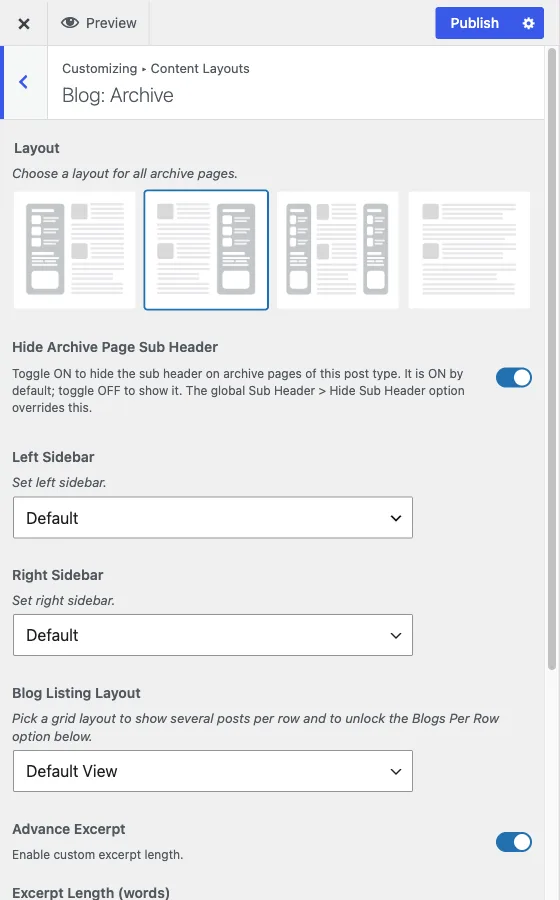
This section controls the blog listing pages: the main blog page and any category, tag or date archive that lists multiple posts.
Like every section in Content Layouts, this one is generated per post type. Any post type registered with an archive gets its own “[Post Type]: Archive” section built the same way, but the listing-layout, excerpt and pagination controls described below are specific to Blog, because they only make sense for a chronological post feed.
Layout and sidebar
Layout picks a left sidebar, a right sidebar, both, or full width. The default is a right sidebar. Left Sidebar and Right Sidebar choose which widget area fills each slot and only show when Layout uses that side.
Sub header
Hide Archive Page Sub Header is on by default, so the page-title banner above the listing is hidden until you turn it off. As with every hide setting in Content Layouts, the site-wide Sub Header > Hide Sub Header switch overrides this regardless of what you set here. See sub header. Once the banner shows, Enable Sub Header Image turns on a background image for it, and Blog Sub Header Image picks the picture.
Blog listing layout and grid columns
Blog Listing Layout picks how posts are arranged: Default View, Thumbnail View, Grid View or Masonry View.
This is the control to set first. Blogs Per Row only appears once you have picked Grid View or Masonry View. Leave the layout on Default View or Thumbnail View and Blogs Per Row stays hidden, because a single-column or list layout has no “per row” to set. Pick the grid layout, save, and the per-row option unlocks. The default row count is 3.
Excerpt length
Advance Excerpt is on by default, and it is the switch that unlocks Excerpt Length (words) below it. Excerpt Length sets how many words of the post show in the listing before it cuts off, and defaults to 20. Turn Advance Excerpt off and the theme falls back to its own default excerpt handling instead of your word count.
Pagination and category color
Blog Listing Pagination Type switches between numbered pagination and infinite scroll.
Blog Listing Category Label Color sets whether the small category label on each post card uses one fixed color or a random color per category. The default is random.
What is missing here
Author info, social sharing, related posts and single-post navigation belong to the single-post view, not the archive. See blog single post layout.