
Page mapping
Point login, registration and 404 at custom pages, and understand the SEO trade-off of mapping a 404 page.
Customize > General > Page Mapping
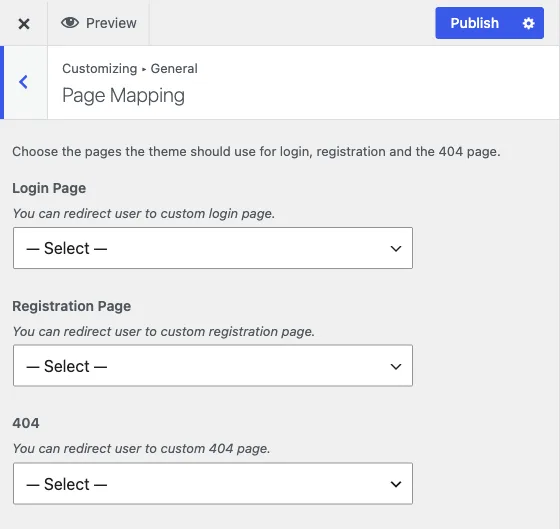
Three settings, each a simple page picker: Login Page, Registration Page, and 404. Leave any of them at ”--- Select a Page ---” and Reign uses the WordPress default for that spot. Set one and visitors are sent to your page instead.
Login and registration pages
Login Page and Registration Page redirect visitors away from
wp-login.php to a page you choose, typically a page built with your page
builder that carries your own branding, or one that embeds the
sign-in and register popup instead of a
full-page form.
If you only want to restyle the default WordPress login screen rather than
replace it with a different page, that is a separate feature: see
Branded Login & Register in the Customizer, which skins
wp-login.php directly rather than redirecting away from it. Use one
approach or the other, not both, for a given site.
The 404 page and why it is a soft 404
404 points broken URLs at a page of your choosing instead of the theme’s built-in 404 template.
Here is what actually happens when you set it: Reign hooks
template_redirect, and on any request that WordPress has already
determined is a 404, it issues a wp_safe_redirect() to your mapped page.
Static assets, AJAX calls, REST requests and admin requests are all excluded
from this redirect, only page-level 404s are affected.
This matters for two reasons:
- It changes what you see while debugging. A broken link no longer looks like an obvious error, it looks like a redirect to a valid page. If you are troubleshooting a URL that should work and does not, set this back to ”--- Select a Page ---” first so you can see the real response.
- It is a soft 404 for search engines. A real 404 tells a crawler “this page does not exist, drop it from your index.” A redirect to a real, 200-status page tells the crawler “this URL now lives somewhere else,” which is a different signal. If broken URLs get indexed as if they were intentional redirects, that can dilute how search engines treat your site’s URL structure over time.
Use this setting when you deliberately want a friendlier landing spot for lost visitors, a search page, a “browse our content” page, and treat it as a UX choice rather than a way to hide broken links. If you are getting a meaningful number of 404s, fix the links or add real redirects for those specific URLs rather than papering over all of them with one catch-all page.
See member or group pages return 404 for a worked example of this setting interacting with a community plugin.