
Forms
Set the resting and focus colors of input fields, textareas and selects, and why the focus colors matter for accessibility.
Customize > Forms
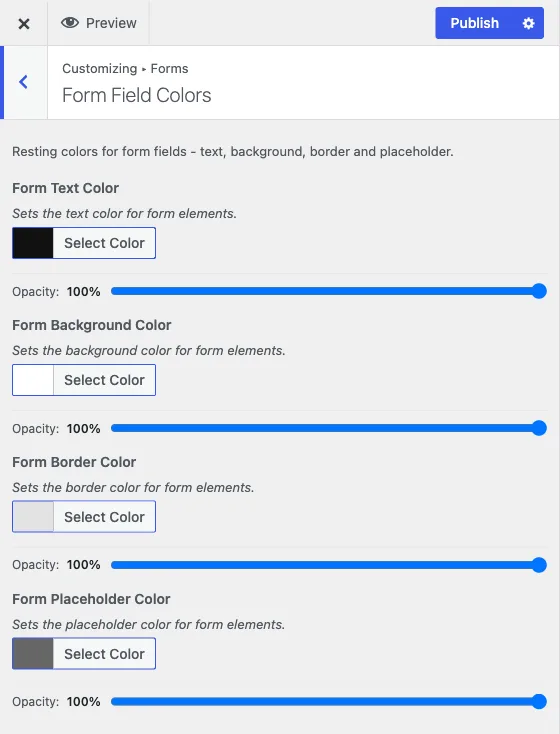
Form fields - text inputs, textareas and selects - get their colors from your active Color Palette like everything else. The Forms panel is where you fine-tune them if the palette default isn’t right for a specific field state. Like Individual Colors, both sections here are scoped to your currently active palette: you only see the block of fields for the palette you’ve picked, and switching palettes keeps each palette’s form colors separate.
Form Field Colors
The resting appearance of a field, before a visitor interacts with it:
- Form Text Color
- Form Background Color
- Form Border Color
- Form Placeholder Color
These apply to every text input, textarea and select on the site.
Focus State Colors
The appearance of a field while a visitor is actively typing in it - the moment after they click into it or tab to it with a keyboard:
- Form Focus Text Color
- Form Focus Background Color
- Form Focus Border Color
- Form Focus Placeholder Color
Why focus colors are worth setting deliberately
Focus state is not a cosmetic detail. It’s how anyone navigating your site with a keyboard - rather than a mouse - knows which field they’re about to type into. If a browser’s default focus outline gets lost against your header or form background (which happens easily once you’ve picked a custom-colored palette), a keyboard user can lose track of where they are on the page entirely. The same applies to anyone with low vision using Reign’s forms, where the difference between a field’s resting and focus state might be all the visual signal they get.
The practical check: use a form field on your site with the mouse untouched - tab into it with the keyboard - and look for a visible, distinct change from the resting state. If the focus border or background color is too close to the resting one, or too close to the background it sits on, that’s worth fixing here even if it looks fine to a mouse user who never notices the in-between state.
Where else form colors show up
If a form still looks wrong in dark mode after adjusting it here, remember that Forms Field Colors and Focus State Colors are light-mode settings, the same way Individual Colors is. There’s no separate dark-mode Forms panel; the form group inside Dark Mode Colors covers form colors for dark mode specifically. See how the color system works for the full picture of how palette, individual and dark colors combine.