
Reign LifterLMS Addon
Adds course and instructor shortcodes, seven widgets, reviews, template overrides, and a BuddyPress activity bridge on top of LifterLMS, and requires LifterLMS to be active.
This page covers Reign LifterLMS Addon version 2.6.0.
What it needs
The add-on checks two things in code before it will run:
- Reign theme (or a Reign child theme)
- LifterLMS, active
If either is missing, the add-on deactivates itself and shows an admin notice. It declares WordPress 6.5 and PHP 8.0 as its floor. There is no minimum LifterLMS version pinned, only that LifterLMS is active.
If BuddyPress is active, the add-on’s activity bridge switches on as well (see below).
What it adds
Template overrides, eight in total: the single course page, the single membership page, a shared template for lessons, quizzes, and assignments, the course syllabus, the lesson preview element, the course sidebar, and two My Account screens (the dashboard section and its navigation).
Discovery shortcodes:
[reign_lifterlms_courses]renders a paginated course grid, twelve per page by default, filterable by category and sortable.[reign_lifterlms_instructors]renders an instructor grid.
Widgets, seven of them: course categories, course difficulties, course listing, course overview, course search, enrolled students (capped at 20 by default so a popular course doesn’t flood the sidebar), and membership listing.
Reviews:
- Course reviews and star ratings, submitted from the front end.
Other display features:
- A related-courses section below the course, with a configurable title and count.
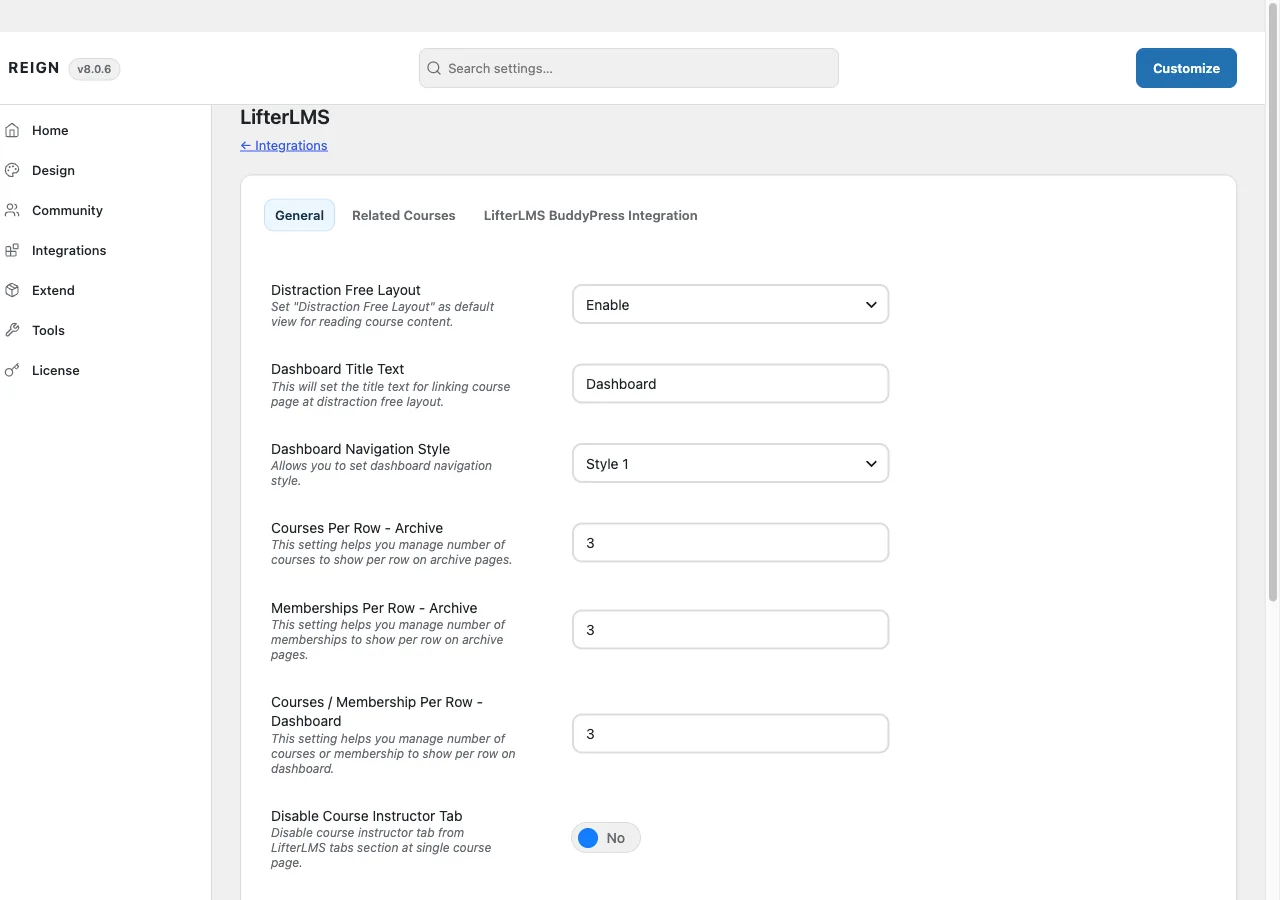
- A distraction-free lesson layout, and dashboard customization: navigation style, custom dashboard text, and per-row counts for the course and membership archives.
- An instructor’s WordPress author archive that lists only the courses that instructor teaches, instead of every post they’ve authored.
BuddyPress integration, when BuddyPress is active:
- Activity-stream entries for enrollment, course completion, lesson completion, certificates, achievements, and quiz results, with a per-course toggle on the course edit screen.
- Group-linked enrollment: joining or leaving a course can join or remove a student from a linked BuddyPress group.
- A course-list widget for group pages.
- Bulk and individual group-enrollment tools for admins.
Where its options live
There is no dedicated admin page. Settings sit on a LifterLMS tab inside Reign Settings, with sub-tabs for General and Related Courses, and, when BuddyPress is active, LifterLMS BuddyPress Integration. They are saved with the same form used by the rest of Reign Settings.
The add-on’s own license key is activated from its panel inside Reign’s license manager, separate from the theme license.
How to install
- Install and activate LifterLMS first. The add-on has nothing to attach to without it.
- Install Reign LifterLMS Addon from your account download, same as any other plugin.
- Activate its license on the panel Reign Settings adds for it.
- Set your options on the LifterLMS tab in Reign Settings.
If you have not committed to an LMS yet, Wbcom’s in-house Learnomy plugin covers the same ground natively, without a third-party tool or this add-on. That is a stack choice for a fresh site, not a reason to avoid this add-on if you already run LifterLMS.