
Reign GeoDirectory Addon
Bridges GeoDirectory listings into BuddyPress and PeepSo member profiles with a Places tab, activity and notifications, and needs GeoDirectory installed to do anything.
Version 2.4.0. Requires PHP 8.0 and WordPress 6.5 or later, plus the Reign
theme itself - like the other add-ons, it deactivates with a notice if Reign
isn’t the active theme. The plugin folder is reign-geodirectory (no
-addon suffix); its main file is named reign-geolocation.php.
What it needs
GeoDirectory, active. The addon checks for the GeoDirectory class on
plugins_loaded and deactivates itself with a notice if it isn’t there.
The bridge itself needs BuddyPress or PeepSo to have anything to bridge to. With neither active, the addon still runs (it registers no bridge classes in that case) but does nothing visible beyond loading GeoDirectory’s own assets and a query fix that prevents duplicate listings on multi-category archives.
If you don’t already run GeoDirectory, Reign’s in-house Listora covers directory listings without a third-party dependency - a stack choice, not a reason to skip this add-on if you’re already on GeoDirectory.
What the bridge does
“Bridge” means specifically this: the addon adds a Places tab to the member profile (BuddyPress and, separately, PeepSo), and connects listing events to each platform’s activity stream and notifications. It does not touch GeoDirectory’s own listing pages, search or maps - those stay exactly as GeoDirectory renders them.
Profile tab. A “Places” (or relabeled) tab appears on the member profile,
listing that member’s submitted GeoDirectory posts in a paginated
[gd_listings] grid, with an “Add” button linking to GeoDirectory’s own
submission page. If a site has more than one GeoDirectory post type
registered (for example places and events), the BuddyPress side splits this
into one sub-tab per post type - “My Place”, “My Event” - each with its own
add button and listing, and you can choose which post types get a sub-tab.
The PeepSo side adds the same tab to the PeepSo profile navigation with its
own paginated segment.
Activity. Three events post to the activity stream when enabled: a new place published, a place marked as favorite, and a review left on a listing. PeepSo members also get a per-user preference switch, in their profile settings, for each activity type - so a member can opt out even when the site-wide toggle is on.
Notifications. BuddyPress members get notified on a new place, a favorite, and a review; PeepSo gets the favorite and review notifications. New-place notifications to the wider membership run through a self-batching cron job (200 users per run) so publishing a listing never blocks on a large member base.
One query fix: a GROUP BY added to GeoDirectory’s own listing query
prevents duplicate rows when a listing belongs to more than one category.
Where its options live
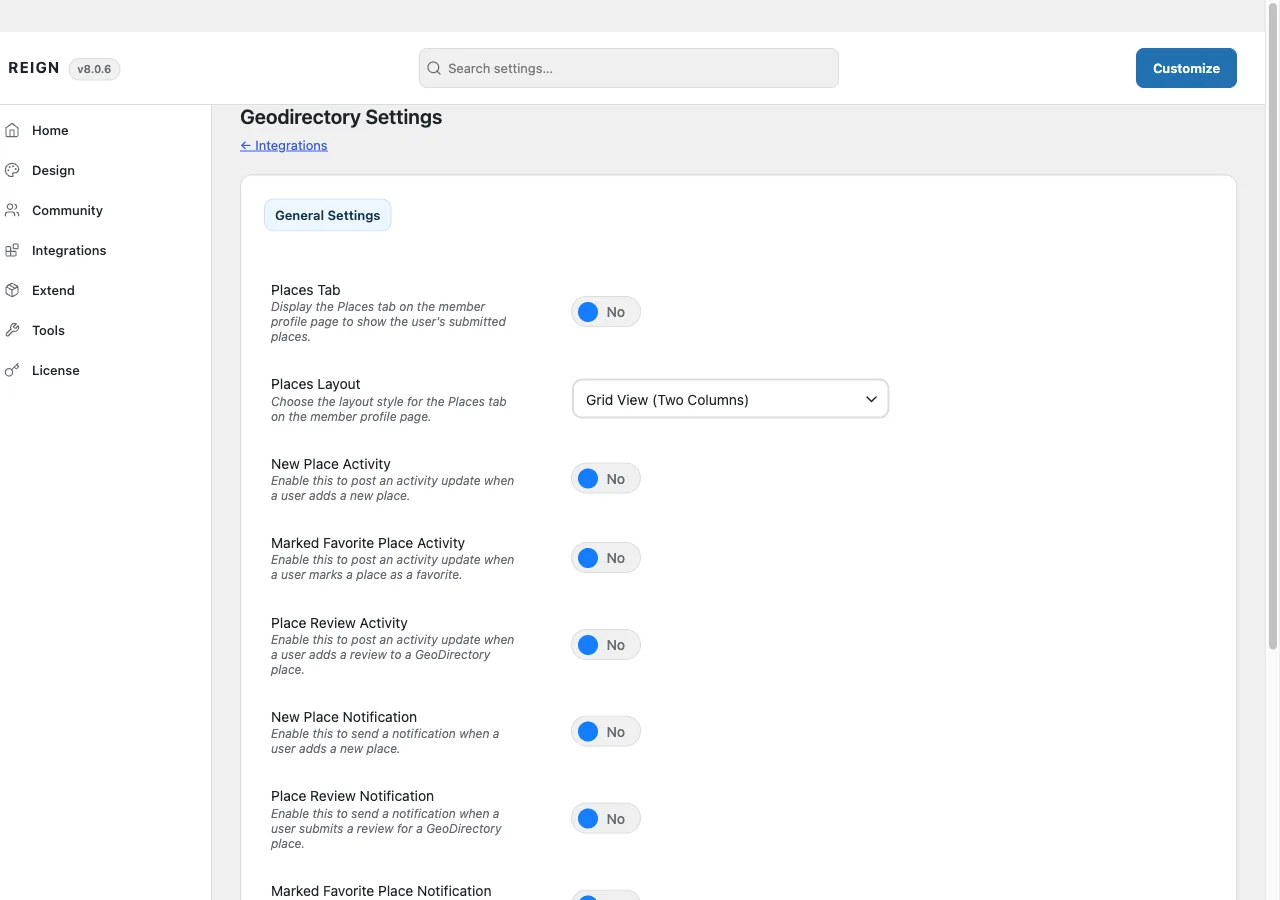
Reign Settings > Geodirectory Settings, a tab the addon adds to Reign’s settings page, under a single General Settings sub-tab. When both BuddyPress and PeepSo are active you get two settings blocks on that one screen, one per integration, each with its own copy of:
- Places Tab (on/off)
- Places Layout (grid, two/three/four/five columns, or list view)
- New Place Activity, Marked Favorite Activity, Place Review Activity
- Place Review Notification, Marked Favorite Notification
- Places Tab Label (text)
The BuddyPress block additionally has New Place Notification, a Places Tab
Slug, and - when more than one GeoDirectory post type is registered - a
checklist of which post types get their own profile sub-tab. These settings
live inside the same shared reign_options option the theme and every other
add-on use, under the reign_geodirectory (BuddyPress) and
reign_peepso_geodirectory (PeepSo) keys.
License activation is separate from the theme’s licence, on its own panel inside Reign Settings, alongside the other add-ons.
How to install
- Confirm GeoDirectory is installed and active, and BuddyPress or PeepSo if you want the profile bridge.
- Install and activate Reign GeoDirectory Addon from your account download.
- Activate its licence on its own settings screen.
- Configure the Places tab and activity toggles under Reign Settings > Geodirectory Settings.
If something looks wrong
Update the theme and this add-on together - see Reign add-ons for the general update guidance. If the profile tab renders unstyled or oddly after an update, deactivate the add-on and reload to confirm the source; see white screen after activating.