
Custom code
Add tracking scripts and quick header or footer JavaScript from General > Custom Code, and know how it relates to Additional CSS.
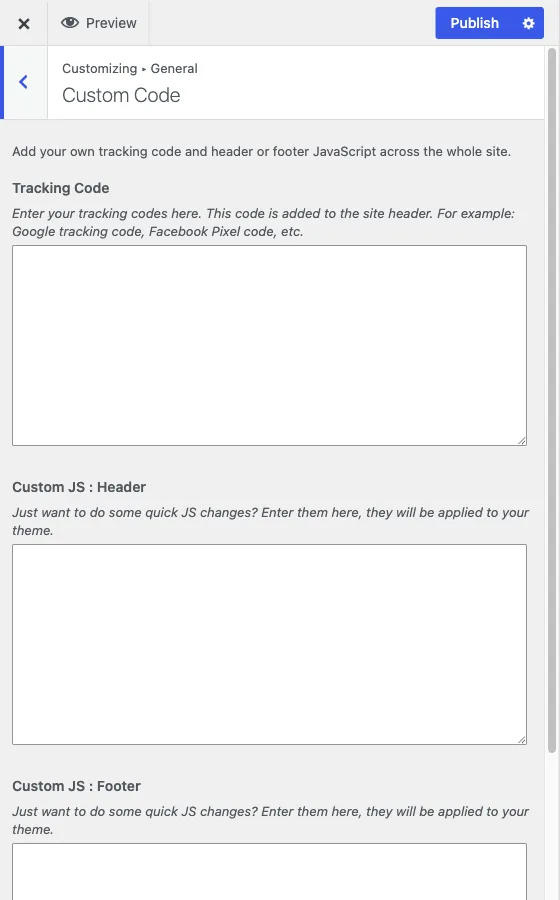
Customize > General > Custom Code
Three fields for adding your own code to every page of the site, with no plugin required.
The three fields
Tracking Code is a general-purpose slot added to the site <head>. Use
it for anything that ships as a snippet: Google tracking code, a Facebook
Pixel, any third-party analytics or verification tag that gives you a block
of HTML to paste in.
Custom JS: Header and Custom JS: Footer each accept plain JavaScript,
no <script> tags needed, added to the header or the footer respectively.
Use the footer field for anything that does not need to run before the page
renders, which is most scripts, so it does not block the page from
displaying.
All three use a code editor field with syntax highlighting for their respective language (HTML for tracking code, JS for the two script fields), and update live in the Customizer preview.
How this relates to Additional CSS
WordPress core already gives you a CSS field, Customize > Additional CSS, for site-wide styling. Custom Code does not replace that field or duplicate it, it covers HTML and JavaScript, which Additional CSS cannot do.
The one thing worth knowing about the relationship: Reign’s own compiled
CSS loads first, and anything you add through Additional CSS loads after
it. That means a rule you write in Additional CSS wins over the theme’s
built-in styling for the same selector, without needing !important, simply
because it comes later in the cascade. If a customization you added through
Additional CSS is not taking effect, check for a more specific selector in
the theme’s CSS rather than reaching for !important as the first fix. See
styles not applying if that
does not resolve it.
When to use this instead of a plugin
For a handful of tracking scripts or a few lines of JavaScript, Custom Code is the simpler choice, nothing to install, nothing to keep updated. Once you are managing many scripts, need conditional loading per page, or want tag firing rules, a dedicated tag manager is the better tool, and you can leave these three fields empty rather than run both.