
Reign Sensei Addon
Adds a redesigned course page, reviews, archive display options, and a BuddyPress or BuddyBoss activity bridge on top of Sensei LMS, and requires Sensei LMS to be active.
This page covers Reign Sensei Addon version 1.9.0.
What it needs
The add-on checks two things in code before it will run:
- Reign theme
- Sensei LMS, active
If either is missing, the add-on deactivates itself and shows an admin notice. It declares WordPress 6.5 and PHP 8.0 as its floor. There is no minimum Sensei LMS version pinned, only that it is active.
If BuddyPress or BuddyBoss Platform is active, the add-on’s community bridge switches on as well (see below). It ships no shortcodes or widgets of its own; instead it customizes Sensei’s own templates and shortcode output.
What it adds
A redesigned single course page. A template override replaces Sensei’s course header with a cover image (set from a metabox on the course editor, with a background colour fallback), the teacher’s name and avatar, and a course-info panel showing lesson and quiz counts, student count, and certificate availability.
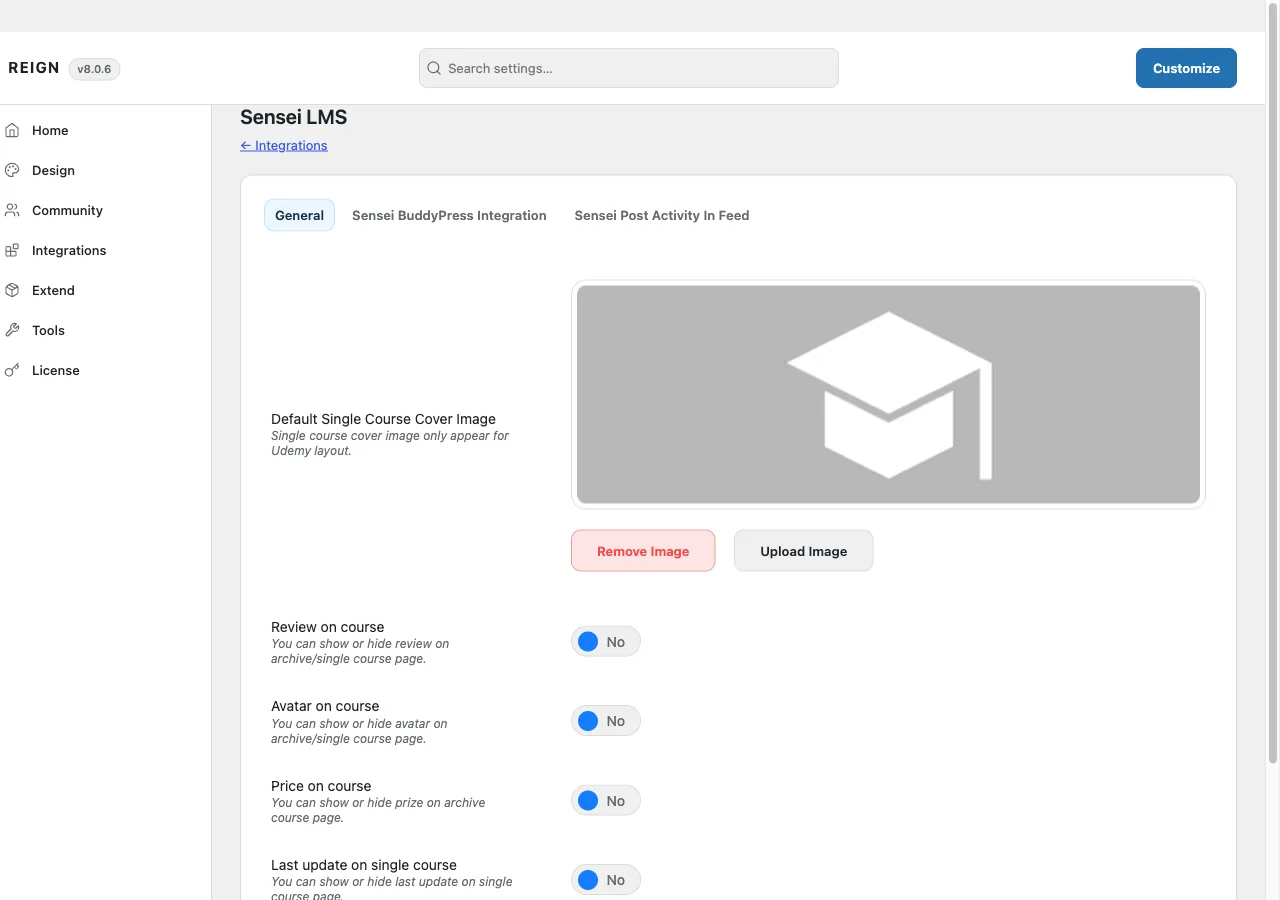
Course archive display options. Toggle review stars, the teacher’s avatar, price, and a last-updated date on course cards, and set how many columns the archive displays.
Reviews. A comment-based review and star-rating system, so students can rate and review a course from the front end.
Customized teacher listings. Sensei’s own [sensei_teachers] shortcode gets its output filtered to show the teacher’s avatar and course count alongside their name.
BuddyPress or BuddyBoss integration, when either is active:
- Courses can be assigned to a group from the group admin screen, with a front-end “Courses” tab on the group.
- A “Courses” tab on the member profile.
- Activity-stream entries for course enrollment, course completion, lesson completion, and quiz completion.
- Activity-stream entries when a new course, lesson, or quiz is published, each independently switched on or off.
Where its options live
There is no dedicated admin page. Settings sit on a Sensei LMS tab inside Reign Settings, with a General sub-tab plus, when BuddyPress is active, a Sensei BuddyPress Integration sub-tab, and, when BuddyPress is active and BuddyBoss Platform is not, a Sensei Post Activity In Feed sub-tab. They are saved with the same form used by the rest of Reign Settings.
The add-on’s own license key is activated from its panel inside Reign’s license manager, separate from the theme license.
How to install
- Install and activate Sensei LMS first. The add-on has nothing to attach to without it.
- Install Reign Sensei Addon from your account download, same as any other plugin.
- Activate its license on the panel Reign Settings adds for it.
- Set your options on the Sensei LMS tab in Reign Settings.
If you have not committed to an LMS yet, Wbcom’s in-house Learnomy plugin covers the same ground natively, without a third-party tool or this add-on. That is a stack choice for a fresh site, not a reason to avoid this add-on if you already run Sensei LMS.