
Reign WCFM Addon
Adds favorite products, a Store tab and Favourite tab on BuddyPress profiles, activity-stream entries, and a second store layout on top of WCFM Marketplace and WooCommerce.
This page covers Reign WCFM Addon version 1.10.0.
What it needs
The add-on checks for three things at once on admin_init, and deactivates
itself with an admin notice if any is missing:
- Reign theme
- WCFM (WooCommerce Frontend Manager / WCFM Marketplace)
- WooCommerce, since WCFM is built on it
This is enforced in code, not a soft warning: without all three active the add-on turns itself off.
BuddyPress (including BuddyBoss) is optional. When it is active, the add-on’s profile tabs and activity-stream entries switch on. Youzify is also detected for a small compatibility branch on order activity.
What it adds
On the storefront:
- A “Mark as Favourite” heart icon on the single product page and in the shop loop, toggled by AJAX and saved per logged-in user.
- A “Visit Store” link added to the WooCommerce shop loop.
- A second, full page-level store layout (“Layout 2”) that replaces WCFM’s own store page template when selected, rebuilding the banner, avatar, and store-info sections WCFM normally renders.
- Filtering support on WooCommerce’s own
[products]shortcode so it can be scoped to favorite products.
This add-on does not register any shortcodes or widgets of its own - its features are toggles and template swaps, not new shortcode tags or widget areas. Any store-list, vendor-registration, or store-hours shortcodes on a WCFM site come from WCFM core, not from this add-on.
BuddyPress integration, when BuddyPress or BuddyBoss is active:
- A “Favourite” tab on the member’s own profile, listing their favorited products.
- A “Store” tab on a vendor’s profile, showing their products through WCFM. Turning this on replaces WCFM’s own native store tab on the profile; leave it off and WCFM’s native tab stays in place.
- Activity-stream entries for new products, product reviews, and completed orders, each behind its own on/off setting.
Where its options live
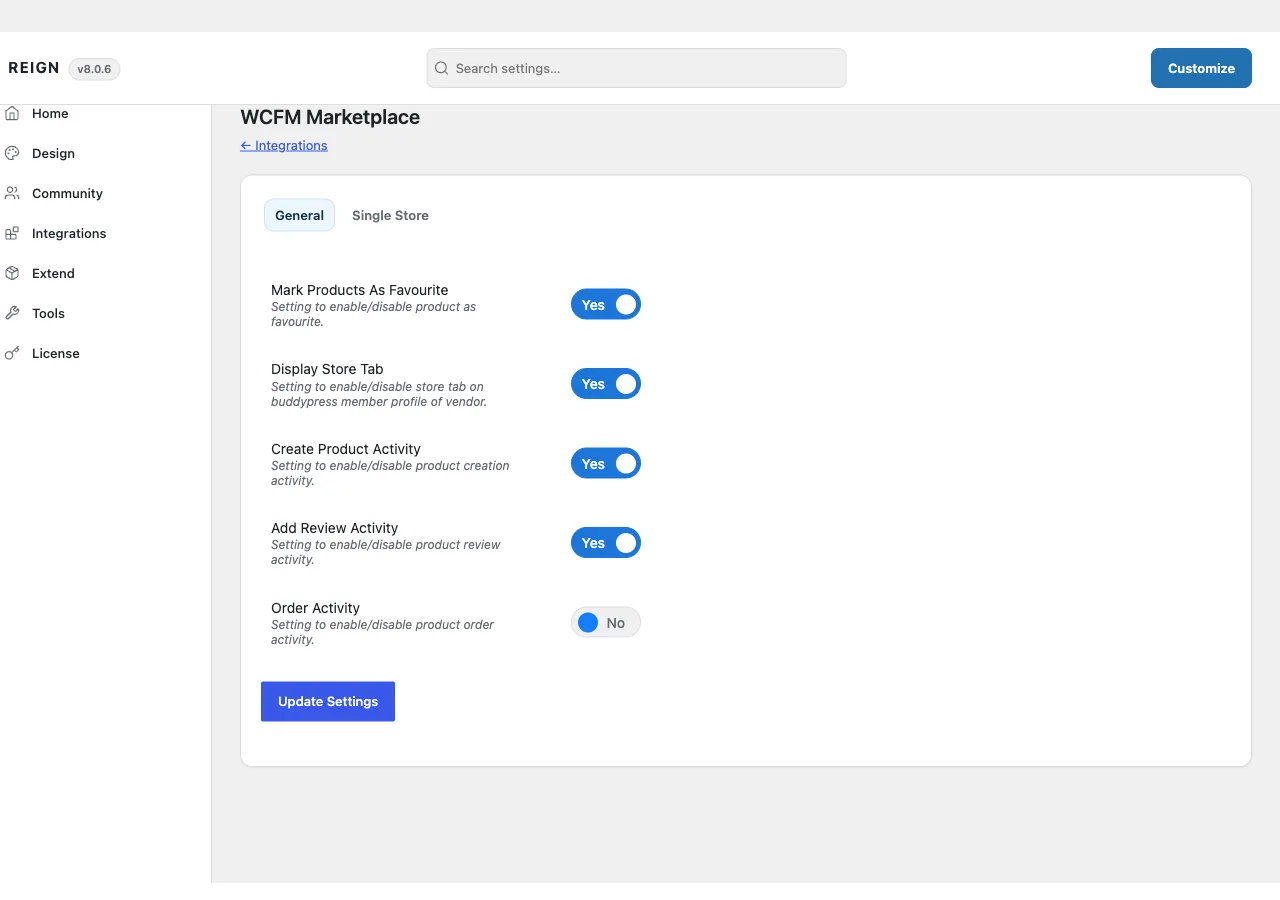
There is no dedicated admin page. Settings sit on a WCFM Marketplace tab inside Reign Settings, split into two sub-tabs:
General:
- Mark Products As Favourite
- Display Store Tab
- Create Product Activity
- Add Review Activity
- Order Activity
Single Store:
- Single Store Layout - a choice of Layout 1 (WCFM’s own store page, styled by the theme) or Layout 2 (the add-on’s own full template override). This is the extent of the store-layout choice this add-on offers: one dropdown, two layouts, no per-section customizer.
There is no separate Customizer panel for this add-on - every option lives on the Reign Settings tab above. The add-on’s license key is activated from its own panel inside Reign’s license manager, separate from the theme license.
How to install
- Install and activate WCFM and WooCommerce first. The add-on has nothing to attach to without them.
- Install Reign WCFM Addon from your account download, same as any other plugin.
- Activate its license on the panel Reign Settings adds for it.
- Set your options on the WCFM Marketplace tab in Reign Settings, and pick a Single Store layout if you want the alternate one.