
Reign Dokan Addon
Adds favorite products, a vendor info panel, activity-stream and profile tabs, and vendor-listing widgets and shortcodes on top of Dokan, plus BuddyPress store and activity integration.
This page covers Reign Dokan Addon version 3.8.0.
What it needs
The add-on requires three things active at once, and checks for all three in code:
- Reign theme
- Dokan (Dokan Lite covers the check; Dokan Pro also satisfies it)
- WooCommerce, since Dokan itself is built on it
If any is missing, the add-on deactivates itself and shows an admin notice naming what to install. This is a hard requirement, not a soft warning: the add-on refuses to run without all three.
If BuddyPress or BuddyBoss is active, the add-on’s social layer switches on as well (see below). If the BuddyVendor plugin is active, the add-on skips its own BuddyPress features entirely, so the two do not double up on the same tabs and activity types.
What it adds
On the storefront:
- A “Sold By” line in the product meta, and a full vendor-info box (avatar, rating, address, phone, a “Visit Store” link) in the product summary.
- A strip of the vendor’s other products on the single product page.
- A store header rendered above the store page and product page content.
- Favorite-product hearts on the single product page and shop-loop items, toggled by AJAX and saved per logged-in user.
Shortcodes:
rda_dokan_vendors- a featured or selected vendors grid, with a slider option and four layout variants.rda_dokan_store_listing- a searchable listing of stores, with pagination and a slider option.
Widget:
- “Reign - Vendors” (
Reign_Dokan_Widget_Vendor_Listing), the same vendor-listing card used by the shortcode above, placed in any widget area.
BuddyPress integration, when BuddyPress or BuddyBoss is active:
- A “Store” tab on the member profile, showing the vendor’s products through Dokan’s own store screen.
- A “Favorite” tab, visible only to the profile owner, listing the products they have marked as favorites.
- A “Store” link on the member’s admin bar menu.
- Activity-stream entries for new products, product reviews, and completed orders, each with its own on/off setting. Order activity has a Youzify-aware branch for sites running that BuddyPress add-on.
Where its options live
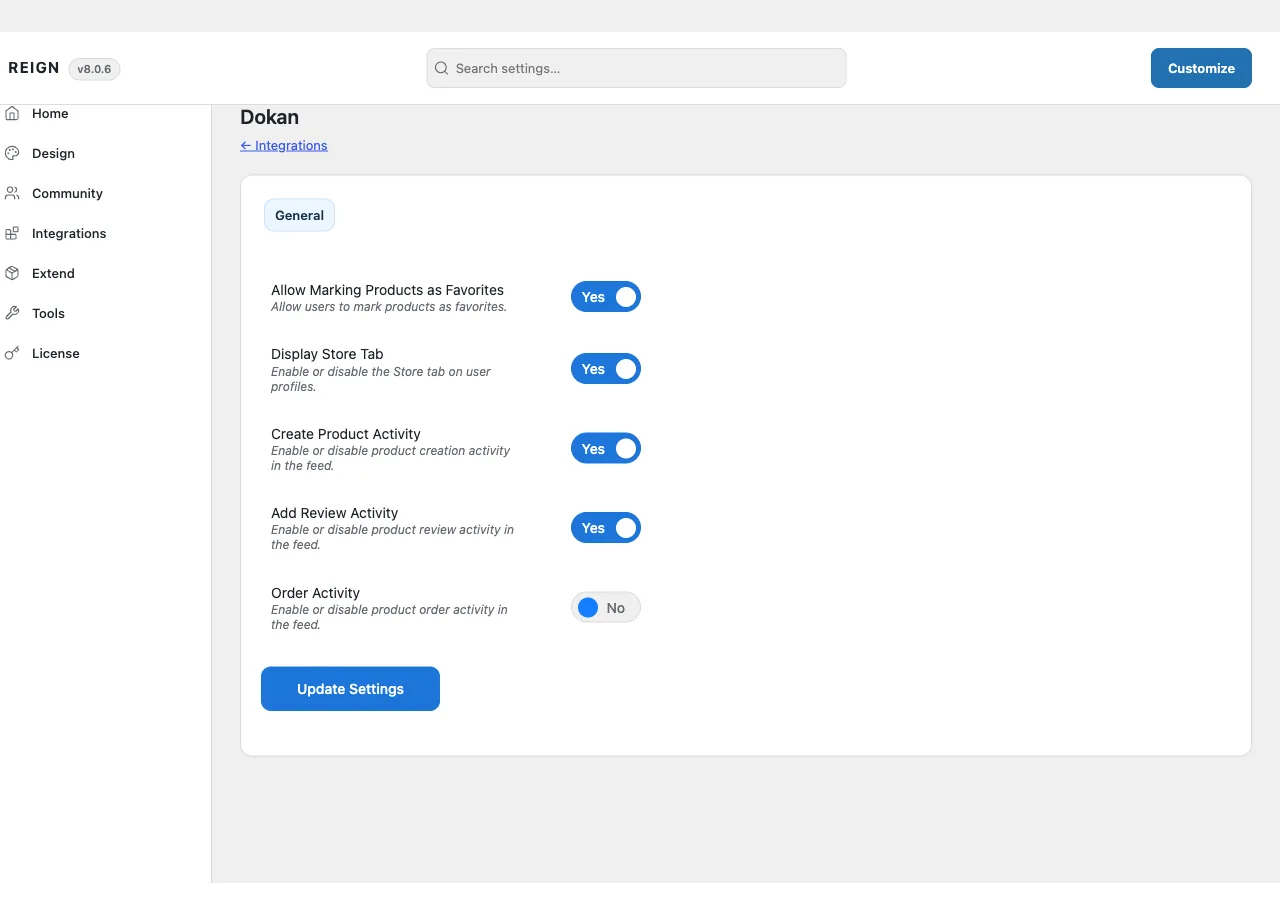
There is no dedicated admin page. Settings sit on a Dokan tab inside Reign Settings, under a “General” sub-tab, and are saved with the same form used by the rest of Reign Settings. From there you control:
- Allow Marking Products as Favorites
- Display Store Tab
- Create Product Activity
- Add Review Activity
- Order Activity
Layout and display choices live in the Customizer, under a Reign Dokan panel with three sections:
- Store List - Store List Layout (Layout One or Layout Two), used by the vendors shortcode and widget.
- Store Page - Store Header Position (normal or top) and Store Header Layout (full width or contained).
- Product Page - toggles for the vendor header, the vendor header width, the vendor’s-products section and how many products it shows, the “Sold By” line, and the vendor info box.
The add-on’s own license key is activated from its panel inside Reign’s license manager, separate from the theme license.
How to install
- Install and activate Dokan (Lite or Pro) and WooCommerce first. The add-on has nothing to attach to without them.
- Install Reign Dokan Addon from your account download, same as any other plugin.
- Activate its license on the panel Reign Settings adds for it.
- Set your options on the Dokan tab in Reign Settings, then check the Customizer for the Reign Dokan panel.