
Login screen themes
Turn on Set New Theme and pick one of four ready-made login layouts, with Modern the only one that adds its own content panel controls.
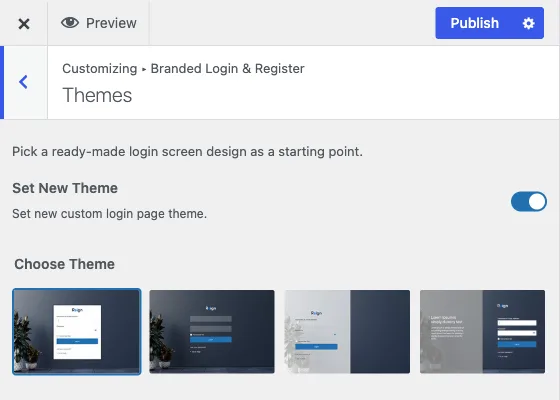
Customize > Branded Login & Register > Themes
Themes is a shortcut to a finished login screen layout, as an alternative to building one from the background, form and button controls covered in branded login screen.
This section only has an effect once WP Login / Register > Custom Login Screen is turned on. It also changes which background controls are live: see the background note in that same page, since turning a theme on here switches the panel over to the Background section instead of the Toggle Custom Background controls.
Turn it on and pick one
Set New Theme is off by default. Turn it on, and Choose Theme shows four layouts as image swatches: Simple, Minimal, Creative and Modern. Simple is the default.
What each theme changes
Simple centers the login box on the page with a drop shadow, and puts no panel or overlay behind it. Whatever you set in the Background section, a color, a gallery image, your own image or a video, fills the entire page behind the centered box.
Minimal also centers the box, but the fields inside it become transparent with light text and a subtle white tint, over a dark tint laid across the whole page. It reads as a glass-style box over a photo, so it is built to be paired with a background image rather than a plain color.
Creative shifts the login box toward the left side of the screen and adds a translucent white panel behind it that covers the left half of the page, with your background image showing through on the right half. On narrow screens the panel and box collapse back to a single centered column.
Modern is the only theme with its own extra settings, because it is built differently from the other three: instead of one box over a background, it splits the screen in half. One half holds the login form; the other holds a content panel with its own heading, supporting text, and a color overlay, which is what the extra controls below are for.
Modern-only controls
These appear under a Left Side Content heading, only when Choose Theme is set to Modern:
- Custom Heading, the large text in the content panel, defaults to “Welcome back!”.
- Custom Text, the smaller supporting line under it.
- Custom Heading Position, a slider from 5 to 90, nudges the block down the panel. Default 30.
- Left Side Overlay Opacity, a slider from 0 to 100%, darkens the panel background so the text stays readable. Default 30%.
- Custom Content Color sets the heading and text color, defaulting to white.
Simple, Minimal and Creative do not expose layout-specific controls beyond Choose Theme itself; their differences are fixed in the theme’s stylesheet rather than configurable per site. Style them further using the Background, Customize Login Form and Customize Button sections described in branded login screen.