
Sticky menu
Turn on sticky-on-scroll for the header, then configure the colors used once it sticks so it stays readable.
Customize > Header > Sticky Menu
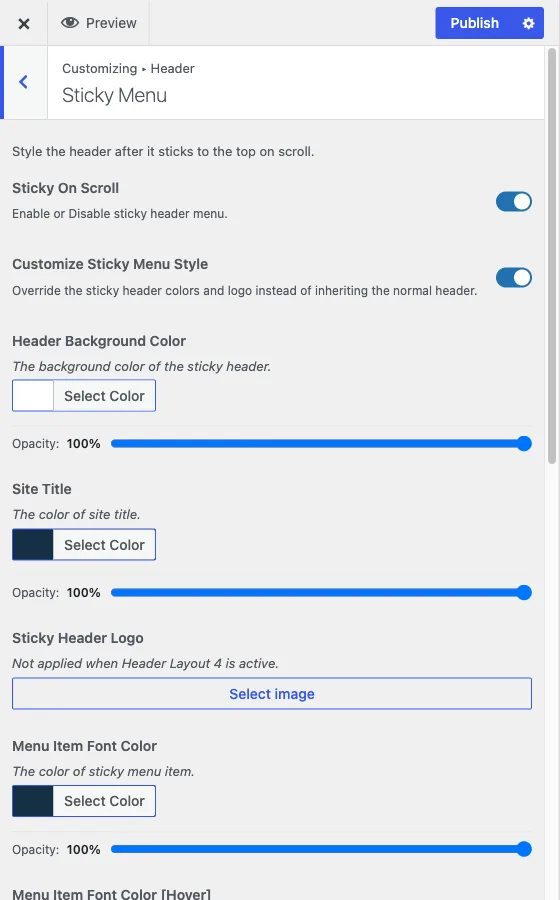
This section controls what happens to the header once a visitor scrolls past it: whether it sticks to the top of the viewport, and what it looks like while stuck.
Turn on sticky-on-scroll
Sticky On Scroll is the master switch, on by default. With it on, the header pins to the top of the viewport instead of scrolling out of view.
Customize its style, or inherit the normal header
Once sticky is on, Customize Sticky Menu Style decides what colors the stuck header uses:
- Default (off), the setting’s default: the sticky header inherits whatever colors the normal header already uses.
- Custom (on): the sticky header uses its own colors, set by the remaining controls in this section, independent of the normal header.
The remaining controls only take effect, and only appear, once Customize Sticky Menu Style is turned on:
- Header Background Color
- Site Title color
- Sticky Header Logo, an alternate logo shown only while stuck. Not applied when Header Layout 4 is active.
- Menu Item Font Color - the colour of menu links while stuck
- Menu Item Font Color [Hover] - the link colour when a visitor points at it
- Menu Item Font Color [Active] - the link colour for the page the visitor is on
- Menu Item Background [Hover] and Menu Item Background [Active]
- Icon Color and Icon Color [Hover], covering the search icon, user menu, and other header icons while stuck
The common failure: an unreadable sticky header
The most common problem with a sticky header is leaving Customize Sticky Menu Style off when the normal header uses a transparent or light background meant to sit over a hero image. That styling looks right at the top of the page, but once the same transparent header sticks over ordinary page content while scrolling, there is nothing behind it for contrast and the menu text becomes hard to read.
If your normal header relies on transparency or a light background over a hero image, turn Customize Sticky Menu Style on and give the sticky state a solid background color and menu text color with enough contrast against it. Test by scrolling an actual content page, not just the top of the homepage, since that is where the problem shows up.
When to change these
Most sites can leave Sticky On Scroll at its default. Reach for Customize Sticky Menu Style whenever your header design depends on the page background behind it, transparent headers, dark headers over light content, or any header where “look the same stuck as it does unstuck” would actually look wrong.