REIGN
Get Reign

How long it takes: Mostly the classroom rebuild; plan a side-by-side period before you switch

Migrate from Skool to Reign.

To move your Skool community to your own WordPress site, collect your member emails, rebuild the classroom in Learnomy and the community in BuddyNext on the Reign theme, add points and leaderboards with WB Gamification, and run both until members have moved. You get your own domain, your own pricing and no monthly platform fee.

Leaving Skool does not mean settling for less. Reign is one theme for the whole site: a community, courses, a member directory, a marketplace or a job board, alone or together, on one login. It is a flat theme licence with no per-member fee and no share of your sales (see pricing), and it is the only thing you have to buy. BuddyNext runs members and spaces, Learnomy the courses, Jetonomy the forums and Q&A, MediaVerse the member media. 11 of our plugins install free, each with a Pro plan for when one part starts earning. No monthly platform fee replaces the one you are leaving.

See ready-made kits or what people build with Reign.

Key takeaways

  • Skool puts a feed, a classroom and a leaderboard on one screen. On your site that is BuddyNext, Learnomy and WB Gamification, all free to install.
  • Points and levels do not export, so everyone starts fresh. Say so up front.
  • Rebuild the classroom before you announce the move, so people arrive to find their lessons waiting.
  • Keep the first version plain. Community and classroom first, everything else later.

What it looks like on Reign

Screens from the live demos, with sample content. Open any of them and click around.

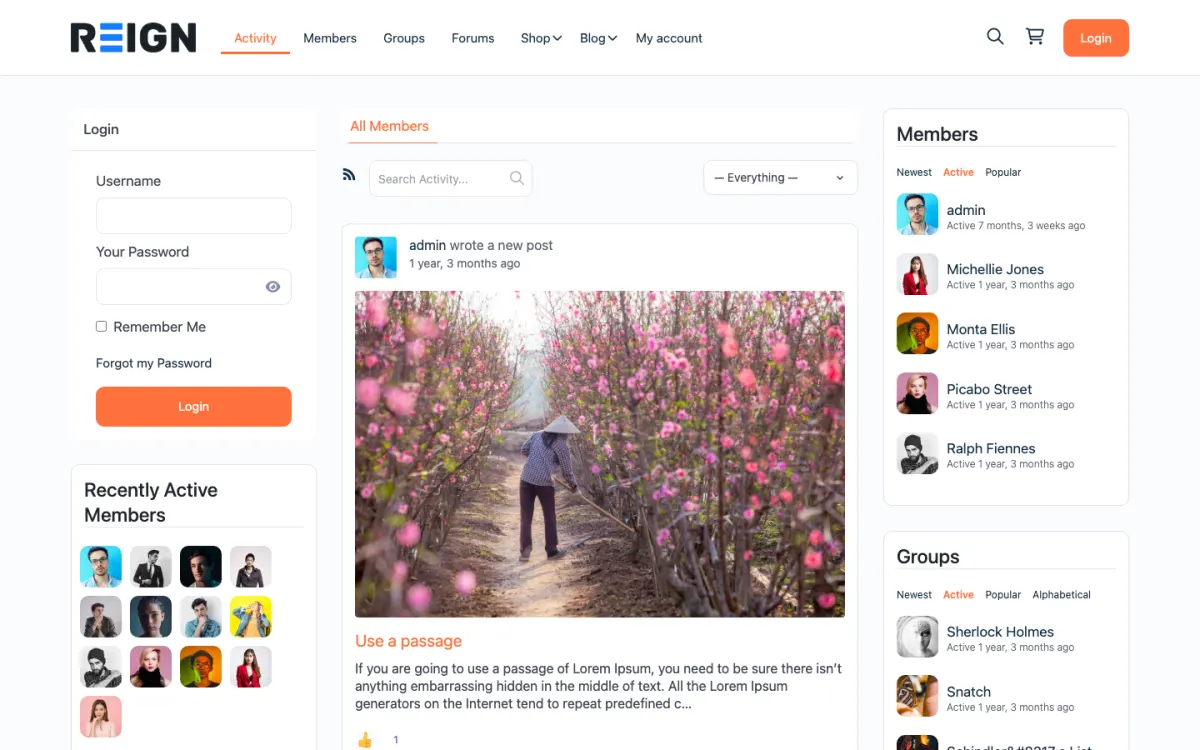
  • Reign BuddyPress demo home with login, activity feed, members and groups
    The home screen: sign-in, the activity feed and who is active, on one page. Open the demo
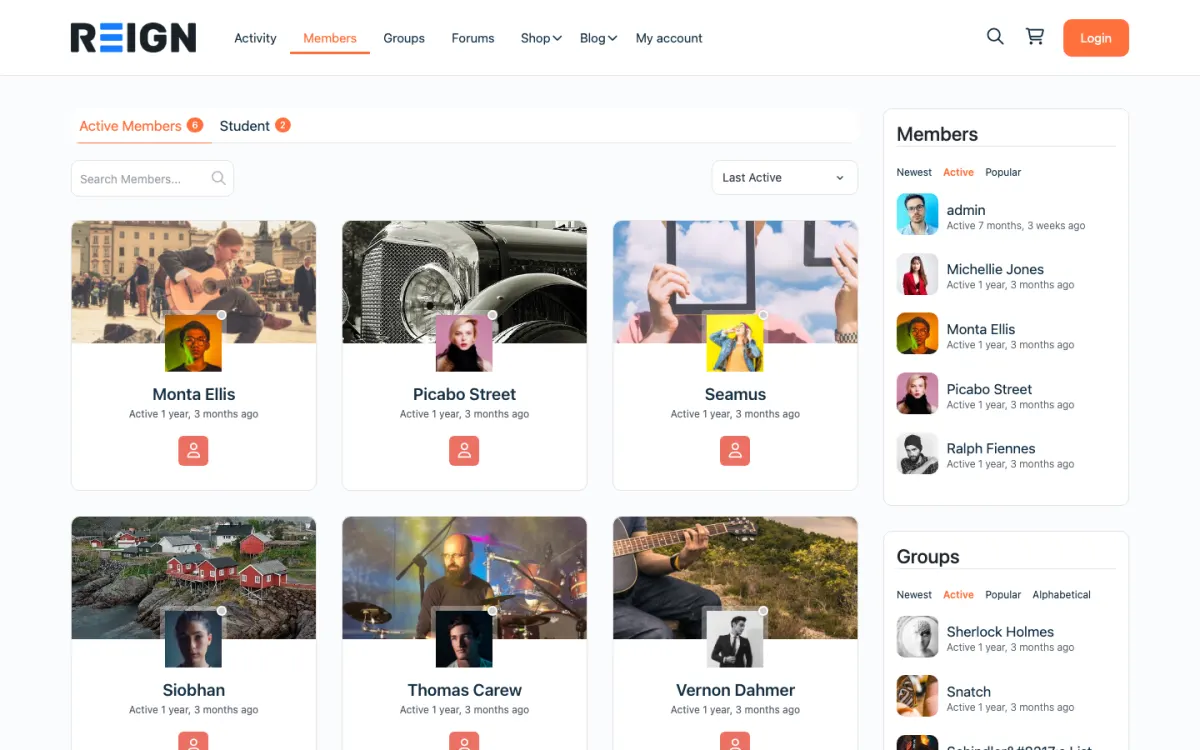
  • Reign members directory with member cards, search and sort
    The member directory: search, sort by activity, and a card for every member. Open the demo
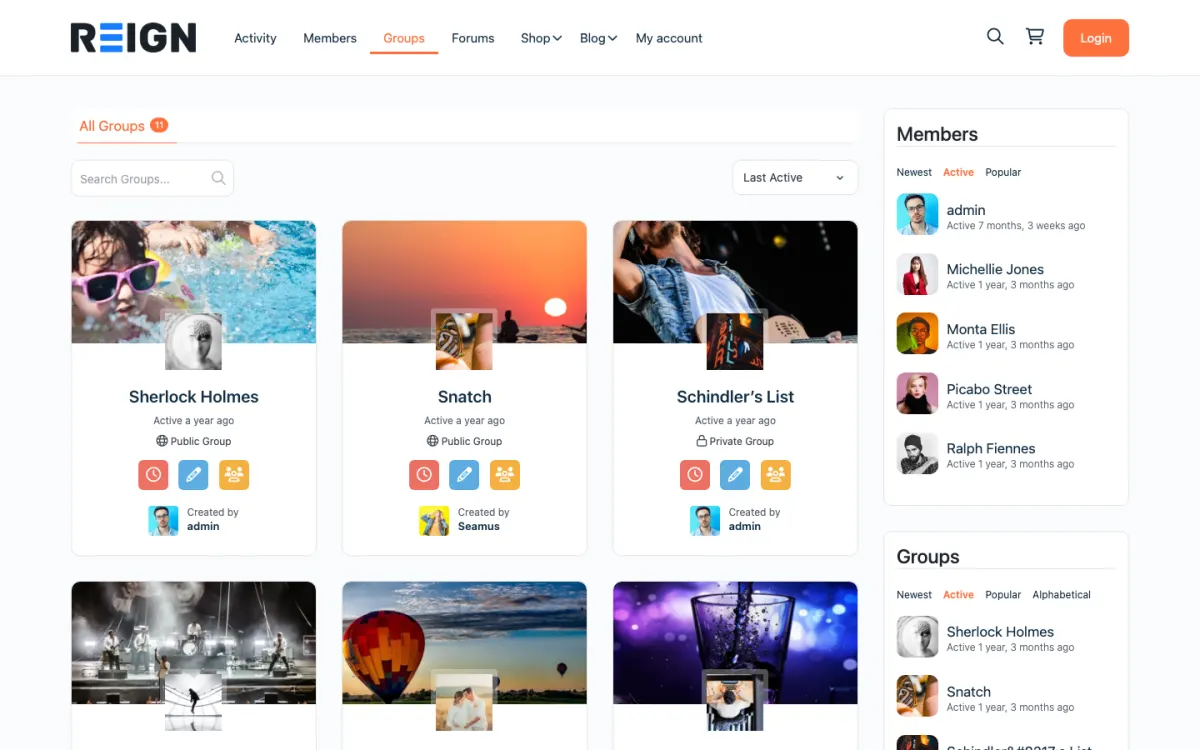
  • Reign groups directory with public and private groups
    Groups: public and private spaces members can join or create. Open the demo

Set expectations before you start.

  • Member list and emails (from the Skool admin, or an opt-in form posted inside the community).
  • Course outline and lesson content (copied into Learnomy).
  • The discussions worth keeping (copied by hand, best ones first).
  • Courses and videos, rebuilt in Learnomy with media in MediaVerse, both free to install.
  • Points, levels and leaderboards, restarted in WB Gamification, which is free.
  • Pricing: one flat price, or several tiers, with Learnomy memberships or BuddyNext Pro plans.
  • Paying members, who re-subscribe on your site.

The migration walkthrough.

1

Collect member emails

Take the member list from the Skool admin. If you cannot get every email, post an opt-in link inside the community and pin it.

2

Pick the course plugin

Learnomy is ours, installs free, and Reign styles it with no add-on. Import a starting layout with the free Reign Demo Installer. Already committed to a third-party LMS? The LearnMate LearnDash and Reign TutorLMS kits are the packaged routes.

3

Rebuild the classroom

For each Skool course, recreate sections, lessons and quizzes in Learnomy.

4

Set your pricing

Keep one price, or add a free tier and a premium tier, with Learnomy memberships and Stripe or PayPal checkout.

5

Add points and leaderboards

WB Gamification gives you points, levels, badges and leaderboards from real activity, all in the free plugin.

6

Upload course videos

MediaVerse, free to install, for self-hosted video, or embed from Vimeo or YouTube.

7

Cut over with a grace period

Announce the move, invite members, and keep Skool live for a grace period.

How long the move takes, phase by phase

The move has four phases, and only one of them is long. Collecting member emails is quick if the Skool admin gives you every address; if it does not, the pinned opt-in link runs alongside the other phases. Installing Reign, BuddyNext, Learnomy and WB Gamification on staging is a short job, and the free Reign Demo Installer gives you a starting layout.

Rebuilding the classroom is the long phase. Its length depends on how many courses and lessons you recreate in Learnomy and how many videos you move, so rebuild the course members use most first. Then run both sites side by side until members are active on the new one. That period is set by your members, not a calendar, and billing moves last.

If you would rather not do the work yourself, the Wbcom team can run the whole move and give you a timeline once they have seen your courses.

What members notice on day one, and how to brief them

Members who are used to one simple screen will notice that your site has a menu, a profile, a feed and a classroom. That is more, and it can feel like more to learn. The answer is to brief them with a single short guide that shows three places: the feed, the classroom and their profile.

They will also notice that their points and levels are gone. Skool does not export them, and WB Gamification awards points from real activity on the new site. Tell people before the move, and give the early movers a reason to feel ahead, such as a founding-member badge. Most members accept a fresh start when they know about it.

Lessons should open in the order they expect. Walk through the classroom as a student before you announce, and fix anything that is out of order.

How to run both sites side by side and pick the cut-over

Collect emails first. If you cannot export every address, post an opt-in link inside the community and pin it. Every sign-up is a member you can now reach. Build the new site on staging while the community carries on as normal.

Open the new site to a small group of regulars first and ask them to go through the classroom. Then announce it to everyone, keep Skool live, and post in both places. Show what the new site adds, such as search and a profile page that is yours.

Pick the cut-over when the classroom is complete, payments work and the active members have moved. A new course launch is a natural moment. After that, make the old community read-only and pin a post that points to the new address.

What you gain on your own site

Your pricing becomes your decision. You can keep one flat price or add a free level and a premium level, using Learnomy memberships with Stripe or PayPal checkout, or BuddyNext Pro paid plans. Reign is a flat theme licence with no per-member fee and no share of your sales; see the pricing page.

The site is also yours to grow. Add Jetonomy for forums and Q&A that stay findable, MediaVerse for photos and video, Eventonomy for live sessions with RSVPs, and later a member directory or a job board. All of it uses the same login, so nobody registers twice.

Search is the last gain. Public pages, lesson previews and forum topics sit on your domain, so people can find you without being inside a login.

Moderation and roles on the new site

Members report posts and you review them in the BuddyNext moderation queue, which is free. If you add Jetonomy, it has its own queue. Auto and bulk moderation are BuddyNext Pro.

Check that WB Gamification rewards the behaviour you want. Points for real activity such as replies and finished lessons make the leaderboard mean something; points for everything make it noise. Set the rules deliberately and review them after the first weeks.

When staying on Skool is the right call

Skool's strength is that it is simple. If your members love that, if you want no site to maintain and you are happy with the hosted terms, staying is a reasonable choice. A WordPress site needs hosting and someone to look after it.

The move fits best when you want your own domain, more control over pricing, a classroom that sits beside forums, media and other features on one login, or search traffic. Weigh those against the effort. The guide to building an online community helps you decide.

Before you start.

Find out exactly what Skool lets you take before you commit to a date, because the answer shapes the whole plan. Members usually come out; course content often does not, which means rebuilding the classroom by hand. Do that rebuild before you tell anyone, so the new site has the thing people paid for waiting for them rather than a promise that it is coming.

What to check once it is live.

Walk through the classroom as a member rather than an admin and confirm lessons open in the right order. Check that gamification is awarding points for the behaviour you want rather than firing on everything. Then confirm your payment flow end to end with a real card, because a community that has moved and cannot take money is worse than one that never moved.

Where this one usually goes wrong.

Underestimating how much of the value was the simplicity. Members used to one screen with a feed, a classroom and a leaderboard can find a full site confusing, and confusion reads as worse rather than different. Keep the first version deliberately plain: community, classroom, and nothing else until people have settled.

Migration questions.

Can I run a course and a community together on Reign like on Skool?

Yes. Learnomy runs the classroom with courses, lessons, quizzes and certificates, and BuddyNext runs the community with a feed and spaces, both on one login. WB Gamification adds points, levels and leaderboards free, so the parts members liked about Skool have a home.

How do I move my Skool community to my own WordPress site?

Collect member emails, rebuild the classroom in Learnomy and the community in BuddyNext on the Reign theme, set up your pricing, then run both until members have moved.

How long does it take to move a Skool community to WordPress?

Collecting emails and installing Reign are the quick parts. Rebuilding the classroom in Learnomy takes the most time and grows with the number of courses, lessons and videos. The side-by-side period lasts until members are active on the new site. The Wbcom team can do the move for you and give a timeline once they have seen your courses.
Is a WordPress theme a good Skool alternative?

Yes, if you want your own domain, your own pricing and no monthly platform fee. Reign with BuddyNext, Learnomy and WB Gamification covers the feed, classroom and leaderboard on a site you own.

Can I export my members from Skool?

You can take the member list from the Skool admin. If you cannot get every email, post an opt-in link in the community and collect the rest that way.

Will my points and levels transfer?

No, Skool does not export them. WB Gamification awards points from real activity on the new site, so everyone starts fresh. Say so up front and most members are fine with it.

Will my members have to make a new account?

Yes. They register on your site, or you import the member list and invite each person to set a password. Keep the step short and have the classroom ready.

Can I keep one flat monthly price?

Yes. Set up a single membership plan in Learnomy. You can add tiers later without moving platform again.

Is the classroom the same?

Similar in function, different in feel. Learnomy handles lessons, quizzes and certificates on the same login as the community. Expect more capability and slightly more setup.

One theme, the whole site

Rebuild what you had on Skool, then go further.

Reign is the WordPress theme for building a complete community site: social network, courses, member directory, marketplace and job board on one install. Start with one, add the others when you need them, and keep one login for every member. Open a live demo, or launch a sandbox and get a fresh WordPress site to click through in about a minute.

Add more when you need it

Not sure what moves from Skool? Ask us.

Tell us how big your community is and what you run on Skool today. The team that builds Reign replies with what moves, what to rebuild and how long it takes, before you buy anything.

Have us migrate you from Skool.

Our team can take the steps on this page off your hands: members brought across, billing set up on Stripe and welcome emails ready to send.

What customers say on Trustpilot

Excellent Theme, Powerful Plugins and Outstanding Support

I am using the REIGN theme and several plugins from Wbcom Designs on my website. The theme is beautifully designed, and the plugins are user-friendly. Everything works smoothly, and the features are perfect for building professional websites and communities. What impressed me most is their…

S W MalcolmUS