REIGN
Get Reign

Community · BuddyNext

Build a WordPress community on the free BuddyNext engine

Install Reign, activate BuddyNext for profiles, a feed and spaces, add Jetonomy for forums and MediaVerse for photos, video and messages, and import a layout with the free Reign Demo Installer. All three plugins install free and Reign styles every screen. BuddyPress and BuddyBoss stay fully supported if you already run one.

The Reign theme is the only thing you have to buy. See every plugin that installs free, or have us install the whole stack.

Key takeaways

  • BuddyNext free ships member profiles, an activity feed, spaces, notifications and a report-and-review moderation queue. Messages run on WPMediaVerse.
  • Jetonomy adds threaded forums and Q&A. MediaVerse adds member photos and video with albums and privacy levels.
  • Reign is the one purchase, a flat theme licence with no per-member fee and no share of your sales.
  • On BuddyPress or BuddyBoss already? Keep it. Reign styles both, and nothing in this guide asks you to move.

What it looks like on Reign

Screens from the live demos, with sample content. Open any of them and click around.

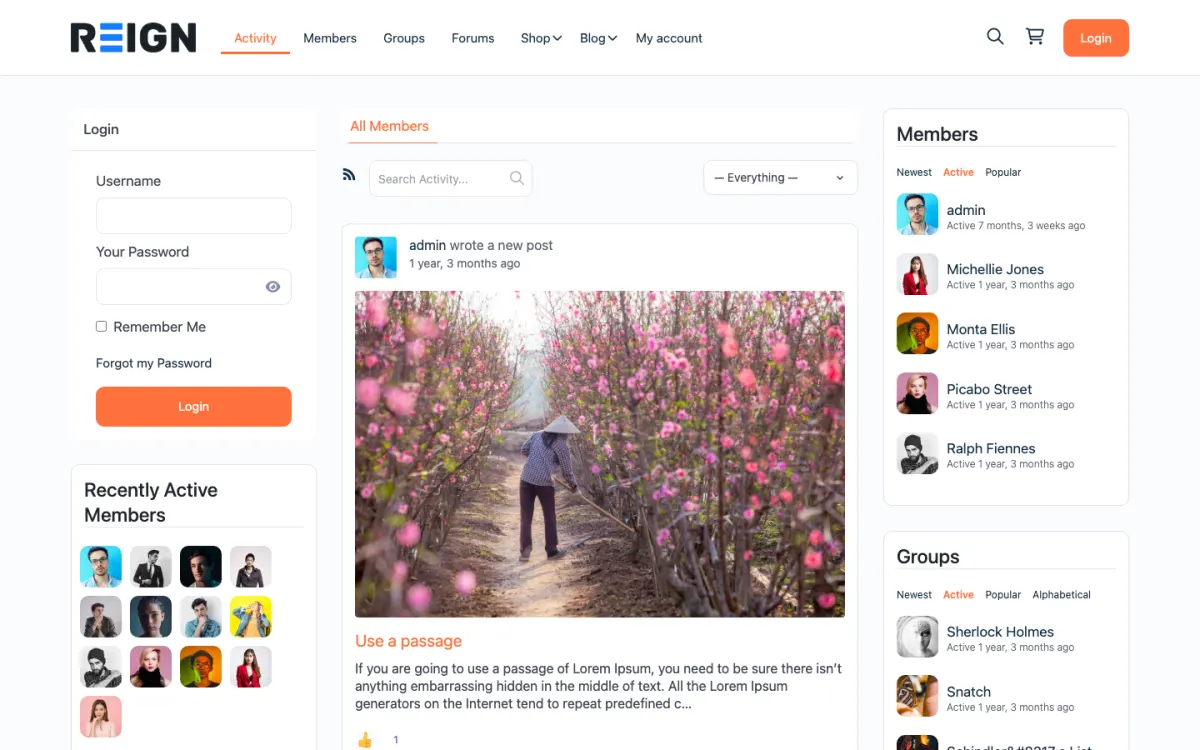
  • Reign BuddyPress demo home with login, activity feed, members and groups
    The home screen: sign-in, the activity feed and who is active, on one page. Open the demo
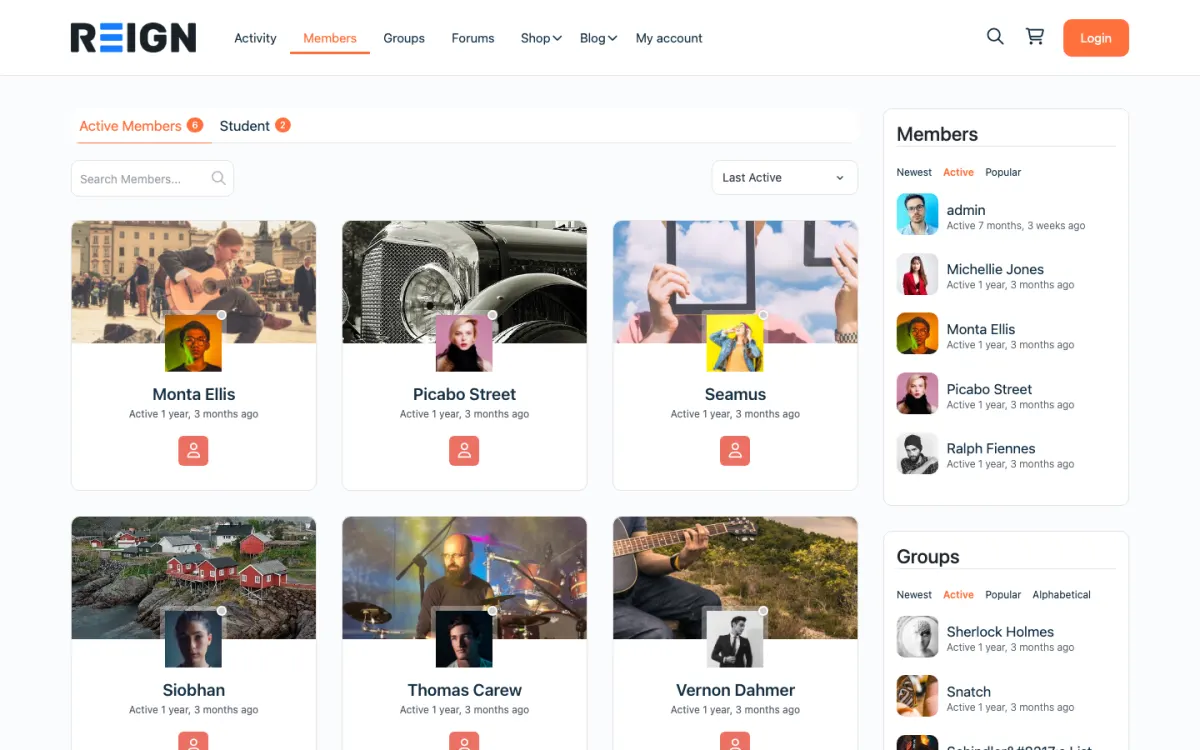
  • Reign members directory with member cards, search and sort
    The member directory: search, sort by activity, and a card for every member. Open the demo
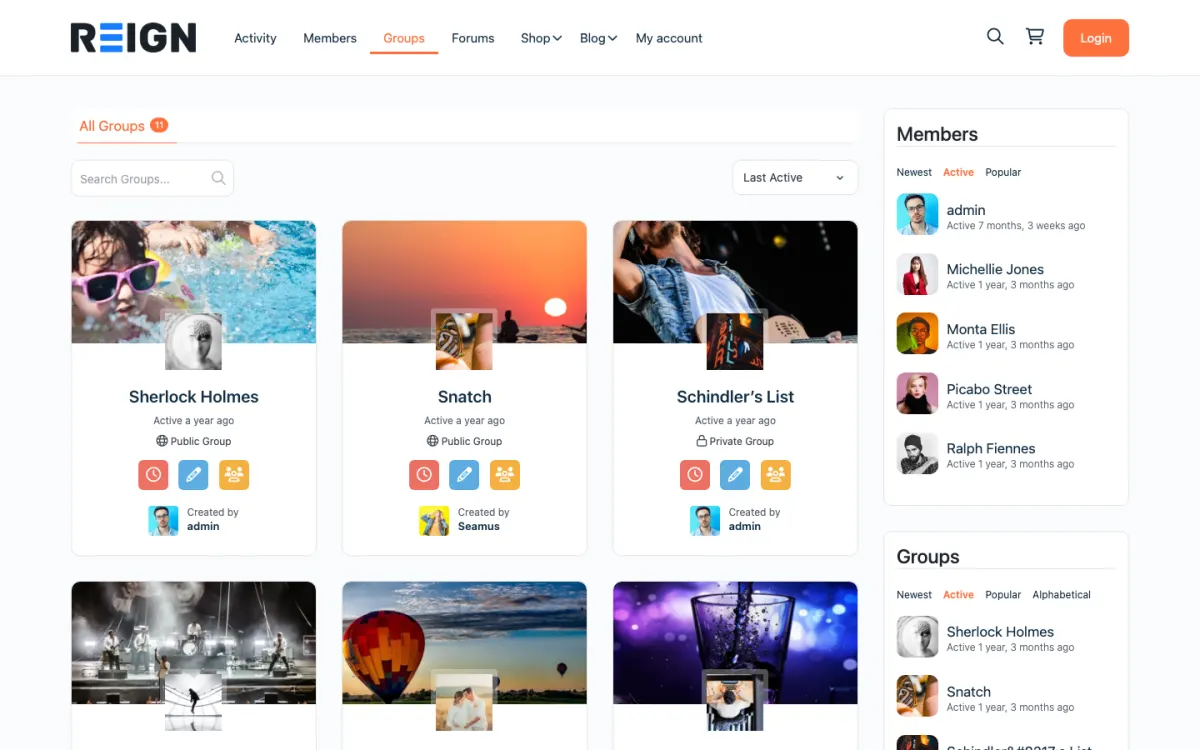
  • Reign groups directory with public and private groups
    Groups: public and private spaces members can join or create. Open the demo

Stack recipe

What you need to assemble.

Buy the theme. Install our plugins free. The third-party engine and its Reign add-on are here for people already running that stack, not a second bill everyone pays.

Build it in 6 steps

From zero to live community.

01

Install Reign and import the community layout

Activate Reign and open the free Reign Demo Installer. The Reign BuddyPress demo on the demos page is the closest starting layout for a social community. Import it for the home page and menus, then replace the sample content with yours.

Reign Demo Installer

02

Activate BuddyNext and set profile fields

Install BuddyNext and decide your profile fields before you invite anyone. Changing them after a few hundred members have joined leaves you with a few hundred incomplete profiles. Ask for little at sign-up and let members add the rest later.

BuddyNext with Reign

03

Create a small set of spaces

Spaces are BuddyNext groups. Create a welcome space, an introductions space and one or two spaces for your real topics. More empty spaces than active ones makes a community look dead. Add more only when a topic already has regular posters.

04

Add Jetonomy for forums and Q&A

A feed moves too fast for anything worth reading twice. Install Jetonomy and create spaces for questions members will ask repeatedly. Accepted answers and voting keep the useful replies near the top.

Jetonomy with Reign

05

Add MediaVerse for photos, video and messages

Install MediaVerse so members can upload photos and video into albums, with privacy levels you control. Activating it also switches on direct messages in BuddyNext. Review the reporting and AI moderation settings before opening uploads.

MediaVerse with Reign

06

Invite a founding group and write the rules

Invite people you know personally and ask them to post in the first week. Publish a short code of conduct and say who members contact when something goes wrong. Open public sign-up when conversations are already running.

What members get from this site

A new member signs up, fills in a profile and lands in a feed with posts from people and spaces they follow. They can join spaces, reply, mention others and get notifications when someone responds. If MediaVerse is active they can upload photos and video into albums and message other members privately.

Forums sit next to the feed rather than inside it. A member with a real question posts it in a Jetonomy space, and the community votes and marks an accepted answer. Reputation comes with the free plugin. The feed is for what is happening now; the forum is for what someone will want to find next month.

Moderation is part of the free stack. BuddyNext has a report-and-review queue and Jetonomy has its own moderation queue. Members can flag a post and you review it from one list. Auto and bulk moderation are BuddyNext Pro features, for when volume outgrows one person reading everything.

What to check before you invite your first members

Sign up as a new member in a private window and go through the first ten minutes with no knowledge of the site. Does the welcome space make sense? Is it clear what to post first? Can you find the report button? Fix the confusing parts now, because you only get one first impression per member.

Test notifications. Post, reply, mention and check what arrives and where. A community with silent notifications feels broken, and one that sends too many gets muted. Look at the site at phone width and try posting a photo from a phone.

Finally, write the welcome post and the code of conduct. Keep both short. Say what the community is for, how to ask for help and what you will remove. Pin the welcome post in the main space. The guide to building an online community covers launch habits in more depth.

Adding the next piece later, on the same login

Add features when members ask for them, not before. If they ask for live meetups, add Eventonomy for event pages, recurring events, RSVPs and attendee management. If they want recognition, add WB Gamification for points, badges, levels, leaderboards and a rewards store, all of it free. If they want courses, add Learnomy and follow the Learnomy build guide.

When you want to charge, BuddyNext Pro adds paid plans, gated spaces, Stripe checkout, broadcast email, push notifications, analytics, white label, and auto and bulk moderation. Jetonomy Pro adds private messaging, polls, email digests, auto-moderation and analytics. MediaVerse Pro adds cloud storage, extra layouts, stories, documents and photo challenges.

Because each plugin is separate, you upgrade the one that hurts. Nobody needs to buy a bundle to fix one problem. The plugins page lists every piece and what is free.

Who this build suits, and who should pick another

This build suits a brand community, a fan community, a professional network, an alumni group or a customer community: any place where the main product is the conversation. It is also a sound base if you expect to add courses, events or a directory later, since all of them run on the same member accounts.

If members should be locked behind a login from the first page, the private community build covers gating. If access depends on paid levels, see the membership site build. For staff, see the enterprise intranet build. If you run BuddyPress or BuddyBoss today, Reign styles them and the BuddyPress Community Bundle holds our Pro plugins for that stack.

One honest comparison. BuddyPress has a much longer history and a much larger ecosystem of third-party plugins around it. BuddyNext is our newer engine and we are not claiming parity with that ecosystem. If your community depends on a specific BuddyPress add-on, check that first.

Running it day to day

Each day, welcome new members by name, clear the report queue and answer questions that have gone unanswered. This takes less time than it sounds when the community is small, and it is the most effective growth work you will do.

Each week, run one recurring moment, such as a weekly thread or a monthly question session, and keep it going. Look at who posted most and thank them publicly. Ask two active members to help welcome newcomers; the community will grow around the people who are needed.

You outgrow the free tools when moderation is more than one person can read through, and not before. Reign is a flat theme licence with no per-member fee, so cost does not climb with membership. The scale page shows how larger communities are run, and the pricing page shows the plugin plans.

Mistakes to avoid when you start a community

The first is opening to everyone before anyone is talking. An empty feed teaches new members that posting is pointless. Invite a founding group first, give a few of them a job and open public sign-up when conversations are already running.

The second is too many spaces. Each space needs people who want to be in it. Start with a welcome space, an introductions space and one or two real topics, and open another only when a topic already has regular posters. A few busy spaces look healthier than many quiet ones.

The third is unclear purpose. Members join for a reason, and the home page should state it in a sentence. If you cannot say who the community is for and what they do there, write that sentence before you configure another setting. Finally, do not skip moderation. Write the code of conduct, use the report queue and act early. Tone is set in the first weeks, and it is hard to change later.

FAQ

Common questions.

What is the best free WordPress community plugin?

BuddyNext is our free community engine: profiles, an activity feed, spaces, notifications and a moderation queue, styled by Reign. BuddyPress is the long-standing alternative and Reign styles it too. Pick on whether you want a new engine or an established ecosystem.

What do I actually have to buy?

The Reign theme, a flat licence with no per-member fee and no share of your sales. BuddyNext, Jetonomy and MediaVerse install free. Pro plans are optional and sold per plugin.

What is in the free version of BuddyNext?

Member profiles, an activity feed, spaces, notifications and a report-and-review moderation queue. Direct messages work with WPMediaVerse. Paid plans, gated spaces, auto and bulk moderation and analytics are Pro.

Is BuddyNext a drop-in BuddyPress replacement?

It is our own engine and the free path this guide leads with, but we are not claiming parity. BuddyPress has a longer history and many third-party plugins, and BuddyBoss ships a paid platform on top. If you run either, Reign styles it.

How do I moderate a community?

BuddyNext free has a report-and-review queue and Jetonomy free has its own moderation queue. BuddyNext Pro adds auto and bulk moderation. Whatever you use, publish a short code of conduct before the first conflict.

When do I need the Pro plans?

When a specific limit hurts: when moderation is more than one person can read, when you want to charge for access, or when you need analytics. Until then the free stack is enough to run a real community.

Ship it

Reign is the only thing you have to buy.

BuddyNext and the rest of our plugins install free, and the theme styles them out of the box. Building on BuddyPress or BuddyBoss instead? The BuddyPress Community Bundle kit ships the theme with the matching Reign add-on.

One theme, the whole site

See what you can build with Reign, then try it.

Reign is the WordPress theme for building a complete community site: social network, courses, member directory, marketplace and job board on one install. Start with one, add the others when you need them, and keep one login for every member. Open a live demo, or launch a sandbox and get a fresh WordPress site to click through in about a minute.

Add more when you need it

Not sure which setup fits your site?

Tell us what you want members to do on your site. We will tell you which Reign setup, plugins and kit fit, before you buy anything.

What customers say on Trustpilot

I only have positive experience!

I only have positive experience with wbcom. My journey started a lot of years back with the free buddyx theme. during my learning of wordpress and futher websites ideas I found a match with their Reign job mate theme. Always there to help, always open to explore ideas, always kind replyes even if I…

Oskar HanborgSE