REIGN
Get Reign

Enterprise intranet

Build a WordPress Intranet and Staff Social Network

Install Reign, activate BuddyNext for staff profiles, department spaces and a feed, add MediaVerse for files and Jetonomy for internal Q&A, and import a layout with the free Reign Demo Installer. Then restrict the site to staff and connect your work account sign-in. The theme licence does not grow with headcount.

The Reign theme is the only thing you have to buy. See every plugin that installs free, or have us install the whole stack.

Key takeaways

  • BuddyNext free gives staff profiles, a feed, spaces and notifications. Use one space per department and one per project.
  • Sign-in with a work account (SAML or OAuth) is configuration work through established WordPress plugins, with no separate Wbcom product involved.
  • The theme licence is flat with no per-member fee, so cost does not follow headcount.
  • MediaVerse adds file and media sharing with privacy levels. Documents and cloud storage are MediaVerse Pro.

What it looks like on Reign

Screens from the live demos, with sample content. Open any of them and click around.

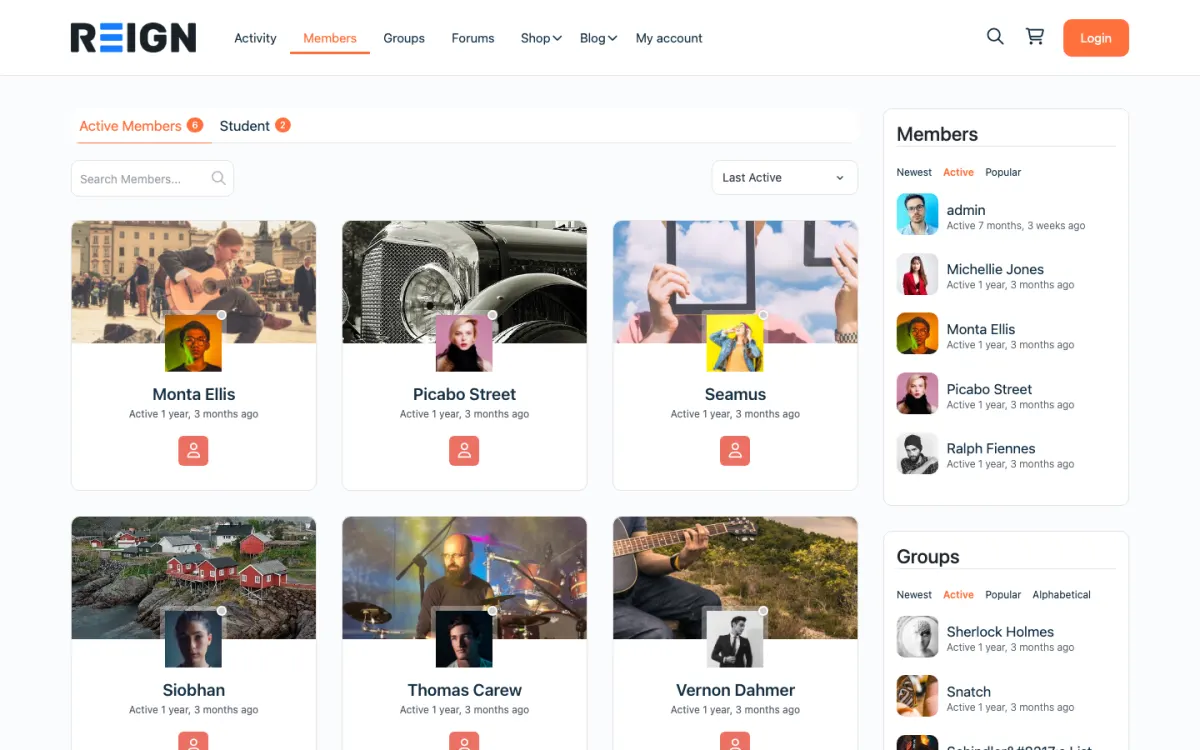
  • Reign BuddyPress demo home with login, activity feed, members and groups
    The home screen: sign-in, the activity feed and who is active, on one page. Open the demo
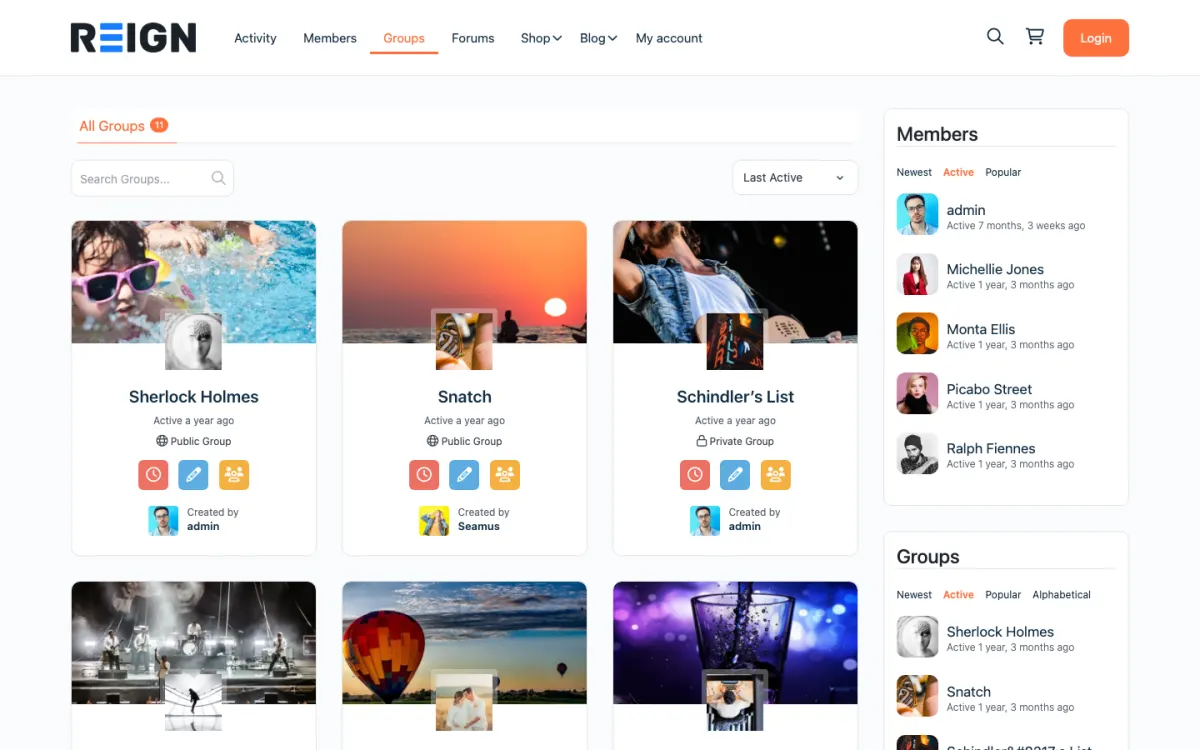
  • Reign members directory with member cards, search and sort
    The member directory: search, sort by activity, and a card for every member. Open the demo
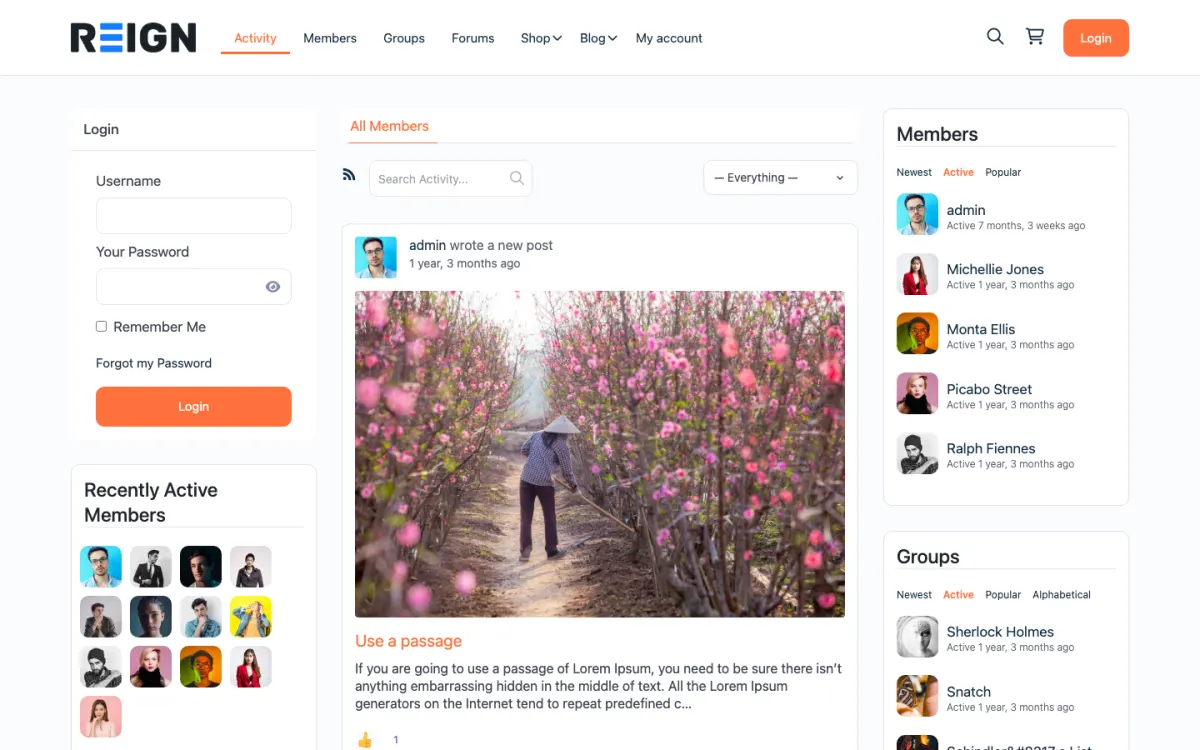
  • Reign groups directory with public and private groups
    Groups: public and private spaces members can join or create. Open the demo

Stack recipe

What you need to assemble.

Buy the theme. Install our plugins free. The third-party engine and its Reign add-on are here for people already running that stack, not a second bill everyone pays.

Build it in 6 steps

From zero to live community.

01

Install Reign and import a community layout

Activate Reign and open the free Reign Demo Installer. The Reign BuddyPress demo on the demos page is the closest social layout. Import it, then rebuild the home page as a staff landing page: announcements, a search box and links to the places people use daily.

Reign Demo Installer

02

Activate BuddyNext and plan spaces

Install BuddyNext. Create a space per department and a space per active project, plus a general space and a space for company announcements. Decide who can post in the announcement space.

BuddyNext with Reign

03

Restrict the site to signed-in staff

Use a membership or private-mode plugin to redirect logged-out visitors to the sign-in page, and turn off open registration in Settings, General. Check a logged-out visit to confirm nothing shows.

04

Connect work-account sign-in

Install a WordPress SSO plugin that supports your identity provider, such as Google Workspace or Microsoft Entra, through SAML or OAuth. This is configuration work, and your IT team will probably want to own it. Test that a leaver loses access when their work account is disabled.

05

Add MediaVerse and Jetonomy

Install MediaVerse for file and media sharing with privacy levels, and Jetonomy for internal Q&A such as how to claim expenses. Accepted answers stop the same question going round the office.

Jetonomy with Reign

06

Pilot with one team, then roll out

Start with one department and listen to what they find confusing. Fix it, then add the next team. A company-wide launch on day one tends to fail on small things.

What staff get from the intranet

A member of staff signs in with their work account and lands on a home page of announcements. They have a profile with their role and team, a feed of posts from the spaces they follow and notifications when someone mentions them. Department spaces keep conversations where they belong, and project spaces keep cross-team chatter in one place.

Files and media go through MediaVerse, which has privacy levels so a file can be visible only to the people meant to see it. Messages run on WPMediaVerse. Jetonomy handles internal questions: how do I claim expenses, who approves leave. The accepted answer stays findable and the question stops circulating.

Because the whole site is members-only, the conversation is for employees. A staff directory that is a search away makes it easier for people in different offices to find each other.

What to check before you roll it out

Check the gate first. Open the site in a private window with no login and confirm nothing is visible. Then test sign-in with a real work account and a leaver account, and confirm that disabling the work account removes access.

Check privacy levels on files with a test group: upload a file, restrict it and confirm someone outside the group cannot open it. Then read your data protection obligations with whoever owns them in your company. MediaVerse free includes GDPR export and erasure, but your policies are your own to write.

Look at the intranet on a phone, since many staff read announcements there.

Adding the next piece later, on the same login

A calendar of company events is a natural next step: Eventonomy gives event pages, recurring events, RSVPs and attendee management. For recognition, WB Gamification adds points, badges and leaderboards earned from real activity, free of charge, which some companies use for onboarding milestones.

If you need broadcast email, push notifications or analytics, BuddyNext Pro adds them, and also paid plans and gated spaces, which you may not need. MediaVerse Pro adds documents and cloud storage. Jetonomy Pro adds polls, email digests and analytics.

The plugins page lists each one and what is free. All of them use the same accounts your staff already sign in with.

Who this build suits, and who should pick another

This build suits a company that wants a self-hosted staff network and does not want a licence that grows with each new hire. It also suits a charity, a school or an association whose members are effectively staff. The licence covers the site, so adding people does not change the theme cost.

If your community is open to the public, see the open community build. If it is invited customers or peers, the private community build is closer. If you already run BuddyPress or BuddyBoss internally, do not migrate: Reign styles those and the BuddyPress Community Bundle holds our Pro plugins for that stack. For very large networks, the scale page and hosting page show how big sites are run.

Running it day to day

Appoint a small group to own the intranet: someone for announcements, someone to moderate and an IT contact for sign-in. Announcements work best weekly. A daily digest gets filtered out; a weekly one gets read.

Review spaces every few months. Close or merge spaces that nobody posts in, and pin the useful answers. An intranet that looks neglected stops being used.

Cost stays the same shape as the staff list grows: Reign is a flat theme licence with no per-member fee and no share of your sales. Hosting is the cost that follows use. The pricing page lists the plugin plans.

Mistakes to avoid when you launch an intranet

The first is launching without owners. An intranet needs a person for announcements, a person to moderate and a contact in IT. If those jobs belong to nobody, the site decays within a few months. Name them before launch and tell staff who they are.

The second is copying the org chart into spaces. A space for every team looks tidy and stays empty. Start with the spaces people actually need: a general one, an announcements one and a handful for the departments or projects that already talk to each other. Add more when someone asks.

The third is moving everything at once. If staff must use the intranet for leave requests, policies, files and chat from day one, they will resent it. Start with one thing that is easier on the intranet than anywhere else, such as finding a colleague or a policy, and let the rest follow. Staff also need a reason to visit that is not an announcement. A weekly question, a new starter introduction or an answered question in Jetonomy gives them one.

Finally, involve your data protection lead early. Decide what staff may post, how long files stay and who can see what, before the first file is uploaded. These decisions are easier to make at the start than to change afterwards.

FAQ

Common questions.

Can WordPress be used as a company intranet?

Yes. With Reign and BuddyNext you get staff profiles, department spaces, a feed and notifications, restricted to signed-in staff. Add a membership or private-mode plugin for the gate and an SSO plugin for work-account sign-in.

Does this work with Google Workspace or Microsoft sign-in?

Sign-in through SAML or OAuth is handled by established WordPress SSO plugins. It is configuration work, and your IT team will usually want to own it.

Is there a licence fee per employee?

No. Reign is a flat theme licence with no per-member fee. BuddyNext, MediaVerse and Jetonomy install free. Hosting grows with use.

We already run BuddyPress internally. Do we migrate?

No. Reign styles BuddyPress and BuddyBoss, and the BuddyPress Community Bundle holds our Pro community plugins for that stack. Keep the engine your staff know.

How do we keep files private?

MediaVerse free includes privacy levels, reporting, blocking and GDPR export and erasure. Documents and cloud storage are MediaVerse Pro.

Ship it

Reign is the only thing you have to buy.

BuddyNext and the rest of our plugins install free, and the theme styles them out of the box. Building on BuddyPress or BuddyBoss instead? The BuddyPress Community Bundle kit ships the theme with the matching Reign add-on.

One theme, the whole site

See what you can build with Reign, then try it.

Reign is the WordPress theme for building a complete community site: social network, courses, member directory, marketplace and job board on one install. Start with one, add the others when you need them, and keep one login for every member. Open a live demo, or launch a sandbox and get a fresh WordPress site to click through in about a minute.

Add more when you need it

Not sure which setup fits your site?

Tell us what you want members to do on your site. We will tell you which Reign setup, plugins and kit fit, before you buy anything.

What customers say on Trustpilot

I only have positive experience!

I only have positive experience with wbcom. My journey started a lot of years back with the free buddyx theme. during my learning of wordpress and futher websites ideas I found a match with their Reign job mate theme. Always there to help, always open to explore ideas, always kind replyes even if I…

Oskar HanborgSE