Reign for YouTube creators. YouTube creator community and courses.
Keep the videos public and put what works badly as public video behind a login: templates, deeper courses and the community itself. Learnomy sells the courses and memberships with Stripe or PayPal, and BuddyNext gives members a place to talk that is not a comments section. Reign makes it look like the brand your viewers already know.
YouTube creators have an audience but few places to build a paid relationship: channel memberships are limited, Patreon takes a share and Discord is hard to charge for.
Reign + Learnomy + BuddyNext for premium courses and a members community that turns YouTube viewers into paid members. Learnomy sells memberships and courses with Stripe or PayPal, and both plugins install free; LearnDash is the alternative.
Courses, memberships and the community feed, free to install. You buy the Reign theme; Learnomy and BuddyNext are ours and install free.
The channel brings people in. Gating it starves the funnel, so gate the extras.
Members who post stay; members who only consume churn at renewal. Design for the lurker, too.
Your site holds the email list, which no algorithm change can take away.
Learnomy and BuddyNext install free. See pricing for the flat theme licence with no platform share.
What it looks like on Reign
Screens from the live demos, with sample content. Open any of them and click around.
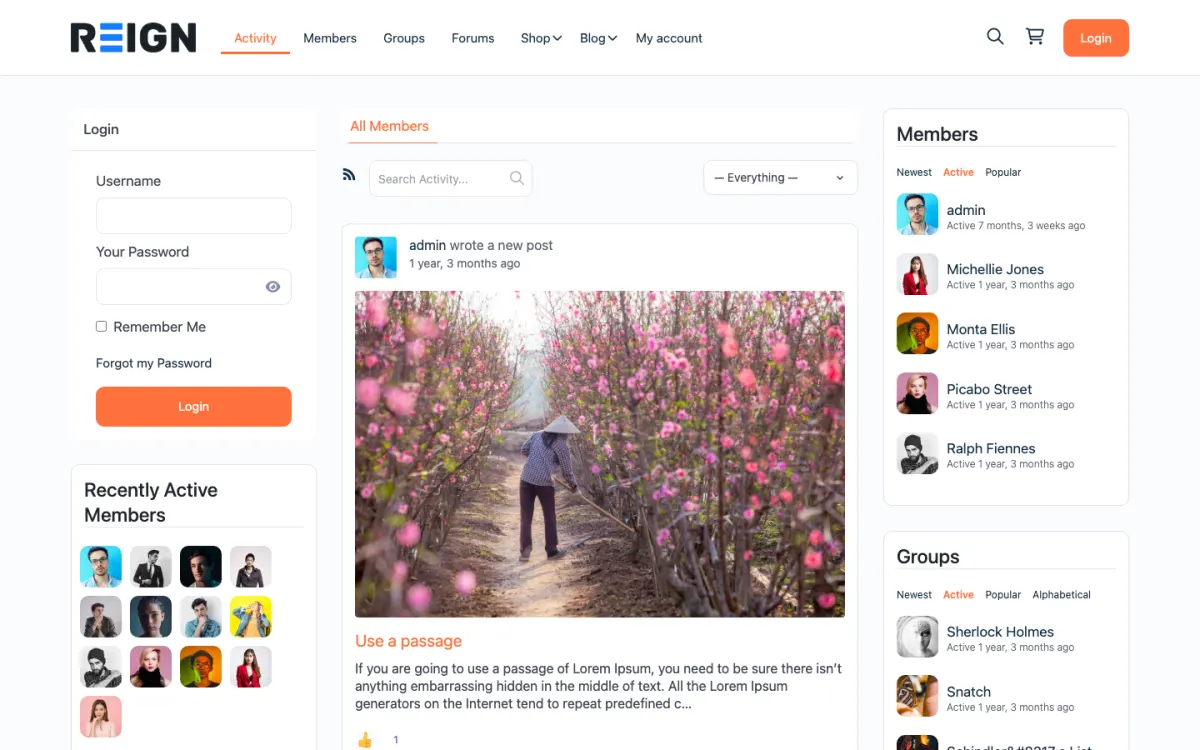
The home screen: sign-in, the activity feed and who is active, on one page. Open the demo
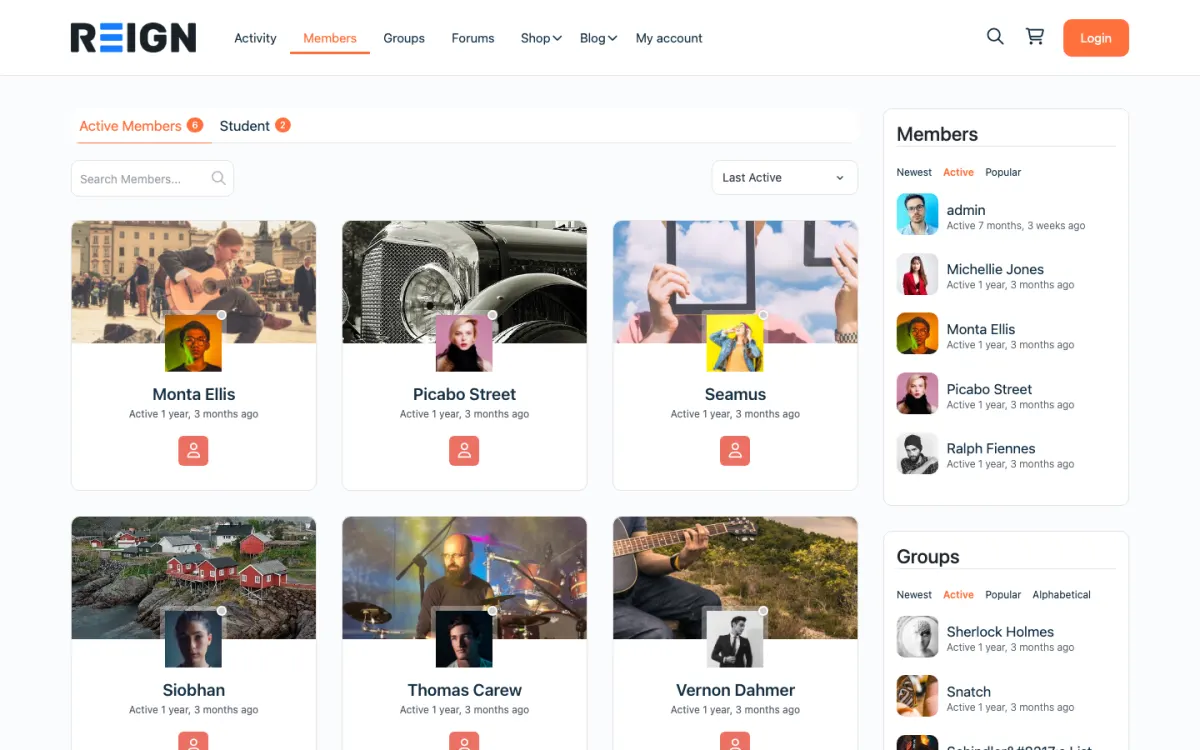
The member directory: search, sort by activity, and a card for every member. Open the demo
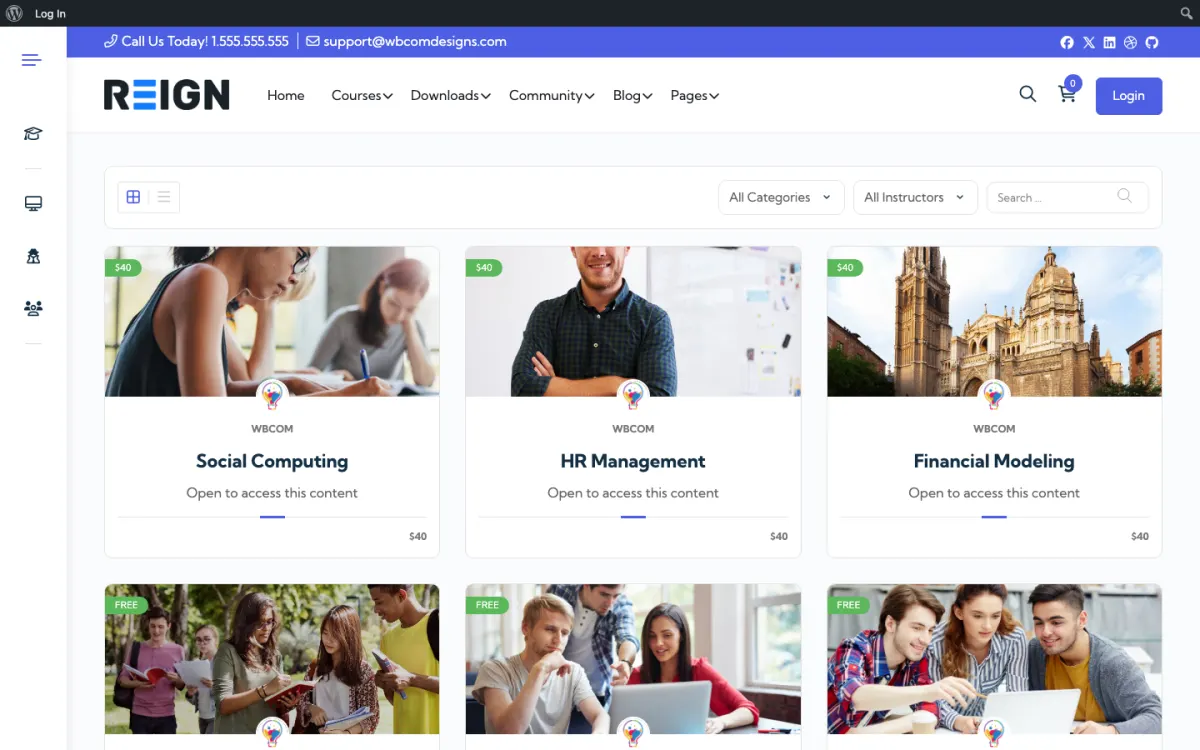
The course catalog, filtered by category and instructor. Open the demo
Three highlights for YouTube creators.
01
A premium course and membership tier on your own site, next to the channel.
02
BuddyNext community, free to install, for member discussion.
03
An email list you own, which no algorithm change can take away.
What the site looks like on day one.
You launch with a members area, a course holding your longer teaching, a discussion space, and video pages with the embed plus notes. YouTube keeps the reach; your site keeps the relationship. The members area is where you put what does not belong on a public channel: templates, deeper material, and a place to talk without the comments section.
What a member actually does.
A viewer arrives from a video, joins for a specific resource, and lurks. Conversion happens when there is something concrete behind the login rather than vague access. Members who post stay; members who only consume churn at renewal. Over months the community becomes the reason people pay, and the channel becomes the top of the funnel rather than the product.
How this usually makes money.
Memberships for templates, courses and community, which is the same job Patreon does, without a platform taking a share and with the email addresses in your own database. Courses sell as one-off purchases to the same audience. Sponsorship stays on the channel; the site is where the recurring revenue lives.
The mistake to avoid.
Gating the videos. The channel is the mechanism that brings people in, so putting it behind a login starves the funnel. Keep the videos public and gate the things that work badly as public video: templates, courses, and the community itself.
Which Reign setup fits a YouTube creator
Reign is the WordPress theme for building a complete community site: social network, courses, member directory, marketplace and job board on one install. A creator uses courses and community and keeps the channel as the front door.
Learnomy sells courses and memberships with Stripe and PayPal checkout, coupons and trials, with no WooCommerce needed. Learnomy Pro adds drip release and assignments. BuddyNext adds the member community, and its Pro plan adds paid plans and gated spaces if you want a higher tier. WB Gamification, free, rewards active members with points and badges.
The site's job is to turn viewers into members, so the first screen they see after clicking from a video matters most.
01
Install WordPress with Reign, Learnomy and BuddyNext. The start page lists the order.
02
Decide what sits behind the login: templates, project files, a deeper course and the community. Keep everything that sells the channel public.
03
Build a landing page that matches one video, such as the template from this video. Use the same thumbnail style and tone.
04
Set up the membership in Learnomy with a free tier as a taster and a paid tier for the full set.
05
Create the community space and pin a welcome post. Ask for introductions and reply to each.
06
Mention the site in your videos, with a link in the pinned comment and the description, and say what members get that the channel does not give.
What viewers and members do week to week
A viewer watches a new video, clicks the link for the template or the project files, signs up for the free tier and gets the download by email. Next week they might return for the next video and the next template, and eventually see the paid tier.
Members work through the course at their own pace, post their results in the community and ask questions. They often share what they made with your tools, which is both feedback for you and proof for new viewers.
Your week alternates between filming and community. After a release, reply to the members' questions, pin the best result and feed what they ask back into next week's topic. Some of your best video ideas will come from the community.
How a creator membership grows
Growth starts on the channel. Every video is a chance to mention the site, and the best-converting mentions are specific: a template, a project file or a live session that exists only for members.
Over time the community becomes the reason people pay, and the channel the top of the funnel. Invite members to show their work in a monthly thread and feature it in videos. Everybody likes to be seen.
Add revenue lines one at a time. Courses sell as one-off purchases to the same audience, and sponsorship stays on the channel. The site is where recurring revenue lives.
How to turn a video into a signup
Most creators lose members in the gap between watching a video and landing on a signup page. The viewer was interested, clicked, and found a page that did not match what they had just seen. Closing that gap is the highest-value work on the site.
Make a landing page for each video that has a resource. If the video is about a template, the page should show the same template, the same thumbnail style and a plain statement of what the visitor gets. A generic membership page loses the click.
Offer something small first. A free tier or a free download in return for an email gives the viewer a low-risk step, and it gives you a way to follow up. Send a short welcome sequence that points to the best three videos and the paid tier.
Use the video itself. Mention the page by name, put the link in the pinned comment and the description, and show it on screen once. Say what members get that the channel does not give, in a sentence.
Look at what converts. Compare pages and videos by signups, and make more of the ones that work. A creator who learns which topics produce members can plan the channel around them.
Mistakes specific to creator communities
Gating the videos is the main one. The channel is the mechanism that brings people in, and putting it behind a login starves the funnel.
Giving away the only reason to join is another. If members get nothing they could not get from the free channel and its comments, they will leave at renewal. Keep a real difference between free and paid.
Third, do not ignore lurkers. Most members of any community never post. They still pay if the library is worth browsing, so do not measure success only by posts.
When a different setup fits better
If your audience is subscribers to a newsletter more than viewers, see the newsletter creator page. If you teach one subject in depth, the online tutors page shows a course-led structure.
If you have fewer than a few hundred engaged viewers, a simple page with a download and an email form may be all you need before building a community.
YouTube creator-specific questions.
How does this compare to Skool?
Skool is opinionated and quick to set up. Reign is more flexible: a flat theme licence, with the course and community plugins free. Skool wins on speed; Reign wins once you want your own domain, your member list and room to add more.
Why not just use Patreon?
Speed to launch, mainly, and there is no shame in starting there. The reasons to move are the platform's share of every payment, which never stops, and the patron emails, which Patreon does not hand over. On your own site the list is yours and the community can be more than a comment feed.
Should videos be public or gated?
Keep the channel public; that is your reach. Gate the things that do not work as public video: templates, deeper courses, the community itself. Gating your YouTube content defeats the mechanism that brings people in.
How do I move subscribers across?
Slowly, and with a reason. Put something genuinely useful behind the signup, mention it in videos rather than in the description alone, and accept that only a small share converts. Those few are worth more than the rest of the channel combined.
What should be free and what should be paid?
Free is everything that brings people in: the videos, the public archive. Paid is what works badly in public: templates, courses, direct access, community. Getting this the wrong way round starves the funnel.
How do I handle members who only lurk?
Accept them, because they still pay. Most members of any community never post. Design for the lurker, with a library worth browsing, and treat active posters as a bonus rather than the requirement.
Buy the theme. Add the plugins free.
Learnomy and BuddyNext cost nothing to install, and each has its own Pro plan for later. Running the third-party stack instead? The LearnMate LearnDash kit is the packaged route. Or have the Wbcom team set either one up for you.
Reign is the WordPress theme for building a complete community site: social network, courses, member directory,
marketplace and job board on one install. Start with one, add the others when you need them, and keep one login
for every member. Open a live demo, or launch a sandbox and get a fresh WordPress site to click through in about a minute.
Community and social network
Profiles, activity feed, spaces, messages and moderation on your own domain. Powered by BuddyNext.
I only have positive experience with wbcom. My journey started a lot of years back with the free buddyx theme. during my learning of wordpress and futher websites ideas I found a match with their Reign job mate theme. Always there to help, always open to explore ideas, always kind replyes even if I…
Oskar Hanborg · SE ·
Swift and expert coding!
Swift and expert coding by Kerit to apply a personalised display adjustment on the Reign Theme for a media plugin that was not fully supported at the moment.
Russell · GB ·
Perfect themes
I purchased Reign theme from Wbcom Designs, the support team was very helpful and I got the perfect website what I was looking for. Good work Wbcom Designs
Monika Singh · IN ·
WBComDesigns is amazing!
WBComDesigns is amazing. The WP plugins and themes are of top notch quality with lots of features and updated very frequently. Supports are very responsive and helpful. I use Reign with TutorLMS, and the experience is surprisingly smooth. The recently launched BuddyNext Pro and MediaShield Pro are…
Hoang Phan · VN ·
Love this company
Love this company. Loved the REIGN product. They were there the entire time helping me set things up; and when things went wrong? They were quick to take action and help find a solution.
Fable Fortitude · CA ·
Excellent Theme, Powerful Plugins and Outstanding Support
I am using the REIGN theme and several plugins from Wbcom Designs on my website. The theme is beautifully designed, and the plugins are user-friendly. Everything works smoothly, and the features are perfect for building professional websites and communities. What impressed me most is their…
S W Malcolm · US ·
Fast and knowledgeable staff
Fast and knowledgeable staff. The support team goes beyond and above their roles by consulting and sharing their extensive knowledge in trying to solve a problem.
Elias · CA ·
Very responsive
Very responsive, helpful, patient, and solve big problems for me. Great customer service!
Kate Zhang · US ·
Great Addon, great Support
Had a minor issue with displaying information in the Resume Manager. Opened a ticket and had the issue fixed the same day. Great job!
Mike & Cris in de Palz · DE ·
Fast and friendly Support
It was really great working with shashank from wbcom designs on my project!