Reign for event directory operators. Local event and activity directory.
Keep submissions free and sell promotion: Eventonomy for the calendar and RSVPs, Listora for venues and organisers, BuddyNext for the people who go, and a weekly digest on the day your audience plans its weekend. Show this week and this weekend first. Reign gives the calendar and map a tidy, scannable layout.
Event directories run on a calendar plugin alone, with no submission flow, no community and no recurring revenue.
Reign + Listora + Eventonomy for a community-submitted event directory with featured event monetization. Both plugins install free. GeoDirectory and The Events Calendar are the alternatives.
Directory listings, event calendars and free RSVPs, free to install. Paid tickets are the Eventonomy Pro upgrade. You buy the Reign theme; Listora, Eventonomy and BuddyNext are ours and install free.
A calendar is only worth visiting if it is comprehensive, and a listing fee guarantees it will not be.
Surface what is happening this week instead of a flat archive, and let expired events drop off the main list.
The weekly email is where the habit lives. The site is where people land.
Eventonomy and Listora install free; paid tickets are Eventonomy Pro. See pricing for the theme licence.
What it looks like on Reign
Screens from the live demos, with sample content. Open any of them and click around.
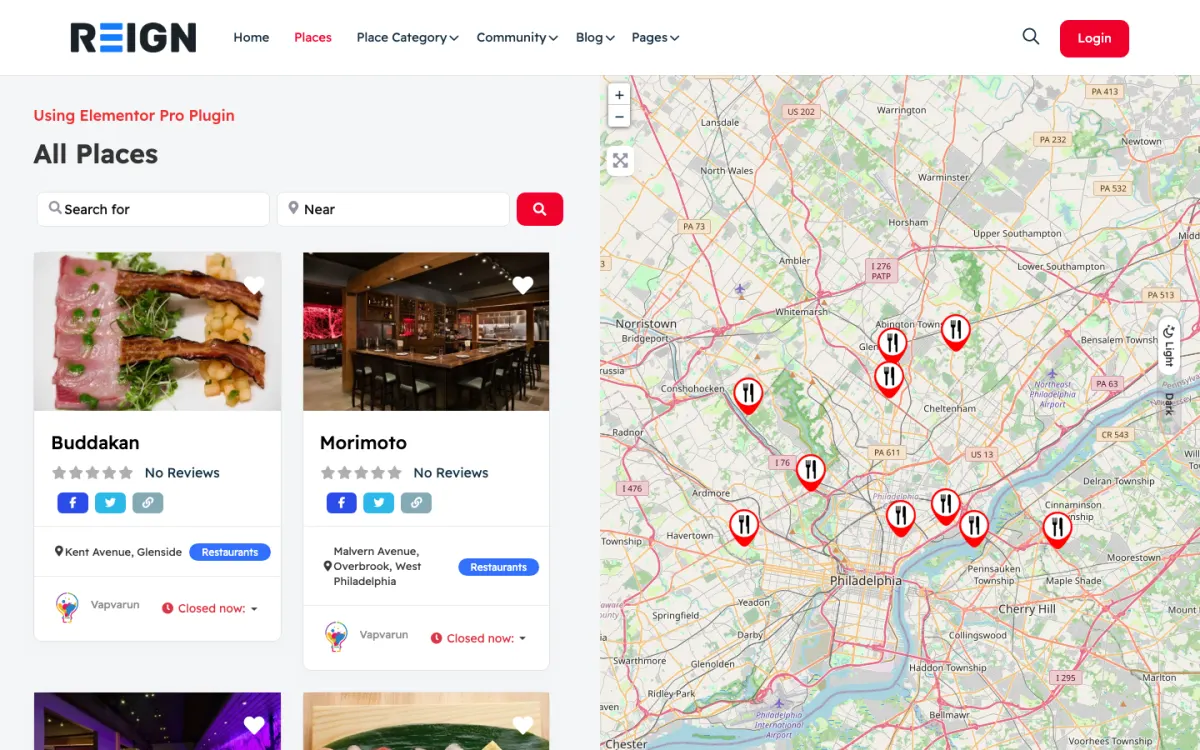
Listings beside a map, with search by keyword and location. Open the demo
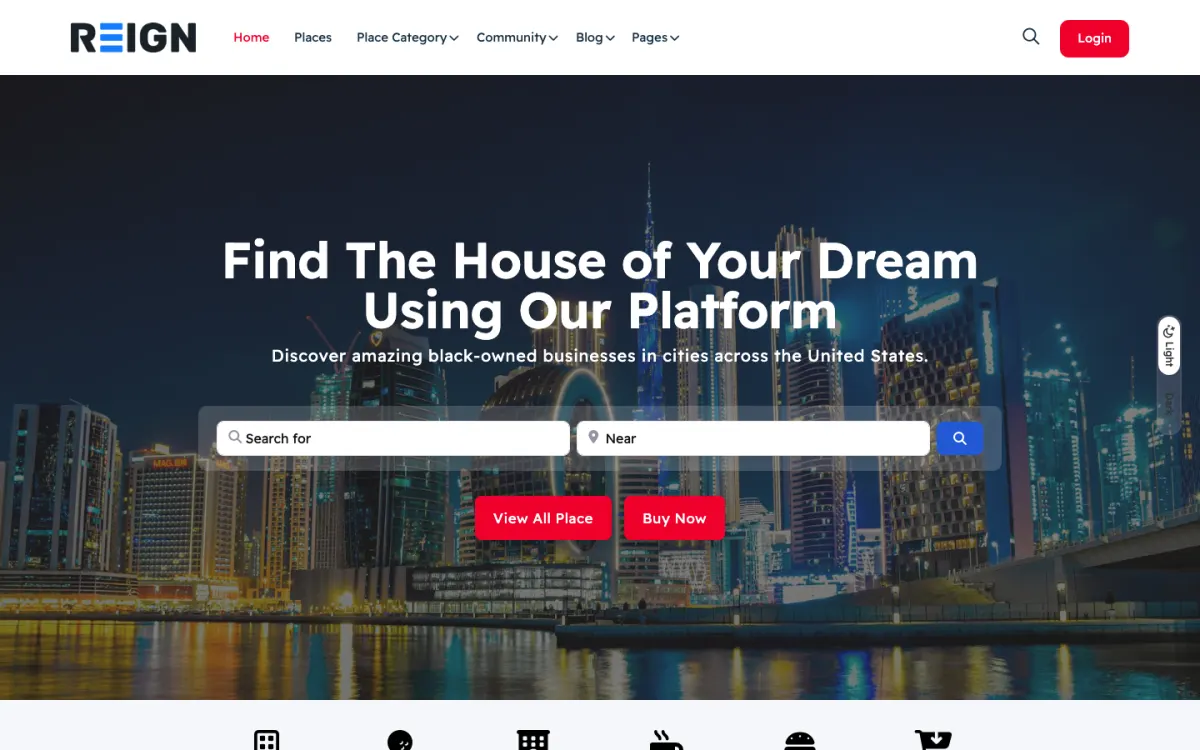
A directory home page with search up front. Open the demo
Three highlights for event directory operators.
01
Member-submitted events with category and date filters.
02
Featured placement for venues and organizers through Listora Pro paid plans.
03
BuddyNext profiles plus Eventonomy RSVPs for community attendance.
What the site looks like on day one.
You launch with local event listings, a calendar and map, category filters, and submissions from organisers. Events are time-bound, so the site needs to handle things expiring gracefully and surface what is happening this week rather than presenting a flat archive. Organiser submissions with moderation keep the calendar full without you filling it.
What a member actually does.
A visitor checks what is on this weekend, saves one or two, and returns when planning again. Habit forms around a weekly rhythm, which is why a Thursday digest outperforms almost any on-site feature. Organisers submit when it is free and easy, and pay for promotion once the calendar demonstrably brings attendance.
How this usually makes money.
Featured or promoted events sold per listing, organiser subscriptions for regular promoters, and sponsorship of the digest. Ticketing commission is possible if you own the ticket flow, though most local directories do better linking out and keeping the operational load low.
The mistake to avoid.
Charging organisers to list. A calendar is only worth visiting if it is comprehensive, and a listing fee guarantees it will not be. Keep submission free and sell promotion, featured placement and the digest instead.
Which Reign setup fits a local event directory
Reign is the WordPress theme for building a complete community site: social network, courses, member directory, marketplace and job board on one install. An event directory uses the events and directory halves.
Eventonomy is our events plugin. The free version includes event listings, calendars, daily, weekly and monthly recurring events, RSVPs and attendee management. Pro adds paid tickets, door check-in, advanced recurrence rules, calendar sync and organizer payouts. Listora supplies venue and organiser listings with maps and reviews, and BuddyNext adds profiles so regulars can follow organisers.
If you already use The Events Calendar, keep it for ticketing and let Listora do the directory. The Reign GeoDirectory kit is the packaged route for a GeoDirectory stack and the business directory build guide explains the structure. The plugins page has the split.
Launch steps for an event directory
Fill the calendar with real events before launch. An empty week is a reason for visitors never to return.
01
Choose your area and the kinds of events you will list. Say what you do not list, to keep the calendar coherent.
02
Install WordPress with Reign, Eventonomy and Listora. The start page lists the order.
03
Add the first fifty events yourself from organisers you contact. Check dates, times and venues, and use good images.
04
Switch on organiser submissions with a moderation step and a short guide on how to write a good event title and description.
05
Set up the weekly digest to go out on the same day each week. Choose the day by asking your audience when they plan.
06
Launch with a clear promise such as everything happening in this town this weekend, and ask early organisers to share the link.
What visitors and organisers do week to week
A visitor checks the calendar on Thursday to plan the weekend. They filter by day and category, save one or two events and share the link with friends. When they need to plan again, they come back, usually after the digest lands in their inbox.
An organiser submits an event, shares the page and watches the RSVPs. Regular organisers learn the rhythm: submit early, include a clear image and respond to questions in the comments. Those who see good attendance pay for promotion.
Your week centres on the digest and moderation. You approve submissions, remove duplicates, pick featured events and write the Thursday email. A calendar that always has something new and accurate is a habit people keep.
How an event directory grows
Growth comes from comprehensive coverage and a reliable rhythm. When people find that your calendar is complete, they stop checking elsewhere. Add categories in response to what organisers submit, and add neighbouring areas when your core is solid.
Promotion is the revenue. Featured events, organiser subscriptions for regular promoters and digest sponsorship are the usual lines. Ticketing commission is possible if you own the ticket flow, but linking out keeps the operational load low. If you do want to own ticketing, Eventonomy Pro offers paid tickets and organizer payouts.
Past events accumulate search traffic. Keep the pages for reference, labelled as past, so people searching for last year's festival still find you and see what is coming.
How to write the weekly digest that keeps people coming back
The digest is the habit. People rarely visit an event calendar on a whim, but they will open an email that arrives on the day they plan their weekend. A good digest takes under an hour to produce and carries most of your repeat traffic.
Pick the day by asking. Run a short poll in your first weeks and ask when people decide what to do. For many local audiences it is Wednesday or Thursday. Send at the same time every week and never skip, because the reliability is part of the product.
Keep the structure the same each time. Open with the three events you would go to, written in a sentence each, then list the rest by day with time and place. Add a short note on what is new, such as a venue that has just joined or a festival announced.
Make it quick to scan on a phone. Short lines, clear day headings and one link per event are better than long descriptions. A reader should know within a few seconds whether the week has something for them.
Give organisers a reason to care. Tell them the next digest deadline, and offer a featured slot to those who want to promote an event. This is where promotion revenue comes from, and it only works if the digest has an audience that trusts it.
Measure by replies and clicks rather than list size alone. Notice which events get clicked and use that to decide what to feature. Over a season you will learn what your area wants.
Mistakes specific to event directories
Charging organisers to list is the main one. A listing fee guarantees an incomplete calendar. Sell promotion instead.
Importing feeds from elsewhere is the second. It brings duplicates and stale entries, and the curation is what makes a local calendar worth checking. Recruit organisers.
Third, do not show next March first. Emphasise this week and this weekend, with planning ahead for a few months.
When a different setup fits better
If your events are a single organisation's programme, you need an events page on that organisation's site, not a directory. The nonprofits page shows events used for volunteers. If you want a community around local hobbies, see the board game enthusiasts page.
If you want to sell tickets as your main business, evaluate ticketing needs carefully before choosing, since payment, refunds and door check-in are real operations.
Event directory operator-specific questions.
Which plugin owns the calendar?
Listora runs the directory listings and Eventonomy, also free, runs the calendar and RSVPs. On a site already using The Events Calendar, keep it for ticketing and let Listora do the directory, with each listing linking to its event page.
How do expired events behave?
They drop off the calendar automatically while their pages remain for reference, which is worth keeping because past events accumulate search traffic. What matters is that nothing expired appears in the main listing, since a stale calendar is the fastest way to lose a returning visitor.
Can organisers submit their own?
Yes, through a front-end form with moderation. Keep submission free and fast; your calendar is only valuable if it is comprehensive, and charging to list is how directories end up half empty. Charge for promotion instead.
What makes people come back?
A weekly email, more than anything on the site. Event discovery is a habit tied to planning the weekend, so meet people in their inbox on the day they plan. The site is where they land, not where the habit lives.
How far ahead should listings go?
Far enough for planning, usually a few months, with the emphasis on this week and this weekend. A calendar that shows next March first is answering a question nobody asked.
Can I import events from elsewhere?
Technically yes, and it is usually a mistake. Imported feeds bring duplicates and stale entries, and the curation is what makes a local calendar worth checking. Recruit organisers instead.
Buy the theme. Add the plugins free.
Listora, Eventonomy and BuddyNext cost nothing to install, and each has its own Pro plan for later. Running the third-party stack instead? The Reign GeoDirectory kit is the packaged route. Or have the Wbcom team set either one up for you.
Reign is the WordPress theme for building a complete community site: social network, courses, member directory,
marketplace and job board on one install. Start with one, add the others when you need them, and keep one login
for every member. Open a live demo, or launch a sandbox and get a fresh WordPress site to click through in about a minute.
Member or business directory
Listings, search, maps and reviews that members can add themselves. Powered by Listora.
I only have positive experience with wbcom. My journey started a lot of years back with the free buddyx theme. during my learning of wordpress and futher websites ideas I found a match with their Reign job mate theme. Always there to help, always open to explore ideas, always kind replyes even if I…
Oskar Hanborg · SE ·
Swift and expert coding!
Swift and expert coding by Kerit to apply a personalised display adjustment on the Reign Theme for a media plugin that was not fully supported at the moment.
Russell · GB ·
Perfect themes
I purchased Reign theme from Wbcom Designs, the support team was very helpful and I got the perfect website what I was looking for. Good work Wbcom Designs
Monika Singh · IN ·
WBComDesigns is amazing!
WBComDesigns is amazing. The WP plugins and themes are of top notch quality with lots of features and updated very frequently. Supports are very responsive and helpful. I use Reign with TutorLMS, and the experience is surprisingly smooth. The recently launched BuddyNext Pro and MediaShield Pro are…
Hoang Phan · VN ·
Love this company
Love this company. Loved the REIGN product. They were there the entire time helping me set things up; and when things went wrong? They were quick to take action and help find a solution.
Fable Fortitude · CA ·
Excellent Theme, Powerful Plugins and Outstanding Support
I am using the REIGN theme and several plugins from Wbcom Designs on my website. The theme is beautifully designed, and the plugins are user-friendly. Everything works smoothly, and the features are perfect for building professional websites and communities. What impressed me most is their…
S W Malcolm · US ·
Helped With Setting Up Theme
Camila Scot of Wbcom was helpful. I got a super prompt help with my BuddyX Theme. Although I am a free version user, I got irst attention. I am satisfied. I will eventually buy the lifetime version once we fully deploy it and we are sure it meets our need.
Anthony Esezobor · NG ·
Good support
I've used several of their plugins. Occasionally support was needed but they were quite prompt in their support and solved the issue.
Cheryl Dimof · US ·
A plugin made a conflict and they fixed…
A plugin made a conflict and they fixed it immediately, great plugins anf great support.
Eric Hinz · DE ·
Great Blog Page
They provided me great advice on how to achieve the best display and function for my blog.