Reign for newsletter creators. Paid newsletter and community.
Publish your archive on the web, run the newsletter from your own list, and open a community for readers who reply: BuddyNext or Jetonomy for subscriber discussion, gated spaces for paid readers, and the issues as searchable pages. Add the community when readers are already replying to you with things others would like to see. Reign makes it all feel like your publication.
Newsletter writers want their own community and courses, but a hosted newsletter platform takes a share of paid subscriptions and its community tools are basic.
Reign + BuddyNext for a self-hosted home for a paid newsletter: public archive, subscriber community and gated spaces on your own domain. BuddyNext installs free, and its Pro plan adds paid plans and broadcast email.
Subscriber community and discussion spaces, free to install. You buy the Reign theme; BuddyNext and Jetonomy are ours and install free.
Past issues are the only part of a newsletter search engines can find. Publish the archive.
Readers who join the discussion renew more than readers who only read, which is the argument for a community.
A dead forum is worse than none. Add one when readers are already replying to you.
BuddyNext and Jetonomy install free; paid plans are BuddyNext Pro. See pricing.
What it looks like on Reign
Screens from the live demos, with sample content. Open any of them and click around.
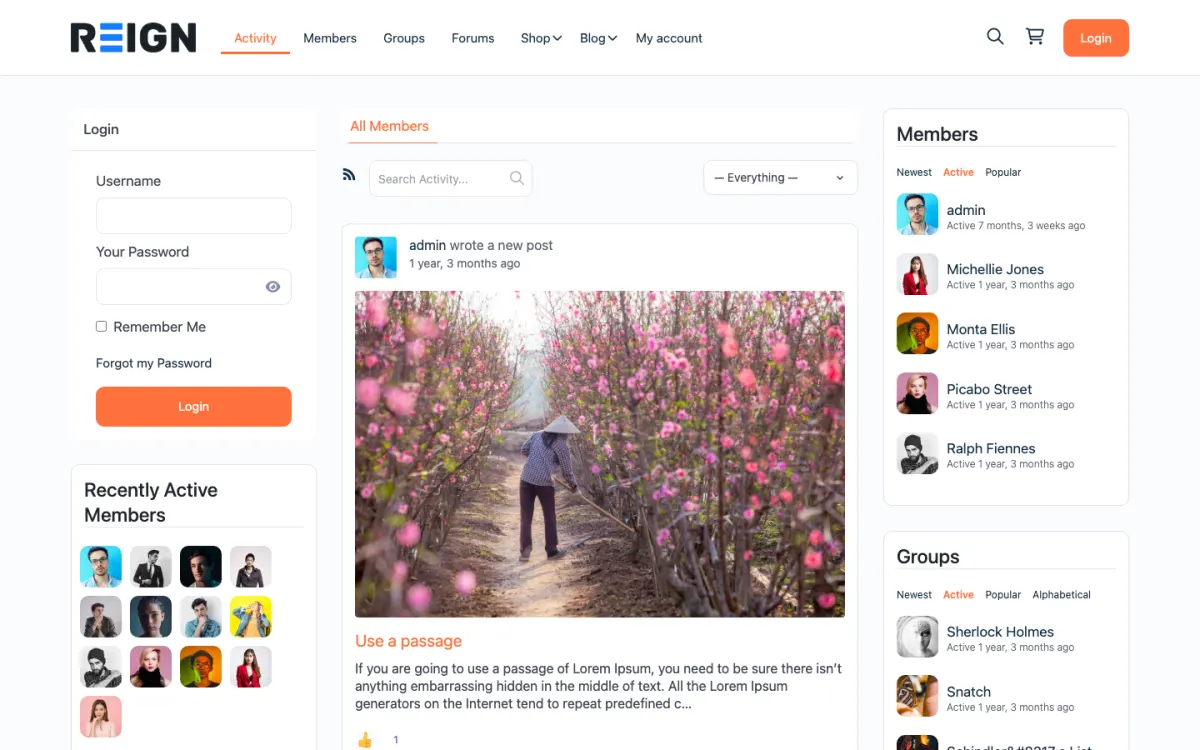
The home screen: sign-in, the activity feed and who is active, on one page. Open the demo
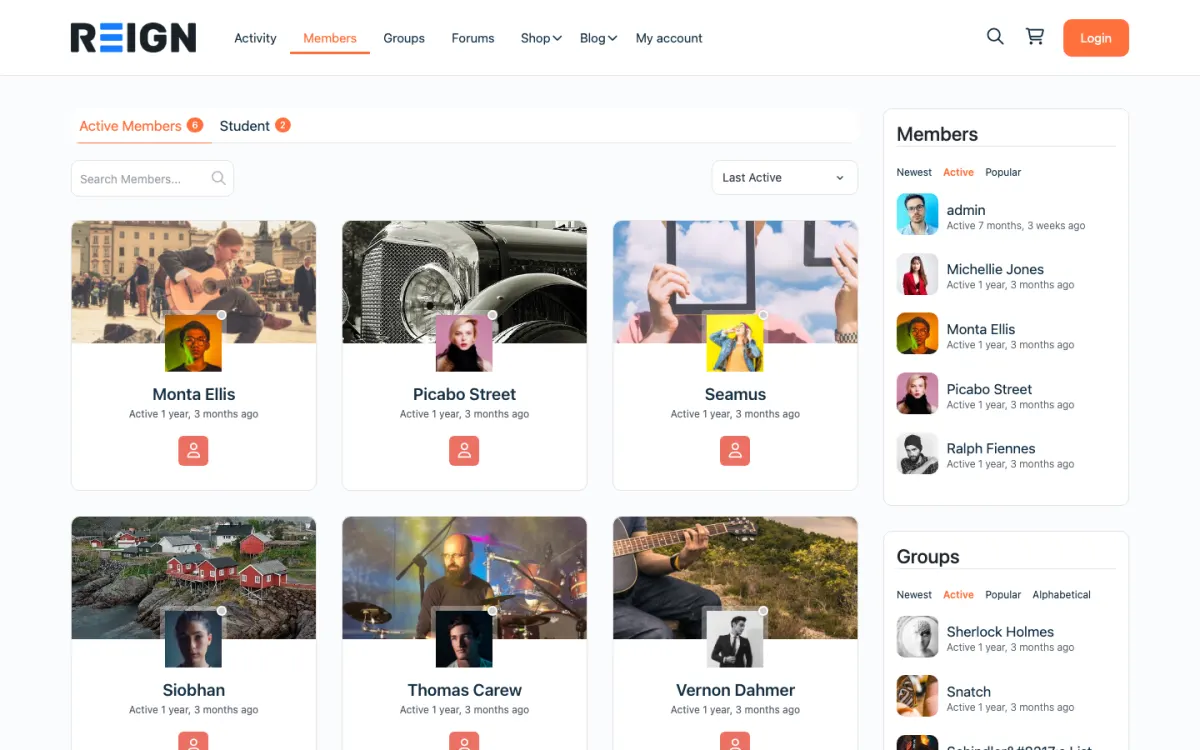
The member directory: search, sort by activity, and a card for every member. Open the demo
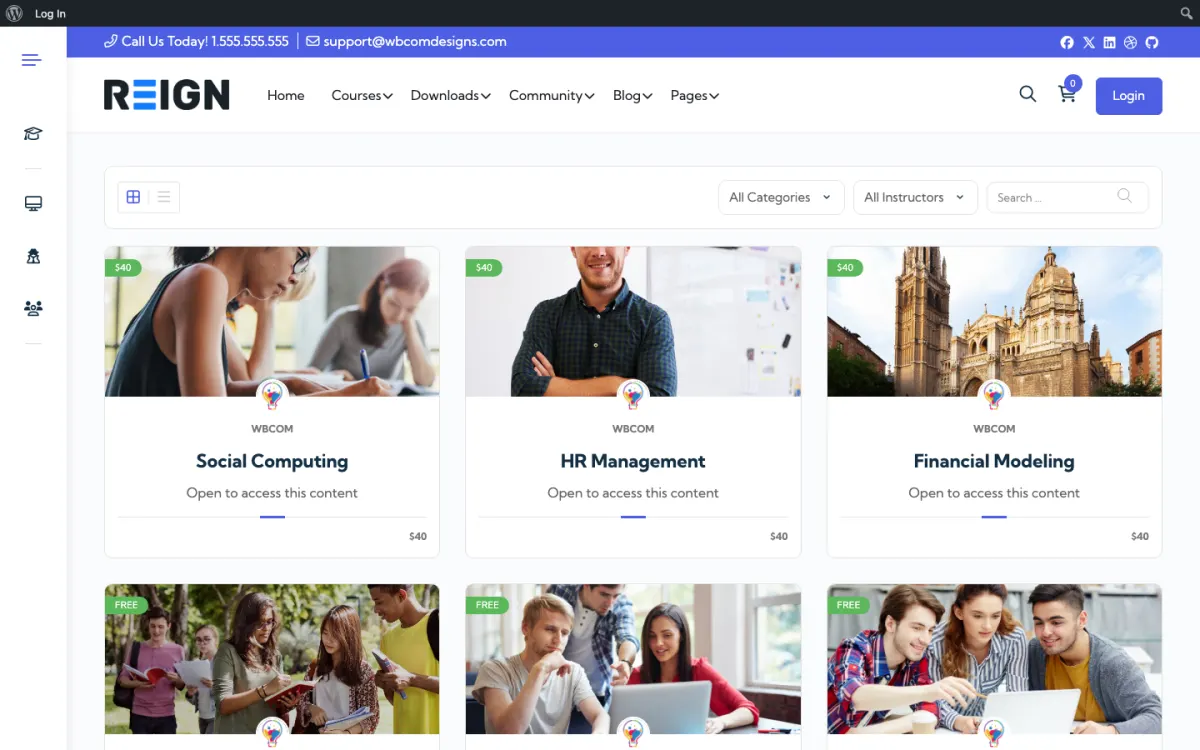
The course catalog, filtered by category and instructor. Open the demo
Three highlights for newsletter creators.
01
A public archive of past issues that search engines can find.
02
BuddyNext community, free to install, for subscriber-only discussion.
03
Own the email list and the domain, with no platform share of subscriptions.
What the site looks like on day one.
You launch with a web archive of past issues, a members area for paid subscribers, and a discussion space. The archive is the part people underestimate: newsletters that live only in inboxes are invisible to search, and publishing them as pages turns years of writing into something that brings in new readers continuously.
What a member actually does.
A reader finds an old issue through search, subscribes, and receives the next one by email. Paid conversion happens when there is something extra: the archive, a community, subscriber-only issues. Readers who join the discussion renew at noticeably higher rates than those who only read, which is the argument for having a community at all.
How this usually makes money.
Paid subscriptions billed monthly or yearly, gated by paid plans on the site, with the free list as the funnel. Running the CRM on your own site means segmenting by tier or engagement without an integration. Sponsorship of the free edition is usually the second line once the list is substantial.
The mistake to avoid.
Hiding the archive. Past issues are the only part of a newsletter that search engines can find, and keeping years of writing locked in inboxes means the list only ever grows through promotion. Publish the archive; the fear that it cannibalises subscriptions is almost always wrong.
Which Reign setup fits a newsletter writer
Reign is the WordPress theme for building a complete community site: social network, courses, member directory, marketplace and job board on one install. A newsletter writer needs the publishing side and a lightly used community.
Past issues go on the site as posts, with Reign providing a readable layout. BuddyNext supplies the reader profiles, feed and spaces, and its Pro plan adds paid plans and gated spaces plus broadcast email. Jetonomy adds threaded discussions for readers who want to respond to an issue. Learnomy, also free, can turn your best series into a course if you want one.
Publish first, build community later. The archive does the early work.
01
Install WordPress with Reign. Import or republish your past issues as posts, keeping the original titles and dates.
02
Add a clear subscribe form to the top of every issue page, with a sentence on what readers get and how often.
03
Decide which issues stay public and which are paid. Gate recent issues or specific formats if you want a paid hook, and keep older ones open.
04
Set up paid plans for readers who want the full set. BuddyNext Pro adds the plans and gated spaces; check the plan structure before you launch.
05
Open a discussion space when readers start replying by email. Post a question from each issue and answer the first replies yourself.
06
Import your existing list into your email tool and ask readers to re-confirm if needed. Tell them where to find the archive and the discussion.
What readers do week to week
Readers meet you in their inbox on a set day. Some open the email and read it there. Others click through to the web version, where they can comment, share and see related issues. A reader who found you through an old issue on a search subscribes and then goes through the archive.
Paid readers get something extra: the full archive, subscriber-only issues, or a discussion space. The ones who join the discussion tend to reply under each issue, and those replies show other readers what the paid tier feels like.
Your week follows the publishing day. You send the issue, reply to comments, pin the best reader response and note questions for the next issue. Because the archive sits on your site, each issue also adds a page that can bring in readers for years.
How a newsletter site grows
A newsletter grows through its archive. Each issue is a page that can rank, and the subscribe form on each page turns searchers into readers. Writers who treat the archive as a product, with tags, series pages and a best-of list, see steady inflow.
Paid conversion depends on what is behind the wall. Keep the free issue valuable and make the paid layer clearly different: earlier access, longer pieces, a members' discussion or a private Q and A. Test one change at a time.
Sponsorship of the free edition is usually the second revenue line once the list is substantial. Running the sign-up and member list on your own site means you can segment by tier or engagement without a separate integration.
How to organise an archive readers actually use
An archive that is just a long list of dates is hard to use, and search engines struggle with it too. Organising it takes a weekend and turns years of writing into a resource. Readers who find an organised archive stay longer and subscribe more often.
Group issues into series. If you have written on the same theme several times, give it a page that lists the issues in order with a short introduction. These series pages can also rank for broad searches that single issues do not.
Tag by topic, not by date. Use a small set of clear tags, such as hiring, pricing or tools, and show them on each issue. Keep the list short enough that every tag has real depth.
Pick a few best-of pages. A page of the ten issues you would send to a new reader is the kindest introduction you can offer, and it works as a landing page from social posts.
Link between issues. When a new issue builds on an old one, link to it. The links help readers and search engines see how the work connects, and they keep people moving through the archive.
Mistakes specific to newsletter sites
Hiding the archive is the main one. Years of writing locked in inboxes means the list only grows through promotion. Publish the archive.
Adding a community too early is the second. An empty forum looks abandoned. Wait for the replies.
Third, do not move the list in a rush. Send a clear message about the change, ask for re-confirmation if your rules require it and keep sending as normal while you switch.
If you only need to send email and have no wish to build a site around it, a hosted newsletter tool is simpler.
Newsletter creator-specific questions.
Can I import my Substack list?
Usually yes. Export your subscriber list as a CSV from your current platform and import it into whichever email tool you use on the new site. Ask subscribers to re-confirm, and check the consent rules that apply to your list.
Can I send the newsletter from the site?
Yes, with a CRM running inside WordPress, so your subscriber list and your member list are the same records. Connect a proper sending service for deliverability. The alternative is a hosted platform plus a sync, which works but adds a moving part.
Should the archive be public?
Mostly yes. Public archives are how new readers find you, and the fear that free archives cannibalise paid is usually wrong. Gate recent issues or specific formats if you need a paid hook, but keeping years of writing invisible costs more than it protects.
Does a newsletter need a community?
Not necessarily, and a dead forum is worse than none. Add one when readers are already replying to you with things other readers would want to see. That is the signal, and before it arrives a community is usually an empty room.
Can I keep my existing email platform?
Yes, with the site as the archive and the membership layer, though it means a sync. Running the CRM on the site removes that, and lets you segment by subscription tier directly, which is usually the reason people move.
How do I price the paid tier?
Offer annual with a monthly option, and price it against what a reader would happily pay without thinking about it. Charging more needs the archive and the community to justify it, so earn the higher price before you ask for it.
Buy the theme. Add the plugins free.
BuddyNext and Jetonomy cost nothing to install, and each has its own Pro plan for later. Running the third-party stack instead? The BuddyPress Community Bundle kit is the packaged route. Or have the Wbcom team set either one up for you.
Reign is the WordPress theme for building a complete community site: social network, courses, member directory,
marketplace and job board on one install. Start with one, add the others when you need them, and keep one login
for every member. Open a live demo, or launch a sandbox and get a fresh WordPress site to click through in about a minute.
Community and social network
Profiles, activity feed, spaces, messages and moderation on your own domain. Powered by BuddyNext.
I only have positive experience with wbcom. My journey started a lot of years back with the free buddyx theme. during my learning of wordpress and futher websites ideas I found a match with their Reign job mate theme. Always there to help, always open to explore ideas, always kind replyes even if I…
Oskar Hanborg · SE ·
Swift and expert coding!
Swift and expert coding by Kerit to apply a personalised display adjustment on the Reign Theme for a media plugin that was not fully supported at the moment.
Russell · GB ·
Perfect themes
I purchased Reign theme from Wbcom Designs, the support team was very helpful and I got the perfect website what I was looking for. Good work Wbcom Designs
Monika Singh · IN ·
WBComDesigns is amazing!
WBComDesigns is amazing. The WP plugins and themes are of top notch quality with lots of features and updated very frequently. Supports are very responsive and helpful. I use Reign with TutorLMS, and the experience is surprisingly smooth. The recently launched BuddyNext Pro and MediaShield Pro are…
Hoang Phan · VN ·
Love this company
Love this company. Loved the REIGN product. They were there the entire time helping me set things up; and when things went wrong? They were quick to take action and help find a solution.
Fable Fortitude · CA ·
Excellent Theme, Powerful Plugins and Outstanding Support
I am using the REIGN theme and several plugins from Wbcom Designs on my website. The theme is beautifully designed, and the plugins are user-friendly. Everything works smoothly, and the features are perfect for building professional websites and communities. What impressed me most is their…
S W Malcolm · US ·
High quality WordPress plugins and themes
We’ve hosted a number of Wbcom Designs clients on Levamo, and our experience with their products has been very positive. Their plugins and themes are well built, their support has been reliable, and they seem to be very innovative and constantly launching cool new products.
Michael Eisenwasser · US ·
I have worked with Wbcom Designs on…
I have worked with Wbcom Designs on several custom development requests for my WordPress platform, and my experience has been excellent.
christian nicolas · BJ ·
Seriously, one of the best "software tech experiences" I've ever had!
After 16 years of buying WordPress themes and plugins, I know exactly what bad support looks like and Wbcom Designs is the polar opposite. My setup was a nightmare: multiple tools, deep integrations, custom configurations that required real back-and-forth. Most vendors would've pointed me to a…
Duston McGroarty · US ·
I was using an excellent plugin created…
I was using an excellent plugin created by Wbcom Designs and had both an error and discovered a slight bug in one aspect of the plugin. After creating a support ticket - I got a super-quick response and discovered the error was on my part and was fixed right away. Regarding the bug - I was thanked…