

Type “LearnDash alternatives” into a search bar and you already know something about your own course business. You are not shopping for a new plugin for fun. Something about the current setup is costing you time, money, or both, and you want to see what else is out there before you commit to another year of it.
This is a practical look at the plugins people actually land on when they go looking: Learnomy, Tutor LMS, LifterLMS, MasterStudy LMS, LearnPress, and Sensei LMS, judged against what LearnDash does today and against each other. No star ratings, no invented statistics, no pretending any of these is free of tradeoffs. Just what each one is built to do, who it fits, and where it runs out of road.
In this guide
- Why instructors look past LearnDash
- What to look for in a LearnDash alternative
- The quick comparison
- 1. Learnomy: the complete learning platform
- 2. Tutor LMS
- 3. LifterLMS
- 4. MasterStudy LMS
- 5. LearnPress
- 6. Sensei LMS
- How Reign fits, regardless of your LMS choice
- Migrating off LearnDash, Tutor LMS, or LifterLMS
- Common mistakes when switching LMS plugins
- Frequently asked questions
- The real question
Why instructors look past LearnDash
LearnDash earned its position the honest way. It has been one of the default answers to “how do I sell a course on WordPress” for a long time, and the course structure it popularized, courses broken into lessons, lessons into topics, topics gated behind quizzes, is the shape most people picture when they picture an LMS at all.
The friction shows up later, once a school is running rather than just launched. LearnDash itself handles the course structure well. Everything around the course structure tends to arrive as a separate decision. Selling usually means pairing it with WooCommerce or a membership plugin. Reporting beyond the basics usually means an add-on. A discussion space for students usually means bringing in bbPress or BuddyPress and wiring the two together. None of these are hidden costs exactly, they are documented and well understood, but they add up to a stack you assemble rather than a platform you install.
The stack problem gets worse the moment two of those separate tools need to talk to each other. A certificate add-on that does not know about a discount code from the membership plugin, or a discussion plugin that cannot see which lesson a student is actually stuck on, is not a hypothetical. It is the normal state of a course business built one plugin at a time, and it is the reason instructors circle back to this decision every year instead of settling it once.
That is the specific gap this guide is about. Not “is LearnDash good,” it clearly works for a large number of schools, but “what does a course creator actually get if they choose differently today, knowing what a school needs once it is past its first cohort.”
What to look for in a LearnDash alternative
Feature lists make every LMS plugin look similar. The differences that matter show up in six places, and they are worth checking in this order before a single course gets rebuilt.
- Who owns the checkout. Does the plugin take payment directly, or does every sale route through a separate commerce plugin you also have to configure and maintain?
- How far the assessment goes. A single quiz type with no way to catch a student switching tabs mid-exam is a different product than one with question banks, partial credit, and an inbox for grading essays by hand.
- Whether certificates hold up. A certificate a student can screenshot and a certificate an employer can independently verify through a public page are not the same claim, even when both are called “certificates.”
- What happens beyond the course. Discussion, community, gamification, and a place for graduates to be found are either part of the platform or a separate shopping list.
- Whether migration is a real path. Moving a live school with paying students is a different problem than starting fresh, and “export your CSV” is not the same as a purpose-built migration.
- Who controls the design. A course page that looks like the plugin’s demo site, versus one that looks like your brand, changes how a school feels the moment a student lands on it.
None of these six questions has one correct answer for every school. A single-course side project has different priorities than a twelve-instructor academy. What changes the answer is honesty about which of the six you are already paying for informally: in support tickets, in plugin conflicts, in the afternoon lost each month reconciling instructor payouts by hand instead of a screen showing them automatically.
Keep those six in mind through the rest of this guide. Every entry below gets judged against them, not against a marketing page.
The quick comparison
Before the detail, here is the shape of each option side by side.
| Platform | Best for | Checkout | Where it needs help |
| LearnDash (the incumbent) | Course structure on an established plugin | Via WooCommerce or a membership plugin | Selling, certificates, and community each need a separate add-on or plugin |
| Learnomy | A complete school: courses, selling, certificates, and a growth path in one platform | Direct Stripe and PayPal, no platform fee | Newer to the market than plugins with a longer track record |
| Tutor LMS | Solo creators who want a frontend course builder without a page builder plugin | Native in Pro, via WooCommerce/EDD elsewhere | Certificates, drip, and multi-instructor payouts sit behind extensions |
| LifterLMS | Membership-driven schools and engagement automation | Native gateways or WooCommerce | Corporate/team training and richer engagement live in add-ons |
| MasterStudy LMS | Multi-instructor marketplaces built with a page builder | Via WooCommerce | Live classes and deeper gamification are Pro-tier |
| LearnPress | A first course on the smallest possible budget | Via add-ons | Nearly every capability beyond the basics is its own paid extension |
| Sensei LMS | Teams already standardized on WooCommerce for commerce | Native WooCommerce integration | Community, gamification, and multi-instructor revenue sharing are out of scope |
Read the table as a starting filter, not a verdict. A membership-heavy school with years invested in LifterLMS is not obligated to move just because a newer platform folds in more of the stack. What the table is meant to surface is where each option asks you to keep assembling, versus where the assembly work has already been done for you.
1. Learnomy: the complete learning platform
Learnomy is not positioned as another LMS plugin competing on quiz types. It is a complete learning platform for WordPress: the course engine, the checkout, the certificates, the grading, and the instructor payouts all built by the same team, running as one system rather than a plugin plus five add-ons plugged into it.
Courses support video, audio, PDF, and reading lessons, built with a drag-and-drop builder on templates that override the way a well-behaved WordPress theme expects. Assessment is where it earns the comparison to a real exam room rather than a quick quiz widget: six quiz types, partial credit instead of all-or-nothing scoring, question banks so a quiz is not the same fifteen questions every attempt, tab-switch tracking that flags when a student leaves the quiz window mid-attempt, and an inbox built specifically for grading essay answers by hand.

Certificates follow the same standard. They are cryptographically signed, checkable by anyone through a public verify page reached with a QR code, shareable straight to LinkedIn, and built with a visual designer rather than assembled from a static template file. That distinction matters most for universities, nonprofits running continuing education, and corporate trainers, the audiences who need a certificate a licensing board or employer can actually confirm, not just a PDF a student prints.
Courses, checkout, certificates, and instructor payouts, in one platform with no per-transaction cut on what a student pays you.
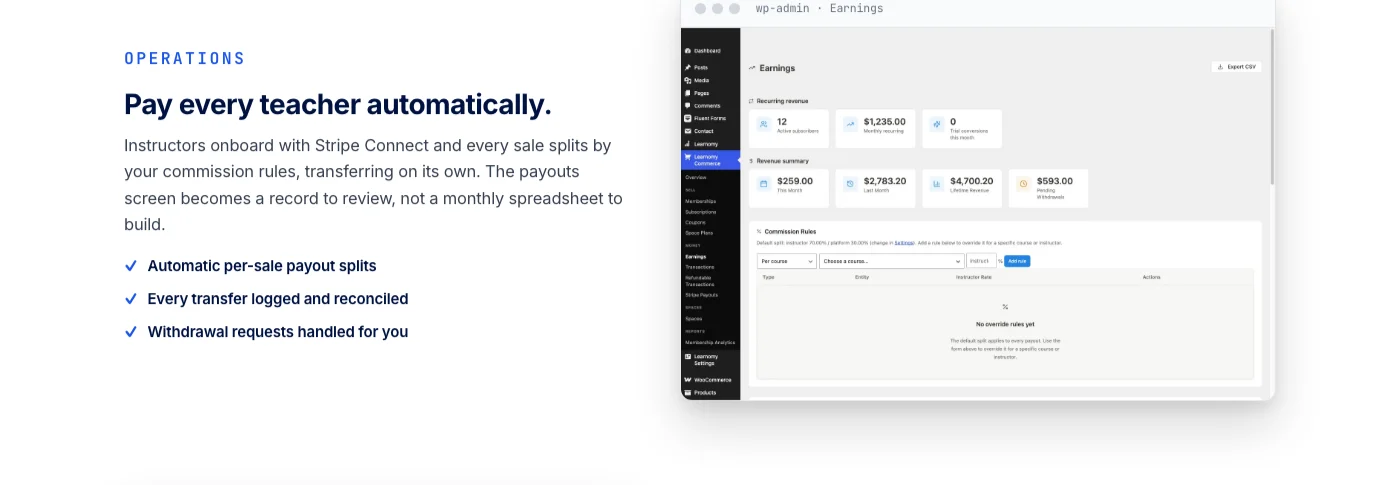
The business layer is where Learnomy separates itself from a course-structure plugin most clearly. Checkout runs directly through Stripe and PayPal, with a WooCommerce adapter available for schools that already run a store, and no platform fee sits on top of what a student pays. Memberships come with trial periods and a pricing page that generates itself instead of being hand-built. And when a one-person course becomes a school with a faculty, instructor revenue sharing, Udemy-style splits with instructor applications and dashboards, means adding a second and third teacher does not mean rebuilding the payment logic from scratch.

A school is rarely just courses, and this is the part most course-structure plugins leave to the shopping list. On the same platform: a learning community that grows up around your courses, and discussion boards and Q&A alongside the lessons themselves. (A few things worth knowing about scope: points-and-badges gamification is not a native Learnomy feature, it pairs in through Wbcom’s companion WB Gamification plugin; a job board where graduates can be found by employers works the same way, pairing in through Wbcom’s companion WP Career Board plugin rather than shipping natively; and protected, watermarked video against downloading runs through a third-party integration called MediaShield rather than shipping in Learnomy itself.)
For anyone already running a school on LearnDash, Tutor LMS, or LifterLMS, Learnomy ships a migration wizard built for exactly those three plugins, moving courses, lessons, and enrollments across in a structured way instead of a rebuild from zero. It does not claim to migrate from anything else, and this guide will not pretend otherwise.
Where it asks something of you: Learnomy is younger in the market than a plugin that has been the default choice for a decade, so the third-party tutorial ecosystem around it is smaller. What it trades for that is a platform designed as one coherent system from the start, rather than a course-structure core with the rest of the school assembled around it over the years.
2. Tutor LMS
Tutor LMS is usually the first name that comes up for solo creators who want to build and edit a course entirely from the front end, without switching between the WordPress admin and a separate page builder. The course builder is genuinely pleasant to use, the quiz builder covers the common question types, and prerequisites and content drip are available without much configuration.
The catch is one familiar from LearnDash: the capabilities that turn a course tool into a school, a proper certificate builder, multi-instructor support with its own payout logic, and deeper monetization beyond a single WooCommerce or EDD product, live in Tutor LMS’s own extension layer rather than the free core. That is a reasonable way to structure a product, but it means the “everything in one place” feeling depends on which extensions end up installed.
Where Tutor LMS earns real loyalty is speed to launch. A creator who already knows the WordPress admin can have a first course live in an afternoon, and the frontend builder means updates do not require touching the backend at all. The tradeoff shows up later, once that first course needs a second instructor with separate payout terms, at which point the extension layer starts doing a lot of the structural work a complete platform would have handled from day one.
Community and discussion follow the same pattern as most plugins on this list: a built-in Q&A exists at the lesson level, but a genuine discussion space or member community around the whole school is a separate integration, not a native feature of the course engine.
3. LifterLMS
LifterLMS built its reputation on membership sites and engagement automation before “LMS” was even the primary word people used for it. Its native gradebook is solid, and its engagement triggers, sending an email, unlocking an achievement, issuing a certificate, when a student hits a specific milestone, are more flexible out of the box than most competitors offer without an add-on.
Corporate and team training is available through LifterLMS Groups, which lets a company buy a block of seats and manage its own roster, a genuinely useful shape for B2B training that not every plugin on this list handles cleanly. Checkout, though, still routes through a payment gateway extension or WooCommerce rather than shipping as a single built-in flow, and a lot of the deeper capability, from advanced quizzes to the richer engagement options, sits across a set of individually maintained add-ons rather than one settings screen.
Learnomy’s team-based access and learning paths, available as an upgrade on the same platform that handles certificates and instructor payouts natively, cover similar ground to LifterLMS Groups, sequential curricula and company-managed rosters, without requiring a separately maintained third-party add-on.
For a school built primarily around memberships and drip content, LifterLMS remains a strong, mature choice. For a school that wants selling, certificates, and community handled as one connected system rather than a set of compatible parts, it asks more assembly than a complete platform does.
4. MasterStudy LMS
MasterStudy LMS leans hardest into the page-builder-first crowd, with course creation designed to work naturally inside Elementor or Gutenberg rather than a separate proprietary editor. A points-based gamification system for learner progress is available as a Pro addon, and a dedicated companion theme is built specifically around its course layouts.
It is a natural fit for a multi-instructor course marketplace, where different teachers manage their own courses from a frontend dashboard. Live class integrations with tools like Zoom sit in the Pro tier, as does the deeper analytics and reporting layer, and monetization for anything beyond a simple sale runs through WooCommerce.
The page-builder-first approach pays off fastest for teams who already build the rest of their site in Elementor and do not want to learn a second, LMS-specific interface just to lay out a course page. That convenience is real. It does not change the underlying pattern: the closer a school gets to needing live classes, deeper analytics, or a genuinely automated instructor payout system, the more of the platform lives behind a specific tier.
5. LearnPress
LearnPress ships as a free, lightweight core, and it is a genuinely reasonable place to put a first course while you are still finding out whether anyone wants to buy it. The course structure is familiar, the setup is quick, and the barrier to publishing something is low.
The extension model is where it starts to resemble the exact problem this guide opened with. Content drip, certificates, prerequisites, assignments, course reviews, and paid membership access are each sold as their own separate add-on, closer to how WooCommerce extensions work than how a single product’s settings panel usually works. A school that grows past its first course tends to end up with a stack of LearnPress add-ons that looks a great deal like the “legacy WordPress LMS stack” this guide’s ownership table warns about, just built one purchase at a time instead of all at once.
None of this makes LearnPress a bad starting point. It makes it exactly that: a starting point, best suited to validating whether a course idea has an audience before investing in the fuller platform a growing school eventually needs.
6. Sensei LMS
Sensei LMS comes from the team behind WooCommerce, and that lineage shows in exactly where it is strongest: selling a course through an existing WooCommerce store is closer to a native feature than an integration bolted on afterward. Lesson layout uses native Gutenberg blocks, quizzes cover the standard question types, and the overall feel is deliberately simple rather than trying to be a complete business platform.
That simplicity is the honest tradeoff. Community features, gamification, multi-instructor revenue sharing, and the kind of certificate a licensing body could verify independently all sit outside what Sensei is trying to be. For a team that already runs its whole business on WooCommerce and wants course delivery added cleanly on top, that scope is a feature, not a gap. For a school trying to build the full platform described earlier in this guide, it is a plugin you would need to build several other systems around.
Sensei’s Gutenberg-native approach also means it tends to feel most at home on a site that already leans on block editing for everything else, rather than introducing a separate visual language just for the course pages. That consistency is worth something. It just does not extend to the parts of a school, community, gamification, multi-teacher payouts, that sit outside what Sensei was built to do.
How Reign fits, regardless of your LMS choice
Whichever plugin from this list ends up running your courses, the design question is a separate one from the LMS question, and it is worth keeping them separate on purpose. An LMS decides how a course is built, graded, and sold. A theme decides what a student sees the moment they land on the page, and whether that page looks like your school or like the plugin’s own demo site.
On Reign, that design layer is the theme itself: colors, typography, dark mode, and layouts that a course engine running underneath inherits rather than fighting against. That holds whether the course engine is Learnomy, LearnDash, or anything else on this list. Readers staying on LearnDash for now and only looking to fix how the course pages look can start with our dedicated guide to the best LearnDash theme for course communities, which covers that decision on its own.
That separation matters more than it sounds like it should. A course engine that gets replaced two years from now should not mean rebuilding the entire visual identity of the school along with it. Keeping the design layer independent of whichever LMS plugin runs underneath is what makes a future migration, if one ever becomes necessary, a technical afternoon instead of a full redesign.
Migrating off LearnDash, Tutor LMS, or LifterLMS
Before touching a live school, it helps to separate the fee argument from the migration argument, because they get decided differently. We covered the fee side in detail in what you actually pay to teach on a hosted platform versus owning the pipes, and the short version applies here too: a subscription is easy to plan around, a percentage of every sale is the part that grows quietly as you succeed.
The migration itself is a separate, practical problem. Learnomy’s migration wizard is built specifically for LearnDash, Tutor LMS, and LifterLMS, moving courses, lessons, and enrollments across in a structured way rather than asking you to rebuild a school lesson by lesson. It is not built for MasterStudy LMS, LearnPress, or Sensei LMS, and a guide like this one should say so plainly rather than imply otherwise.
The order matters more than the tooling. A migration wizard can move the data correctly and still cause damage if it runs against a live, paying audience without warning. The sequence below is less about the mechanics of any one plugin and more about protecting a school’s revenue and reputation while the underlying system changes.
- Move one course first, ideally a smaller one or an older one you no longer actively promote, while everything else stays exactly where it is.
- Test the whole path yourself, checkout, the receipt email, login, and video playback on an actual phone, before a single real student touches it.
- Run the migration on staging before it ever touches the live site, the same discipline you would apply to a major theme or plugin update.
- Tell your students what changed and why, ideally before they notice a different login screen on their own.
- Move the flagship course last, once nothing about the new system surprises you anymore.
Leaving the Kadence theme at the same time? We walk through the full move in two steps, the theme first while courses keep running and the courses second, with costs and a timeline, in moving a course site off LearnDash and Kadence.
Common mistakes when switching LMS plugins
Most bad migrations fail for the same handful of avoidable reasons, not because the new plugin was the wrong pick.
- Moving everything on one weekend. A live school with paying students is not the place to discover a checkout bug for the first time.
- Assuming certificates carry over identically. A visually similar certificate is not the same as one built with the new platform’s own signing and verification system. Reissue rather than assume.
- Forgetting where the checkout will actually live. Deciding this after the migration starts, rather than before, is how schools end up running two payment systems by accident.
- Underestimating what the community side was doing. If students were discussing lessons somewhere, even informally, losing that quietly costs completion rates more than any single feature does.
- Skipping a staging test. The instructors who regret a migration almost always skipped the same step: testing the new checkout, login, and video playback before sending real traffic to it.
- Going silent with enrolled students. A short email explaining what changed prevents most of the support tickets a quiet migration generates.
Frequently asked questions
Is there a genuinely free alternative to LearnDash?
LearnPress ships a free, lightweight core, and Learnomy’s core course, quiz, certificate, and checkout system runs with no platform fee on what a student pays. The difference is what each looks like once a school grows: LearnPress tends to add a paid extension for each new capability, while Learnomy’s core is built to cover selling, grading, and certifying without assembling that stack piece by piece.
Do I need a separate community plugin for student discussion?
With LearnDash, Tutor LMS, LifterLMS, MasterStudy LMS, LearnPress, or Sensei LMS, yes, in most cases a real discussion space or community layer means bringing in bbPress, BuddyPress, or a similar plugin and connecting it yourself. A complete learning platform folds that in as part of the same system instead.
Can I keep using WooCommerce if I switch LMS plugins?
Generally yes. Most of the plugins on this list, including Learnomy through its WooCommerce adapter, are built to sit alongside an existing store rather than force you to abandon it. Confirm this specifically before migrating if WooCommerce already handles other products on the same site.
How does the Learnomy migration wizard actually work?
It is built to move courses, lessons, and enrollments from LearnDash, Tutor LMS, or LifterLMS into Learnomy in a structured way rather than a manual rebuild. As with any migration tool, test it on staging first with a non-critical course before running it against a live, paying school.
Which of these is best for corporate or team training?
LifterLMS Groups and Learnomy’s team-based access both support a company buying seats and managing its own roster, with learning paths and cohorts available on Learnomy, as an upgrade, for structuring that training. LearnPress and Sensei LMS are not built with this use case in mind.
Will switching LMS plugins hurt my SEO or break existing course URLs?
It can, if the migration is not planned carefully. Redirects for course and lesson URLs, preserved slugs, and a check that structured data still renders correctly are all things to verify after any migration, regardless of which plugin you move to.
Are certificates from these plugins actually verifiable, or just a printable PDF?
This varies a lot by plugin and tier. A certificate is only genuinely verifiable if someone outside your site, an employer or licensing board, can confirm it independently, typically through a public verify page reached by a QR code. Confirm this specifically rather than assuming “certificate” means the same thing across every plugin on this list.
Is Learnomy’s pricing hidden somewhere in this guide?
No, and it should not be. Specifics on cost belong on the product page, not folded into a comparison guide. What matters here is structural: Learnomy’s core checkout takes no platform fee on what a student pays, which is a different kind of claim than a price tag, and it is the one this guide is actually making.
Key takeaways
- LearnDash handles course structure well, but selling, certificates, and community typically arrive as separate plugins you assemble yourself.
- Learnomy is a complete learning platform: courses, quizzes with anti-cheat tracking, verifiable certificates, direct checkout, and instructor revenue sharing, built as one system.
- Tutor LMS, LifterLMS, MasterStudy LMS, LearnPress, and Sensei LMS each do specific things well, but each pushes the deeper capability of a full school into extensions or a separate plugin stack.
- A migration wizard exists for LearnDash, Tutor LMS, and LifterLMS specifically. It does not cover MasterStudy LMS, LearnPress, or Sensei LMS.
- Your theme, not your LMS plugin, decides whether a course page looks like your school. That choice stays separate no matter which plugin from this list you pick.
The real question
Every one of these plugins can run a course. That was never really the question. The question underneath “LearnDash alternatives” is whether the plugin you land on treats selling, grading, certifying, and growing beyond one instructor as part of the same job, or as five separate jobs you happen to be doing on the same website.
There is no single right answer for every school. A LearnPress site is a reasonable place to test a first course. A LifterLMS membership site with years of engagement automation built in is not worth abandoning on a whim. But for a school that keeps hitting the same wall, another add-on needed for the thing that should already be there, it is worth asking whether the fix is one more plugin, or one platform built to already include it.
Stop assembling a school out of add-ons.
Courses, quizzes, certificates, checkout, and instructor revenue sharing, in one connected platform with no per-transaction cut on what students pay you.