

Updated September 2026.
You recorded the course. You answer the questions. You are the reason someone bought it. And every time a student pays, a slice goes somewhere else.
Most instructors make peace with that early on, because the alternative sounds like becoming a developer. This is a plain look at online course platform fees: what the slice actually costs once your school is working, what you genuinely get in return, and what the other path involves. Including the parts of it that are harder.
In this guide
- Start with the structure, not the number
- Who the arithmetic actually applies to
- What you get for it, honestly
- The part that is not about money
- What running your own school actually looks like
- A complete school, not a stitched-together stack
- The ownership table
- Staying findable once you own the pipes
- Building a faculty, not just a course
- What it costs to run it yourself
- What you take on
- Who should stay where they are
- If you have an audience rather than a course
- Where this fits, beyond a single course
- Common objections, answered plainly
- What “escaping LearnDash, Tutor LMS, or LifterLMS” actually involves
- Where to start
- The question underneath
Start with the structure, not the number
Course platforms charge in two layers, and the second one is the layer that grows with you.
- A subscription for the software, billed monthly or yearly.
- A cut of every sale, on top of the subscription, removed only on their higher tiers.
The subscription is easy to plan around. It is a line item you can put in a spreadsheet and forget about. The cut of every sale is the one worth sitting with, because it stays invisible right up until the month you actually succeed.
A subscription is a cost you chose. A percentage of every sale is a partner you did not choose, taking a bigger slice each year you get better at this.
Teach for a year and do well, and a real share of what you earned was never yours to begin with. That is not a fee on the software. It is a fee on how well you taught, collected automatically, for as long as you stay on that plan.
Who the arithmetic actually applies to
Every hosted course platform runs a version of the same model, even though the marketing pages read differently from one to the next.
Teachable and Thinkific sit at the lighter end: a monthly subscription, plus a transaction cut on the entry plan that disappears once you move up a tier. Kajabi and LearnWorlds sit heavier, bundling in email and funnel tools so the subscription itself climbs, on the promise that you will not need anything else. Podia sits in between, closer to the Teachable model. Circle charges the same way for the community half of the business, a subscription plus a smaller transaction cut on paid memberships. Skool folds the subscription and the transaction cut into one flat rate and calls it simple, which it is, right up until you want to change how the cut is calculated.
Udemy is a different animal again, and worth naming separately because instructors sometimes lump it in with the rest. It is a marketplace, not a platform you configure. You do not set your own price with any confidence; Udemy runs constant promotional pricing across the catalogue, and the split of what you keep depends on how the student found the course, whether through Udemy’s own marketing, an affiliate, or your own link. Two instructors selling the identical course can keep very different shares of the same sale, decided by traffic source rather than by teaching.
None of this makes any of these platforms a bad choice on day one. It explains why the online course platform fees conversation gets more urgent, not less, the longer an instructor stays.
What you get for it, honestly
It would be easy to make the platforms sound like villains. They are not. Here is what that money actually buys, and it is worth naming properly before you consider leaving.
Somebody else keeps the site online when hundreds of people arrive at once for a launch. Somebody else patches security holes on a Tuesday night. Somebody else handles the video encoding so your lesson plays on a five year old phone in a country you have never visited. Somebody else deals with sales tax rules in places you have never sold to before, which is genuinely tedious work.
If you are teaching part time around a job, that convenience is worth paying for. Nobody should feel foolish for choosing it.
The question is not whether the service has value. It is whether the price still matches the value once you are earning real money, and whether you are comfortable with what you do not control.
A complete learning platform removes that math entirely: courses, checkout, and certificates in one place, with no per-transaction cut on what a student pays you.
The part that is not about money
Ask an instructor who has been doing this for five years what worries them, and it is rarely the subscription bill.
It is that the student list lives somewhere else. That the pricing rules can change with an email. That the course page looks like every other course page on that platform, because the template is the template. That if the company is acquired or shuts a feature you depend on, your school changes shape and you find out at the same time as everyone else.
None of that is a crisis on any given day. It is a slow discomfort that grows as the thing you built becomes the thing you rely on.
What running your own school actually looks like
Forget the software for a moment. Here is the day to day, because that is what you are really choosing between.
Your students are yours
They have accounts on your site. Their email addresses are in your database. When you want to tell hundreds of past students about a new cohort, you do not ask permission or export a limited list. You write the email.
Your checkout is your checkout
This is where the structural argument turns concrete. A complete learning platform built for WordPress can take payments directly through Stripe and PayPal, with no platform fee sitting on top of the transaction. What a student pays goes from them, to your processor, to your bank. You set the price, the currency, the coupons, the payment plans. Nobody takes a percentage for the privilege of the sale happening. Add a membership on top, with a trial period and a pricing page that builds itself, and the same rule holds: what members pay is yours. It also means skipping a step many instructors assume they need: setting up a separate ecommerce store just to collect payment for one course.
The course does not have to end at the last lesson
This is the part most instructors underestimate. On your own site, the course, the discussion, the member profiles, and the community around your school can all share one login. A student finishes lesson six and asks a question in the same place, to the same people, under the same account. You are not stitching a course tool to a separate community tool and asking students to hold two passwords.
We wrote about why that matters for completion rates in building engagement that outlasts the course. The short version is that people finish things when other people notice whether they finished.
It looks like your school
Your colours, your typography, your layout, in light and dark. Not a platform’s template with your logo in the corner. Students who arrive from your newsletter land somewhere that feels like the same person made both. On Reign, that design layer is the theme itself, so a learning platform running underneath it inherits your branding down to the pixel rather than sitting inside its own visual world.
A complete school, not a stitched-together stack
The traditional WordPress answer to “I want to sell courses” has always been a pile of separate plugins: an LMS, a membership plugin, a certificates add-on, a payments bridge, a community plugin, a gamification plugin. Different vendors, different update cycles, and a gap at every seam where one plugin has to guess what another one just did.
The alternative is a single platform built to be the whole school rather than one shelf in it. Here is what that looks like when the pieces come from one team instead of six:
- Courses with video, audio, PDF, and reading lessons, built with a drag-and-drop builder, running on templates that override the way any well-behaved WordPress theme expects.
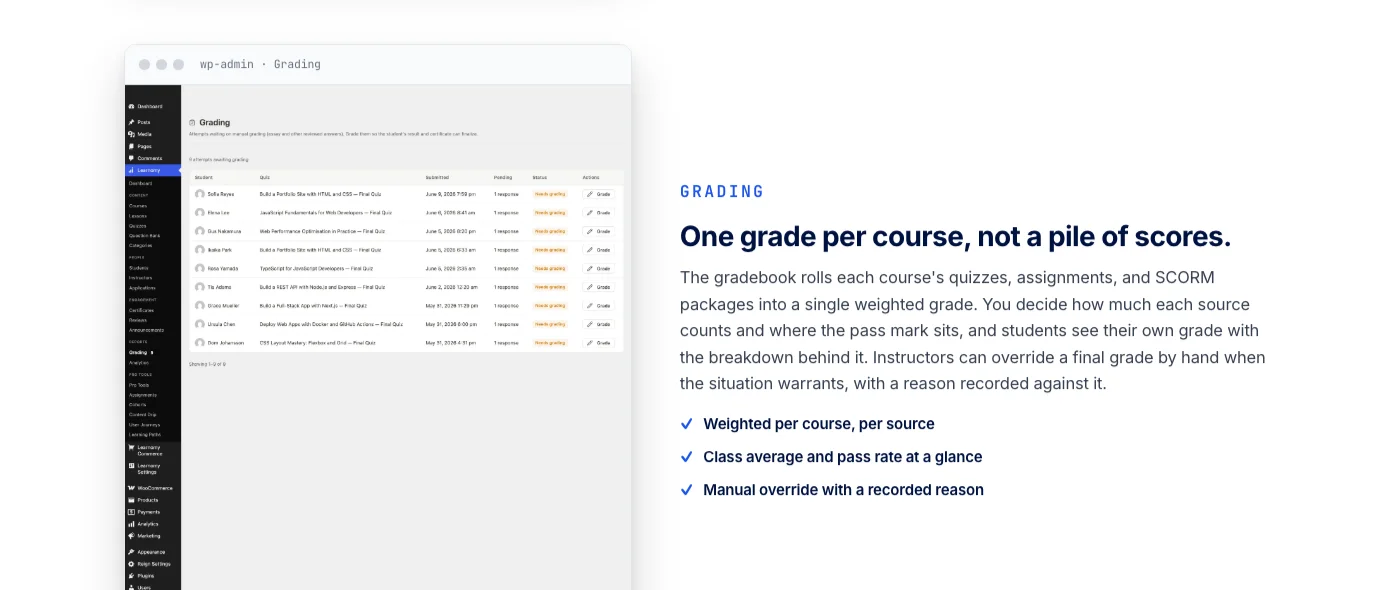
- Assessment that actually holds up, with several quiz types, partial credit, question banks, tab-switch tracking so a graded quiz means something, and an inbox for grading essay answers by hand.
- Certificates worth showing, cryptographically signed, checkable on a public verify page through a QR code, and shareable straight to LinkedIn, designed visually rather than assembled from a template file.
- Built-in checkout with no platform fee, direct through Stripe and PayPal, with a WooCommerce path when a store already exists.
- Memberships with trials and a pricing page that is generated for you rather than hand-built.
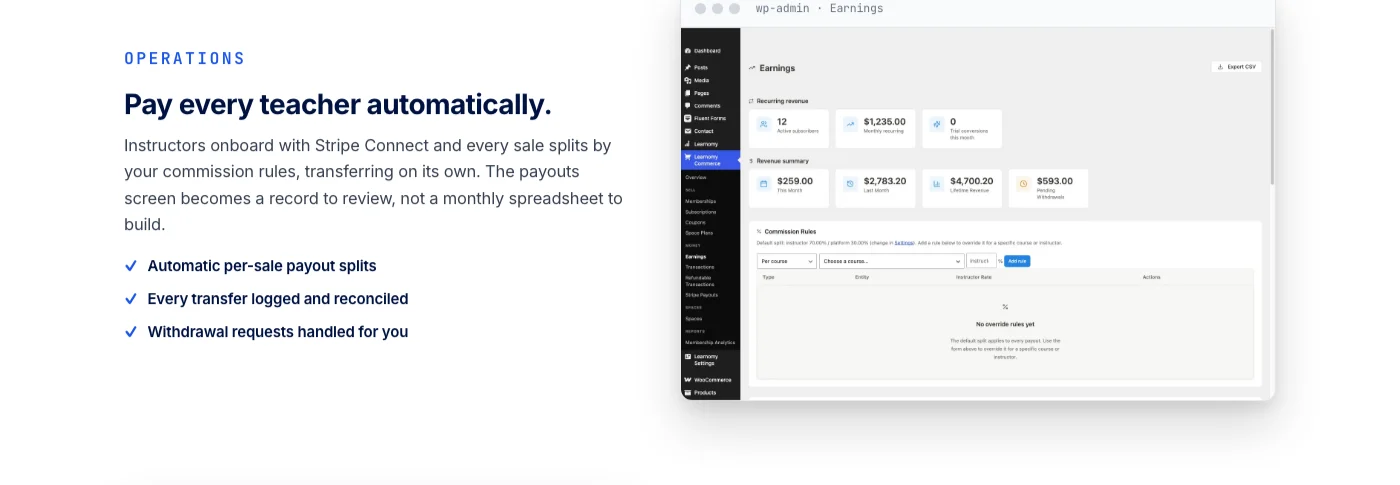
- Instructor revenue sharing, Udemy-style splits with instructor applications and dashboards, for the day your one-person school becomes a school with a faculty.
- A migration wizard that moves a school over from LearnDash, Tutor LMS, or LifterLMS without asking you to rebuild it lesson by lesson.
And because a school is rarely just courses, the same platform reaches further without needing separate purchases stapled together: a learning community that grows up around your courses, discussion boards and Q&A alongside the lessons themselves, gamified learning with points and badges to keep students moving, a job board so graduates have somewhere to land, and protection for your course videos against casual downloading. All of it under your own branding, on a site you own.
None of that replaces the arithmetic from the top of this piece. It is the arithmetic, extended. The subscription-plus-percentage model exists because a hosted platform has to charge for every part of what it does. A platform you install once and run on your own hosting does not carry that same bill to pass on to you.
The ownership table
Laid side by side, the difference is not a feature list. It is what happens to your school over years, not months.
| Hosted platforms | Legacy WordPress stack | A complete learning platform | |
| The deal | Subscription plus a cut of every sale, indefinitely | Licences scattered across several vendors | One platform you install and own |
| Your students | Records live in their database | Yours, but split across tools | Yours, in one coherent schema |
| Fees on sales | Yes, on the cheaper tiers | Depends what you stitched together | No platform fee on what students pay |
| Courses, selling, certificates, community, job board | Bundled, partially, their way | Bolted together across plugins | One platform, one team |
| Branding and design | Logo slot on their template | Whichever theme you found first | A real design layer, your brand, dark mode included |
| If you stop paying | The school is gone | The stack slowly rots | Your school keeps running |

Staying findable once you own the pipes
Owning the school raises an obvious worry: does leaving a hosted platform’s built-in audience mean starting from zero on discovery? Not if the platform underneath is built to be found. A learning platform aimed at WordPress can ship full-text course search on the site itself, structured data markup on every course page so search engines understand it is a course rather than a generic article, and a progressive web app layer so a half-finished lesson keeps its place even when a student’s connection drops. None of that requires the marketplace traffic hosted platforms sell as part of their pitch. It requires the same basic SEO discipline any WordPress site needs, applied to pages that are already built to earn it.
Building a faculty, not just a course
The single-instructor version of this decision is the easy one to picture. The harder version, and the one that actually determines whether “owning your school” scales, is what happens when your school stops being just you.
On a hosted platform, adding co-instructors usually means a higher-tier plan, a second login system layered on top of the first, and a payout process that runs through the platform’s own rules for splitting revenue. On a platform built around instructor revenue sharing from the start, applications, dashboards, and Udemy-style splits are part of the core design rather than a workaround. A teacher applies, you approve them, the split is set, and the platform handles keeping the accounting straight as more people teach under your school’s name. It is the difference between a school that can only ever be one person’s project and a school that can genuinely outgrow its founder.
This matters even if you have no plan to bring on other teachers today. Schools that succeed tend to get requests from other instructors who want in, and the schools that can say yes without a platform migration are the ones that were built for it from day one. We walked through what that handoff actually looks like in a piece on why a growing school shouldn’t depend on one instructor for every lesson.
What it costs to run it yourself
Running it yourself has a bill too. It is smaller and it is shaped differently, and it is worth being honest about what is in it rather than pretending it disappears.
- Hosting that can handle a launch day without complaining. This scales with your traffic, not with your revenue.
- A domain, which you likely already own if you have been building an audience anywhere.
- The learning platform itself. A complete course system with quizzes, certificates, checkout, memberships, and instructor revenue sharing runs with no per-transaction cut on what students pay you. Deeper capability, like learning paths, content drip, cohorts, and automated instructor payouts, sits in the platform’s fuller tier for schools that have outgrown the basics. The product page has the specifics; the point here is the shape of the cost, not the figure.
- Payment processing, the usual card fees, which you pay on any platform anyway because that part is never free regardless of who you sell through.
Set that against a subscription plus a percentage that scales with your best months, and the gap is the point. It widens every year your school grows, it does not narrow.
What you take on
This is the section most articles like this leave out, so here it is plainly.
Updates become yours. Backups become yours. If the site goes down at 2am on launch day, there is no support queue at a company whose job it is to care. Sales tax and VAT reporting become your responsibility rather than being handled invisibly. And the first setup takes a weekend rather than an afternoon.
Two honest answers to that. Managed WordPress hosting handles most of the maintenance for a modest, predictable cost. And if you would rather never think about it, this is exactly the kind of thing an agency looks after on a retainer. Either way, it is a known, flat cost rather than an open ended percentage that rises with your success.
Who should stay where they are
If you are testing whether anyone wants your course at all, stay. Validate the idea on the fastest thing available and worry about ownership when there is something to own.
If you sell occasionally and the percentage you lose adds up to very little in absolute terms, stay. The maths does not justify a move yet.
Move when the percentage starts to feel like a second employee you never hired, when you want the community and the course in one place, or when you have started planning your school around a rule somebody else can change without telling you first.
If you have an audience rather than a course
The same arithmetic applies to anyone who has built a following and monetises it, even without a formal course.
If your income comes from a membership, a paid newsletter, a private group, or coaching, you are almost certainly paying a percentage or a per member fee somewhere, and your audience list probably lives on a service you do not control. The uncomfortable version of that: the people who follow you are borrowed, and the terms of the loan can change.
Running it yourself looks much the same as it does for an instructor. Members sign up on your site, pay you directly, and get access to whatever you sell them: a private space, a library of recordings, live sessions, a discussion with the rest of the members. The difference is that when the numbers get good, they stay good, because nobody is taking a cut that scales with your success.
Where this fits, beyond a single course
“Course platform fees” sounds like a narrow problem, until you notice how many kinds of teaching run into it.
| What you are building | What replaces the fee |
| A single course creator or coach selling a handful of courses | Direct checkout with no platform cut, keeping the whole margin as you scale |
| A full academy with multiple teachers | Instructor revenue sharing, so growth beyond one person does not mean rebuilding on a different platform |
| A cohort course built around a community | Courses and a learning community sharing one login, one brand, one platform |
| Corporate training or onboarding | Team-based access and structured learning paths, without a per-seat vendor bill |
| A membership education site | Built-in memberships with trials, instead of stacking a separate membership plugin on an LMS |
| Escaping an existing LearnDash, Tutor LMS, or LifterLMS site | A migration wizard built for exactly those three |
Two categories worth naming on their own: universities and nonprofits running continuing education rarely think of themselves as “instructors,” but they run into the identical fee structure the moment they use a hosted platform to deliver credit-bearing or accredited content, and they have an additional requirement most course creators do not: a certificate that a licensing board or employer can independently verify, not just a PDF the learner prints. A verify page reachable by QR code answers that requirement in a way a generic completion badge does not.
Common objections, answered plainly
“I am not technical enough to run my own school”
The comparison is not “hosted platform” versus “raw server administration.” A learning platform built for WordPress installs like any plugin, with templates that render out of the box and a builder for the parts you customise. The setup weekend mentioned earlier is real, but it is a weekend, not a new career.
“What if something breaks during a launch?”
This is a fair worry, and it is the one place hosted platforms genuinely earn their keep. The honest mitigation on your own site is the same one serious WooCommerce stores use: managed hosting built for traffic spikes, and a staging environment to test the checkout flow before you send traffic to it. It is a smaller, flatter cost than the ongoing percentage, but it is not zero effort.
“Will my certificates and quizzes actually hold up?”
This is where the specifics matter more than the pitch. Certificates that are cryptographically signed and checkable through a public verify page are not a cosmetic PDF, they are something an employer or accreditation body can actually confirm. Quizzes with tab-switch tracking and an essay-grading inbox exist because “quiz” and “assessment that holds up” are not the same claim.
“Can I still sell if I already have a WooCommerce store?”
Yes. A WooCommerce adapter sits alongside the direct Stripe and PayPal checkout, so a course can be sold through an existing store without forcing you to run two separate payment systems side by side.
“What happens to my students if I ever switch hosting?”
Nothing, as long as you move the database and files the way any WordPress migration works. This is the actual difference between owning a school and renting one: a hosting migration is a technical afternoon, handled by the same people who move any WordPress site. A platform migration is a rebuild, because the platform is the product, not a layer sitting on top of infrastructure you control.
“Do I lose the community and gamification features hosted platforms bundle in?”
No, though it is fair to expect them to arrive differently. A complete learning platform built for WordPress extends into a learning community around your courses, discussion boards and Q&A, and gamified learning with points and badges, the same way the course engine itself does: as part of one connected platform rather than a bolt-on integration you have to configure by hand.
What “escaping LearnDash, Tutor LMS, or LifterLMS” actually involves
A meaningful number of instructors reading a piece like this are not deciding between a hosted platform and WordPress. They are already on WordPress, already running one of the three big LMS plugins, most commonly LearnDash, and wondering whether a different plugin under the hood is worth the disruption. The fee argument looks different from this angle, because the platform fee was never the problem. The problem is closer to the “legacy WordPress stack” column in the ownership table above: an LMS plugin plus a membership plugin plus a certificates add-on plus a payments bridge, each maintained by a different team, each updating on its own schedule, each one capable of breaking the other two on a bad Tuesday.
A migration wizard built specifically for LearnDash, Tutor LMS, and LifterLMS exists because this is a common enough move to deserve a dedicated path rather than a manual export and a prayer. Courses, lessons, and enrolments move across in a structured way instead of a rebuild from scratch. The honest caveat: any migration deserves a staging test before it touches your live site, the same discipline you would apply to a theme change or a major plugin update. Nobody should trust a migration tool blindly, including this one.
What you are actually buying by making that move is not a different quiz builder. It is collapsing five vendors into one, so the next update does not carry a chance of breaking the seam between your quiz plugin and your certificate plugin.
“Are online course platform fees actually cheaper, or just cheaper on paper?”
It depends what you count. If the only line item you compare is the software subscription, a hosted platform can look competitive, especially in the first year. The comparison only becomes honest once you add the transaction cut back in and project it across a year of real sales rather than a launch month. A flat, predictable cost that does not move when you have a good quarter is a different kind of expense than one that grows in step with your best work. Most instructors who move do so not because the sticker price shocked them, but because they did the year-two version of this math and did not like where the line was heading.
Where to start
Do not migrate everything on a Saturday. The instructors who move well do it in this order.
- Put one course up on your own site while everything else stays where it is. A small one, or an older one you no longer promote.
- Sell it to a handful of people and watch what breaks. Checkout, the receipt email, the login, the video on a phone.
- Move the community next, so students have a reason to visit between lessons.
- Then move the flagship, once nothing about the process surprises you, using a migration path if your existing courses live on LearnDash, Tutor LMS, or LifterLMS.
If you want the fuller walkthrough of standing up the paid side, we covered it in creating a paid online course community, and the wider question of what to charge for in monetising an online community.
There is a version of this decision that has nothing to do with money at all: control over the roadmap. A hosted platform ships the features it decides its whole customer base needs, on its own timeline, and there is no version of your feedback that moves faster than that queue. A platform you install carries the same limitation in reverse: you are trusting one vendor’s roadmap rather than one platform’s committee, but you are not waiting behind millions of other accounts for a feature your school specifically needs. Neither path gives you infinite control. Owning the platform gives you a shorter distance between “we need this” and “we have this,” because the person who can prioritise the request is closer to you than a support ticket queue.
Key takeaways
- Hosted course platforms charge a subscription plus a percentage of every sale, and the percentage is the part that grows as you succeed.
- A complete learning platform built for WordPress takes payments directly through Stripe and PayPal, with no platform fee on what a student pays.
- Owning your school means your students, your checkout, your branding, and your community all live in one place you control.
- Instructor revenue sharing lets a one-person school become a multi-teacher academy without a platform migration.
- A migration wizard moves an existing LearnDash, Tutor LMS, or LifterLMS catalog across without a rebuild from zero.
The question underneath
Every instructor eventually asks a version of the same thing. Am I building a business, or am I building someone else’s inventory?
There is no wrong answer while you are starting. There is a point, though, where the percentage stops being the cost of convenience and starts being the cost of not having decided. That point is different for everyone, and it is worth recognising when you reach it rather than noticing a year later.
A complete learning platform will not write your course or find your first student. What it removes is the second bill: the one that arrives quietly, every time you succeed, for as long as you rent the school you built.
Stop renting the school you built.
Courses, quizzes, certificates, checkout, and instructor revenue sharing, in one connected platform with no per-transaction cut on what students pay you.