
A paid course community WordPress site is not one plugin doing everything. It is several pieces working together, and this guide walks through exactly which ones.
Updated September 2026.
Courses sell better when they come with a community. Communities retain members better when they come with ongoing learning. The combination, paid courses gated by a community membership, is one of the most resilient online business models of the last five years, and WordPress is the platform that most independent course businesses I work with use to actually run it. Not Circle. Not Mighty Networks. Not Skool. WordPress, because the long-term economics and the customer ownership are dramatically better for businesses that intend to stick around.
This guide is the architecture walkthrough I give to every client who asks how to build a paid course community WordPress site that holds up for years, not just weeks: which plugins do what, how the subscription gate actually enforces access, what the member journey looks like, and the monetization patterns that work in 2026. It assumes Reign Theme on the front end because its BuddyPress templates save weeks of customization work, but the underlying architecture works on any BuddyPress-compatible theme. I have built this exact stack for six clients in the last year, and the patterns are now stable enough to write them down with confidence.
There are two honest ways to build this in 2026, not one, and this guide covers both. The first is the deep, proven multi-plugin stack most of this article walks through, the right call when the community mechanics themselves are core to the product. The second, covered later in this guide, is a single connected learning platform for builders starting from zero who want fewer moving parts. Neither is a lesser version of the other; they suit different starting points.
In this guide
- The stack, and why each piece is on the list
- How access control actually works under the hood
- The member journey from signup to engaged member
- Pricing models that actually convert
- Community structure, less is more
- Content strategy for the community itself
- Course design inside a community context
- Email is half the system, do not skimp on it
- The launch sequence I recommend
- Which architecture fits which kind of academy
- Certificates and quizzes that actually hold up
- Frequently asked questions
- Common mistakes that sink course communities
- Reign vs the other community-focused alternatives
- The alternative architecture: one platform instead of five plugins
- The short architecture, in one paragraph
The stack, and why each piece is on the list
- WordPress and Reign Theme as the foundation and the community-oriented design layer that makes BuddyPress look modern
- BuddyPress for member profiles, groups, activity streams, private messaging, and the friend graph that ties members together
- LearnDash or LifterLMS as the course platform. Both work. Pick LearnDash if your courses are assessment-heavy with quizzes and certifications, LifterLMS if your business model is payments-heavy with bundled course-and-membership pricing
- WooCommerce plus WooCommerce Memberships plus WooCommerce Subscriptions for the payment and access control layer that turns subscriptions into membership states
- Optionally, Easy Affiliate for referral programs and FluentCRM for the lifecycle email work that keeps members engaged through the early weeks
Every piece on that list has a specific role and earns its place. Do not add more plugins than this list calls for, because every additional plugin is more attack surface, more update coordination, and more potential conflict. The temptation is to add a forum plugin, a separate gamification plugin, a custom directory plugin, until you have 30 plugins and the site takes 8 seconds to load. Resist it.
Prefer fewer moving parts than a five-plugin stack? Learnomy runs courses, memberships, drip, and checkout as one connected platform, with Reign supplying the branding.
How access control actually works under the hood
WooCommerce Memberships is the gatekeeper for everything members can see and do. A membership plan grants access to specific content types: LearnDash courses, BuddyPress groups, gated pages, downloadable resources. WooCommerce Subscriptions handles the recurring payment side. WooCommerce Memberships listens to the subscription status and grants or revokes the membership accordingly, automatically.
The mechanical flow looks like this:
- User signs up for a subscription product, which is functionally the membership purchase
- The subscription becomes active, the membership plan becomes active for that user
- The membership plan grants access to the LearnDash courses bundled with the tier, the private BuddyPress group for that tier, and the members-only content category
- The subscription lapses or is cancelled, the membership plan revokes automatically, and access to the courses and the private group is removed without manual intervention
The single most important setup detail, and the one I see new builders get wrong: in WooCommerce Memberships plan settings, link the plan to a subscription product, not just a one-time product. If you link it to a one-time product, cancellations will not revoke access automatically, and you will have lapsed members still inside the community for years until somebody manually cleans them up. Do this once, get it right, and the rest of the system runs itself.
The member journey from signup to engaged member
What a new member actually experiences, in order, on a well-built course community:
- Arrives on the sales page, sees tiered pricing of Basic, Pro, and All-Access
- Clicks Subscribe, completes the WooCommerce checkout in under two minutes
- Post-checkout: automatic redirect to a dedicated onboarding page, not the generic order-received screen
- Onboarding: sets up BuddyPress profile, joins the mandatory community group, previews the first lesson of the first course
- Day 1 email via FluentCRM: welcome message plus the first course link plus a one-line invitation to introduce themselves in the community
- Day 3 email: community introduction prompt, “post in the introductions forum and meet other new members from this week”
- Day 7 email: progress check, “how are you doing with Module 1, here is a useful resource if you got stuck on the third lesson”
- Week 2 onward: weekly content drip combined with community activity prompts and steady course progression
This retention flow is the difference between a community that grows month over month and one that quietly churns out new members faster than it brings them in. Part of what drives the two-week silence that triggers a re-engagement email in the first place is simpler than most builders assume: a member who only has five minutes on their phone between meetings needs lessons that actually work on a phone, not a course built and tested only at a desk. Build the flow with FluentCRM and the WooCommerce Subscriptions integration, and you will see the difference in your monthly churn numbers within the first quarter of running it.
Pricing models that actually convert
Four pricing patterns I have seen convert reliably in course communities over the last few years:
Simple monthly or annual at one tier. One price, billed monthly or annually, no tier to compare against another. Works for narrow, single-vertical communities with a clear outcome and a clear audience. The simplicity is itself a selling point because the customer never has to choose.
Three-tier Basic, Pro, Enterprise. Basic gets core courses and community access. Pro adds live monthly calls and advanced modules. Enterprise adds one-on-one mentoring or office hours with the founder. The middle tier is usually the best seller, and the Enterprise tier exists partly to make the Pro tier look like a bargain by comparison.
Founding members plus regular pricing. Launch at a “founding member” price that is lifetime-locked in for the people who join in the first 30 days. Switch to regular pricing after a target member count. This generates launch momentum and early revenue while creating a small group of evangelist members who got the best deal.
Course-plus-community bundle. Sell individual courses at one price, and sell a membership that includes all courses, the community, and live calls at a higher price. The bundle attracts people who are on the fence about a single course because the perceived value is much higher. Whether that higher-priced tier should even be recurring in the first place, versus a one-time bundle price, is worth settling before you build the pricing page rather than after: see this breakdown of when a one-off sale beats a subscription and when it does not.

A cohort-based pricing model, a single higher-ticket cohort running a fixed number of weeks with a capped seat count, is a separate pattern entirely. It benefits from the same WordPress stack but the economics, the launch cadence, and the ongoing work look different from a continuously open membership.
Community structure, less is more
A small active community beats a large inactive one, every time. Structure your BuddyPress groups so activity is visible and concentrated rather than diluted across dozens of empty rooms.
- One master group that every member joins automatically. This is the site’s pulse, and new posts here appear in the general activity feed where everybody sees them.
- Topic-based groups for focused interests, but keep the count to four to six total. Twenty groups dilutes activity and creates the empty-room problem.
- Per-course groups auto-created by the LearnDash BuddyPress integration, kept private to enrolled learners so course discussions stay relevant.
- VIP or higher-tier group restricted to the top membership tier, which helps justify the price difference between tiers in a way that pricing copy alone cannot.
Resist the temptation to create a group for every possible subtopic. Every empty group is a failure signal to new members who walk in expecting an active community and find ghost rooms.
Content strategy for the community itself
The community does not sustain itself in the early months. As the founder, expect to spend 5 to 10 hours a week inside the community for the first six months, doing the work that makes the community feel alive to new arrivals.
- Weekly prompt post in the main group, something like “What did you learn this week, and what is the one thing you are still stuck on?”
- Monthly live call or AMA with members, recorded so people who could not attend get the value too
- Consistent reply to member posts, every post gets a thoughtful reply within 24 hours in the early days, even if the reply is short
- Celebrating member wins publicly, somebody completing a course gets a public post in the main group, not a quiet email
As the community matures and the most engaged members start to take ownership, power members will take over much of this organically. In the early months it is all you, and trying to delegate it before there are members to delegate to is a recipe for stalling.
Course design inside a community context
Courses delivered inside a community setting are different from standalone courses sold once and forgotten. They benefit from being:
- Shorter than standalone courses. Community members do not expect 40-hour megacurriculums. They expect 8 to 15 hour curricula they can complete in a few weeks and then discuss with peers.
- Cohort-aware in the drip schedule. Drip-release content weekly so everyone in the cohort is on roughly the same lesson at the same time, which prevents the “I am behind” shame spiral that kills self-paced learning.
- Discussion-prompted at the end of each lesson. Every lesson ends with a community prompt like “post your answer to question X in the course group,” which converts passive consumption into active participation.
- Certificate-issuing on completion. A visible certificate and a badge tied to the gamification layer drives continued engagement and gives members something to share publicly when they finish.
Email is half the system, do not skimp on it
The in-WordPress experience is one half of the member relationship. Email is the other half, and skimping on email is one of the most common ways I see course communities underperform their potential. FluentCRM with the WooCommerce Subscriptions integration gives you everything you need:
- Welcome sequence triggered by signup, day 1, 3, 7, 14, and 30
- Weekly “what is happening in the community” digest that brings inactive members back
- Course-specific drip emails keyed to the customer’s enrollment date so they get the right lesson reminders at the right time
- Re-engagement sequence for members who have not logged in for two weeks
- Renewal warnings sent before the subscription auto-renews, so customers are not surprised by the charge
- Cancellation winback sequence for the customers who did cancel, because some of them will come back if you make it easy
Skip this entire layer and your churn will be substantially higher than it needs to be. Even an excellent in-platform community without email support loses the members who simply forget to come back, and they are not coming back on their own initiative because they are busy.
The single-platform path in this guide handles a version of this natively through its own membership and notification system, which reduces the number of moving parts but is worth pairing with a dedicated email tool of your own once the list is large enough that lifecycle segmentation genuinely matters. Neither path exempts you from doing the lifecycle thinking. Software sends the email. You still have to decide what it says and when it goes out.
The launch sequence I recommend
A realistic launch timeline for a new course community, based on what has worked for the projects I have shepherded:
- Week 1 to 4: build the stack, record the first 5 courses, configure onboarding flow, write the welcome email sequence, set up the membership plans
- Week 5 to 6: open founding members enrollment to a small list of 20 to 50 people from your existing audience, price aggressively, get them inside
- Week 7 to 10: work intensively with the founders inside the community, gather feedback on what is missing, refine the courses based on what they actually struggle with
- Week 11 to 12: public launch with revised pricing, where the existing founding-member community already demonstrates active engagement to new prospects who land on your sales page
Launching to an empty community is the single biggest failure pattern I have seen in this category, and it kills otherwise good launches because the first public visitors see ghost-town activity and leave. Founders get there first and seed the community. Public visitors then see a populated community on day one of the public launch, which dramatically increases conversion because social proof is doing the work for you.
Which architecture fits which kind of academy
The right shape for a paid course community WordPress build depends on what you are actually creating, not on which plugin looked best in a demo.
| What you are building | Which path tends to fit |
| A single-vertical academy with a tight community and deep BuddyPress engagement as part of the product | The full stack: Reign, BuddyPress, LearnDash or LifterLMS, WooCommerce Memberships and Subscriptions, FluentCRM |
| A new academy with nothing built yet, wanting one system instead of five | A complete learning platform with memberships, drip, and checkout built in, Reign supplying the branding |
| An academy already running LearnDash, Tutor LMS, or LifterLMS considering a simpler stack | The migration wizard path, moving courses and enrolments across without a rebuild |
| A cohort-based programme rather than a continuously open membership | Either stack works; the pricing and launch cadence differ more than the plumbing does |
| Corporate training or a multi-teacher academy planning to add instructors | Instructor revenue sharing built into a single platform, rather than a custom payout process bolted onto WooCommerce |
Certificates and quizzes that actually hold up
Whichever architecture you choose, do not treat certificates and quizzes as an afterthought you will configure the week before launch. A certificate is often the only artifact a member has to show for months of work, and a quiz is the only real signal you get that a lesson actually landed rather than merely played in a background tab.
On the LearnDash side of the deep stack, certificate generation and quiz scoring are mature and well documented, and they pair cleanly with the BuddyPress profile display covered elsewhere on this site, so a finished course shows up as a visible achievement on a member’s profile, not just an entry in an order history. On the single-platform path, certificates that are cryptographically signed and checkable through a public verify page carry more weight than a printable PDF, particularly for corporate training and continuing education audiences who need to confirm a credential is real rather than take a member’s word for it. The same single-platform path also removes the per-transaction cut hosted course platforms charge, which we break down in what you actually pay to teach on a rented platform versus owning your school. Quiz types with partial credit, question banks, and tab-switch tracking exist for the same reason: “completed the quiz” and “actually knows the material” are not automatically the same claim, and the software should not pretend otherwise.
Frequently asked questions
Can I start with the full stack and simplify later, or do I have to choose upfront?
You can move in either direction, but moving away from a multi-plugin stack is more work than starting simple and adding depth later. Every plugin you add accumulates its own data: subscription records in WooCommerce, membership grants in WooCommerce Memberships, enrolment records in LearnDash. Consolidating that later means migrating each of those data sets, not just switching a setting. If you are unsure, it is easier to start on a single connected platform and add specific BuddyPress-level community depth later than to start with five plugins and try to collapse them afterward.
I already have WooCommerce Memberships and Subscriptions configured. Should I rip it out?
No. If the access control layer already works and your churn numbers are healthy, that is a sunk cost working in your favor, not a liability. The single-platform path in this guide is for people building from zero, not a reason to migrate a working system for its own sake. Revisit the question if you find yourself fighting the coordination between plugins more than you are building the actual academy.
Do I need a separate forum plugin on top of BuddyPress groups?
Usually not at launch. BuddyPress groups with activity streams cover the discussion needs of most course communities in their first year. A dedicated forum or Q&A layer earns its place once a specific group’s conversation volume outgrows what an activity feed can organize clearly, not before you have enough members to generate that volume in the first place.
How long does a paid course community WordPress build actually take from a standing start?
For the full stack, the four-week build window described in the launch sequence above is realistic if you already have course content mostly recorded and are configuring rather than creating from scratch. Add real time if you are also writing courses simultaneously. For the single-platform path, the setup itself is faster because there are fewer plugins to configure and fewer integration points to test, though the same content-creation timeline still applies since no platform writes your course for you.
What is the actual cost difference between the two paths?
This guide deliberately does not quote figures, because list prices change and the honest comparison is structural rather than a number to memorize. The full stack means separate licences for the LMS, the membership plugin, and the subscriptions plugin, each renewed and updated on its own schedule. A single connected platform means one licence covering courses, memberships, and checkout together. Compare the actual current pricing on each product’s page before you commit, and weigh it against the coordination cost of keeping several plugins working together correctly over years, not just the sticker price in year one.
Common mistakes that sink course communities
- Building everything before selling anything. Sell the community to 20 founders before recording course three. Their feedback shapes what you actually build, and their money funds the work.
- Over-engineering the technical stack. Reign plus BuddyPress plus LearnDash plus WC Subscriptions is enough to run a large, healthy, high-revenue community. You do not need five more plugins.
- Neglecting email entirely. Without FluentCRM or an equivalent, lifecycle communication falls to manual work and retention suffers.
- Pricing too low. A community priced like a rounding error is a permanent hobby that will burn you out within a year. Price it to actually sustain real engagement and the ongoing investment of your time, and the model holds up.
- Giving up on community work in the first 90 days. Early traction is hard, and the temptation to stop posting weekly prompts is real. Consistency for three months is what determines whether the community compounds or stalls.
- Choosing the architecture based on what looks impressive in a demo rather than what your actual member count needs. A five-plugin stack configured for scale you do not have yet is overhead with no payoff, and a single connected platform outgrown by real demand is a good problem to solve when it happens, not a reason to avoid starting simple.
- Skipping the staging environment before the first real payment runs through the system. Test the full signup-to-access flow with a real card in test mode before a real member ever sees the checkout page. The most expensive bugs in this category are the ones that only show up after money has already changed hands.
If you are still deciding between Reign and other community-focused themes, my best BuddyPress themes for 2026 comparison walks through the trade-offs in detail. And if you are still not sure WordPress is the right platform versus a hosted alternative, the WordPress vs Circle vs Mighty Networks vs Skool comparison covers the cost and ownership math in honest detail. Both of those are worth reading before you commit to the architecture in this post.
Reign vs the other community-focused alternatives
If you have already settled on WordPress and BuddyPress but are still choosing between Reign and BuddyBoss, that is a separate comparison worth working through. I covered the differences in detail in my Reign Theme vs BuddyBoss community platform comparison, and the short version is that Reign wins on price, customization flexibility, and ecosystem fit with the rest of the WordPress community plugin ecosystem, while BuddyBoss wins on out-of-the-box polish for teams that do not want to do any setup work themselves.
The alternative architecture: one platform instead of five plugins
Everything above is the deep, proven path: Reign for the theme, BuddyPress for the community, LearnDash or LifterLMS for the courses, WooCommerce plus Memberships plus Subscriptions for the access control, FluentCRM for the lifecycle email. Six clients and counting have run on exactly this stack, and if you already have pieces of it in place, extending it is usually smarter than ripping it out.
If you are starting from nothing, it is worth knowing this stack is not the only proven path from the same theme’s ecosystem. Pairing an LMS with a separate membership plugin and a separate subscriptions plugin means three codebases, three update cycles, and three points of failure between the moment a card gets charged and the moment a student can see a lesson. A complete learning platform built for WordPress collapses that chain into one system: membership tiers, content drip, and checkout live in the same place a course does, so there is one thing to configure and one thing to keep updated instead of three plugins that each have to agree with each other correctly, forever.
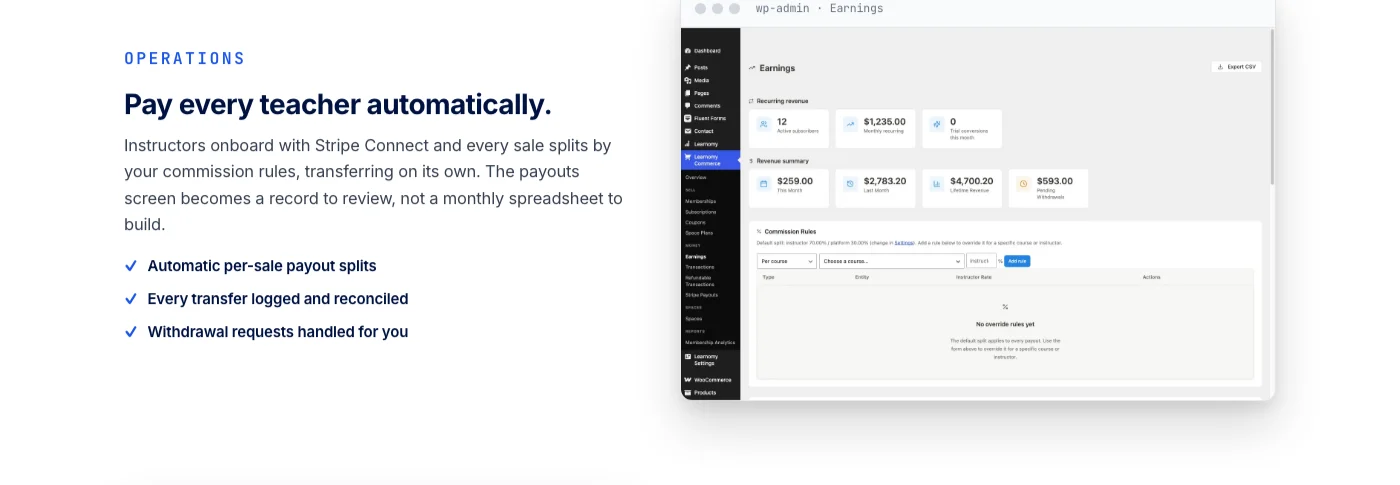
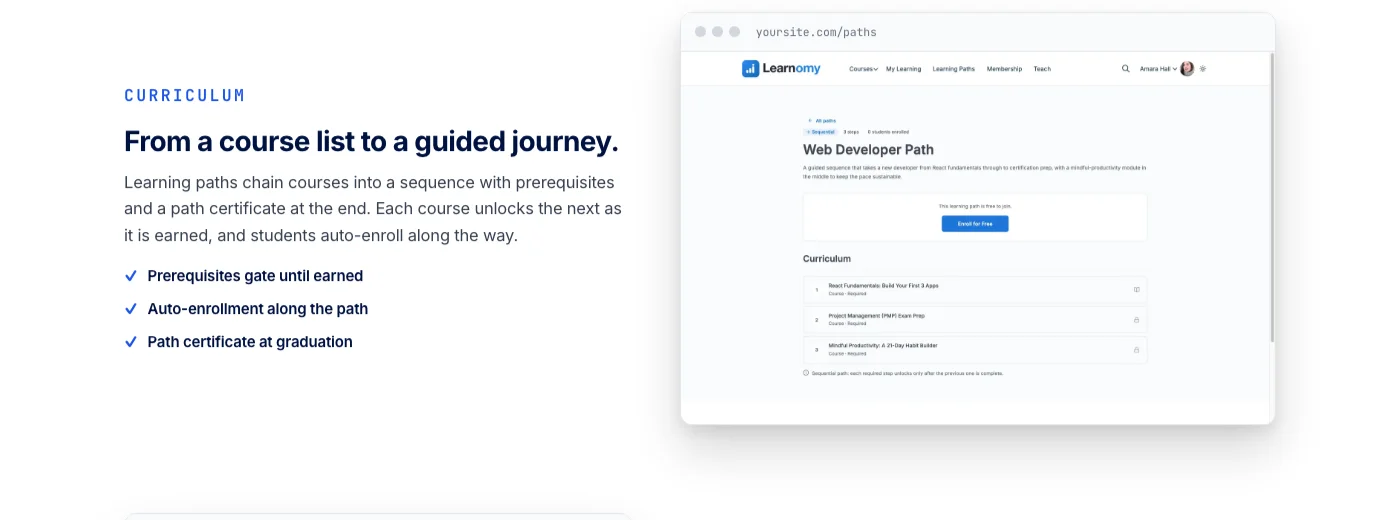
Concretely, that means creating a membership tier, assigning courses to it, and setting a drip schedule for when lessons unlock after enrolment, all inside the same platform that also runs the quizzes and issues the certificates. Checkout runs directly through Stripe and PayPal, with no platform fee on what a member pays, and a WooCommerce path exists for sites that are already selling other products through a store and do not want two separate carts. Instructor revenue sharing is part of the same system too, for the point where a single-teacher academy becomes a multi-teacher one. Deeper capability, like structured learning paths with prerequisite gates and sequenced curricula, sits in the platform’s fuller tier for academies that have outgrown the basics; the product page has the specifics.
Best for: subscription academies, monthly course clubs, and educators who gate content by access level and do not want a membership plugin, a subscriptions plugin, and an LMS each maintained on their own schedule.
Same as the LearnDash comparison elsewhere on this site: the BuddyPress-plus-LearnDash stack above has the deepest, most specific community integration available today, with per-course groups, activity feed announcements, and profile-level progress tracking built and tested over years. A complete learning platform reaches toward the same territory, a learning community around your academy, discussion boards and Q&A, gamified learning with points and badges, a job board for graduates, protection for your course videos, all under the same Reign branding, but describe those as a platform extending outward rather than a documented, hook-level bridge the way the BuddyPress integration above is. Pick the deep stack when the community mechanics themselves are the product. Pick the single platform when you want fewer moving parts and are building the academy, not the plugin configuration, from day one.
If your existing academy already runs on LearnDash, Tutor LMS, or LifterLMS and the multi-plugin coordination is the actual pain point rather than a hypothetical one, a migration wizard exists for exactly those three, so switching does not mean rebuilding every course and every student record from scratch.
Key takeaways
- Paid courses gated by community membership is one of the most resilient online business models, and WordPress gives independent builders the best long-term economics and customer ownership.
- The deep stack (Reign, BuddyPress, LearnDash or LifterLMS, WooCommerce Memberships and Subscriptions, FluentCRM) is proven, but every added plugin is more attack surface and more coordination cost.
- Link membership plans to a subscription product, not a one-time product, or lapsed members will stay inside the community indefinitely.
- A single connected learning platform collapses the course, membership, drip, and checkout layers into one system for builders starting from zero.
- Neither architecture is a lesser version of the other. Choose based on whether the community mechanics themselves are the product, or you want fewer moving parts.
The short architecture, in one paragraph
Reign Theme renders BuddyPress cleanly so the community looks modern. WooCommerce Subscriptions handles payment so renewals happen without manual work. WooCommerce Memberships gates access so non-members cannot reach gated content. LearnDash delivers courses so learners can progress at the right pace. BuddyPress hosts the community so conversations have a home. FluentCRM drives retention through the email lifecycle so members do not drift away in the first month. Everything else is marketing and moderation, which is where your time actually goes, because the technical stack itself, once built, just runs and runs without needing your daily attention.
Or, for the single-platform version of the same idea: Reign renders the branding so the school looks like yours. A complete learning platform handles courses, quizzes, certificates, memberships, drip, and checkout as one system, so renewals, access, and progress all live behind one login instead of three. Everything else is still marketing and moderation, because no architecture, deep or simple, replaces the actual work of running a community. It only decides how much of your week goes to configuring plugins instead of talking to members.
Building from zero? Skip the five-plugin stack.
Courses, memberships, drip, and checkout in one connected platform, so renewals and access live behind one login instead of three.