
The best WordPress eLearning theme is the one that styles the course plugin you actually run and still looks like your school. Reign is the one to start with if you also want a community around your courses, because it styles Learnomy for free and covers LearnDash, LifterLMS, Tutor LMS and Sensei through add-ons and kits. The other themes below are real options for a plain course site.
Reign is the WordPress theme for building a complete community site: social network, courses, member directory, marketplace and job board on one install. This post looks at the courses side of that, and then at the other eLearning themes people shortlist, described fairly so you can compare them.

WordPress e-learning platform and portal: what you need
A WordPress e-learning platform is three parts: WordPress itself, an LMS plugin that runs courses, quizzes and progress, and a theme that styles it. A WordPress e-learning portal is the same stack with a login area, so students and staff sign in and see their own courses, progress and certificates.
Learnomy is a free LMS plugin that covers the middle layer, and Reign supplies the theme and the student-facing screens. Add a community plugin such as BuddyNext and the portal gains profiles, an activity feed and spaces. The course community build guide shows the order to install them.
An eLearning WordPress template you can import
If you search for an eLearning WordPress template, you usually want a finished layout rather than a blank theme. Reign offers demo sites you install in one click from the demos page, and the LearnMate kits give you a course site ready for LearnDash or LifterLMS. Import it, replace the sample content with yours and adjust colours.
WordPress eLearning services
If you would rather not set it up yourself, our team offers a done-for-you build. See the services page for what is included and how to get in touch.
What an eLearning theme actually does
An eLearning theme does not teach anyone. Your LMS plugin does that: it holds the courses, lessons, quizzes, progress and certificates. The theme decides what a student sees when they land on a course page, how the catalog looks, and whether the student dashboard feels like part of your site or like a separate app bolted on.
That split matters when you shop. A theme with a beautiful homepage but no styling for your quiz screens leaves you fixing CSS for weeks. A theme that was built around one LMS plugin can leave you stuck if you switch plugins later.
So the first question is not “which theme looks best in the demo”. It is “which LMS plugin am I running, and does this theme style its pages?”
What to check before you pick one
Demos are made to look good. These are the things that show up after launch, so check them first.
- Which LMS plugin it styles. Look for named support for the plugin you use, not a vague line about “LMS compatibility”.
- The student side. Open the course player, the quiz screen, the student dashboard and the certificate page in the demo. These are where students spend their time.
- Mobile. Many students watch lessons on a phone. Open the demo on one.
- Community. If you want profiles, a feed or discussion around your courses, check whether the theme supports it or whether you will bolt on another plugin and style it yourself.
- Selling. Check how the theme handles pricing pages, checkout and memberships for the plugin you picked.
- What happens if you change plugins. A theme tied to one plugin has a switching cost. A theme that styles several does not.
- Licence model. Some themes charge once per site, some charge yearly. Read how renewals work before you buy, and look at the vendor’s pricing page for current figures.
The themes at a glance
| Theme | Best for | LMS it works with |
|---|---|---|
| Reign | Courses plus a community on one site | Learnomy (no add-on), LearnDash, LifterLMS, Tutor LMS, Sensei (add-ons) |
| LearnMate LearnDash | A ready-made LearnDash course site | LearnDash |
| LearnMate LifterLMS | Membership-led course sites | LifterLMS |
| Edufire | Schools and online course sites | LearnDash, WooCommerce |
| Owly | Tutoring and course sites | Course plugins per its listing |
| Turitor | Education sites on LearnDash | LearnDash |
| eLearni | Selling courses through a store | WooCommerce |
| Kindero | Kindergarten and early years | General-purpose plugins |
| MasterStudy | Course portals with live sessions | Its own LMS plugin, BuddyPress |
| Coursaty | Multipurpose course sites | Per its listing |
| Epsilon | Small education sites | Per its listing |
Theme details change between releases. Treat this table as a starting filter and confirm the current feature list on each theme’s own page before you buy.
1. Reign: courses plus a community on one site

Reign started as a community theme, and that is why it suits courses that people talk about. Students get profiles, a place to ask questions and a reason to come back between lessons. Most course sites have none of that, and completion rates tend to show it.
The theme does not lock you into one course plugin. You choose the LMS, and Reign styles it.
Reign with Learnomy
Learnomy is our own LMS, and it installs free. The free version gives you courses, lessons, quizzes, certificates, Stripe and PayPal checkout, memberships and coupons. Reign styles it with no add-on, because the theme and the plugin come from the same team.
The paid Learnomy plan adds drip content, assignments, grading, cohorts, subscription management and instructor payouts. You can start on the free version, sell a first course and upgrade only when you need one of those. See the Reign and Learnomy page for how the two fit together.
Reign with LearnDash, LifterLMS, Tutor LMS or Sensei
If you already run one of these, you do not need to move. Reign has a separate add-on for each: the LearnDash add-on, the LifterLMS add-on, the Tutor LMS add-on and the Sensei add-on. Each one styles the course catalog, lesson pages and student screens so they match the rest of the theme.
There are also ready-made kits, covered below, if you want a full course site you can import in one go.
What else comes with it
Reign is built for the whole site, not just the course pages. Our other plugins install free and the theme styles them with no add-on:
- BuddyNext for profiles, an activity feed, spaces and notifications.
- Jetonomy for forums and Q&A with accepted answers.
- Eventonomy for live sessions and meetups.
- WB Gamification for points, badges and leaderboards.
- WP Career Board for a job board where graduates and employers meet.
Direct messages between members need WPMediaVerse as well. The point is that a course site can grow into a community site without changing themes.
The cost model
You pay for one theme licence per site, yearly or lifetime. There is no per-member fee and no share of your sales. Current figures are on the pricing page, so they stay accurate.
Who it is not for: if you want a single landing page that sells one video course and nothing else, a lighter theme is fine. Reign pays off when you want students to interact.
2. LearnMate LearnDash
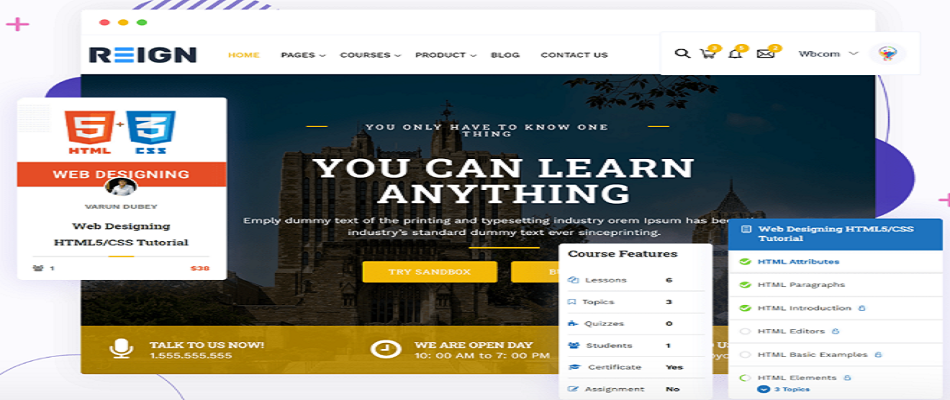
LearnMate LearnDash is a kit from the same team as Reign. It gives you a finished LearnDash site: course layouts, page designs, a demo importer, and reviews on courses. You import the demo, swap in your content and you have a working school.
It suits you if LearnDash is already your engine and you want a head start rather than a blank theme. It is built on Reign, so you can add the community pieces later. The LearnMate LearnDash kit page lists what is in it, and the LearnDash build guide walks through the setup.
3. LearnMate LifterLMS

LearnMate LifterLMS does the same job for LifterLMS. LifterLMS is known for memberships and engagement rules, so this kit fits sites where access plans matter as much as the courses. The student dashboard is easy to reach, and the kit includes several header variations.
Take a look at the LearnMate LifterLMS kit and the LifterLMS build guide if that is your plugin. If you use Tutor LMS instead, there is a matching Reign Tutor LMS kit.
4. Edufire
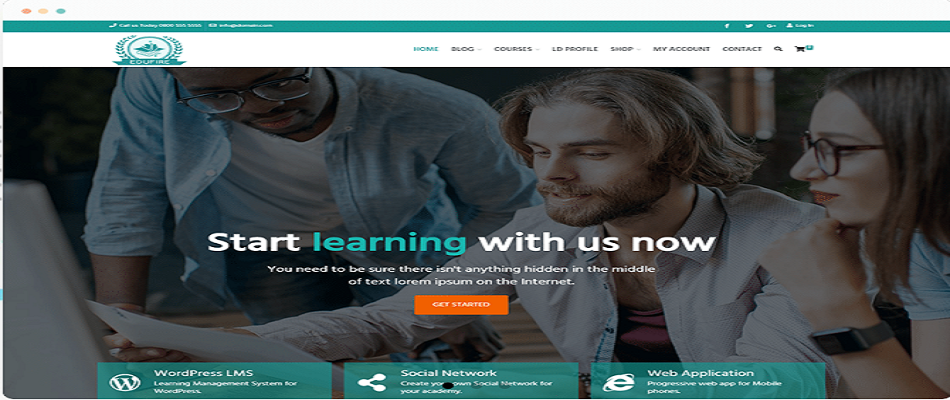
Edufire is aimed at schools, universities and online course sites. Its listing mentions LearnDash and WooCommerce support, a theme options panel and a responsive layout. It is built for the block editor, and it includes widgets such as a progress bar so students can see how far along they are.
Edufire is a reasonable pick if you want a conventional education look and do not need a member community. Check the theme page for the current list of supported plugins.
5. Owly

Owly is positioned as a tutoring and eLearning theme. It presents your courses in a browsable layout and comes with several inner page designs plus a drag-and-drop page builder for building your own pages.
It fits a tutor or a small academy that wants a polished front end quickly. As with any theme sold on a marketplace, read the changelog to see how actively it is maintained, and test the quiz and lesson pages with your own LMS plugin.
6. Turitor
Turitor is an education theme with built-in layouts and LearnDash integration. It also supports scheduling classes, which helps if you teach live sessions alongside recorded lessons. Several demo layouts are included, and the design is responsive.
Choose it if LearnDash is your engine and you like a classic education layout. If you later want members to talk to each other, you will be adding that yourself.
7. eLearni

eLearni is a general online learning theme. Its listing highlights managing courses and selling them through WooCommerce, several page designs, a drag-and-drop page builder and quiz forms. It is easy to customise.
It is a sensible fit if your business already runs on WooCommerce and you want courses to sit inside the same store. Selling through WooCommerce means you manage products, orders and tax settings there, which is familiar if you sell other things too.
8. Kindero

Kindero is a kindergarten and early years theme. It has a bright, friendly look and several homepage layouts. It works with common plugins such as Elementor and Contact Form 7, and it is responsive.
It is not a course platform in the sense the others are. Think of it as a school website theme for a nursery or preschool that wants to present its programs to parents, rather than a place to host paid lessons.
9. MasterStudy

MasterStudy is an education theme designed around its own LMS plugin. Its listing highlights one-click demo import, several demo sites, Zoom integration, live streaming and BuddyPress integration for a community portal.
It is a fit if you want live sessions built in and are happy to use its LMS plugin rather than another. If you already run LearnDash or Tutor LMS, check carefully whether a theme built around a different engine will style your pages.
10. Coursaty

Coursaty is a multipurpose courses and education theme with a modern look, a theme options panel and a drag-and-drop page builder. It bundles several demo layouts for schools and course projects.
It suits someone who wants flexibility in the layout more than a specific LMS integration. Ask which LMS plugins it supports before you commit, because that decides how much styling work you do yourself.
11. Epsilon

Epsilon is an educational theme with a demo importer, two homepage styles and WPML support for multilingual sites. It is responsive, and you can add live chat through a third-party plugin.
The WPML support is the useful detail here. If you teach in more than one language, confirm any theme’s translation support before you buy. It is a quick check and an expensive thing to discover late.

12. Eduma, EduMall and WPLMS
These three are long-running education themes sold on ThemeForest, and they are often listed next to the themes above. Eduma is built around the LearnPress LMS. EduMall is built around Tutor LMS. WPLMS is a larger learning-management theme with its own course system and social features built on BuddyPress.
Each fits a school-style course site when you are happy to stay with the LMS it was built for. The question is what happens when you add more: a member community, a directory, a marketplace or a job board. Reign styles those on the same install and works with Learnomy, LearnDash, LifterLMS and Tutor LMS, so changing your LMS later does not mean changing your theme.
Which eLearning theme fits your situation
Start from what you have and what you want the site to become.
- Starting fresh and want courses plus a community. Reign with Learnomy. Both install free apart from the theme licence, and nothing needs an add-on.
- Already on LearnDash. The LearnMate LearnDash kit or the Reign LearnDash add-on. You keep your courses and change the look.
- Already on LifterLMS or Tutor LMS. The matching LearnMate or Reign kit, or the add-on for your plugin.
- Selling courses through a WooCommerce store. A theme such as eLearni, or Reign with the LMS of your choice.
- A school or institution site with no member features. Edufire, Turitor or Epsilon are straightforward education layouts.
- Live sessions are central. MasterStudy builds them into its listing, and Reign pairs with Eventonomy for events.
If you are still deciding on the plugin itself, the LMS picker asks a few questions and points you at one. For a broader comparison of themes and plugins together, read our guide to the best WordPress LMS theme.
How to test a theme before you buy
A demo is a sales page. Spend an hour on this instead.
- Install the theme and your LMS plugin on a staging site, not your live one.
- Create one real course with a video lesson, a quiz and a certificate.
- Enroll as a student in a separate browser and go through the whole course on a phone.
- Check the catalog, course page, lesson player, quiz screen and student dashboard for broken spacing or unstyled buttons.
- Run a test checkout and read the receipt email.
- Switch on dark mode or a different colour scheme if the theme offers one and look again.
If a screen looks unfinished, ask the vendor whether that is expected. A good theme styles the pages students use most. A weak one only styles the homepage.
With Reign, you can try this without touching your live site. The demos page has one-click installs you can open and click through.
Building a course community, not just a course site
Most course sites are a shelf of videos. Students buy, watch part of it and drift away. A community changes that: they see other members, ask questions in a space tied to the course and pick up a badge for finishing a module.
That is the gap Reign closes. The theme styles the social side and the course side in one design, so a student moves from a lesson to the discussion without noticing a change. If you want to build that, the course community build guide lists the plugins and the order to set them up, and it covers each LMS engine separately.
Frequently asked questions
What is the best WordPress theme for an eLearning site?
It depends on the LMS plugin you use and whether you want a community. Reign is the one to start with if you want courses and a community together, since it styles Learnomy, LearnDash, LifterLMS, Tutor LMS and Sensei. For a plain education layout, themes such as Edufire or Turitor are also common choices.
How do I build a WordPress e-learning platform?
Install WordPress, add an LMS plugin such as Learnomy, and pick a theme that styles it, such as Reign. Then create a course, connect Stripe or PayPal and test the student journey on a phone. The build guide linked above lists each step.
What is a WordPress e-learning portal?
It is a WordPress site where learners log in to reach their courses, progress and certificates. The LMS plugin provides the course logic, and the theme provides the dashboard and course screens students see.
Is there an eLearning WordPress template I can import?
Yes. Reign demos install in one click, and the LearnMate kits ship a ready course site for LearnDash or LifterLMS. You replace the sample content and keep the layout.
Do you offer WordPress eLearning services?
Yes. Our team can set up the site for you, from theme and LMS to checkout and community. Start on the services page.
Do I need a theme and an LMS plugin?
Yes, in almost every case. The LMS plugin runs courses, quizzes and progress. The theme controls how those pages look. Some themes bundle or recommend a plugin, but they are still two separate parts.
Is Learnomy free?
Yes, there is a free version. It covers courses, lessons, quizzes, certificates, Stripe and PayPal checkout, memberships and coupons. Drip content, assignments, grading, cohorts, subscription management and instructor payouts are in the paid plan.
Can I keep my LearnDash courses and change the theme?
Yes. Switching themes does not touch your course content. Install Reign with the LearnDash add-on, check your course, lesson and quiz pages, and adjust the colours and layout. Do this on a staging copy first.
Does Reign work with Sensei?
Yes, through a Sensei add-on that styles the course catalog and lesson pages. You can see it on the add-ons page. Like the other third-party add-ons, it is a separate purchase.
Will an eLearning theme slow my site down?
It can if it loads heavy sliders, many fonts or several page builders. Test the demo with a speed tool and compare, and look at how the vendor handles asset loading. Good hosting matters too, and our hosting guide covers what a course site needs.
How much does a theme like Reign cost?
You pay for one theme licence per site, either yearly or as a lifetime licence. There is no per-member fee and Reign takes no share of your sales. See the pricing page for current figures.
Try it on a live demo
Open the Reign demos, pick the one that matches your LMS and click through a course as a student. If you want the full setup steps, follow the course community build guide, and tell us in the comments which theme you plan to use.
Interesting Read:
Best WordPress Themes For Handmade Crafts