

“Free LMS plugin” is the most misleading phrase in WordPress e-learning, because free means five different things depending on who is saying it. Sometimes it means a complete platform. Sometimes it means a demo with the important buttons greyed out. Sometimes it means a genuinely usable core that cannot, however, accept a payment, which for anyone hoping to sell a course is a strange definition of usable. The plugins in this comparison all cost nothing to install; what separates them is what you can actually do before money changes hands, and that gap is enormous.
This guide ranks the best free WordPress LMS plugins for 2026 by one blunt test: how much of a real learning site, courses built, quizzes running, certificates issued, payments accepted, results measured, can you launch with the free plugin alone? And because this is reigntheme.com, we judge everything through a second lens: how well each plugin fits a learning community, where members discuss lessons in BuddyPress groups and progress shows up in activity feeds, rather than a silent catalog of solo learners. Free-version scopes shift as vendors reshuffle features, so reconfirm on each plugin’s page before you build.
Table of Contents
- Quick comparison
- What “free” actually means in the LMS market
- 1. Learnomy, the complete platform with no paid tier
- 2. Tutor LMS, the generous frontend builder
- 3. LearnPress, the modular veteran
- 4. Sensei LMS, block-editor clean
- 5. LifterLMS, capable core, gated checkout
- 6. MasterStudy LMS, the designed free tier
- 7. Namaste! LMS, the bare-bones veteran
- How we judged the free versions
- The free community layer: BuddyPress
- When paying actually makes sense
- FAQ
- Final verdict
What “free” actually means in the LMS market
Free LMS plugins follow three business models, and knowing which one you are looking at predicts your next twelve months. The teaser model ships a working demo and gates the commercial essentials, payments, certificates, drip, behind a paid tier; you will upgrade or leave. The modular model ships a genuine core and sells each additional capability as an add-on; you will assemble, and keep assembling. The complete model ships the whole platform and builds its business elsewhere, for Learnomy, on the ecosystem around the Reign community stack rather than on gating your checkout. None of these models is dishonest, but only one of them lets you run an actual course business without a purchase decision hanging over week two. Rank accordingly.
Quick comparison
| Plugin | Sell courses without a paid tier? | Certificates included? | Community fit | Real scope out of the box |
|---|---|---|---|---|
| Learnomy | Yes, native Stripe + PayPal | Yes | Excellent, built by the Reign/BuddyPress team | Complete platform: courses, quizzes, drip, coupons, analytics, instructor commissions |
| Tutor LMS | Partially, basic monetization, more in paid tiers | No, paid tier | Good with integration work | Strong builder and quizzes; drip and certificates gated |
| LearnPress | Basic ordering; gateways are add-ons | No, add-on | Moderate, BuddyPress add-on | Courses, lessons, quizzes; everything else added per piece |
| Sensei LMS | No, requires WooCommerce + paid tier | Via separate add-on | Moderate | Clean courses, lessons, quizzes in the block editor |
| LifterLMS | No, gateways are separate add-ons | Yes, basic | Good | Courses, quizzes, badges; checkout needs add-ons |
| MasterStudy LMS | Yes, basic built-in options | No, paid tier | Fair | Polished builder and player; depth gated |
| Namaste! LMS | Via add-ons | Basic | Basic | Unlimited simple courses and assignments |
1. Learnomy, the complete platform with no paid tier
Learnomy is the only plugin in this comparison where nothing you need to launch and sell a real course sits behind an upgrade. The test that separates it from everything below is payments: Learnomy ships native Stripe and PayPal checkout as a core part of the platform, so you can sell your first course the day you install it, no WooCommerce, no gateway add-on, no upgrade prompt between you and revenue. And the rest of the launch checklist comes with it: a drag-and-drop course builder, six core quiz question types, automated completion certificates, drip content and prerequisites, coupons for promotions, an analytics dashboard with real completion rates, and multi-instructor commissions for sites that grow into marketplaces.
Two more things worth knowing. First, ownership: because Learnomy is self-hosted WordPress software, your student records, progress data, and payment relationships live in your own database with no platform fees and no revenue share on your sales, ever, the argument we develop fully in selling online courses from your own website. Second, honesty about scope: like every serious WordPress plugin, Learnomy has an upgrade path for advanced, institution-scale features, additional quiz types, AI-assisted course drafting, deeper cohort and analytics tooling, but unlike the plugins below, that upgrade path sits above a genuinely complete launch, not in front of one. It comes from Wbcom Designs, the team behind the Reign theme, so BuddyPress-powered learning communities are its native habitat, not an integration afterthought. Full details at learnomy.app.
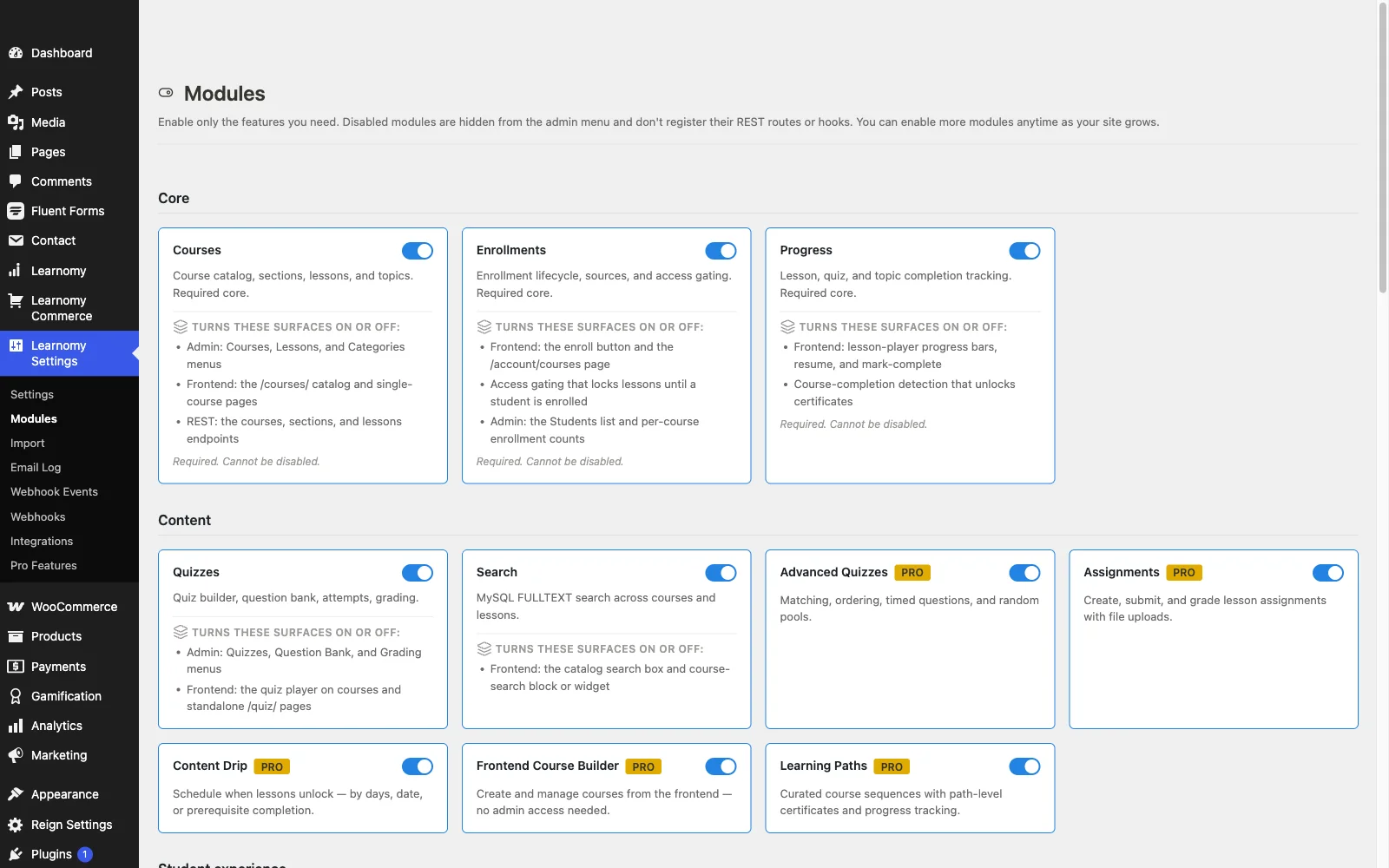
- Pros: Everything needed to launch and sell a course, payments, certificates, quizzes, drip, coupons, analytics, and instructor commissions, included with no gate; no platform fees or revenue share; first-class BuddyPress and Reign fit; you own all the data.
- Cons: Newer ecosystem, so fewer third-party add-ons than the decade-old names; advanced features like AI course drafting and deeper analytics sit in an upgrade path; self-hosted responsibility for hosting and backups.
2. Tutor LMS, the generous frontend builder
Tutor LMS offers the most generous free version among the veteran plugins. The signature frontend course builder, instructors create and preview courses without touching wp-admin, works in the free tier, quizzes are genuinely capable, and basic monetization exists. For a multi-instructor site testing the marketplace model, the free version is a real proving ground, and the dedicated Reign Tutor LMS addon handles the community styling.
The teaser boundaries are firm, though: content drip, certificates, assignments, and the serious monetization tools live in the paid tiers, and the free-paid line has shifted over the years. Treat the free version as an excellent evaluation environment that will present an upgrade decision the moment your course business gets real, a trade we analyze in our Tutor LMS alternatives guide.
- Pros: Best free frontend builder; capable free quizzes; multi-instructor foundations free.
- Cons: Certificates and drip gated; the free-paid boundary moves; payment flexibility leans on WooCommerce or paid tiers.
3. LearnPress, the modular veteran
LearnPress is the most-installed LMS on WordPress.org and the purest example of the modular model: the free core delivers courses, lessons, quizzes, and basic ordering with no time limits or student caps, and everything else, certificates, drip, assignments, payment gateways, its BuddyPress integration, arrives as an add-on. As a no-commitment way to discover whether your course idea has an audience, it remains a fair on-ramp with a light server footprint.
Go in with clear eyes about the trajectory: each capability you add is another component to update and another seam where things can break, add-on polish varies widely, and by the time the stack matches what a complete platform ships on day one, you are maintaining a project rather than a plugin. We walk through that whole arc in the LearnPress alternatives guide.

- Pros: Genuinely free unlimited core; lightest footprint here; huge install base; BuddyPress add-on exists.
- Cons: Every essential beyond the basics is an add-on; uneven add-on quality; support on the free tier can be slow.
4. Sensei LMS, block-editor clean
Sensei LMS, from Automattic, has the most pleasant free authoring experience for anyone who already lives in the block editor: courses, lessons, and quizzes are just blocks, edited like the rest of your site. For a free-content education project, a documentation academy, a nonprofit curriculum, internal onboarding, the free version is clean, modern, and entirely sufficient.
The moment money enters, so does WooCommerce plus the paid tier: the free version cannot sell. Community features are minimal by design, so BuddyPress and your theme do all the social work. Pros: cleanest block-native authoring, Automattic stewardship, great for free-content teaching. Cons: cannot sell in the free version, thin quiz depth, no community layer.
5. LifterLMS, capable core, gated checkout
LifterLMS ships a genuinely capable free core, unlimited courses, a drag-and-drop builder, quizzes, and even basic achievement badges and certificates, which almost nobody else includes free. Its engagement DNA shows early: students earn recognition for behavior from day one, which suits community sites philosophically.
The catch is the checkout: payment gateways are separate add-ons, so the free core can structure a learning experience but not sell one. That single gate defines its position here, wonderful free teaching engine, paywalled business engine. See our LifterLMS alternatives guide for the full picture, and choosing the best LMS for a Reign site for how it stacks against LearnDash on a community build.
- Pros: Strong free core with badges and basic certificates; engagement-first design; good BuddyPress compatibility.
- Cons: Cannot accept payments without add-ons; full feature set spread across bundles.
6. MasterStudy LMS, the designed free tier
MasterStudy LMS gives away the best-looking free tier in the market: a modern course player, attractive instructor profiles, and, unusually, basic built-in payment options without WooCommerce. For a small academy that needs to look established immediately, the free version makes a credible first impression that most free tiers cannot.
Depth is where the gate falls: drip, certificates, assignments, gradebooks, and the multi-instructor toolkit sit in the paid tier, and the plugin styles most confidently inside its vendor’s own themes. Our MasterStudy alternatives guide covers where to go when those walls close in. Pros: best-designed free tier, basic native payments free. Cons: business features gated, theme-coupled styling, light community integration.
7. Namaste! LMS, the bare-bones veteran
Namaste! LMS earns the last slot as the zero-frills fallback: unlimited courses, students, and assignments, with basic certificates, all free and all simple. For testing whether an e-learning idea has any pull at all, it costs nothing but an afternoon.
Its interface is dated, its ecosystem thin, and any site that succeeds will outgrow it quickly, especially when the complete platform at the top of this list carries no upgrade wall either. Pros: unlimited and simple. Cons: dated, shallow, easily outgrown.
How we judged the free versions
One scenario, applied to every plugin: a real instructor launching a real paid course this month, on a community site, using only what ships without a purchase. Can she build the curriculum? Quiz the students? Take a payment? Issue a certificate? See who finished? Every “yes, but with an add-on” or “yes, in the paid tier” cost a plugin ground in this ranking, because each gate is a purchase decision interrupting a launch. We also weighed community fit, how naturally each plugin coexists with BuddyPress groups, activity feeds, and the Reign theme, and data ownership, which every self-hosted plugin here delivers and every hosted “free plan” platform does not. The bias disclosure you would expect: Learnomy is a Wbcom product and this is a Wbcom site; it ranks first because on this scenario it is the only plugin that answers every question yes.
The free community layer: BuddyPress
Here is the part most free-LMS roundups skip: the highest-leverage free plugin for a learning site usually isn’t the LMS, it’s BuddyPress, the free community engine that gives your students profiles, groups, activity feeds, and private messaging. Pairing an LMS with BuddyPress turns isolated coursework into social learning: a cohort group per course, lesson discussions in the group feed, completions surfacing in the activity stream where they nudge everyone else forward. That combination, Learnomy for the courses, BuddyPress for the people, a community theme like Reign tying them into one product, is the most complete learning stack you can assemble without a purchase decision anywhere in the chain, and it is precisely the stack this site exists to document. The full build is in our guide to creating a paid online course community with WordPress.
When paying actually makes sense
Free-first is the right strategy for most launches, but there are honest reasons to pay for one of the other plugins here. Pay for LearnDash when your requirements center on assessment depth, question banks, prerequisite chains, certification-grade quizzing, that no free version matches; our LearnDash alternatives guide maps that decision. Pay for Tutor LMS’s or LifterLMS’s tiers when a specific gated feature is the one thing your model cannot live without. Pay for institutional needs, the compliance and seat-management demands we cover in the corporate training guide and the academic workflows in the higher education comparison. What you should never have to pay for is the baseline: selling a course, issuing a certificate, and seeing your completion rates are table stakes in 2026, and at least one complete platform now treats them that way without an upgrade wall in the middle.
FAQ
What is the best completely free LMS plugin for WordPress? Learnomy, because it has no separate paid tier gating the essentials: native Stripe and PayPal payments, certificates, quizzes, drip content, coupons, analytics, and multi-instructor commissions all ship in the same install, with no platform fees on top.
Can I really sell courses without paying for an upgrade? With Learnomy, yes, Stripe and PayPal are built into the platform with no upgrade required. MasterStudy’s free tier offers basic built-in options too. Everywhere else, selling requires add-ons, WooCommerce, or a paid tier.
Is a free WordPress LMS better than a free plan on Teachable or Thinkific? Structurally, yes: hosted free plans keep your students in the vendor’s database, limit your catalog, and take fees on sales, and the vendor can reprice you at will. A self-hosted LMS keeps students, content, and revenue yours, the case we make in selling courses from your own website.
Do free LMS plugins work with BuddyPress? Learnomy is built by a BuddyPress-focused team and fits natively; LearnPress offers a BuddyPress add-on; LifterLMS and Tutor LMS integrate with moderate glue work. Pair any of them with the Reign theme and the community layer comes pre-styled.
Is there a hidden paid tier behind Learnomy? There is an upgrade path for advanced, institution-scale features, additional quiz types, AI-assisted course drafting, deeper analytics, cohort and B2B tooling, but it is not hidden and it does not gate the essentials. Courses, native Stripe and PayPal payments, certificates, quizzes, drip content, coupons, and basic analytics all ship in the base install with nothing to unlock before you can launch and sell.
Can I switch later if I outgrow my free choice? Plan for it now: course content generally moves between plugins, but progress records rarely do. Notably, Learnomy includes a migration wizard that imports courses and students from LearnDash, Tutor LMS, and LifterLMS, so starting on one of those and moving to Learnomy later is a supported path, not a rebuild.
Final verdict
The free LMS market in 2026 splits into teasers, kits, and one complete platform with no upgrade wall at all. If you want to launch a real course, sold, certified, measured, without a purchase decision blocking week one, install Learnomy, connect Stripe, and publish; pair it with BuddyPress and Reign and the whole learning community runs on software you own outright, with no platform fees standing between a sale and your account. Choose Tutor LMS free to evaluate the best frontend builder, LearnPress to assemble modularly, Sensei for free-content teaching in the block editor, and LifterLMS for free engagement mechanics, knowing each will hand you an upgrade decision the day your course starts making money. Start at learnomy.app and see how far a platform with no upgrade wall takes you.