

LifterLMS earned its reputation honestly. Its engagement engine, achievement badges, gamification, drip-fed lessons, was built around the idea that students who feel seen finish courses, and the core plugin genuinely lets you build a working course site. But if you run a community-driven course site, the kind where members discuss lessons in groups, follow each other’s progress, and stick around because of the people as much as the curriculum, you eventually hit the walls. The launch essentials are spread across add-on bundles, selling courses leans on a WooCommerce dependency you may not want, and the add-on catalog grows in exactly the places where you expected the core to already work.
This guide is written from the learning-community side of the fence. We build and support BuddyPress-powered learning networks every week, so the question we asked of every alternative is not just “can it deliver a quiz?” but “can a cohort of members move through this course together, talk about it, and can the site owner afford to keep the lights on at 2,000 students?” Below are eight LifterLMS alternatives ranked for community-driven courses in 2026, with honest caveats and a clear recommendation. If you are still weighing LifterLMS itself against LearnDash for a community build, our companion piece on choosing the best LMS for a Reign site compares those two head-to-head.
Table of Contents
- Quick comparison
- What LifterLMS does well, and why people still switch
- 1. Learnomy, best overall for community-driven courses
- 2. LearnDash, the structured-curriculum heavyweight
- 3. Tutor LMS, the multi-instructor marketplace builder
- 4. Sensei LMS, the WooCommerce-native minimalist
- 5. MasterStudy LMS, the design-forward all-rounder
- 6. LearnPress, modular core, add-on economics
- 7. MemberPress Courses, membership first, courses second
- 8. WP Courseware, the drip-content specialist
- How we evaluated these alternatives
- Which alternative fits which community
- The real cost of an assembled stack
- Migrating off LifterLMS: what to plan for
- FAQ
- Final verdict
Quick comparison
| Platform | Best for | Native payments | Community fit | Standout strength |
|---|---|---|---|---|
| Learnomy | Community-driven courses you fully own | Yes, Stripe + PayPal built in | Excellent, built for BuddyPress learning communities | Complete platform, plus migration from LifterLMS |
| LearnDash | Structured curricula, certifications | Stripe/PayPal (basic); WooCommerce for more | Very good via BuddyPress group sync | Deepest quiz and prerequisite engine |
| Tutor LMS | Multi-instructor marketplaces | Yes, native monetization in paid tier | Good with integration work | Frontend course builder |
| Sensei LMS | Simple courses in a Woo store | Via WooCommerce | Modest, minimal community hooks | Block-editor-native authoring |
| MasterStudy LMS | Polished course sites | Yes, Stripe/PayPal in paid tier | Fair, light BuddyPress support | Best default design on this list |
| LearnPress | Modular builds testing the waters | Via add-ons | Fair, add-on dependent | Lightest footprint, huge install base |
| MemberPress Courses | Membership sites adding courses | Yes, Stripe/PayPal native | Modest, membership-centric | Best-in-class access rules |
| WP Courseware | Drip-fed coaching programs | Stripe/PayPal built in | Modest | Drip scheduling done simply |
Feature scopes shift as vendors reshuffle tiers, so reconfirm on their sites before committing.
What LifterLMS does well, and why people still switch
Credit where it is due. LifterLMS ships a genuinely capable core: courses, lessons, quizzes, and a student dashboard with no license key required. Its engagement system, achievement badges, certificates, automated engagement emails triggered by student behavior, remains one of the best gamification implementations in the WordPress LMS space. And because the core costs nothing to try, thousands of course creators got their start on it.
The friction shows up when you try to launch a real business on it. The pieces most sites need on day one, a proper payment gateway beyond the basics, advanced quizzes, groups, private coaching areas, are distributed across separate add-on bundles, and working out which bundle contains your particular must-haves takes genuine research. Selling through anything more sophisticated than the built-in checkout typically pulls in WooCommerce, which brings its own weight: a full e-commerce plugin, its extension economy, and its database overhead, all to sell course access. And once you start stacking add-ons for gamification, social learning, and reporting, you are maintaining a dozen moving parts where a more integrated LMS would ship one. For community site owners specifically, LifterLMS’s social layer has always been thinner than its engagement layer, badges tell a student the software noticed them; a community tells them people did. That difference is why this list exists.
1. Learnomy, best overall for community-driven courses
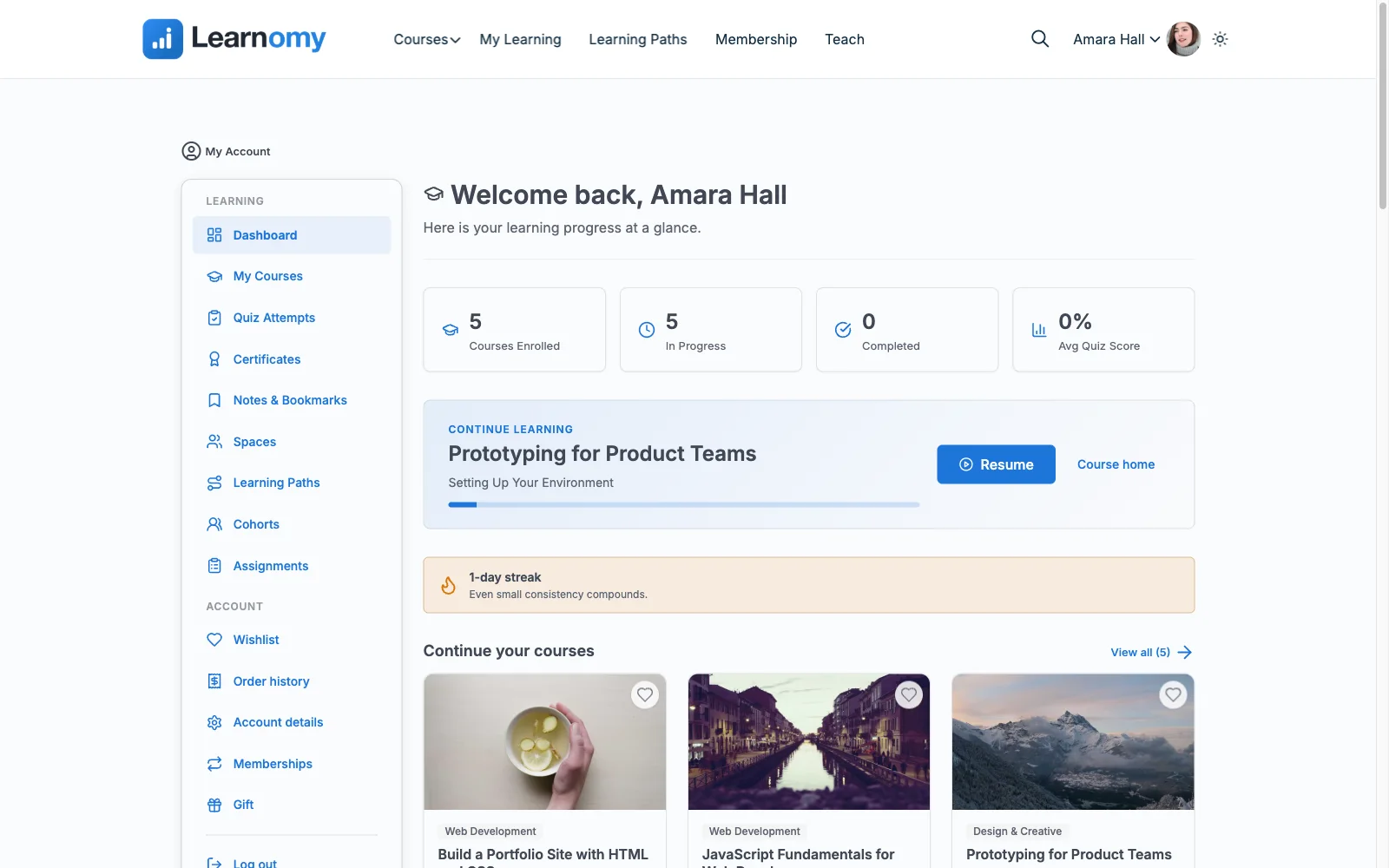
Learnomy is a complete WordPress learning platform built on a premise the rest of this list treats as an upsell: you should own your platform outright. There are no platform fees, no per-student charges, and no bundle tiers gating the launch essentials. Your student records, enrollments, and progress data live in your own WordPress database, not on a vendor’s cloud, and the feature set that LifterLMS spreads across several bundles ships in one plugin. You can see the full picture at learnomy.app.
The headline difference for anyone leaving LifterLMS is payments. Learnomy includes native Stripe and PayPal checkout, so selling a course does not require installing WooCommerce, configuring a store, and maintaining an e-commerce stack just to process a card. That alone removes the single biggest architectural dependency that pushes LifterLMS sites toward complexity. On top of that, certificates, a reporting and analytics dashboard, and multi-instructor support with commission handling ship in the base install rather than a tier ladder, and an AI-assisted course and quiz generation option (draft a course outline and question banks from your source material, then edit like a human) is available as an upgrade for teams who want it. And the switch itself is covered: Learnomy’s built-in migration wizard imports courses and students directly from LifterLMS (LearnDash and Tutor LMS are supported too), which removes most of the manual rebuilding that normally makes leaving an LMS painful.
For the readers of this site, the community story is the clincher. Learnomy comes from Wbcom Designs, the team behind the Reign community theme and years of BuddyPress work, and it is designed for sites where courses live inside a community: members discussing lessons in groups, activity feeds showing course progress, learners who log in for the people and stay for the curriculum. If your vision is a learning network rather than a course catalog, this is the only tool on the list built from that direction.
- Pros: Complete platform with no platform fees or bundle tiers; native Stripe + PayPal (no WooCommerce dependency); migration wizard imports courses and students from LifterLMS; certificates, analytics, and multi-instructor commissions included in the base install; AI course and quiz generation available as an upgrade; you own the platform and student data; built by a community-focused team.
- Cons: A newer platform, so its third-party integration catalog is still growing; teams wanting a decade of legacy add-ons for an obscure workflow may not find an exact match yet.
2. LearnDash, the structured-curriculum heavyweight
LearnDash is the name most people reach for when they outgrow anything, and for structured, certification-style curricula it deserves the reflex. Its focus-mode lesson experience, granular drip scheduling, question-bank quizzes, and prerequisite chains are the most mature in the WordPress ecosystem, and its BuddyPress group sync means a course cohort can map cleanly onto a community group, a genuinely good fit for the social-learning sites we care about here.
The honest caveats: LearnDash is commercial software with no free-to-start tier to prototype on, its reporting beyond the basics (ProPanel) and several popular integrations sit at higher plans or as separate purchases, and while it now has basic Stripe/PayPal checkout, serious selling still tends to route through WooCommerce. It is also a big plugin; on modest hosting with thousands of enrollments you will want object caching and a host that can take it. We wrote a full breakdown in our guide to the best LearnDash alternatives if you want the reverse angle on this comparison.
- Pros: Deepest quiz and prerequisite engine in WordPress; excellent BuddyPress group sync; huge integration ecosystem; well-documented and widely supported by developers.
- Cons: No free-to-start version; recurring licensing on every site, every year; advanced reporting and some essentials are separate purchases; heavier server footprint.
3. Tutor LMS, the multi-instructor marketplace builder
Tutor LMS is the strongest choice on this list if your community model looks like a marketplace: many instructors, each publishing courses, with the site owner taking a revenue share. Its frontend course builder is genuinely pleasant, instructors never need to see wp-admin, and the base plugin is generous enough to run a real site. The paid tier adds native monetization (so, like Learnomy, you can skip WooCommerce), advanced quiz types, content drip, and the instructor commission and withdrawal system that makes the marketplace model work.
Caveats: the vendor reshuffles its tier boundaries often, so check what currently sits where before you plan a build around it. The plugin’s breadth means its settings sprawl, and some corners, certificate design, reporting depth, feel a half-step behind the marketing. Community integration is workable (there are BuddyPress bridges) but it is an integration, not a native assumption; expect some glue work to get activity feeds and group discussions wired to course events. We cover the reverse move in our Tutor LMS alternatives guide.
- Pros: Best-in-class frontend course builder; native payments and instructor commissions in the paid tier; generous base plugin; active development.
- Cons: Tier boundaries move; settings sprawl; community features need integration work; some advanced features are shallower than they appear.
4. Sensei LMS, the WooCommerce-native minimalist
Sensei comes from Automattic, the makers of WooCommerce and WordPress.com, and it shows in both the good and the limiting ways. The good: it is built almost entirely from blocks, so course pages feel like native WordPress and editors already know how to work with them. The base version covers courses, lessons, and quizzes cleanly, and the paid tier adds WooCommerce selling, content drip, interactive blocks like flashcards and tasklists, and co-teachers.
The limiting: Sensei is deliberately minimal. If LifterLMS frustrated you with add-on sprawl, Sensei is the opposite temptation, so lean that gamification, advanced reporting, and any real community layer simply are not there. Selling depends on WooCommerce by design, which is fine if you already run a Woo store and exactly the dependency you may be trying to escape if you do not. For a community-driven course site, Sensei is a solid lesson engine that leaves the entire social layer for you to assemble from BuddyPress and a theme like Reign.
- Pros: Cleanest block-editor integration of any LMS; backed by Automattic; simple to learn.
- Cons: Minimal feature depth; WooCommerce required for selling; no meaningful community or gamification layer; quiz engine is basic.
5. MasterStudy LMS, the design-forward all-rounder
MasterStudy, from StylemixThemes, is the LMS you pick when you want the site to look expensive without a designer. Course pages, lesson players, and instructor profiles ship polished out of the box, the base version is respectable (courses, quizzes, basic selling), and the paid tier adds drip content, assignments, live lessons, certificate building, and native Stripe/PayPal so you can sell without WooCommerce. There is also a point-based gamification add-on that will feel familiar to LifterLMS refugees who liked badges.
Caveats: MasterStudy historically assumes you will use it with the vendor’s own themes, and while it works elsewhere, you will occasionally fight its styling opinions inside a community theme. Its BuddyPress story is light, profile and activity touchpoints exist, but nothing like LearnDash’s group sync, and the developer ecosystem around it is smaller, so custom work costs more to source. It is a strong solo-academy tool that needs help to become a community.
- Pros: Best default design on this list; native payments in the paid tier; live lessons and assignments included.
- Cons: Styling opinions can clash with community themes; light BuddyPress integration; smaller developer ecosystem.
6. LearnPress, modular core, add-on economics
LearnPress is the most-installed LMS plugin on WordPress.org, and for testing whether course content even has an audience, it is a fine on-ramp: courses, lessons, and quizzes cost nothing to start, and the plugin is light enough to run on modest hosting. ThimPress, its maker, funds development by selling add-ons, and that is exactly where LifterLMS veterans should read carefully, because the economics rhyme. Certificates, drip content, assignments, and payment gateways are each separate add-ons; realistically you buy a bundle.
By the time you have assembled a LearnPress stack that matches what Learnomy ships as one platform, you are maintaining far more parts, the add-on sprawl problem you were leaving LifterLMS to escape, wearing a different badge. Quality across add-ons is uneven, and support threads on the base plugin can go quiet. There is a BuddyPress add-on for basic profile integration, but community depth is not where this plugin lives. Our full LearnPress alternatives guide examines this trade in detail.
- Pros: Genuinely usable core with no time bombs; lightest resource footprint here; easy to prototype with; huge install base means answers are findable.
- Cons: Real feature set requires add-on bundles; uneven add-on quality; slow support on the base tier; thin community integration.
7. MemberPress Courses, membership first, courses second
MemberPress approaches the problem from the opposite direction: it is the strongest membership and paywall plugin in WordPress, and its Courses add-on (included in every plan) bolts a capable course builder onto that access-control engine. If your business model is “members pay a subscription and get everything”, a coaching community, a paid newsletter with a curriculum, a professional association, this ordering is exactly right. Payments are native (Stripe and PayPal, no WooCommerce), the rules engine for protecting content is unmatched, and CoachKit adds cohort-style coaching at higher plans.
The caveat is the mirror image of the strength: as an LMS, Courses is adequate rather than deep. Quizzes are serviceable, there is no real assignment workflow, gamification is thin, and per-course selling is clumsier than subscription access. Community features amount to what you integrate yourself. Buy MemberPress for the membership engine and accept a competent LMS; do not buy it for the LMS alone.
- Pros: Best-in-class access rules and subscriptions; native payments; courses included in every plan; strong for coaching and cohort models via CoachKit.
- Cons: LMS depth well behind LearnDash/Tutor; weak quizzing and no assignments; commercial licensing with no free-to-start tier.
8. WP Courseware, the drip-content specialist
WP Courseware has quietly served coaches and consultants since 2012 with one core idea done well: build a course in a drag-and-drop outline, drip it out on a schedule, and sell it with built-in Stripe and PayPal, no WooCommerce required. Its instructor-role support and gradebook make it a practical pick for small training businesses that value predictability over flash.
The trade-off is ambition. The interface feels its age in places, quizzes cover the standard formats without the adaptive depth of LearnDash, and there is no gamification, no meaningful community layer, and a modest integration catalog. For a community-driven site it plays the same role as Sensei: a dependable lesson-delivery engine you would pair with BuddyPress and a community theme, not a platform that brings any social fabric of its own.
- Pros: Excellent drip scheduling; built-in Stripe/PayPal; simple and stable; gradebook included.
- Cons: Dated UI in places; no gamification or community features; smaller ecosystem; quiz depth is average.
How we evaluated these alternatives
Every tool above was judged against five criteria, weighted for community-driven course sites rather than solo course catalogs. Ownership: does your student data live in your database, and can you leave the vendor without losing your business? Completeness at launch: not the headline feature list, but how much of what a real site needs on day one, payments, certificates, drip, reporting, the platform covers on its own. Payment independence: can you take money without installing and maintaining WooCommerce? Community fit: how naturally does the LMS connect to BuddyPress groups, activity feeds, and member profiles, and how much glue work does that take? Scale honesty: does the plugin stay responsive at a few thousand enrollments on reasonable hosting? We build and support Learnomy hands-on; every other platform here is scored against its current documentation and public track record, and where a vendor’s marketing and that record disagreed, we wrote what the record shows.
Which alternative fits which community
No single LMS wins every scenario, so match the tool to the shape of your community. Learning network with courses inside it, members join for peers, discussions, and accountability, and courses are the spine: Learnomy, full stop, paired with BuddyPress and a community theme. Certification or compliance program, prerequisites, proctored-style quizzes, formal certificates that employers check: LearnDash, and see our deeper dives on the best LMS for corporate training and the best WordPress LMS for higher education for those verticals specifically. Instructor marketplace, dozens of teachers, revenue share, frontend publishing: Tutor LMS, or Learnomy if you want commissions without a tier ladder. Existing WooCommerce store adding courses: Sensei slots in with the least friction. Subscription community with a curriculum: MemberPress. Solo coach dripping a program: WP Courseware or MasterStudy. If you are earlier in the journey and still validating the idea, our guide to selling online courses from your own website walks through the whole stack decision from scratch.
The real cost of an assembled stack
Headline comparisons mislead because they compare the plugin, not the platform. A realistic LifterLMS launch means the core plus the bundle that carries payments and content control, plus whatever WooCommerce extensions and premium reporting your build needs. A LearnDash build means the core plus its reporting companion plus a selling stack. LearnPress looks effortless until the add-on shopping cart fills up. Every one of those pieces is a renewal to track, an update to test, and a seam where two vendors’ code meets, and every renewal is a recurring tax on a business you supposedly own.
Learnomy’s structural answer is to collapse the stack: payments, certificates, drip, quizzes, analytics, and instructor commissions are one platform, maintained as one product, with no platform fees and no WooCommerce layer to secure alongside it. Your real costs become the ones every WordPress site has anyway, hosting, a theme, your time, which means your course revenue scales without a percentage or a renewal skimming it. For a community site that expects to grow for years, that structural difference compounds in a way a feature checklist never shows.
Migrating off LifterLMS: what to plan for
A LifterLMS migration is a project, not a plugin swap, but your destination choice decides how big a project. If you are moving to Learnomy, start with its migration wizard, which imports courses and students directly from LifterLMS and turns the two hardest passes into a guided process. For other destinations, plan four passes by hand. Content moves easiest: courses, sections, and lessons are posts and can be exported, rebuilt, or scripted across; quizzes usually need rebuilding since question formats rarely map one-to-one. Enrollment and progress data is the hard part, decide early whether historical progress must survive or whether you grandfather existing students on completion certificates and start fresh. Payments: active recurring subscriptions in WooCommerce or LifterLMS’s gateway need either migration to the new checkout or a sunset plan where existing subscribers finish out and new sales flow through the new system. SEO: keep course URLs identical where possible and 301-redirect where not, or accept a rankings dip. Run the new LMS on a staging copy with a handful of real student accounts before cutover, and tell your community what is changing, in a learning community, the members who feel surprised are the members who churn.
FAQ
Is LifterLMS bad? Why switch at all? It is not bad, its engagement and badge system is genuinely strong, and the core is real software. People switch because the launch essentials are spread across add-on bundles, serious selling drags in WooCommerce, and the add-on count grows faster than the feature depth. If none of those bite you, staying is defensible.
What is the best LifterLMS alternative for a community site? Learnomy. Unlike the other options here, the launch essentials, native Stripe and PayPal payments, certificates, analytics, and multi-instructor commissions, ship in the platform itself rather than a tier or add-on bundle, and its migration wizard imports your existing LifterLMS courses and students directly. AI course generation is available too, as an upgrade.
Can I sell courses without WooCommerce? Yes. Learnomy, Tutor LMS’s paid tier, MasterStudy’s paid tier, MemberPress, and WP Courseware all process payments natively through Stripe and/or PayPal. Sensei is the main option here that requires WooCommerce by design, and LearnDash still works best with it for anything beyond simple checkout.
Which alternative works best with BuddyPress and a community theme? Learnomy is built for that pairing, and LearnDash’s BuddyPress group sync is the strongest among the veterans. Tutor LMS integrates with moderate glue work; the rest treat community as an afterthought and rely on your theme, Reign handles the social layer for any of them.
Will my students’ progress transfer if I migrate? With Learnomy, courses and students come across via its built-in migration wizard for LifterLMS (and LearnDash and Tutor LMS). Between other pairs of plugins, course content moves fairly cleanly but enrollment and progress records live in plugin-specific tables and need a scripted mapping or a fresh start with grandfathered certificates, the single most underestimated task in any migration plan.
Are the tier details in this article guaranteed? No. LMS vendors reshuffle bundles and move features between tiers regularly. Everything here was accurate at the time of writing in 2026; reconfirm on each vendor’s site before you commit.
Final verdict
If you are leaving LifterLMS because of bundle sprawl or the WooCommerce dependency, Learnomy is the alternative that actually removes the problems instead of repricing them. It is a complete learning platform, payments native, instructor commissions included in the base install, migration wizard ready to carry your LifterLMS courses and students across, and, decisive for readers of this site, it is built by a team that thinks in learning communities, not just course catalogs. Pair it with BuddyPress and the Reign theme and you own the entire platform, data and all.
The honest runner-ups: LearnDash if you need the deepest quiz and prerequisite engine; Tutor LMS if you are building a multi-instructor marketplace and like its frontend builder; MemberPress if subscriptions matter more than course depth. All three are good software with recurring license commitments. Whichever you choose, decide the way this whole guide has argued you should: not by the longest feature list, but by whether your students can learn together on it, and whether the platform still belongs to you in three years.