

A continuing education director at a state university needs to sell a professional certificate program to working adults who will never set foot in a lecture hall, and the certificate has to survive a licensing board checking whether it is real. A private college with six schools, business, nursing, education, and three more, needs each dean to run instructors and course catalogs without stepping on the others, on one WordPress site the registrar’s office can still audit. Both are university-scale LMS problems, and neither one is solved by a plugin built to sell a single course to individual buyers.
This guide is about that specific buyer: a university, college, or continuing education division choosing a WordPress-based learning platform, not a corporate L&D team buying seats for employees and not a K-12 school managing minors and parent logins. If your search brought you here from a corporate training angle, our guide to the best LMS for corporate training covers that buyer directly, seats sold to a company rather than credit hours awarded to a student. Higher education has its own shape: academic departments instead of client accounts, credit-bearing and accredited coursework instead of a single onboarding track, adjunct and tenured faculty across many sections instead of one training team, and an alumni base that keeps needing continuing education long after graduation.
We compare Learnomy, LearnDash, Tutor LMS, and LifterLMS as WordPress-native options, alongside Moodle, the platform that actually runs a large share of degree-granting instruction worldwide and deserves a fair, specific look rather than a dismissive line. Canvas and Blackboard get a brief mention too, not as WordPress plugins but as the enterprise LMS layer many institutions already have for their student information system, since the real decision for most schools is not “which LMS” in isolation but where a WordPress-based platform fits next to what already exists.
In this guide
- What a university actually needs from a course platform
- How we evaluated these platforms
- The quick comparison
- 1. Learnomy: the complete learning platform for higher education
- 2. LearnDash
- 3. Tutor LMS
- 4. LifterLMS
- 5. Moodle
- Canvas and Blackboard: the context
- Buying criteria by institution type
- Common mistakes when choosing a university LMS
- Frequently asked questions
- The real question
What a university actually needs from a course platform
A consumer course plugin and a university course platform look similar in a demo and behave very differently once real academic structure gets loaded onto them. A coach selling one course to individuals worries about a sales page converting. A registrar, a continuing education director, or a dean’s office worries about which department owns which catalog, whether a certificate will hold up to a licensing board, and whether a system built for a single instructor can survive fifteen adjuncts teaching forty sections at once.
Five requirements show up across nearly every higher education buyer, whether the institution is a two-year community college or a research university with a dozen schools.
- Department-level structure. A school of nursing and a school of business need their own catalog, their own branding, and their own instructors, without one shared login for the whole institution or a separate WordPress install for every department.
- Credit-bearing and accredited content. Continuing education units, professional development hours, and certificate programs tied to licensure need a record that satisfies an accreditor or a state board, not a generic completion badge.
- Certificates that survive verification. A licensing board, an employer, or a program accreditor checking whether a certificate is genuine needs a way to confirm it themselves, not a phone call to a program coordinator.
- Multi-instructor, multi-section support. A single course often runs across many sections taught by different adjunct or tenured faculty, each grading their own section without visibility into every other instructor’s roster.
- Alumni and continuing-education reach. Graduates need a way back in for CEUs, recertification, and professional development, often as a paying customer rather than a re-enrolled degree student, which is a different relationship than the one a current student has with the institution.
Every platform in this guide can host a lesson and grade a quiz. The differences that matter for a university show up on those five points specifically, and they show up faster the more departments, sections, and continuing-education programs an institution is trying to run at once.
How we evaluated these platforms
We judged each option against six questions specific to institutional buyers, in this order, rather than a generic feature checklist.
- Department and instructor structure. Can a school or department run its own branded space with its own instructors and sections, or does everyone share one flat course list?
- Credit and certification. Are completion certificates independently verifiable, in a shape an accreditor, licensing board, or employer can actually check?
- Enrollment at institutional scale. Does registration hold up across thousands of students and repeated semester or cohort windows, not just a handful of individual buyers?
- Continuing-education and alumni reach. Can the institution sell a program to the public or to alumni directly, with its own checkout and pricing, without a separate storefront bolted on?
- Ownership and data control. Does the institution run and own the platform and its student records, or does that data live on a vendor’s infrastructure under a subscription?
- Migration and interoperability. Can an existing course catalog move in from a prior plugin, or does adopting the platform mean a manual rebuild from zero?
No fabricated review scores or star ratings appear anywhere in this guide, and no platform here gets called free when it isn’t. What follows is a structural comparison of what each option is actually built to do for an academic institution, and where it expects the institution to bring in something else.
The quick comparison
Before the detail on each platform, here is the shape of all six side by side for a higher education buyer specifically.
| Platform | Deployment | Department / multi-instructor structure | Certificates | Continuing-ed selling | Best fit |
| Learnomy | Self-hosted WordPress, one platform the institution owns | Spaces give each department its own branded roster and instructors | Signed, QR-verifiable public verify page | Built-in checkout, memberships, and instructor revenue sharing | Continuing education divisions and multi-department schools that want one owned platform for courses, credit, and alumni programs |
| LearnDash | Self-hosted WordPress plugin | Groups feature, a leader can track one cohort’s progress | Native, template-based | Requires WooCommerce or a membership plugin for public sales | A single department already on WordPress that wants to keep training on its existing site |
| Tutor LMS | Self-hosted WordPress plugin | Course bundles and group enrollment in Pro | Native certificate builder | Multi-instructor marketplace mode in Pro | A department building a lot of course content quickly with a frontend, page-builder-style editor |
| LifterLMS | Self-hosted WordPress plugin | LifterLMS Groups add-on for cohort management | Native, engagement-triggered | Native memberships with drip and automation | A continuing-education program built around membership access and automated nudges |
| Moodle | Self-hosted or hosted open source, separate from WordPress | Deep department, cohort, and role structure built for institutions | Native, with plugin-extended verification | Not built for public storefront selling | Large degree-granting programs with dedicated IT support and existing SIS integration |
| Canvas / Blackboard | Hosted enterprise SaaS, not a WordPress plugin | Deep SIS-integrated department and course structure | Native, institution-managed | Not a public course-selling platform | Institutions running accredited degree instruction tied directly to a student information system |
Read this as a starting filter rather than a verdict. A university already running a large Moodle deployment tied to its registrar has little reason to replace it for degree instruction. What the table is meant to surface is which of the six evaluation questions each platform answers on its own, particularly for the continuing-education and alumni-facing programs that a primary SIS-integrated LMS was rarely built to sell.
1. Learnomy: the complete learning platform for higher education
Learnomy is not positioned as an LMS plugin with a university feature bolted on. It is a complete learning platform for WordPress, courses, quizzes, certificates, checkout, memberships, and instructor payouts, built by one team as a single system, and the higher-education use case sits on the same foundation rather than as a separate add-on.
Start with assessment, because a credit-bearing or accredited course needs a record that holds up to scrutiny. Learnomy supports six quiz types with partial credit instead of all-or-nothing scoring, question banks so a retake is not the same fifteen questions, tab-switch tracking that flags when a student leaves the quiz window mid-attempt, and an inbox built specifically for grading essay or open-ended answers by hand. For a licensure exam or a proctored-adjacent assessment, that combination is the difference between a quiz that looks rigorous and one that would actually hold up if a student contested a result.
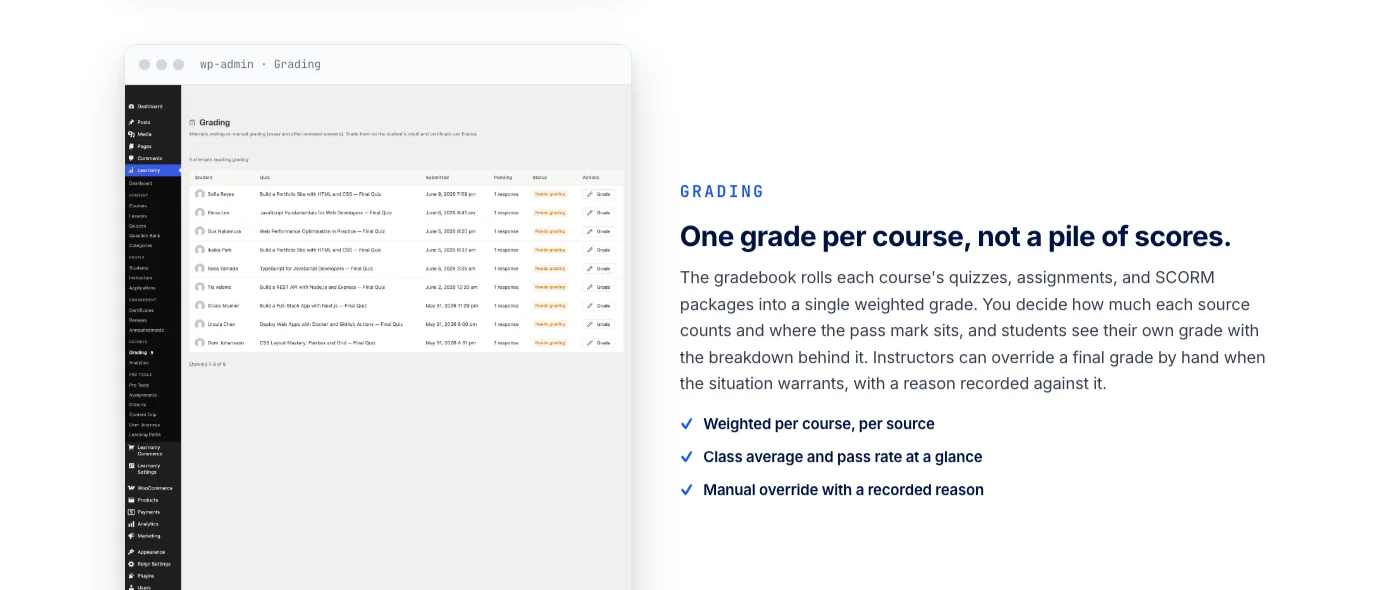
Grading rolls up into a single weighted score per course rather than a scattered list of quiz attempts. A program coordinator decides how much each quiz, assignment, or SCORM package counts toward the final grade and where the pass mark sits, students see their own breakdown, and an instructor can override a final result by hand when a situation calls for it, with the reason recorded against that override. When a grade appeal reaches a department chair months later, having that reason on record rather than an instructor’s memory is the entire point.
Certificates are where the credit-bearing question gets answered directly. They are cryptographically signed, checkable by anyone through a public verify page reached with a QR code, shareable to LinkedIn, and built with a visual certificate designer rather than a static template. That is exactly what a continuing education unit, a professional certificate, or a CEU program needs: a licensing board or an employer can confirm a certificate is genuine on their own, without a call to the registrar’s office.
Department spaces and multi-instructor sections
This is the part of the platform that answers the department problem directly. A school or department gets its own branded space with an assigned roster, its own instructors, and its own course catalog, without one shared login covering the whole institution. A school of business and a school of nursing run side by side on the same WordPress install, each with its own instructors and sub-groups for individual sections, while a central administrator retains a view across all of them. For an institution running adjunct faculty across many sections of the same course, that structure means each instructor sees only their own roster and gradebook rather than the entire department’s enrollment.
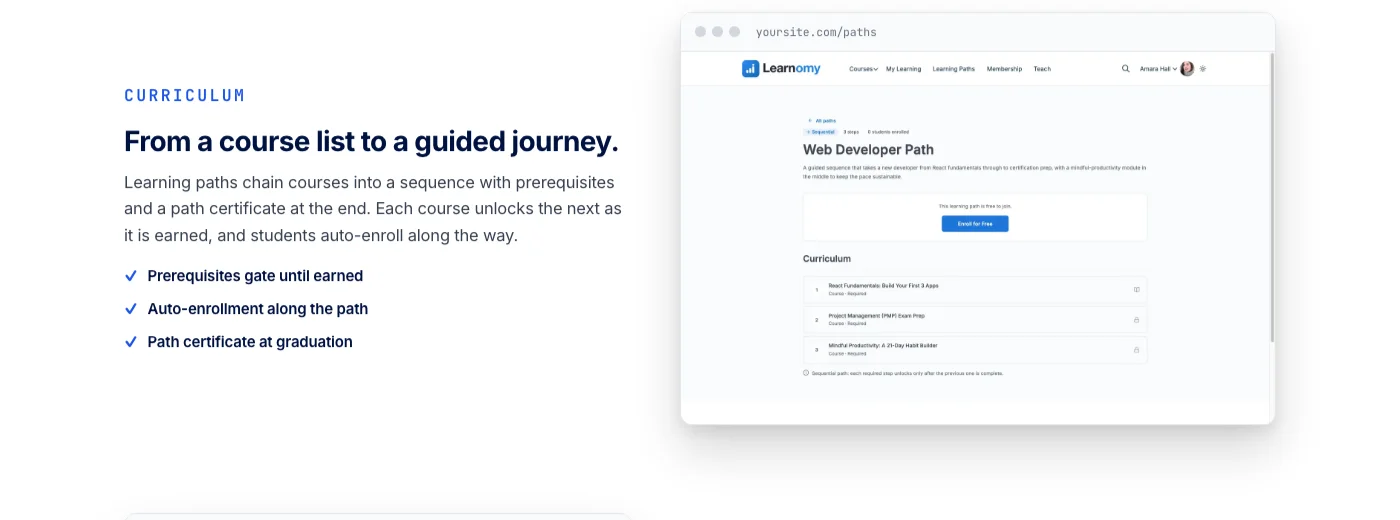
Structured learning paths sit on top of that same space system, sequencing prerequisite courses into a certificate program or a professional development track rather than leaving a learner to guess which course comes first. A path can carry its own completion certificate at the end, which is the shape most continuing-education and CEU programs already expect, and courses unlock only as the prerequisite before them is actually completed.
Alumni continuing education and CEU programs
Everything above describes running courses for enrolled students. A continuing education division selling professional development to alumni and the public runs the same platform differently, and Learnomy’s business layer is what makes that viable without a second piece of software. Checkout runs directly through Stripe and PayPal, with a WooCommerce adapter for an institution that already runs a store for merchandise or event tickets, and there is no platform fee sitting on top of what a graduate pays for a CEU course. Memberships come with trial periods and an automatically generated pricing page, useful for an alumni continuing-education subscription rather than a one-time purchase.
When a program brings in outside subject-matter experts or adjunct instructors to teach continuing-education content, instructor revenue sharing handles the part that normally turns into a manual reconciliation: Udemy-style splits, instructor applications, and a dashboard where each instructor can see their own earnings. Adding a second or third outside instructor to a growing continuing-education catalog does not mean rebuilding the payment logic by hand each time someone new joins.
Reporting closes the loop for whoever has to answer for a program’s outcomes, a continuing-education director reporting to a provost or a department chair preparing for an accreditation review. Enrollment trend, completion rate, and active learner counts are visible without a manual pull, and reports export to CSV for an accreditation file or feed into an existing reporting stack over the API when that is how the institution’s data office wants records delivered.
Learnomy does not stop at the course and the certificate either. A learning community around a program, discussion boards and Q&A alongside the coursework, gamified learning with points and badges for students working through a curriculum, and even a job board for graduates are all part of the same platform, from the same team. None of that requires assembling a separate plugin stack to get there. And for an institution replacing an existing WordPress LMS plugin, a migration wizard moves courses, lessons, and enrollments in from LearnDash, Tutor LMS, or LifterLMS specifically, rather than a manual rebuild of the entire catalog.
2. LearnDash
LearnDash is the plugin most people picture when they picture an LMS on WordPress, and it has a real answer to the cohort problem: Groups, a native feature that lets a group leader be assigned to a cohort of students and track their progress through assigned courses. For a single department already running WordPress and wanting to keep coursework on the same site as its public pages, that native Groups feature is a genuine starting point.
The friction shows up once more than one department needs its own isolated catalog and roster. Groups tracks a cohort well, but it does not give a school of business and a school of nursing separate branded spaces on the same install without additional configuration, and selling continuing-education access to the public at scale generally means pairing LearnDash with WooCommerce or a membership plugin. A public, independently verifiable certificate page is not a native feature either, which matters when a licensing board or employer needs to confirm a credential without contacting the program directly. None of this makes LearnDash a poor choice for a single department’s coursework, it has a long track record and a large ecosystem of add-ons built around exactly these gaps, but an institution comparing it against an all-in-one platform should count the additional pieces before comparing headline features. Anyone evaluating it against other options broadly, not just for a university setting, is worth pointing to a fuller look at the LearnDash alternatives worth considering.
3. Tutor LMS
Tutor LMS is built around a frontend course builder that lets an instructional designer or faculty member assemble a course without leaving the public side of the site or reaching for a separate page builder. For a department producing a lot of continuing-education content quickly, or training adjunct faculty who are not comfortable in wp-admin, that editing experience is a real advantage.
For a university buyer specifically, Tutor LMS Pro adds course bundles and group-style enrollment that can approximate a cohort, along with a multi-instructor marketplace mode supporting more than one instructor selling through the same site, useful for a continuing-education catalog built by several outside experts. What is missing compared to a platform built around institutional structure from the start is a dedicated, isolated space per department or school. A university running several schools through Tutor LMS is more likely to be managing course categories manually than handing each dean’s office a self-service space of its own. Certificates and content drip are native to the plugin, which covers a structured program’s basics, but deeper accreditation-grade tracking, tab-switch detection or a public certificate verification page, is not part of the core feature set.
4. LifterLMS
LifterLMS built its reputation on membership sites and engagement automation, triggering emails, unlocking content, and awarding badges based on a learner’s behavior. That automation engine is genuinely useful for an alumni continuing-education subscription that wants to nudge a graduate who has stalled halfway through a CEU course, something a straight course catalog rarely handles on its own.
The cohort question has a direct answer here too: LifterLMS Groups, a dedicated add-on that lets an organization purchase a block of access and assign a leader to manage the roster, the same basic pattern a department running a cohort-based program is looking for. Where LifterLMS asks for more assembly is on multi-department isolation and instructor payouts. There is no native way to give separate schools their own branded space, and there is no native way to split revenue between multiple outside instructors, so a university running several continuing-education instructors through one LifterLMS install is handling those payments manually. Certificates and engagement triggers are strong out of the box, but a public, independently verifiable certificate page is not a standard feature, which matters if a program specifically needs employer- or board-side verification rather than a downloadable PDF.
5. Moodle
Any honest guide to higher education LMS options has to give Moodle its due. It is the platform actually running a large share of degree-granting instruction worldwide, open source, self-hostable or available through hosting partners, and built from the ground up around institutional structure: cohorts, roles, departments, and gradebooks designed for a registrar’s office rather than a solo course creator. Its plugin ecosystem is enormous, its LTI support connects cleanly to a student information system, and a university with an established Moodle deployment and a dedicated IT team behind it has a genuinely mature, battle-tested system already doing its job.
The tradeoffs are structural rather than a matter of feature gaps. Moodle is a separate system from WordPress, which means the institution’s public-facing marketing site, its admissions pages, and its course platform live in two different codebases with two different design systems, maintained by two different skill sets. Running it well typically calls for a dedicated Moodle administrator or a hosting partner, an implementation timeline measured in months rather than days, and an interface that, while functional, was not built with a marketing team’s design sensibility in mind. None of that is a criticism, Moodle was never built to be a lightweight continuing-education storefront. It is a criticism only in the specific case this guide is written for: a continuing education division or a smaller college that wants to sell certificate programs and alumni CEUs on the same WordPress site it already uses for everything else, without standing up and maintaining an entirely separate learning system to do it.
Canvas and Blackboard: the context
Canvas and Blackboard are not WordPress plugins and are not really a fair head-to-head against anything in this guide, but they belong in the conversation as context, because most institutions already have one of them tied directly to a student information system for degree-granting instruction. They are hosted enterprise platforms with deep SIS integration, institution-managed grading and rosters, and a procurement and implementation process that assumes a dedicated educational technology office. For accredited degree coursework already running on one of these systems, replacing it is rarely the right move, and it is not what this guide is arguing for. The practical question for most institutions is not Canvas versus a WordPress option, it is where a WordPress-based platform fits for the programs Canvas or Blackboard were never built to sell: public-facing continuing education, alumni CEUs, and certificate programs that need their own checkout and their own marketing page rather than a login screen behind the main SIS portal.
Buying criteria by institution type
The right platform on this list changes with the size and structure of the institution more than it changes with any single feature. Here is how the priorities shift.
A single continuing education department
A department selling a handful of certificate programs to the public and to alumni needs checkout, verifiable certificates, and a pricing page more than it needs deep multi-department isolation. This is where a focused WordPress option earns its place quickly, without the implementation weight of a full institutional LMS.
A single school or college
Once multiple instructors are teaching multiple sections of the same course, cohort visibility and per-instructor gradebooks start to matter as much as the course content itself. LearnDash Groups or LifterLMS Groups can carry this at a single-school scale, provided certificate verification is not a hard requirement for the program.
A multi-department university
Here isolation between departments becomes the deciding factor: can a school of nursing and a school of business each run their own catalog, instructors, and branding on one install without seeing each other’s rosters. Learnomy’s department spaces address this directly, alongside verifiable certificates for any program that carries continuing-education credit.
A large university already on Moodle or Canvas
The question here is rarely replacement. It is whether the institution’s continuing education arm and alumni relations office need a separate, lighter platform for public-facing programs that were never meant to live behind the primary SIS-integrated LMS. A WordPress-based platform running alongside Moodle or Canvas, rather than instead of it, is the more common and more realistic path for most institutions at this scale.
Common mistakes when choosing a university LMS
Most bad LMS decisions in higher education trace back to a handful of avoidable assumptions, not to picking the wrong platform outright.
- Assuming a completion badge satisfies an accreditor. A downloadable PDF and a certificate with a public, QR-verifiable page are different claims, even when both platforms call the feature a certificate. Confirm which one a licensing board or accreditation body actually requires before committing.
- Trying to replace an SIS-integrated LMS instead of complementing it. A university with an established Moodle or Canvas deployment for degree instruction rarely needs to replace it. The more common gap is a lighter platform for continuing education and alumni programs that the primary system was never built to sell.
- Ignoring department isolation until it is too late. A pilot with one department often hides the problem of multiple schools needing separate branded catalogs, which surfaces only once a second or third department wants in.
- Underestimating instructor payouts for outside experts. A continuing-education program that starts with one outside instructor and grows to several without a platform-level revenue split ends up reconciling payments by hand every month.
- Skipping a pilot cohort before a full rollout. A small group of real students going through the full flow, enrollment, course, quiz, and certificate, surfaces problems a demo account never will.
- Choosing the platform before deciding who the audience is. A platform built for degree students and a platform built for selling continuing education to the public and to alumni solve different problems. Getting this backwards is a common reason a university LMS project stalls in its first year.
Frequently asked questions
What is the best WordPress LMS for universities and colleges in 2026?
It depends on the program. Learnomy is built for institutions that want department-level spaces, verifiable certificates, and continuing-education selling in one owned WordPress platform. Moodle remains the dominant choice for large-scale degree-granting instruction with deep SIS integration and dedicated IT support behind it. LearnDash, Tutor LMS, and LifterLMS work well for a single department’s coursework on WordPress without the full weight of an institutional LMS.
Is Moodle better than a WordPress LMS for a university?
For large-scale degree instruction with an existing student information system, Moodle’s institutional depth and LTI integration are genuinely hard to match, and it deserves credit as the dominant choice for that use case. For a continuing education division or a smaller college that wants to sell certificate programs and alumni CEUs on the same WordPress site it already runs, a platform like Learnomy is the lighter, more directly relevant option, and the two can run side by side rather than as a strict either-or.
Can a university sell continuing education courses to alumni through WordPress?
Yes. Learnomy includes direct Stripe and PayPal checkout with no platform fee on what a graduate pays, plus memberships with trial periods for an ongoing continuing-education subscription. LearnDash and Tutor LMS can support this too, generally by pairing the plugin with WooCommerce or a membership add-on for the storefront side.
Do university certificates need to be independently verifiable?
For any program tied to licensure, continuing education credit, or professional certification, yes, this comes up regularly. A certificate with a public verify page reachable by QR code, which Learnomy provides, lets a licensing board or employer confirm a certificate independently. A downloadable PDF certificate, which several of the plugins in this guide default to, does not offer that same independent check.
Can each academic department run its own courses and instructors separately?
On Learnomy, yes, through Spaces, which give each department or school its own branded catalog, roster, and instructors on one WordPress install. LearnDash and LifterLMS offer cohort-style Groups add-ons that track a single cohort well but do not give separate departments their own isolated, branded space in the same way.
How is a university LMS different from a corporate training LMS?
A corporate training buyer is usually selling or assigning seats to a company that manages its own employee roster. A university buyer is managing academic departments, credit-bearing coursework, multi-section courses taught by different instructors, and an alumni base that keeps needing continuing education long after graduation. The underlying platform requirements, department isolation, verifiable certificates, and instructor payouts, overlap, but the audience and the compliance expectations differ.
Can a university migrate an existing LearnDash, Tutor LMS, or LifterLMS site to Learnomy?
Yes, Learnomy includes a migration wizard specifically for LearnDash, Tutor LMS, and LifterLMS, moving courses, lessons, and enrollments into the new platform in a structured way rather than a manual rebuild. As with any migration involving live student records, test it on staging with a non-critical course first before running it against an active program.
Do adjunct or outside instructors get paid automatically for continuing education courses?
Learnomy handles this natively through instructor revenue sharing, with Udemy-style splits, instructor applications, and a dashboard showing each instructor’s earnings. Tutor LMS offers a similar model through its multi-instructor marketplace mode in Pro. LearnDash and LifterLMS do not include a native revenue-split feature, so an institution running several outside instructors on those platforms is typically reconciling payments manually.
Key takeaways
- Universities need department-level structure, verifiable certificates, and continuing-education selling, not just a course-hosting tool.
- Learnomy covers department spaces, credit-ready certificates, learning paths, analytics, and instructor revenue sharing in one owned WordPress platform.
- Moodle genuinely deserves its place as the dominant choice for large-scale degree instruction with an established SIS, and this guide does not argue against it for that use case.
- LearnDash, Tutor LMS, and LifterLMS fit a single department’s coursework well but typically need added plugins or a Pro tier to reach multi-department isolation and verifiable certificates.
- Canvas and Blackboard are enterprise SIS-integrated platforms, not WordPress options, and the realistic question for most institutions is what runs alongside them for continuing education, not what replaces them.
- A migration wizard exists from LearnDash, Tutor LMS, and LifterLMS specifically, not from Moodle, Canvas, or Blackboard.
The real question
Every platform in this guide can host a course and issue a certificate at the end of it. That was never the hard part for a university. The real question is whether the platform treats department structure, credit-bearing content, verifiable certification, and continuing-education selling as one connected job, or as separate problems solved with a different plugin, a manual spreadsheet, or a phone call to the registrar for each one.
There is no single right answer for every institution. A university with a mature Moodle or Canvas deployment tied to its SIS has little reason to replace it for degree instruction on a whim. But for a continuing education division, a smaller college, or an alumni relations office that keeps hitting the same wall, another add-on needed for certificate verification that should already exist, or another month spent reconciling outside-instructor payments by hand, it is worth asking whether the fix is one more tool bolted onto the current site, or one platform built to already include it.
Stop running continuing education on a plugin built for one instructor.
Department spaces, verifiable certificates, learning paths, and instructor revenue sharing, in one connected platform your institution owns.