
A course creator runs two businesses wearing one pair of shoes. The first is the teaching: turning what you know into lessons worth paying for. The second is everything else, checkout flows, certificates, student support, knowing which lesson everyone quits on, and it is the second business that decides whether the first one survives. When an LMS handles that second business well, the creator’s hours go into content and students. When it doesn’t, the creator becomes an unpaid systems administrator for their own school.
This guide ranks the best WordPress LMS options for course creators in 2026 with that division of labor in mind, and with one conviction the rest of the market undersells: independent creators win on community. You cannot outspend the big course platforms on production value, but a cohort of members who know each other, discuss lessons, and pull each other to the finish line is something no marketplace listing can replicate, and it is built with an LMS that plays well with BuddyPress and a community theme like Reign. Vendors adjust their feature scopes constantly, so confirm details on their sites before committing.
Table of Contents
- Quick comparison
- 1. Learnomy, built for someone doing this alone
- 2. LearnDash, the safe, deep default
- 3. Tutor LMS, the studio experience
- 4. LifterLMS, retention as a feature
- 5. Sensei LMS, for the WooCommerce creator
- 6. MasterStudy LMS, looks funded from day one
- 7. WP Courseware, the scheduled-program workhorse
- 8. MemberPress Courses, when it’s really a membership
- What actually matters for a solo creator
- How we evaluated
- Three creators, three right answers
- The community moat
- FAQ
- Final verdict
Quick comparison
| Platform | Best for | Sell without WooCommerce? | AI help | Community fit |
|---|---|---|---|---|
| Learnomy | Solo creators who want the whole business in one plugin | Yes, Stripe/PayPal native | Yes, available as an upgrade | Excellent, built by the Reign/BuddyPress team |
| LearnDash | Assessment-heavy, certification-style courses | Basic native; WooCommerce for more | Limited | Very good, mature group sync |
| Tutor LMS | Creators who live in the authoring studio | In paid tier | Some features | Good with integration work |
| LifterLMS | Creators focused on completion rates | Via gateway add-ons | No | Good |
| Sensei LMS | Creators already running WooCommerce | No, WooCommerce required | No | Moderate |
| MasterStudy LMS | Creators who need visual polish immediately | Basic native options | Some features | Fair |
| WP Courseware | Coaches running scheduled programs | Yes, Stripe/PayPal built in | No | Basic |
| MemberPress Courses | Creators whose product is a membership | Yes, native | No | Moderate |
1. Learnomy, built for someone doing this alone
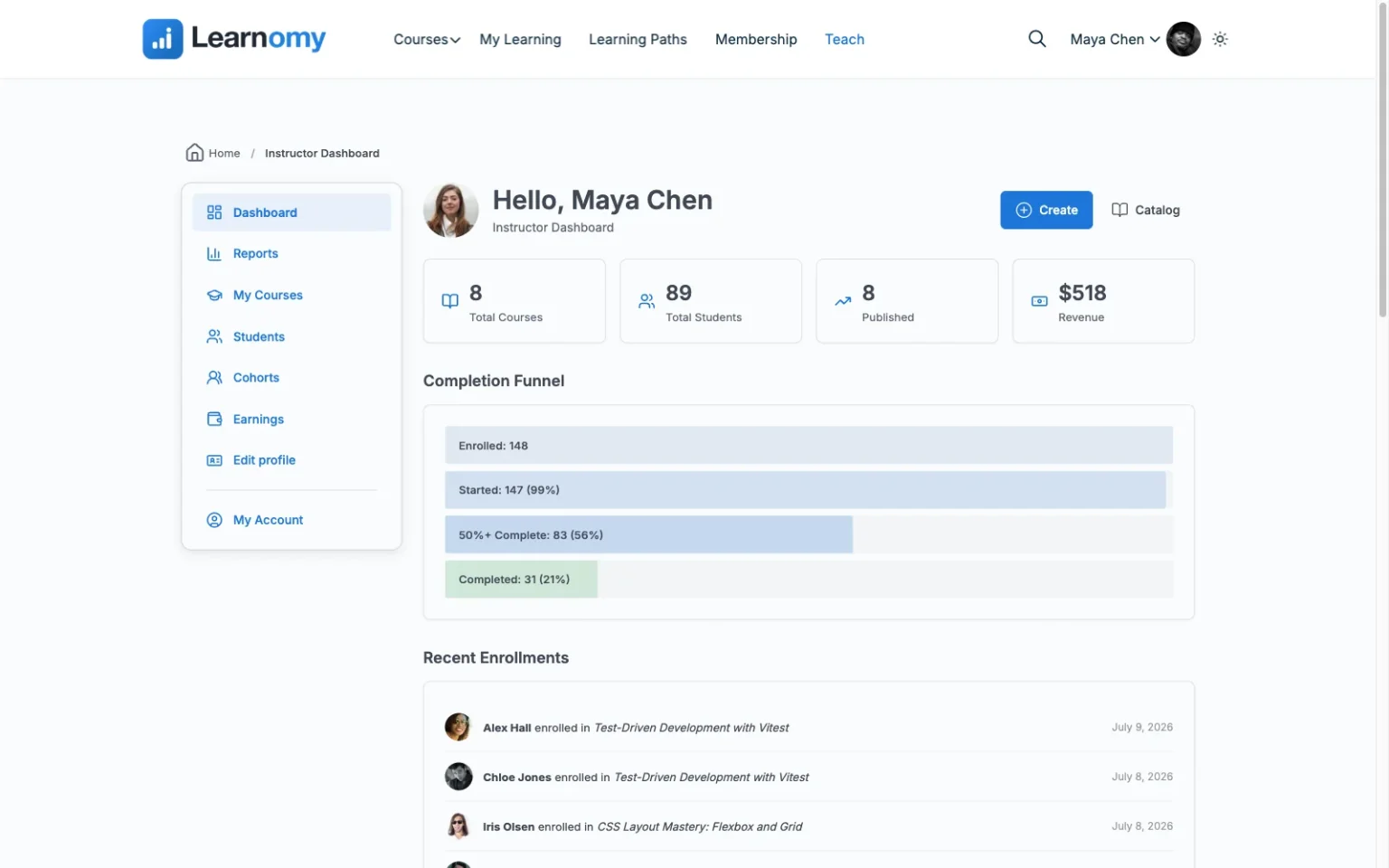
For a solo creator, the operational overhead of a platform matters as much as its features, and Learnomy is engineered to make that overhead vanish. It is a complete learning platform in a single plugin: drag-and-drop course building with no page-builder dependency, native Stripe and PayPal checkout so selling never becomes a WooCommerce project, automated certificates, drip scheduling, coupons for promotions, and an analytics dashboard that reports real completion rates, the number that tells you whether your course works, not just whether it sells.
Two things matter disproportionately for someone working alone. An available AI course and quiz generation upgrade can turn your source material into a structured draft curriculum with question banks, the difference between staring at a blank outline and editing a competent first draft. And the ownership model protects your downside: your students, content, and payment relationships live in your own WordPress database with no platform fees and no revenue share, so nobody can reprice your business underneath you, the argument we make in full in selling online courses from your own website. When you grow, multi-instructor commissions are already built in, and if you are arriving from LearnDash, Tutor LMS, or LifterLMS, the migration wizard imports your courses and students directly. Built by the Reign team, it slots into a BuddyPress community as though the two were designed together, because they were. Details at learnomy.app.

- Pros: The whole creator business in one plugin, payments, certificates, drip, coupons, analytics, commissions; an available AI-drafting upgrade beats the blank page; complete ownership with no platform fees; native fit with BuddyPress and Reign; migration wizard from the big three.
- Cons: Newer ecosystem still growing its third-party catalog; self-hosted responsibilities (hosting, backups) are yours or your managed host’s.
2. LearnDash, the safe, deep default
LearnDash remains the reflex recommendation across the WordPress LMS world, and for a certain kind of creator the reflex is right: if your course’s credibility rests on rigorous assessment, question banks, randomization, prerequisites, controlled retakes, nothing else matches its engine, and its decade-deep add-on catalog means nearly every niche requirement has an established answer. Its BuddyPress group sync is mature, and Reign has shipped a dedicated LearnDash addon for years.
The creator’s caveat is assembly: flexible selling typically means WooCommerce, meaningful reporting means companion tooling, and there is no free-to-start tier to validate on, every experiment happens on commercial licensing. Where that trade stops making sense, our LearnDash alternatives guide maps the alternatives. Pros: benchmark quizzes, deepest ecosystem, proven at scale. Cons: assembly-heavy, wp-admin authoring, licensing stacks with add-ons.
3. Tutor LMS, the studio experience
Tutor LMS gives creators the most enjoyable place to actually build: a frontend studio where you assemble and preview courses exactly as students will see them, never touching wp-admin. Its quiz tooling is capable, its base plugin is generous enough for genuine validation, and if your ambition includes recruiting other instructors, its marketplace features (commissions, withdrawals) are the market’s most developed, with the Reign Tutor LMS addon handling community styling.
Know where the gates are: drip, certificates, and serious monetization live in the paid tiers, and payment flexibility leans on WooCommerce or add-ons, the trade we dissect in the Tutor LMS alternatives guide. Pros: best authoring UX, marketplace-ready. Cons: tier gates on launch essentials, payment stack lean.
4. LifterLMS, retention as a feature
LifterLMS is the creator’s pick when the metric that keeps you up at night is completion rate. Its achievement badges, milestone certificates, and engagement emails fire off real student behavior, stall for a week and the system reaches out, which makes it the closest thing to an automated teaching assistant in this list. Access plans handle bundles, payment plans, and trials with unusual grace.
The friction is packaging: gateways and several essentials are separate add-on bundles, so a working build takes research to specify, analysis we run in the LifterLMS alternatives guide and the Reign-specific head-to-head in choosing the best LMS for a Reign site. Pros: best engagement automation, flexible selling shapes. Cons: essentials spread across bundles, checkout needs add-ons.
5. Sensei LMS, for the WooCommerce creator
If your creator business already runs on WooCommerce, you sell templates, coaching, merch, Sensei LMS adds courses with the least new surface area: lessons are blocks, the checkout is the one you already operate, and Automattic’s stewardship keeps it current. For block-editor natives it is the gentlest learning curve in the market.
Without WooCommerce it cannot sell, its assessment depth is modest, and community is deliberately out of scope, BuddyPress’s job. Pros: zero new UI, cleanest store integration. Cons: WooCommerce required, light depth, no social layer.
6. MasterStudy LMS, looks funded from day one
MasterStudy LMS solves the credibility problem first: its default course pages, players, and instructor profiles are the best-looking in WordPress, so a solo creator launches something that looks like a funded academy. The frontend builder is quick, and basic native payment options arrive unusually early in its stack.
Depth sits in the paid tier, styling assumes the vendor’s own themes, and community integration is light, the full map is in our MasterStudy alternatives guide. Pros: best default polish, fast builder. Cons: tier gates, theme coupling, thin social story.
7. WP Courseware, the scheduled-program workhorse
For coaches and consultants whose product is a scheduled program, six weeks, drip-fed, cohort by cohort, WP Courseware is quietly ideal: outline-first building, drip scheduling in core, native Stripe and PayPal, and a gradebook. It has shipped steadily since 2012 and behaves like it.
It offers no flash, no gamification, and no community fabric; pair it with BuddyPress and Reign if members matter. Pros: drip done right, native payments, dependable. Cons: dated presentation, minimal engagement tooling.
8. MemberPress Courses, when it’s really a membership
Some creator businesses are honestly memberships wearing a course costume, subscribers pay monthly for access to everything, courses included. MemberPress models that truth directly: WordPress’s strongest subscription and access-rule engine, native payments, with a competent course builder included in every plan and CoachKit for cohort coaching at higher tiers.
As a pure LMS it is the shallowest commercial option here, basic quizzing, no assignments, so buy it for the membership engine, not the courseware. Pros: unmatched access rules, native billing. Cons: LMS depth trails dedicated platforms.
What actually matters for a solo creator
Strip away the feature grids and three questions decide this purchase. How much can you do without hiring anyone? Every dependency, a WooCommerce stack, a reporting companion, an add-on bundle, is either your unpaid evening or someone’s invoice. How complete is the platform on day one? The gap between “installed” and “selling” is where launches die; complete platforms cross it in an afternoon, assembly platforms in a lost month. What happens when it works? Growth means more students, maybe co-instructors, maybe a marketplace, and a platform that supports that path natively spares you the migration your success would otherwise force. Weigh every option above against those three, in that order.
How we evaluated
We evaluated as the creator, not the IT department: one person, real material, no team, a community waiting. Criteria, in order: completeness (how much of the launch checklist, selling, certifying, dripping, measuring, ships in the product), ownership (your students and revenue in your database, no platform fees, no repricing risk), authoring experience (including AI assistance for the blank-page phase), community fit (how naturally the LMS joins BuddyPress and Reign), and growth path (multi-instructor support, migration options). Standing disclosure: Learnomy is a Wbcom product and this is a Wbcom site, it ranks first because on these criteria it earns it, and every runner-up is our honest answer for the creator whose criteria differ.
Three creators, three right answers
The validator, first course, unproven demand, should choose the platform where experimenting costs nothing but time and no purchase decision blocks the launch: Learnomy, publishing into a small BuddyPress group that doubles as a feedback engine. The established teacher, proven audience, second or third course, credibility riding on assessment, should weigh LearnDash’s quiz depth seriously, with the mature Reign pairing smoothing the community side. The future marketplace builder, planning co-instructors within two years, should decide for that future now: Learnomy’s built-in commissions or Tutor LMS’s studio, because retrofitting a solo platform into a marketplace later is the migration everyone regrets. Whichever profile fits, the corporate and academic variants of this decision live in our corporate training and higher education guides.
The community moat
Here is the strategic truth that should shape a creator’s platform choice more than any feature: content is copyable and communities are not. Your lessons can be summarized by an AI and undercut by a marketplace; your community, the specific people at the specific stage discussing this week’s specific lesson, cannot. That is why the strongest creator stack is an LMS inside a community: BuddyPress groups as cohorts, activity feeds making progress contagious, the Reign theme binding courses and members into one product. It is also why completion rates on community-wrapped courses embarrass the industry’s solo-learning averages, and why we treat community fit as a ranking criterion rather than a footnote. The full build is in creating a paid online course community with WordPress; the broader plugin field is in our ten best LMS plugins ranking.
FAQ
What is the best WordPress LMS for a solo course creator? Learnomy, it carries the most of the creator’s second business (payments, certificates, drip, coupons, analytics, commissions) in one plugin, offers an optional AI-drafting upgrade for the first business, and fits natively into the community stack that keeps students finishing.
Do I need WooCommerce to sell my courses? Only on platforms without native checkout. Learnomy, WP Courseware, and MemberPress sell without it; LearnDash, Tutor LMS, LifterLMS, and especially Sensei lean on WooCommerce for flexible selling.
How should a course creator use the AI features? As a drafting partner, not a ghostwriter: generate the outline and question banks from your material, then edit with your voice and judgment. The value is skipping the blank page, not skipping the teaching.
WordPress LMS or a hosted platform like Teachable? If this is a business, own it: a self-hosted LMS keeps your students, checkout, and margins in your hands with no platform fees, and no vendor can change your terms, the case in selling courses from your own website.
What if I outgrow my first choice? Plan the exit before the entrance. Content generally moves between platforms; progress data usually doesn’t, except via Learnomy’s migration wizard, which imports courses and students from LearnDash, Tutor LMS, and LifterLMS directly.
Can one person really run a course community alongside creating courses? Yes, if the platform absorbs the operations. A complete LMS plus BuddyPress groups largely runs itself day to day, members answer each other’s questions, and the creator’s community time becomes presence rather than administration.
Final verdict
The best LMS for a course creator is the one that gives you your hours back and your business outright. Learnomy does both: a complete platform, native checkout through honest analytics, with an optional AI-drafting upgrade, in one plugin you own, with no platform fees, built by the team behind the community stack that turns buyers into finishers. LearnDash is the right call when assessment rigor defines your credibility, Tutor LMS when the authoring studio and future marketplace matter most, MemberPress when your product is honestly a membership. Start at learnomy.app, build one real course, wrap it in a community, and get back to the business only you can do.