

Looking for the best WooCommerce WooCommerce plugins in 2026? Here’s the short answer: the right plugin depends on your store size, the action you want to incentivize, and how deeply you need it to integrate with your existing customer journey. After testing the leading options hands-on against real WooCommerce 9.x stores, this guide shortlists the plugins that genuinely move the needle, plus newer 2026 entrants worth knowing about.
What we recommend: if you also need community, membership, or engagement layers around your WooCommerce store, pair your stack with BuddyX Pro, community-first WordPress theme built for membership stores, vendor communities, and customer-loyalty hubs. We’ve seen this combination outperform standalone woocommerce plugins because retention compounds when product, content, and community live under the same roof.

What is a Save Cart plugin, and why does it matter?
A Save Cart plugin gives shoppers the ability to remove items from their live cart without losing track of them, often into a “Saved for later” list, a shareable cart link, or a named cart that can be restored later. This reduces friction for indecisive buyers, supports group purchases (shareable carts), and turns forgetfulness into future conversions.
Related reading: 8 Best WooCommerce Auctions Plugins in 2026 I Personally Tested, 8 Best WooCommerce Multistore Plugins for Beginners I Tested, The 7 Best WooCommerce Gift Card Plugins I Actually Tried - A Practical Guide.
From a merchant’s perspective, these plugins lower abandonment, provide insight into intent (what customers save), and allow targeted follow-ups (email reminders, discounts on saved carts). Choosing the right WooCommerce Plugins for Saving Carts for Later depends on whether the store needs guest support, share links, admin visibility, or discount workflows.
Also Read: How to Add Order Tracking in WooCommerce
How to use a Save Cart plugin
Most modern WordPress/WooCommerce save-cart plugins follow a similar setup flow: install → enable save/save-and-share options → configure where saved carts appear → optionally enable guest saving and email reminders. The steps below are intentionally generic so they apply across plugins.
- Install the plugin: Dashboard → Plugins → Add New or upload the plugin zip from the vendor. Activate it and check compatibility notes (WP/PHP/WooCommerce versions).
- Enable Save Cart UI: In plugin settings, turn on the “Save for later” button on the cart page. Choose placement (below item, separate table, or account page).
- Guest vs. Account behaviour: Decide whether guests can save carts (cookie-based expiry) or only logged-in users. Set expiration for guest-saved carts if available.
- Sharing & links: If shareable carts are needed, enable social links or direct cart links and configure expiration/security options.
- Email reminders & discounts: If supported, enable reminder emails for saved carts and set timing / optional discounts to nudge completion.
- Test flows: Save an item as both a guest and a logged-in user; share a saved-cart link; restore a cart; confirm coupon/discount application.
Table of contents
- Save Cart Later for WooCommerce (WP Swings)
- YITH WooCommerce Save Cart for Buy Later
- Save for Later for WooCommerce (Flintop / Woo)
- Save & Share Cart for WooCommerce (HighAddons)
- Save and Share Cart for Later (FmeAddons)
- Save, Share Cart & Get Discount (Extify)
- CartBounty, Save & Recover Abandoned Carts
- WPC Save For Later for WooCommerce
- Save Products for Later / Save & Share (CodeCanyon / Bitempl)
- Save Cart for Later (MoreConvert / other vendors)
1. Save Cart Later for WooCommerce (WP Swings)

Save Cart Later is a focused cart-enhancement extension that places a “Save for later” workflow directly on the cart. The plugin supports one-click saving of single items or entire carts and includes options to share saved carts and send reminder emails.
Built for both guests and registered users, it’s handy for stores that want both simple saved lists and more advanced multi-cart features (customers can create multiple named carts). Compatibility notes and HPOS support appear on the vendor page.
Key features:
- Save single items or Save Whole Cart
- Guest support with cookie expiry and logged-in persistent lists
- Multiple named carts, rename/delete saved carts
- Share cart links and email reminders
Pricing: $49 / year (1-year license on WooCommerce marketplace).
2. YITH WooCommerce Save Cart for Buy Later
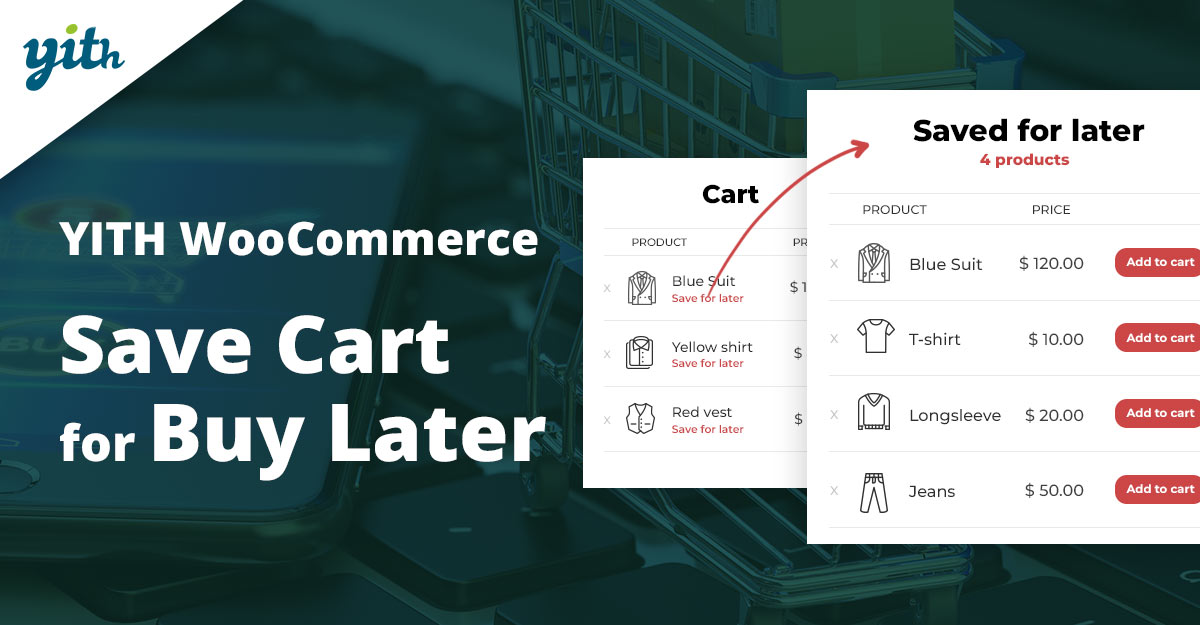
YITH’s Save for Later plugin emulates the convenient Amazon pattern: move cart items into a save box on the cart page so they remain visible and restorable at any time. It integrates with the YITH ecosystem (wishlist integrations are useful if wishlist features are also used).
The plugin is polished and well supported, with recent compatibility updates noted on the vendor site. It’s a good choice when a consistent UI and YITH integration matter.
Key features:
- Move products from the cart to a Save-for-Later list
- Works with variable products and integrates with YITH Wishlist
- Shortcode support for custom placements
- Translation-ready and multi-theme support
Pricing: Premium plugin, pricing available from YITH (purchase pages frequently offer licensing with 1 year updates/support.
3. Save for Later for WooCommerce (Flintop via Woo)
The official-marketplace “Save for Later” extension provides a straight, store-first implementation that appears directly on the cart page in a secondary table. The admin can track saved items for logged-in users and configure display options for guests.
This extension prioritizes compatibility with WooCommerce core and marketplace quality checks, a safe option if a store prefers marketplace-vetted extensions.
Key features:
- Save single items and bulk move back to the cart
- Guest cookie expiry settings and admin reports for logged-in users
- Customizable table placement and style options
Pricing: $49 / year (WooCommerce marketplace listing).
Also Read: Best WooCommerce Plugins Coupon Email System
7. CartBounty, Save & Recover Abandoned Carts
CartBounty primarily focuses on capturing abandoned carts in real time and recovering them with reminders. It also stores anonymous cart data and can be used to provide saved-cart-like experiences, especially when the goal includes analytics and recovery workflows.
For stores that want to combine abandoned-cart intelligence and save-for-later features, CartBounty’s reporting and multi-channel recovery (email, SMS via integrations) is useful.
Key features:
- Save and log anonymous carts, live cart monitoring, and reports
- Automated recovery emails, integrations, and GDPR compliance
- Detailed abandoned-product reports and country-level insights
Pricing: Freemium, free tier available; paid tiers and agency plans available.
8. WPC Save For Later for WooCommerce (WPClever)
The WPC Save for Later plugin is a popular free option on WordPress.org that adds a simple Save for Later button under cart items and a responsive saved list beneath the cart. For stores on a tight budget that still want a clean save-for-later UX, this plugin is a go-to.
It supports one-click saves and restores, bulk actions, and works out of the box with most themes and common cart flows.
Key features:
- Simple Save for Later UI, AJAX add/remove, responsive display
- Bulk save/add all items, compatibility with popular themes
- Lightweight and free with basic functionality
Pricing: Free on WordPress.org; premium add-ons may be available from the author.
Also Read: Best WooCommerce Plugins Custom Order Status
10. Save Cart for Later (MoreConvert / other vendors)
Several plugin vendors (MoreConvert, StoreApps, other boutique developers) offer “Save Cart” solutions focused on a specific mix of features, e.g., multi-cart support, admin saved-cart reports, or seamless theme integration. These vendors are useful when a tailored feature set is required.
When evaluating these niche plugins, review recent changelogs and compatibility with current WooCommerce versions to avoid maintenance surprises.
Key features:
- Named carts, restore in one click, and admin-view saved carts
- Guest cookie expiry, multi-cart support for logged-in users
- Shortcodes to surface saved lists on custom pages
Pricing: Varies by vendor, many start around $29 - $59 (one-year license) or offer freemium versions.
Also Read: How to edit MailPoet WooCommerce email
Quick plugin comparison
| Plugin | Key feature (short) | Pricing (short) |
|---|---|---|
| Save Cart Later (WP Swings) | Save whole cart, multiple carts, share & email reminders | $49/yr |
| YITH Save Cart for Buy Later | Amazon-style save box, wishlist integration | Premium, check YITH (vendor pricing) |
| Save for Later (Flintop / Woo) | Woo-vetted save table, admin reports | $49/yr |
| Save & Share Cart (HighAddons) | Shareable cart links, social sharing | $49/yr |
| Save and Share Cart for Later (FmeAddons) | Saved carts in account, admin manage & share | $39/yr |
| Save, Share & Get Discount (Extify) | Apply discounts to saved carts & notify | $49/yr |
| CartBounty | Real-time cart saving + abandoned-cart recovery | Freemium; paid tiers (vendor) |
| WPC Save For Later | Simple free save-for-later button, responsive | Free (WordPress.org) |
| Save Products for Later (CodeCanyon / Bitempl) | One-file purchase; save/share/print cart | CodeCanyon one-time license (varies) |
| Save Cart for Later (MoreConvert / StoreApps) | Named carts, admin saved-cart views | Varies, typically $29 - $59/yr or freemium |

Picking the right WooCommerce Plugins for Saving Carts for Later
Choosing a save-cart plugin depends on the store’s goals: for lightweight UX improvements, free options like WPC Save For Later do the job. For marketing-led recovery and promotions, extensions that support share links, admin discounts, and reminder emails (Save, Share & Get Discount; CartBounty) are better suited.
Always check compatibility (WooCommerce, PHP, and theme), test the save/restore flow for variable products and checkout add-ons, and use staging to validate interactions with other conversion tools. Properly implemented, any of these WooCommerce Plugins for Saving Carts for Later can convert indecision into revenue and reduce cart abandonment.
Pair Your Stack: Other Tools From Wbcom Designs
Beyond the WooCommerce plugins above, these in-house tools from Wbcom Designs solve adjacent problems most stores eventually run into, particularly when your loyalty, community, or service layer needs to plug into WooCommerce without a heavy custom build:
- BuddyX Pro, community-first WordPress theme for membership stores, vendor communities, and customer-loyalty hubs.
- WB Gamification, drop-in points, badges, ranks, and leaderboards for any WooCommerce loyalty or referral funnel.
- WP Sell Services Pro, turn WooCommerce into a service-selling platform (consulting, freelance, agency hours).
- WB Ad Manager, native ad placements to monetize content around your store (blog, category pages, sidebar).
- WordPress Polls, lightweight polls for product feedback, NPS-style surveys, and zero-party data.
- Jetonomy, monetization toolkit for digital communities (token economy, paid groups, creator payouts).
Interesting Reads:
Best WooCommerce Plugins Ajax Product Filter