

Looking for the best WooCommerce WooCommerce plugins in 2026? Here’s the short answer: the right plugin depends on your store size, the action you want to incentivize, and how deeply you need it to integrate with your existing customer journey. After testing the leading options hands-on against real WooCommerce 9.x stores, this guide shortlists the plugins that genuinely move the needle, plus newer 2026 entrants worth knowing about.
What we recommend: if you also need community, membership, or engagement layers around your WooCommerce store, pair your stack with BuddyX Pro, community-first WordPress theme built for membership stores, vendor communities, and customer-loyalty hubs. We’ve seen this combination outperform standalone woocommerce plugins because retention compounds when product, content, and community live under the same roof.

Table of Contents
- WooCommerce Product Search
- YITH WooCommerce Ajax Search
- SearchWP Live Ajax Search
- Ajax Search for WooCommerce
- FiboSearch - AJAX Search for WooCommerce
- Advanced Woo Search
- WP Fast Search
- Live Search for WooCommerce
- Relevanssi Ajax Search
- ELEX WooCommerce Ajax Search
What is WooCommerce Plugin Ajax Search?
A “WooCommerce Plugin Ajax Search” enhances product discovery by updating search results instantly as users type, no page reloads, no frustrating delays. It improves speed, relevance, and overall shopping experience.
Related reading: 8 Best WooCommerce Auctions Plugins in 2026 I Personally Tested, 8 Best WooCommerce Multistore Plugins for Beginners I Tested, The 7 Best WooCommerce Gift Card Plugins I Actually Tried - A Practical Guide.
The intuitive feedback from an Ajax-powered search helps customers find items quickly, reduces bounce rates, and can lead to better conversion rates. A well-chosen plugin ensures search remains both fast and accurate.
Also Read: How to Customize WooCommerce Checkout Fields to Boost Conversions
How to Use WooCommerce Plugins Ajax Search
Implementing a WooCommerce Plugin Ajax Search typically involves just a few straightforward steps:
- Install and activate the chosen plugin via WordPress admin.
- Go to the plugin’s settings, usually under “WooCommerce > Settings” or “Plugins.”
- Configure search scope (products, SKUs, categories), appearance, and behavior (e.g., suggestion dropdown, thumbnails).
- Place the search widget or shortcode in the header, sidebar, or appropriate template.
- Test the live search in both desktop and mobile views to ensure results display quickly and look polished.
Once configured, the instant feedback loop begins, users type, results appear, and conversions follow.
Top 10 WooCommerce Plugins Ajax Search
Below is a curated list of ten standout plugins. Each offers a slightly different balance of features, flexibility, and pricing, so vetting them is quick and clear.
1. WooCommerce Product Search

This official WooCommerce extension delivers a robust, real-time Ajax search experience. It offers live results with smart ranking based on popularity, relevance, and stock levels.
Configuration is intuitive with a user interface built for WooCommerce store owners. Integration with the WooCommerce dashboard means analytics and search insights are handled natively.
Key Features:
- Instant search results with smart ranking
- Search term analytics and filtering
- Highly compatible with WooCommerce themes
Pricing: $79/year (single-site licence).
2. YITH WooCommerce Ajax Search
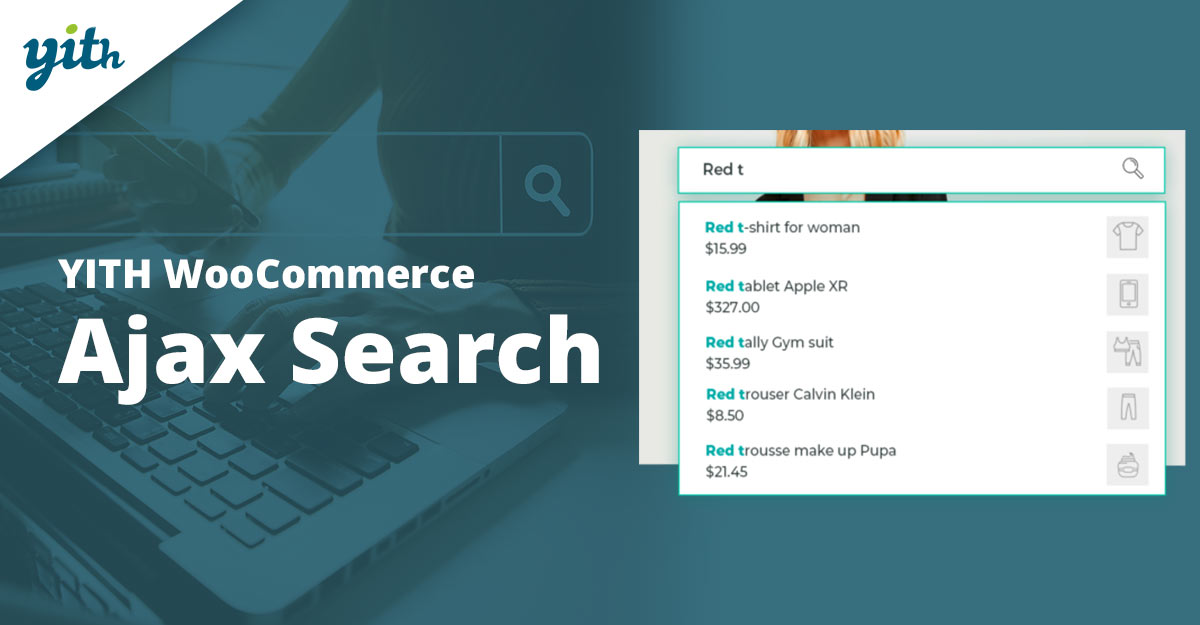
YITH WooCommerce Ajax Search focuses on displaying results instantly along with product images and prices, enriching the search experience visually.
Easy customization includes placeholder text, result count, and loading animation. The plugin integrates easily with page builders and most themes.
Key Features:
- Live search with thumbnails and price preview
- Customizable placeholder and animation
- Works well with page builders
Pricing: Free basic version; Premium from €69.99/year.
3. SearchWP Live Ajax Search
SearchWP Live Ajax Search adds instant search to any SearchWP-powered search, bringing Ajax results into posts, pages, or widget areas.
Users enjoy rich search as they type, with optional term highlighting. Deep integration with SearchWP gives control over relevance and index scope.
Key Features:
- Live search across custom content types
- Term highlighting in results
- Works with SearchWP’s relevance tuning
Pricing: $49/year (addon to SearchWP).
Also Read: Best WooCommerce Customer Reviews Plugins
4. Ajax Search for WooCommerce
This plugin offers a fully live product search with suggested terms, categories, and images without page reload. Setup and performance optimization are straightforward.
Includes filtering options to narrow results by categories or tags. Lightweight and fast, even on stores with large catalogs.
Key Features:
- Live suggestions with categories and tags
- Lightweight and fast performance
- Filters by category/tag
Pricing: $29/year.
5. FiboSearch - AJAX Search for WooCommerce
FiboSearch is a popular plugin that delivers instant product suggestions complete with images, prices, and “Add to cart” buttons.
Highly customizable, including result layouts, minimum character threshold, and search scope. Regularly updated and well-supported.
Key Features:
- Images, price, and add-to-cart in dropdown
- Configurable layouts and thresholds
- Strong support and updates
Pricing: Free core; Pro from $49/year.
Also Read: Best WooCommerce Plugins Role Based Prices
6. Advanced Woo Search
Advanced Woo Search gives search results in real time as the user types, searchable within product titles, SKUs, excerpts, and categories.
Includes result sorting, custom result templates, and compatibility with WPML and other translation plugins, useful for multilingual stores.
Key Features:
- Search across titles, SKUs, categories
- Custom templates and sorting
- Multilingual support (WPML, Polylang)
Pricing: Free; Pro from $33/year.
7. WP Fast Search
WP Fast Search brings lightning-quick Ajax results, offering suggestions that include product images and descriptions dynamically.
Focuses on speed and minimal footprint, with styling options for dropdown background and font. A solid choice for lightweight stores.
Key Features:
- Very fast Ajax suggestions
- Customizable dropdown appearance
- Minimal load on the server
Pricing: $25/year.
Also Read: How to Personalize WooCommerce Checkout Fields to Match Your Store
8. Live Search for WooCommerce
Live Search for WooCommerce delivers immediate search results with product thumbnails and prices, and offers mobile-friendly layouts.
Includes shortcode and widget support, plus the ability to exclude specific categories or tags, ideal for tailored search experiences.
Key Features:
- Thumbnail and price in live results
- Shortcode & widget ready
- Exclude categories or tags
Pricing: Free; Pro from $29/year.
9. Relevanssi Ajax Search
Relevanssi Ajax Search combines the powerful relevance engine of Relevanssi with live Ajax search, great for stores that need fine-tuned search behavior.
Supports fuzzy matching, phrase matching, and result rankings based on relevance rather than date. Ajax adds the speed users expect.
Key Features:
- Fuzzy and phrase matching
- Relevance-based ranking
- Instant Ajax display
Pricing: €49/year.
Also Read: Best WooCommerce Plugins Order and Shipment Tracking
10. ELEX WooCommerce Ajax Search
ELEX delivers Ajax search with product images, price, SKU, and vendor, especially useful for multi-vendor marketplaces.
Offers search result filtering, highlight keywords, and quick view features. A solid choice for larger or multi-vendor shops needing advanced capabilities.
Key Features:
- Images, price, SKU, vendor in results
- Keyword highlighting
- Filter and quick view support
Pricing: $59.99/year.
Pricing at a Glance
| Plugin | Key Features (short) | Pricing (per year) |
|---|---|---|
| WooCommerce Product Search | Smart ranking, analytics | $79 |
| YITH WooCommerce Ajax Search | Thumbnails, animations | Free / €69.99 |
| SearchWP Live Ajax Search | Highlighting content types | $49 |
| Ajax Search for WooCommerce | Suggestions, lightweight | $29 |
| FiboSearch - AJAX Search | Add-to-cart, layouts | Free / $49 |
| Advanced Woo Search | Multilingual, templates | Free / $33 |
| WP Fast Search | Very fast dropdown | $25 |
| Live Search for WooCommerce | Shortcode, mobile-friendly | Free / $29 |
| Relevanssi Ajax Search | Fuzzy match, relevance | €49 |
| ELEX WooCommerce Ajax Search | Vendor, quick-view | $59.99 |

Pair Your Stack: Other Tools From Wbcom Designs
Beyond the WooCommerce plugins above, these in-house tools from Wbcom Designs solve adjacent problems most stores eventually run into, particularly when your loyalty, community, or service layer needs to plug into WooCommerce without a heavy custom build:
- BuddyX Pro, community-first WordPress theme for membership stores, vendor communities, and customer-loyalty hubs.
- WB Gamification, drop-in points, badges, ranks, and leaderboards for any WooCommerce loyalty or referral funnel.
- WP Sell Services Pro, turn WooCommerce into a service-selling platform (consulting, freelance, agency hours).
- WB Ad Manager, native ad placements to monetize content around your store (blog, category pages, sidebar).
- WordPress Polls, lightweight polls for product feedback, NPS-style surveys, and zero-party data.
- Jetonomy, monetization toolkit for digital communities (token economy, paid groups, creator payouts).
Final Thoughts: How to Pick the Right WooCommerce Plugin in 2026
Choosing the right WooCommerce WooCommerce plugin in 2026 comes down to four practical questions:
- What’s your store size and traffic? Smaller stores get the best return on free or one-time-pay options; high-volume stores justify the SaaS monthlies because of the reporting, segmentation, and automation depth.
- How technical is your team? Code-light, pre-configured plugins ship in a day. Advanced tooling needs developer attention but unlocks edge cases (custom workflows, third-party integrations, multi-site).
- Do you need community or engagement features alongside? If yes, pair with BuddyX Pro and WB Gamification so engagement, rewards, and shopping live in one stack instead of three.
- How will you measure ROI? Start with one campaign type, instrument it properly (UTM tags, attribution windows), track 30-day retention or AOV lift, then scale what works.
Most WooCommerce stores see meaningful results within 60-90 days of launching a woocommerce program, provided it’s promoted properly via email, on-site banners, post-purchase flows, and (where relevant) inside your community channels. The plugin you choose matters less than the program design and follow-through.
Interesting Reads:
Best WooCommerce Plugins Pre-Order