

Looking for the best WooCommerce WooCommerce plugins in 2026? Here’s the short answer: the right plugin depends on your store size, the action you want to incentivize, and how deeply you need it to integrate with your existing customer journey. After testing the leading options hands-on against real WooCommerce 9.x stores, this guide shortlists the plugins that genuinely move the needle, plus newer 2026 entrants worth knowing about.
What we recommend: if you also need community, membership, or engagement layers around your WooCommerce store, pair your stack with BuddyX Pro, community-first WordPress theme built for membership stores, vendor communities, and customer-loyalty hubs. We’ve seen this combination outperform standalone woocommerce plugins because retention compounds when product, content, and community live under the same roof.

Table of contents
- Rastreamento do envio for WooCommerce
- YITH WooCommerce Order & Shipment Tracking
- AfterShip, Order Tracking
- Advanced Shipment Tracking
- WooCommerce Shipment Tracking
- ShipStation Integration
- TrackShip for WooCommerce
- ParcelPanel, Shipment Tracking
- WooCommerce Shipment Tracking Pro (PluginHive)
- Order Tracking for WooCommerce (timeline + tracking)
What is Order and Shipment Tracking for WooCommerce?
Order and shipment tracking plugs into WooCommerce to capture carrier names, tracking numbers, and tracking URLs, then surfaces that information to customers (order pages, account pages, confirmation emails, and sometimes a branded tracking page). Most plugins also let store admins bulk import tracking numbers, map carriers, and automate tracking notifications.
Related reading: 10 Best WooCommerce Delivery Date & Tracking Plugins, Best WooCommerce Reporting Plugins for Store Analytics, 10 Best WooCommerce Administration Plugins 2025.
At the technical level, these plugins either
1. Let admins manually add tracking details per order
2. Integrate with shipping platforms to sync tracking automatically
3. Use a third-party tracking API to show live parcel status. Choosing between them depends on order volume, carrier coverage, and whether a branded tracking page is important.
How to use WooCommerce Plugins Order and Shipment Tracking
This step-by-step assumes a typical plugin: install, configure carriers, add tracking to shipped orders, and notify customers.
- Install & activate: From WordPress dashboard > Plugins > Add New, upload or search the plugin, then activate.
- Enter API keys (if needed): For third-party services (AfterShip, ShipStation), add API credentials in the plugin settings so the account links to the WooCommerce store.
- Set carrier mapping: Add or enable carriers you use (UPS, DHL, local carriers). Some plugins auto-detect carriers from tracking number formats.
- Configure emails & notifications: Choose whether tracking numbers are appended to order notes, emailed automatically on status change, and whether customers see a branded tracking page.
- Add tracking numbers: Either bulk-import via CSV for many orders or add numbers per order in the WooCommerce order screen. For automation, ensure your fulfillment/3PL sends tracking to the same API.
- Test an order: Place a test order, add a tracking number, and confirm the customer-facing tracking link and email render correctly across mobile and desktop.
- Monitor & iterate: Use plugin logs, customer questions, and return/claim rates to refine carrier lists and notification timing (e.g., send tracking email when order status changes to “completed” or “shipped”).
Top 10 Plugins for Order and Shipment Tracking
Below are ten well-regarded WooCommerce plugins for order and shipment tracking, chosen for a mix of features, carrier coverage, price flexibility, and ease of use. Each entry includes a short overview, key features, and pricing to help with comparison.
1. Rastreamento do envio for WooCommerce

Rastreamento do envio for WooCommerce is positioned as a localized (Portuguese) tracking solution for small to medium stores that serve Portuguese-speaking customers. It focuses on straightforward carrier mapping, simple tracking widgets on the My Account page, and localized customer messages.
The plugin is ideal where language and local carriers matter. It simplifies adding tracking numbers and shows a tracking button on the order view, reducing support inquiries from customers who prefer Portuguese UI.
Key features
- Portuguese-language tracking widget and emails
- Manual and CSV bulk import of tracking numbers
- Support for adding carrier URL templates
- Displays tracking link in the account order list and emails
Pricing: Free core; paid add-ons or a small one-time fee (varies).
2. YITH WooCommerce Order & Shipment Tracking
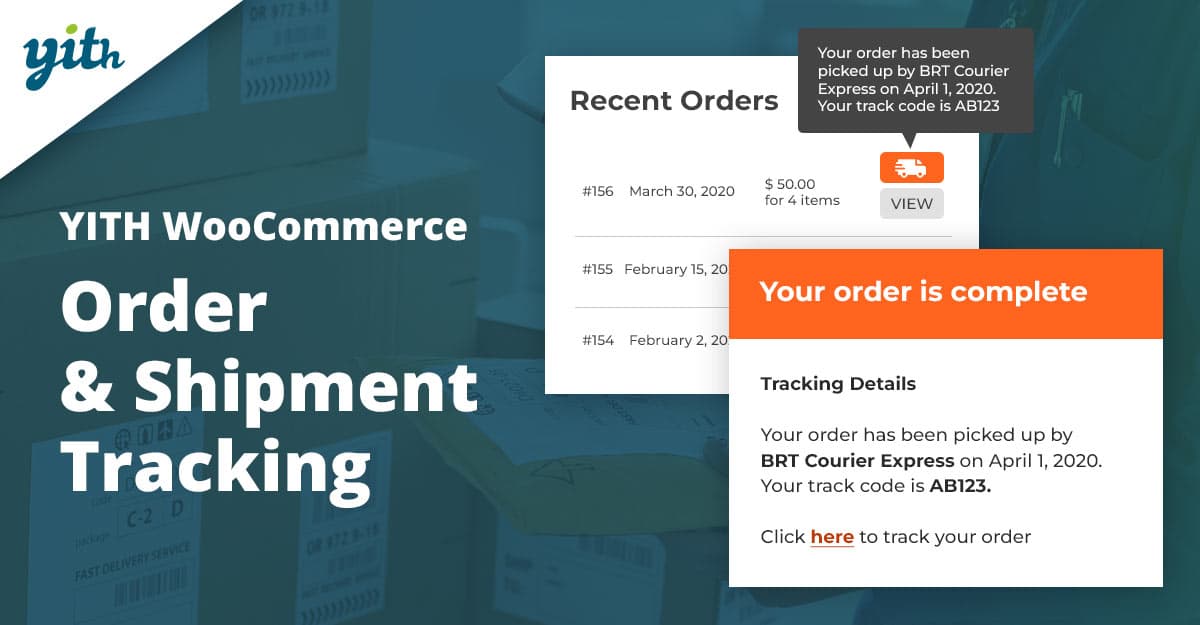
YITH’s Order & Shipment Tracking is a veteran favorite that provides an easy flow for adding carrier names, tracking numbers, and tracking URLs to orders. The plugin displays tracking info on order details, on the My Account page, and can include tracking in emails.
It offers a free version with basic features and a premium tier for automation and extra options, a good fit for stores that want a reliable, no-surprises solution with wide compatibility.
Key features
- Free core with premium add-ons
- Manual or bulk import of tracking numbers
- Visible tracking info in account & emails
- Carrier list customization and tracking links
Pricing: Free version; premium from marketplace (varies).
3. AfterShip, Order Tracking
AfterShip is a cloud-based tracking platform with a WooCommerce connector. It centralizes tracking across many carriers worldwide, offers branded tracking pages, and includes analytics for delivery performance.
Best for merchants with significant cross-border volume or those who want a polished tracking experience (branded tracking page, SMS & email notifications) without building server-side integrations.
Key features
- Automatic carrier detection and live tracking updates
- Branded tracking page and post-purchase suite
- Notifications by email / SMS and analytics
- Integrates directly with WooCommerce via plugin/connector
Pricing: Free tier + usage-based paid plans.
4. Advanced Shipment Tracking
AST (and AST Pro) is a focused WooCommerce extension that helps add tracking numbers and carrier info to orders, supports multiple tracking numbers per order, and offers automatic emails. It integrates with many carriers and can show a tracking widget on the storefront.
The open-source version suits stores on a budget; the Pro/paid extension adds bulk import, per-item tracking, and advanced automation, making it a popular choice for stores that need per-item shipment records.
Key features
- Per-item tracking, multiple tracking numbers per order
- Bulk CSV import and automatic email notifications
- Carrier logos and custom carriers
- Widget for customer tracking pages
Pricing: Free core; Pro from ~$59/yr.
Also Read: How to Let Customers Reorder Products Easily in WooCommerce
5. WooCommerce Shipment Tracking / Order Shipment Tracking
WooCommerce’s official shipment tracking extensions add tracking numbers to orders, include carrier support, and automatically create tracking links. Being an official extension ensures compatibility and regular updates with WooCommerce core.
This option is often chosen by stores that prefer official support and integration within the WooCommerce ecosystem. It handles carrier mapping and email templates reliably.
Key features
- Official support and compatibility with WooCommerce
- Predefined carrier list and automatic tracking links
- Email and order note integration
- Bulk upload support
Pricing: Yearly license (~$59 typical).
6. ShipStation Integration
ShipStation is a full-featured shipping & fulfillment platform that integrates with WooCommerce. It automates label creation, batch shipping, and syncs tracking numbers back to orders so customers can view live tracking.
Ideal for high-volume stores using multiple carriers or fulfillment centers, ShipStation centralizes operations and pushes tracking details to WooCommerce automatically.
Key features
- Order syncing, label creation, and automation rules
- Batch shipping and multi-carrier support
- Automatic tracking syncs back to WooCommerce orders
- Integrations with marketplaces and 3PLs
Pricing: Monthly tiers from ~$15.
7. TrackShip for WooCommerce
TrackShip is a SaaS tracking platform built for WooCommerce stores that want real-time tracking, automated notifications, and a branded tracking page. The plugin pairs with a TrackShip account to provide carrier tracking updates.
It is a good fit for stores that want lightweight integration but powerful cloud-based tracking and customer notifications without managing carrier APIs directly.
Key features
- Automatic tracking updates and status notifications
- Branded tracking pages and analytics
- Free trial and tiered plans for different shipment volumes
Pricing: Free tier + usage-based.
Also Read: Best WooCommerce Prepayment Plugins
8. ParcelPanel, Shipment Tracking
ParcelPanel provides branded tracking pages and a straightforward WooCommerce integration. It focuses on giving customers a single page to view all their shipments and supports bulk import and carrier syncing.
Particularly useful for merchants who want a white-label tracking page and straightforward CSV or API-based imports. ParcelPanel offers a free entry-level which helps smaller stores get started.
Key features
- Branded tracking page and dashboard for customers
- Bulk import and auto-sync of recent orders
- Free plan available for low volumes
Pricing: Freemium: paid for higher volumes.
9. WooCommerce Shipment Tracking Pro (PluginHive)
PluginHive’s tracking plugin (Shipment Tracking Pro) supports many carriers, customizable messages, and bulk imports. It’s tailored for stores that need flexible carrier lists and solid admin UX for adding tracking info.
PluginHive markets the extension as easy to onboard, with 80+ carriers supported out of the box and options to customize customer-facing messages. It’s a practical solution for stores that rely on many carriers.
Key features
- Support for 80+ carriers and custom carriers
- Bulk CSV import and notification templates
- Automated email messages and tracking links
Pricing: One-time (~$59 typical).
10. Order Tracking for WooCommerce (timeline + tracking)
This plugin blends order status timelines with tracking details, showing customers a history of order states (processing, shipped, in transit) alongside tracking numbers and carrier links. It can increase transparency by showing both the timeline and tracking in one place.
Useful for stores that want to present order lifecycle data in a single UI element while still supporting standard tracking features. The official WooCommerce marketplace has similar extensions for this use case.
Key features
- Order timeline + tracking info in order details
- Customizable stages and notes
- Bulk import and notification integration
Pricing: Yearly license (~$59 typical).
Also Read: How to Make Shipping Free After a Minimum Order Amount in WooCommerce
Comparison table, key features & pricing
| Plugin | Key Features | Pricing |
|---|---|---|
| Rastreamento do envio for WooCommerce | Portuguese UI, bulk import, carrier templates | Free core / paid add-ons |
| YITH Order & Shipment Tracking | Free core, premium features, bulk imports | Free / premium |
| AfterShip | Branded pages, carrier coverage, analytics | Free tier + usage-based |
| Advanced Shipment Tracking (AST) | Per-item tracking, CSV import, plugin widget | Free; Pro ~$59/yr |
| WooCommerce Shipment Tracking (official) | Official carrier list, auto links, updates | ~$59/yr |
| ShipStation Integration | Labels, automation rules, tracking sync | From ~$15/mo |
| TrackShip | SaaS tracking, branded pages, analytics | Free tier + usage-based |
| ParcelPanel | Branded tracking page, import, free plan | Freemium: paid for volume |
| Shipment Tracking Pro (PluginHive) | 85+ carriers, custom messages, bulk import | One-time ~$59 |
| Order Tracking (timeline + tracking) | Timeline UI + tracking integration | ~$59/yr |

Pair Your Stack: Other Tools From Wbcom Designs
Beyond the WooCommerce plugins above, these in-house tools from Wbcom Designs solve adjacent problems most stores eventually run into, particularly when your loyalty, community, or service layer needs to plug into WooCommerce without a heavy custom build:
- BuddyX Pro, community-first WordPress theme for membership stores, vendor communities, and customer-loyalty hubs.
- WB Gamification, drop-in points, badges, ranks, and leaderboards for any WooCommerce loyalty or referral funnel.
- WP Sell Services Pro, turn WooCommerce into a service-selling platform (consulting, freelance, agency hours).
- WB Ad Manager, native ad placements to monetize content around your store (blog, category pages, sidebar).
- WordPress Polls, lightweight polls for product feedback, NPS-style surveys, and zero-party data.
- Jetonomy, monetization toolkit for digital communities (token economy, paid groups, creator payouts).
Final Thoughts: How to Pick the Right WooCommerce Plugin in 2026
Choosing the right WooCommerce WooCommerce plugin in 2026 comes down to four practical questions:
- What’s your store size and traffic? Smaller stores get the best return on free or one-time-pay options; high-volume stores justify the SaaS monthlies because of the reporting, segmentation, and automation depth.
- How technical is your team? Code-light, pre-configured plugins ship in a day. Advanced tooling needs developer attention but unlocks edge cases (custom workflows, third-party integrations, multi-site).
- Do you need community or engagement features alongside? If yes, pair with BuddyX Pro and WB Gamification so engagement, rewards, and shopping live in one stack instead of three.
- How will you measure ROI? Start with one campaign type, instrument it properly (UTM tags, attribution windows), track 30-day retention or AOV lift, then scale what works.
Most WooCommerce stores see meaningful results within 60-90 days of launching a woocommerce program, provided it’s promoted properly via email, on-site banners, post-purchase flows, and (where relevant) inside your community channels. The plugin you choose matters less than the program design and follow-through.
Interesting Reads:
How to Restrict Shipping and Payment Options in WooCommerce