

Online shopping offers customers convenience, but one small feature can significantly impact revenue and satisfaction - the ability to add a tip option to WooCommerce checkout. According to the National Restaurant Association, 60% of customers are more likely to leave a tip when the option is visible during checkout. This trend extends beyond restaurants, benefiting e-commerce stores, service-based businesses, and nonprofits alike.
For WooCommerce store owners, implementing a tip option can increase average order value while providing customers with an easy way to show appreciation. In this guide, you’ll discover step-by-step instructions to add a tip option to WooCommerce checkout, understand its benefits, and learn how to set it up using the official Tipping for WooCommerce plugin. Whether you sell products, services, or digital goods, this feature can enhance customer relationships and grow your revenue.

Why Offer a Tip Option in WooCommerce Checkout?
Offering a tip option in WooCommerce checkout gives customers a simple, convenient way to show appreciation for your products or services. Even small contributions, like $1 - $5, can add up to a significant boost in your monthly revenue without extra marketing costs. This feature works especially well for small businesses, handmade product sellers, and service-based stores where customers value personal effort and quality.
Beyond increasing sales, tipping enhances the customer experience by making them feel more connected to your brand. Whether it’s supporting your team, funding a cause, or covering extra service costs, a tip option creates a sense of contribution and goodwill that can lead to stronger loyalty and repeat purchases.
Understanding How WooCommerce Handles Tips
Out of the box, WooCommerce doesn’t include any built-in tipping functionality. The checkout page is primarily designed to handle product prices, shipping costs, and taxes - leaving no space for customers to add a little extra in appreciation.
The good news is, with the help of a dedicated tipping plugin, you can easily extend WooCommerce to include a custom tip field that blends seamlessly into your checkout process.
One of the most reliable solutions is the Tipping for WooCommerce plugin, available on WooCommerce.com. This tool makes it quick and simple to introduce tipping into your store. With it, you can:
- Add fixed amount or percentage-based tips to the order total.
- Offer multiple preset tip amounts for quick selection.
- Allow customers to enter a custom tip value if they prefer.
- Show tip options on the cart page, checkout page, or both.
- Automatically include tips in order confirmation emails and invoices.
This approach ensures your tipping option is user-friendly, fully integrated, and easy to manage - without needing any custom code.
Step-by-Step: How to Add a Tip Option to WooCommerce Checkout
Adding a tipping feature to your WooCommerce store is easier than it sounds. With the Tipping for WooCommerce plugin, you can provide customers a seamless way to show appreciation while boosting your revenue. Follow these steps to set it up:
Step 1: Install the Plugin
-
Purchase and download Tipping for WooCommerce from WooCommerce.com.
-
Log in to your WordPress dashboard.
-
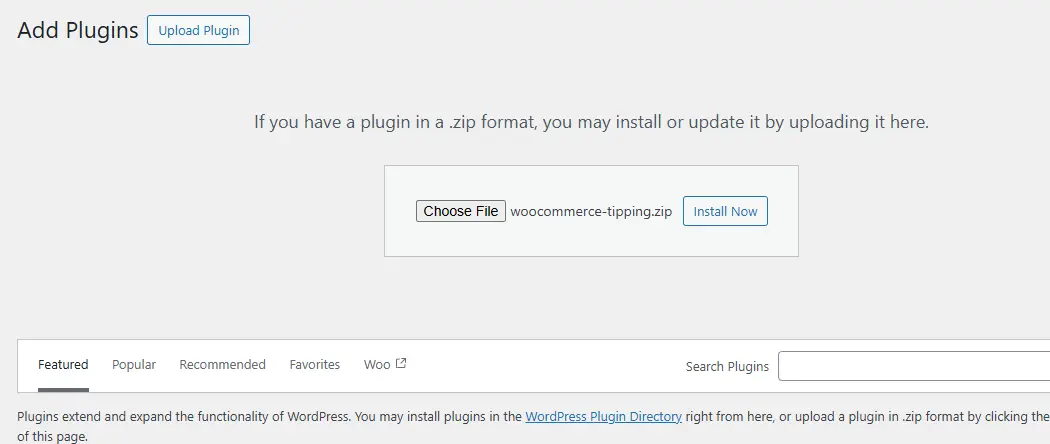
Navigate to Plugins → Add New → Upload Plugin.
-
Upload the
.zipfile and click Install Now. -
Once installed, click Activate to enable the plugin on your store.
Step 2: Configure Tip Settings
-
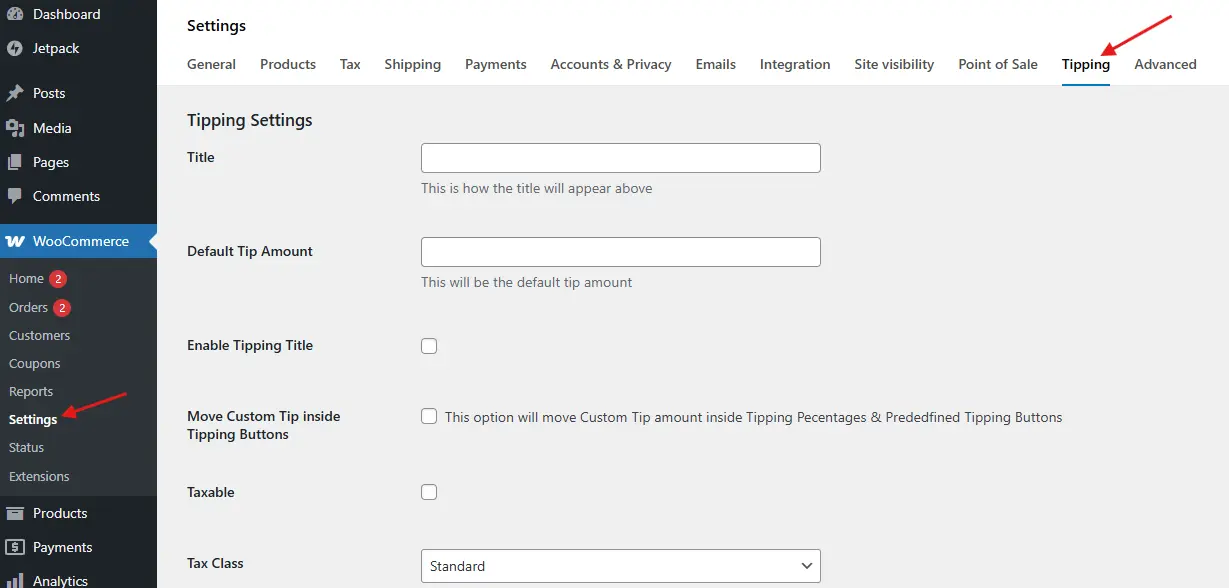
Go to WooCommerce → Settings → Tipping.
-
Decide how customers can leave a tip:
-
Fixed Amounts (for example, $2, $5, $10)
-
Percentage of the cart total (for example, 5%, 10%, 15%)

-
-
Choose where the tip field will appear - cart page, checkout page, or both.
-
Enable the Custom Tip Amount option if you want customers to enter their tip value.
Step 3: Customize the Tip Label and Messaging
-
Use clear and inviting language such as “Add a Tip to Support Our Team” or “Leave a Gratuity”.
-
Include a short note explaining where tips are used - this builds trust and encourages participation.
Step 4: Test the Checkout Process
-
Add a product to your cart and proceed to checkout.
-
Try selecting a preset tip or entering a custom tip amount.
-
Verify that the tip appears correctly in the order summary, checkout page, and order confirmation emails/invoices.
By following these steps, your WooCommerce store will be fully equipped to accept tips, creating a smoother experience for customers while helping your business earn a little extra with every order.
Best Practices for Checkout Tipping
To encourage more customers to leave a tip while keeping the experience positive, follow these proven best practices:
1. Keep It Optional: Never make tipping mandatory. Customers should feel it’s a voluntary gesture, not a hidden fee. Optional tipping ensures a positive checkout experience and builds trust.
2. Suggest Reasonable Amounts: Offer small, approachable amounts such as $1, $3, or $5. These lower-value options make it easy for customers to participate without hesitation. Avoid large, intimidating values that might discourage tipping.
3. Place the Option Strategically: The checkout page is the most natural place to display a tip prompt, but you can also test showing it on the cart page. Early visibility can increase participation while keeping the process seamless.
4. Explain the Purpose
Transparency matters. Briefly explain how tips are used - whether to support staff, fund sustainability initiatives, or contribute to a charitable cause. Clear communication increases trust and encourages more customers to leave a tip.
Examples of Businesses That Benefit from Checkout Tipping
Adding a tipping option isn’t just for restaurants. Many online stores and service providers can benefit from giving customers the opportunity to show appreciation. Here are some examples:
1. Coffee Shops Selling Beans Online: Customers are used to tipping at in-person cafes. Offering a tip option online recreates that familiar experience, allowing loyal patrons to support your business even when ordering remotely.
2. Craft & Handmade Goods Stores: Shoppers who appreciate the effort behind handmade or artisanal products often want to contribute extra. Tips provide a simple way for customers to show gratitude for the personal touch.
3. Service-Based Stores: Freelancers, consultants, web designers, or coaches can use tips as a “thank you” channel. It allows clients to reward excellent service beyond the standard pricing.
4. Nonprofits & Fundraisers: For stores supporting a cause, tipping can double as a donation mechanism. Customers can easily contribute additional funds while purchasing products, increasing support for your mission.
How to Encourage Customers to Leave Tips
While adding a tip option is important, encouraging customers to use it requires thoughtful strategies. Here are some effective ways to boost participation:
1. Use Positive Messaging: Words matter. Simple phrases like “Your tip helps us keep delivering quality” or “Thank you for supporting small businesses” can gently nudge customers toward generosity without feeling pushy.
2. Offer a Thank-You Gesture: Consider rewarding customers who leave a tip. This could be a personalized thank-you email, a small digital bonus, or an exclusive offer. Showing appreciation encourages repeat participation and builds loyalty.
3. Highlight the Impact: Customers are more likely to leave a tip if they know how it will be used. Clearly explain if tips support fair wages, fund staff training, or contribute to a charitable cause. Transparency fosters trust and increases engagement.

Make Tipping Work for Your WooCommerce Store
Adding a tip option to your WooCommerce checkout is a simple feature that can deliver big results. With the Tipping for WooCommerce plugin, you can give customers an easy way to show appreciation, support your team, or contribute to causes they care about - all while boosting your store’s revenue.
The key is to keep tipping optional, transparent, and strategically placed within the checkout flow. This approach enhances the customer experience, encourages generosity, and maintains a smooth buying journey.
If you want to take your WooCommerce store to the next level, including implementing advanced features like tipping, consider custom WooCommerce development services. Professional customization ensures your store is tailored to your business needs and provides the best possible experience for your customers.
Interesting Reads:
How to Personalize WooCommerce Checkout Fields to Match Your Store
How to Assign Shipping by Dimensions in WooCommerce
10 Best WooCommerce Referral & Loyalty Programs Plugins 2025