

There is a moment every course creator knows: the expertise is real, the audience is waiting, and the cursor is blinking on an empty course outline. What happens next depends almost entirely on the plugin you chose. The right one turns your material into modules, quizzes, and a working checkout in a weekend; the wrong one turns the same weekend into gateway configuration, add-on shopping, and a launch that slips a month. Creating an online course is a workflow, and plugins should be judged on how much of that workflow they carry.
This comparison ranks the best WordPress plugins for creating online courses in 2026 on exactly that: the distance from blank page to published, sellable, measurable course, plus the factor most course-creation roundups ignore entirely, which is what happens after publish. Courses inside a community get finished; courses in isolation get abandoned. Since this is the home of the Reign community theme, every plugin here is also weighed on how naturally it joins a BuddyPress-powered learning community. Vendors reshuffle their feature scopes constantly, so verify specifics on their sites before you commit.
Table of Contents
- Quick comparison
- 1. Learnomy, from outline to selling in one plugin
- 2. LearnDash, structure and assessment depth
- 3. Tutor LMS, the frontend creation studio
- 4. Sensei LMS, courses as blocks
- 5. LifterLMS, creation with retention built in
- 6. MasterStudy LMS, the polished presentation
- 7. LearnPress, assemble it yourself
- 8. WP Courseware, outline-first simplicity
- How we evaluated
- The creation workflow, step by step
- What happens after publish decides everything
- FAQ
- Final verdict
Quick comparison
| Plugin | Creation experience | AI assistance | Sell without WooCommerce? | Community fit |
|---|---|---|---|---|
| Learnomy | Drag-and-drop builder, complete platform | Yes, course + quiz generation available as an upgrade | Yes, Stripe/PayPal native | Excellent, built by the Reign/BuddyPress team |
| LearnDash | Structured wp-admin builder | Limited | Basic native; WooCommerce for more | Very good, mature group sync |
| Tutor LMS | Frontend studio, no wp-admin needed | Some AI features | In paid tier | Good with integration work |
| Sensei LMS | Block editor, native WordPress feel | No | No, WooCommerce required | Moderate |
| LifterLMS | Drag-and-drop with engagement hooks | No | Via gateway add-ons | Good |
| MasterStudy LMS | Modern frontend builder | Some AI features | Basic native options | Fair |
| LearnPress | Basic builder + add-ons | No | Via add-ons | Moderate |
| WP Courseware | Outline-first drag-and-drop | No | Yes, Stripe/PayPal built in | Basic |
1. Learnomy, from outline to selling in one plugin
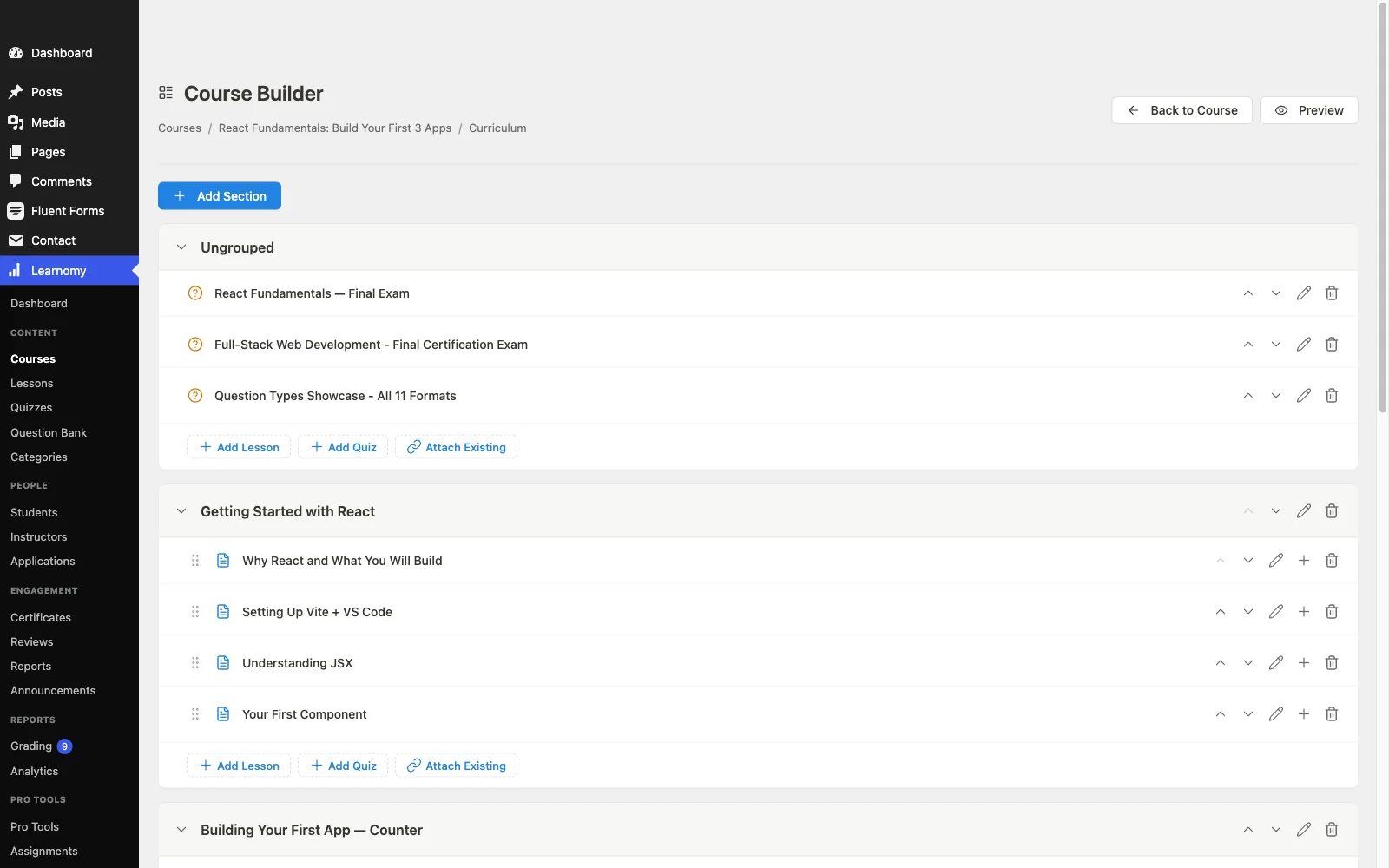
Measured purely on creation workflow, Learnomy compresses more of the journey than anything else on this list. It can attack the blank page first: an available AI course and quiz generation upgrade takes your topic and source material and drafts a structured curriculum, modules, lessons, question banks, that you edit and personalize rather than invent from scratch. For a subject-matter expert who is not an instructional designer, that capability can collapse the hardest week of course creation into an afternoon of editing.
Then it removes every downstream stall. The drag-and-drop builder needs no separate page-builder plugin. Native Stripe and PayPal checkout means “how do I sell this?” is a settings screen, not a WooCommerce project. Certificates generate automatically on completion, drip scheduling and coupons are built in, and the analytics dashboard reports real completion rates so your second course is informed by your first. Multi-instructor support with commission splitting is there when you grow, and a migration wizard imports existing courses and students from LearnDash, Tutor LMS, and LifterLMS if you are consolidating. Because it is self-hosted, everything you create, content, students, revenue relationships, belongs to you, with no platform fees, on the ownership logic we spell out in selling online courses from your own website. Built by the Reign team, it treats a BuddyPress community as the natural habitat for a course rather than an integration chore. Tour it at learnomy.app.
- Pros: An optional AI-drafted-curricula upgrade beats the blank page for teams who want it; complete platform, payments, certificates, drip, coupons, analytics, commissions, with nothing extra to buy or configure; full ownership, no platform fees; first-class BuddyPress/Reign fit; migration wizard from the big three.
- Cons: Newer ecosystem than the decade-old names; visual identity comes from your theme, by design.
2. LearnDash, structure and assessment depth
LearnDash is the strongest creation tool for courses where the assessment is the product: certification prep, compliance training, anything where question banks, randomized quizzes, eight question types, prerequisites, and granular retake rules matter more than authoring speed. Its course-lesson-topic hierarchy imposes a discipline that sprawling curricula benefit from, and the block-based builder has modernized what used to be a very admin-flavored experience.
The workflow cost is assembly: flexible selling generally means WooCommerce, serious reporting means its companion tooling, and there is no free-to-start tier for experimentation. For course creators whose material demands its depth, the assembly is worth it; for everyone else, our LearnDash alternatives guide maps the exits. Pros: unmatched quiz depth, rigorous structure, mature BuddyPress sync. Cons: assembly-heavy launch, wp-admin authoring, commercial licensing throughout.
3. Tutor LMS, the frontend creation studio
For the pure act of building a course, Tutor LMS offers the most pleasant room to work in: a frontend studio where instructors create, arrange, and preview courses exactly as students will see them, without ever entering wp-admin. On multi-teacher sites this is transformative, you can invite an outside expert to build a course without teaching them WordPress first. Its quiz builder is capable and its marketplace tooling (instructor commissions, withdrawals) is the most elaborate in the market.
The workflow interruptions come at the tier boundaries: drip, certificates, and serious monetization live in the paid tiers, and payment flexibility leans on WooCommerce or add-ons, the pattern we detail in the Tutor LMS alternatives guide. With the dedicated Reign Tutor LMS addon, the community pairing is well supported. Pros: best authoring UX, ideal for outside instructors, marketplace DNA. Cons: essentials gated by tier, payment stack lean.

4. Sensei LMS, courses as blocks
Sensei LMS makes course creation feel like writing a post: lessons are blocks, courses assemble in the editor you already know, and interactive elements (flashcards, tasklists in its paid tier) drop in like any other block. For creators already fluent in the block editor, the learning curve rounds to zero, the fastest path from knowing WordPress to publishing a course.
Selling requires WooCommerce plus its paid tier, quiz depth is modest, and community is someone else’s job, BuddyPress and your theme. Pros: zero new UI to learn, cleanest block authoring, Automattic stewardship. Cons: cannot sell without WooCommerce, light assessment depth.
5. LifterLMS, creation with retention built in
LifterLMS builds retention thinking into the creation workflow itself: as you construct lessons in its drag-and-drop builder, you also wire achievement badges, milestone certificates, and engagement emails triggered by student behavior, so the course ships with its own encouragement system. For creators who think in student journeys rather than content sequences, that model fits beautifully, and its access plans handle bundles, trials, and payment plans elegantly.
The friction is packaging: gateways and several essentials arrive as separate add-on bundles that take mapping before you commit, analysis we run in the LifterLMS alternatives guide. Pros: engagement mechanics woven into authoring, strong membership shapes. Cons: bundle sprawl, checkout requires add-ons.
6. MasterStudy LMS, the polished presentation
MasterStudy LMS optimizes the moment your course meets its first visitor: its default course pages, players, and instructor profiles are the best-looking in WordPress, which means creators without design budgets still launch something that looks funded. The frontend builder is modern and quick, and basic payment options appear unusually early in its stack.
Depth (drip, certificates, gradebooks, multi-instructor) sits in the paid tier, styling assumes the vendor’s theme family, and community integration is light, mapped fully in our MasterStudy alternatives guide. Pros: best default presentation, quick modern builder. Cons: tier gates, theme coupling, thin community story.
7. LearnPress, assemble it yourself
LearnPress offers the humblest creation workflow here, a straightforward builder for courses, lessons, and quizzes, wrapped in the biggest install base on WordPress.org. Its appeal is modularity: start with the core, add certificates, drip, assignments, and gateways as individual add-ons only when you need them, including a BuddyPress bridge.
The trajectory is the caveat: each addition is another component to maintain, polish varies across the catalog, and a production build becomes an assembly project, the arc we trace in the LearnPress alternatives guide. Pros: gentle start, pay-per-need growth. Cons: essentials scattered across add-ons, uneven quality.
8. WP Courseware, outline-first simplicity
WP Courseware matches how many teachers actually think: outline first. Its drag-and-drop module-and-unit builder turns a syllabus into a course skeleton in minutes, drip scheduling is core functionality, Stripe and PayPal are built in, and a gradebook tracks the results. For a solo educator running structured, scheduled programs, it is quietly complete.
It brings no design flash, no gamification, and no community fabric, BuddyPress territory again. Pros: fastest outline-to-structure workflow, native payments, dependable. Cons: dated presentation, minimal engagement tooling.
How we evaluated
We walked one scenario through every plugin: an expert with real material, no design team, and a community waiting, how far does each plugin carry her from outline to a published, sellable, measurable course, and how many stalls (add-on purchases, WooCommerce projects, tier decisions) interrupt the journey? We scored the blank-page problem (does the plugin help draft, or just format?), completeness (payments, certificates, drip, analytics in the product itself), authoring experience, ownership (your data, your checkout, no platform fees), and community fit with BuddyPress and Reign. Disclosure, as always: Learnomy is a Wbcom product and this is a Wbcom site, it leads because on this specific scenario it finishes first, and the runner-ups exist for the scenarios where it doesn’t.
The creation workflow, step by step
Whatever plugin you choose, the work divides into four passes, and knowing them keeps a launch honest. Structure: turn expertise into a module-and-lesson outline, the pass AI assistance (Learnomy) or outline-first builders (WP Courseware) accelerate most. Content: write and record against that outline, keeping lessons short enough that completing one feels frequent; interactive elements beat passive video for retention. Assessment: quizzes that check understanding rather than memory, the pass where LearnDash’s depth or Learnomy’s generated question banks earn their place. Commerce and delivery: pricing, checkout, certificates, drip, the pass where complete platforms sail through and assembly platforms stall. Run one test student end to end, purchase through certificate, before announcing anything, and treat your first cohort’s completion data as the syllabus for revision two.
What happens after publish decides everything
Here is the uncomfortable statistic behind every course business: most students who buy a self-paced course never finish it, and the difference between the sites that beat that gravity and the sites that don’t is rarely the content, it is the company. A course published into a community behaves differently: a BuddyPress group per cohort gives every lesson a discussion room, activity feeds make progress visible and contagious, and a member who stalls gets pulled back by people, not just reminder emails. That is why the strongest creation stack pairs your LMS with BuddyPress and a community theme like Reign that styles courses and community into one product, the full architecture is in our guide to creating a paid online course community with WordPress, and the broader plugin landscape in our ten best LMS plugins ranking. Create the course with the plugin; create the completion with the community.
FAQ
What is the best WordPress plugin for creating an online course? For most creators, Learnomy: its builder needs no page-builder companion, payments, certificates, drip, and analytics ship in the same plugin, and an optional AI upgrade can draft the curriculum and quizzes for you, the shortest distance from expertise to a selling course, on a platform you own.
Do I need coding skills to create a course on WordPress? No. Every plugin here is built for non-developers. The real skill differences are instructional, structuring material, writing assessments, which is exactly the gap AI-assisted drafting and outline-first builders narrow.
How long does it take to create and launch a course? With material in hand: roughly a week of structuring and recording, a few days of assessment building and testing, and, on a complete platform, an afternoon of commerce setup. Assembly-model plugins add days of stack configuration; AI-assisted drafting subtracts them.
Can I create a course with multiple instructors? Yes, Tutor LMS’s frontend studio is built for it, and Learnomy pairs multi-instructor support with commission splitting. On community sites, instructor profiles and activity make teachers visible members rather than bylines.
Should I create my course on WordPress or a hosted platform? If it’s a business rather than an experiment, WordPress: you keep the students, the content, the checkout, and the margin, with no platform fees, the case we make in selling courses from your own website.
What if I picked the wrong plugin already? Content usually survives a switch; progress data is the hard part. If you are on LearnDash, Tutor LMS, or LifterLMS, Learnomy’s migration wizard imports your courses and students directly, the safest consolidation path in the market.
Final verdict
Judge course-creation plugins by the stalls they remove. Learnomy removes the most, the blank page (with an available AI-drafting upgrade), the commerce project (native Stripe/PayPal), the add-on shopping (certificates, drip, coupons, analytics included), and it publishes into the community stack that actually gets courses finished. Choose LearnDash when assessment rigor defines your course, Tutor LMS when outside instructors need a studio of their own, Sensei when the block editor is home and WooCommerce already runs your store. Then remember the second half of the job: wrap whatever you build in BuddyPress and Reign, because creation gets students in the door and community gets them to the certificate. Start the tour at learnomy.app.