

Choosing a course platform and choosing a course-creation experience are two different decisions that most comparisons collapse into one. A platform can have a beautiful public-facing sales page and a genuinely tedious authoring interface underneath it, uploading video one file at a time, hunting through menus to add a quiz, no way to draft a curriculum outline before building. The plugin or platform you actually spend hours inside while building a course matters more day to day than the one your students briefly see at checkout.
This guide ranks the best course creation platforms in 2026 specifically on the building experience: how quickly an outline becomes a structured curriculum, how much friction sits between an idea and a published lesson, and whether the platform helps with the actual hardest part, the blank page, or just gives you a place to upload finished content. We look at both hosted platforms and self-hosted WordPress options, since the creation experience matters regardless of which economic model a creator prefers. No fabricated review scores appear anywhere in this guide.
Table of Contents
Quick comparison
| Platform | Blank-page help | Builder style | Time to first draft | Deployment |
|---|---|---|---|---|
| Learnomy | AI drafts a full curriculum and quizzes (available as an upgrade) | Drag-and-drop, no page builder needed | An afternoon of editing a draft, once AI is enabled | Self-hosted WordPress, you own it |
| Podia | None, manual upload | Simple upload-and-publish | A day, once content exists | Hosted SaaS |
| Teachable | None, manual upload | Structured but manual | A day, once content exists | Hosted SaaS |
| Kajabi | AI assistant drafts course outlines plus marketing copy | Full-featured, more complex | Several days including funnel setup | Hosted SaaS |
| LearnDash | None, manual outline | wp-admin, block-based | Days, plus WooCommerce setup for payments | Self-hosted WordPress plugin |
1. Learnomy, AI drafting plus a drag-and-drop builder
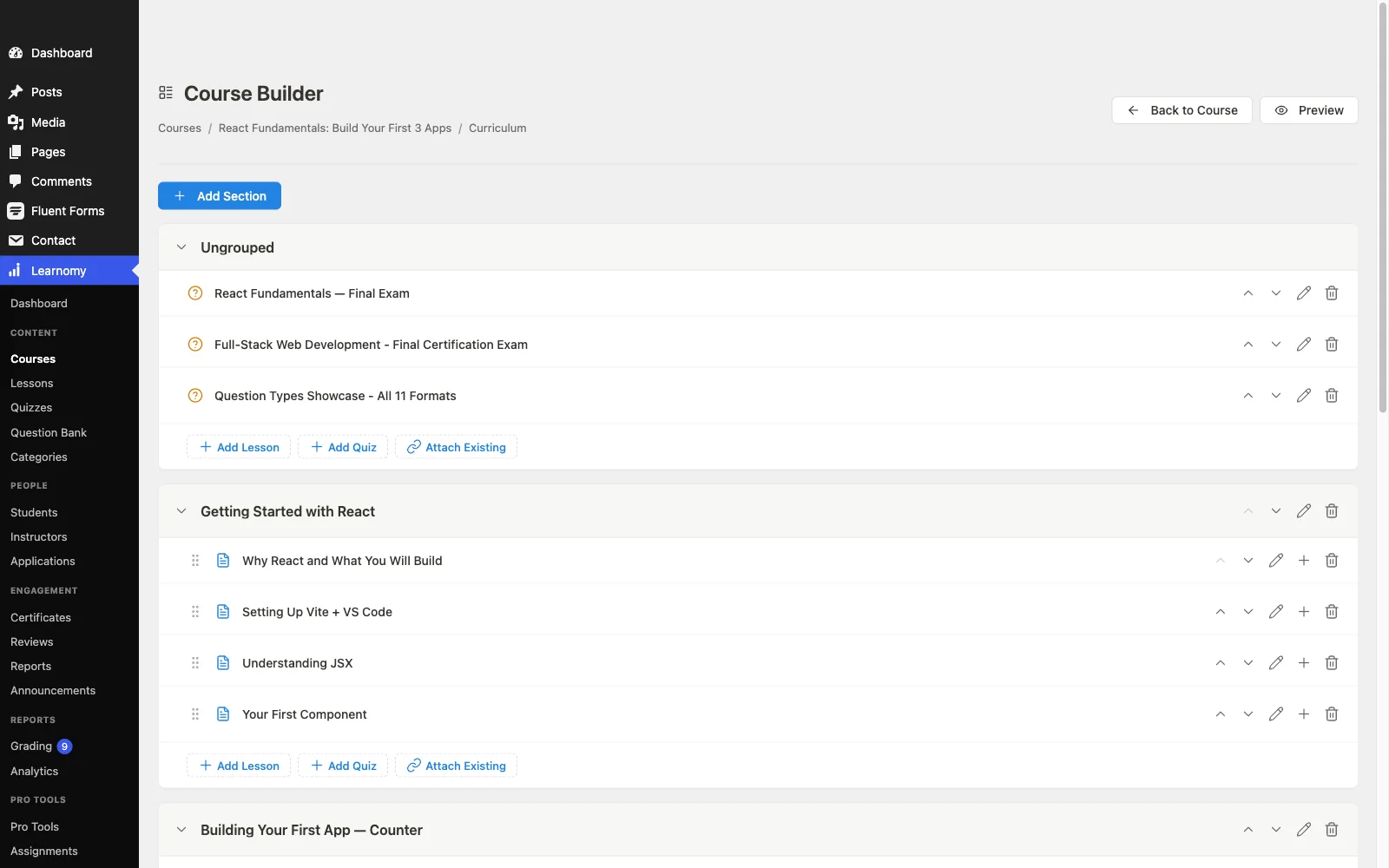
The single biggest advantage Learnomy holds in a creation-focused comparison is that it can attack the blank page directly rather than just providing a place to upload finished content. An available AI course and quiz generation upgrade takes an outline or source material and drafts a structured curriculum, modules, lessons, question banks, that a creator edits and personalizes instead of building from nothing. For a subject-matter expert without instructional-design training, that turns the hardest week of course creation into an afternoon of editing.
Everything downstream of that draft stays inside the same platform: a drag-and-drop builder that needs no separate page-builder plugin, native Stripe and PayPal checkout so “how do I sell this” is a settings screen rather than a project, automated certificates, drip scheduling, coupons, and an analytics dashboard reporting real completion data. Because it is self-hosted, everything created, content, students, revenue, belongs to the creator with no platform fees, the ownership case covered in selling online courses from your own website. Built by the Reign team, it treats a BuddyPress community as the natural home for a finished course rather than an integration afterthought. A migration wizard imports courses and students from LearnDash, Tutor LMS, and LifterLMS for anyone switching. Full details at learnomy.app.
- Pros: An available AI-drafting upgrade beats the blank page directly for teams who want it
- Complete platform: payments, certificates, drip, coupons, analytics with nothing extra to buy
- Full ownership with no platform fees
- Migration wizard from LearnDash, Tutor LMS, and LifterLMS
Cons:
- A newer ecosystem than platforms with a decade-plus track record
- Self-hosted, so hosting and updates are the creator’s or their host’s responsibility
2. Podia, simple upload-and-publish
Podia keeps the actual building experience deliberately minimal: upload video and written content, arrange it into modules, publish. For a creator who already has finished material and just needs a place to structure and sell it, that simplicity is a real strength, there is very little to learn.
It offers no drafting assistance for a creator starting from an outline rather than finished material, and community and gamification features are minimal compared to more full-featured hosted options. Pros: minimal learning curve, fast for existing content. Cons: no help with the blank-page problem, light community features.
3. Teachable, straightforward but manual
Teachable‘s course builder is straightforward and well organized, sections and lectures assemble cleanly, quizzes attach without much friction, and the whole flow is easy to learn even for a first-time creator. That structure is a genuine advantage over a completely blank canvas.
Every piece of content still has to be manually created and uploaded, there is no AI-assisted drafting to shortcut the outline stage, and the deeper the course structure gets, the more manual assembly the builder asks for. Pros: clean, learnable structure. Cons: entirely manual content creation, no drafting assistance.

4. Kajabi, capable but complex
Kajabi‘s course builder is genuinely capable, supporting varied content types and assessment options, and its AI content assistant (Cofounder) can draft course outlines in addition to sales-page and email copy. For a creator who wants the course, its outline, and the surrounding marketing funnel built in the same place, that breadth is valuable.
That same breadth is the honest trade-off: more menus, more settings, and a genuinely longer learning curve before a first course is fully configured. The AI assistant covers course outlines reasonably well, but Learnomy’s AI generation goes a step further into structured quiz question banks alongside the curriculum. Pros: capable builder, AI help for course outlines and marketing copy. Cons: steeper learning curve than a purpose-built LMS.
5. LearnDash, structured but wp-admin-bound
LearnDash‘s course-lesson-topic hierarchy imposes real discipline that benefits a sprawling, assessment-heavy curriculum, and its block-based builder has modernized what used to be a very admin-flavored experience. For a creator who wants the deepest quiz engine in the WordPress LMS space, building around that structure is worth it.
Building happens in wp-admin rather than a dedicated frontend studio, there is no AI drafting assistance, and flexible selling generally means a separate WooCommerce configuration once the course itself is built. Creators comparing it broadly should also see our LearnDash alternatives guide. Pros: rigorous structure, deep assessment engine. Cons: wp-admin authoring, no drafting assistance, assembly-heavy checkout.
How we evaluated
We walked one scenario through every platform: an expert with real material and no design team, how far does each platform carry them from an outline to a published, sellable course, and how many manual steps interrupt the journey? We scored the blank-page problem, whether the platform helps draft or just formats; authoring experience, how pleasant and fast the actual building process is; completeness, whether payments, certificates, and analytics ship in the product itself; and ownership, whether the finished course and its data belong to the creator. No fabricated review scores or invented statistics appear anywhere in this guide.
The blank page is the real bottleneck
Every platform in this guide can eventually hold a finished course. The actual bottleneck for most creators is never the platform’s polish, it is staring at an empty course outline with real expertise and no idea how to chunk it into modules, lessons, and assessments. Platforms built around upload-and-publish, Podia, Teachable, solve the packaging problem well but leave the drafting problem entirely to the creator. A platform with genuine AI-assisted curriculum drafting collapses that first, hardest step into an editing pass rather than a creation project, which is why it matters more to the actual timeline from idea to launch than almost any other single feature comparison in this guide.
FAQ
What is the best platform for actually building a course, not just selling one? Learnomy, because its optional AI course and quiz generation upgrade drafts a structured curriculum from an outline or source material, closing the gap that every other platform in this guide leaves entirely to the creator, on top of a base builder that already needs no separate page-builder plugin.
Do any of these platforms help draft course content, not just format it? Learnomy’s AI course and quiz generation upgrade is the most complete drafting tool in this comparison, structured curriculum plus quiz question banks, though like the AI features on other platforms, it is a paid add-on rather than part of the free base install. Kajabi’s AI assistant can draft course outlines as well as marketing copy. Podia, Teachable, and LearnDash offer no drafting assistance.
How long does it actually take to build a course on these platforms? With material in hand: roughly a week of structuring and recording on any platform, plus a few days of assessment building. AI-assisted drafting on Learnomy, an available upgrade, can compress the structuring phase from days to an afternoon of editing.
Do I need design skills to build a professional-looking course? No, every platform in this guide handles layout and presentation without design work from the creator. The skill gap that actually matters is instructional design, which AI-assisted drafting narrows more directly than any visual template does.
Can I switch platforms after building a course somewhere else? Content generally exports in some form from hosted platforms, though student progress rarely moves cleanly. Learnomy’s migration wizard imports courses and students specifically from LearnDash, Tutor LMS, and LifterLMS.
Final verdict
Judge a course creation platform by the friction it removes between an idea and a published lesson. Learnomy removes the most: the blank page through an available AI-drafting upgrade, the commerce project through native checkout, the add-on shopping through a genuinely complete base platform. Podia and Teachable are solid choices for a creator with material already in hand who wants the simplest possible upload-and-publish flow. Start at learnomy.app and draft one real outline before deciding how much help you actually need.