

Looking for the best WooCommerce Videos plugins in 2026? Here’s the short answer: the right plugin depends on your store size, the action you want to incentivize, and how deeply you need it to integrate with your existing customer journey. After testing the leading options hands-on against real WooCommerce 9.x stores, this guide shortlists the plugins that genuinely move the needle, plus newer 2026 entrants worth knowing about.
What we recommend: if you also need community, membership, or engagement layers around your WooCommerce store, pair your stack with BuddyX Pro, community-first WordPress theme built for membership stores, vendor communities, and customer-loyalty hubs. We’ve seen this combination outperform standalone videos plugins because retention compounds when product, content, and community live under the same roof.

Table of Contents
List of plugins
Related reading: 8 Best WooCommerce Auctions Plugins in 2026 I Personally Tested, 8 Best WooCommerce Multistore Plugins for Beginners I Tested, The 7 Best WooCommerce Gift Card Plugins I Actually Tried - A Practical Guide.
-
- Product Video for WooCommerce
- YITH WooCommerce Featured Audio & Video Content
- Addify, WooCommerce Product Video
- WPC Product Videos for WooCommerce
- WooGallery / Gallery Slider for WooCommerce
- Product Video Gallery (WP repo)
- VideographyWP / Videography Product Video
- Video Gallery for WooCommerce
- Codecanyon, Product Featured Video plugins
- Really Simple Featured Video
What is a WooCommerce video plugin?
A WooCommerce video plugin lets you add videos (hosted or embedded) to product pages and galleries.
replacing or augmenting static images. That can mean a featured product demo, gallery video thumbnails,
or audio samples for media products. These plugins integrate with common sources such as YouTube, Vimeo,
and self-hosted MP4s.
In practice, a good WooCommerce Videos Plugin gives you multiple video sources, a gallery, and lightbox integration.
lazy-loading, and controls for autoplay, loop, or muted playback, all optimized so pages still load quickly.
Also Read: Best WooCommerce Quick Checkout for Digital Goods
How to use
Below is a compact, general workflow that applies to most WooCommerce video plugins. I keep it short and practical.
- Pick the right plugin, choose one that supports your video sources, gallery behavior, and your budget.
- Install & activate, from Plugins > Add New (or upload premium ZIP) and activate the plugin.
- Configure defaults, in the plugin settings, set global options: autoplay, display position, thumbnail behavior, lightbox, and lazy-load.
- Add video to a product, Edit product > find the plugin’s product panel (often “Product Video”, “Featured Video”, or “Media”). Add your YouTube/Vimeo URL or upload an MP4/audio.
- Test on desktop & mobile, check performance, autoplay behavior, and ensure the player is responsive.
- Optimize for SEO & accessibility, add captions, transcripts, or ALT text for accessibility and indexable content where relevant.
- Monitor analytics, see whether product pages with video are converting better (Google Analytics, WooCommerce reports).
Quick tip: always host marketing videos on YouTube/Vimeo for bandwidth savings; use self-hosted MP4 only for private or high-fidelity product demos.
List of plugins
Below are 10 well-known WooCommerce Video Plugins, starting with the required two. For each plugin, you’ll find
a short overview, two quick paragraphs describing what it does and who it’s best for, plus key features and pricing.
1. Product Video for WooCommerce
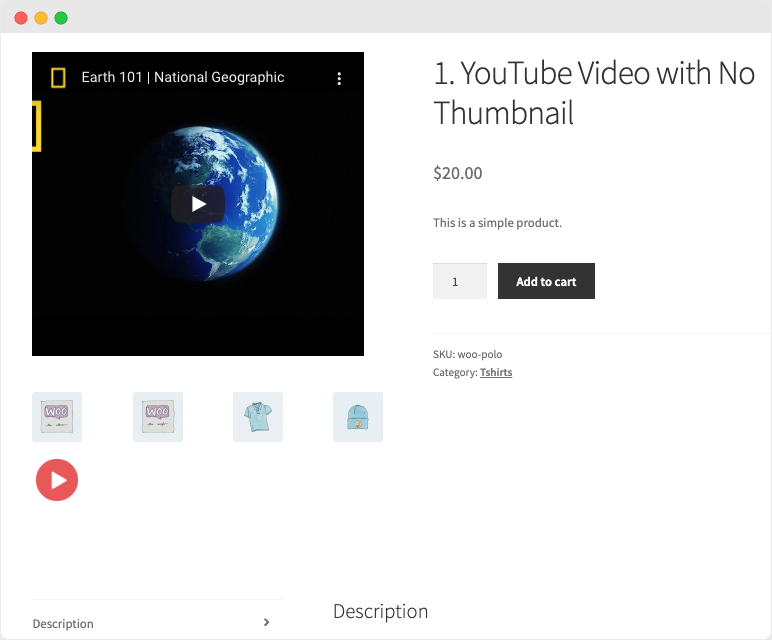
Overview: The official WooCommerce extension (and similar well-supported third-party builds) lets you add featured videos
or multiple videos into the product gallery. You can embed YouTube, Vimeo, Dailymotion, Facebook, or upload an MP4.
Why use it: It integrates tightly with the native WooCommerce gallery, shows thumbnails on listing pages,
and is built for reliability and compatibility with WooCommerce updates, a solid choice if you want official support.
Key features:
- Add featured product video,
- Multiple videos per product
- Thumbnail customization
- embed & self-hosted support
- gallery integration
Pricing: Typically sold as a paid extension (official WooCommerce/marketplace listings vary; check vendor page for current price and license options).
2. YITH WooCommerce Featured Audio & Video Content
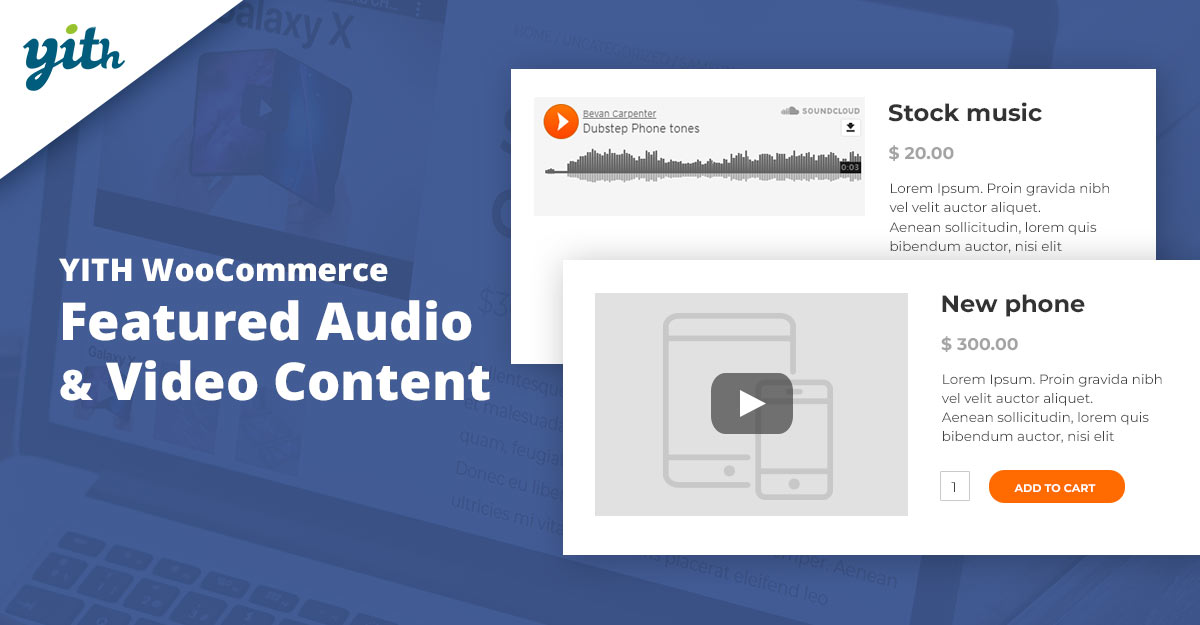
Overview: YITH’s plugin specializes in replacing or augmenting the featured image with audio or video content.
It supports YouTube and Vimeo for video and SoundCloud for audio, plus self-hosted files depending on settings.
Why use it: Great for stores that sell media (albums, audio/video products) where a sample should replace the main image,
or for stores that want a simple “featured video or audio” field in product admin.
Key features:
- Featured video/audio replacement
- Support for YouTube/Vimeo/SoundCloud
- Product-level controls
- Playlist/preview options
Pricing: YITH’s premium extension is typically sold with a yearly license (check the YITH product page for current pricing and renewal terms).
3. Addify, WooCommerce Product Video
Overview: Addify’s Product Video plugin focuses on adding videos into the product gallery, including the ability to customize the video thumbnail
and show featured videos on archive/listing pages.
Why use it: If you want granular thumbnail control and an easy UI for uploading or embedding videos, this plugin is clear and practical.
Addify also bundles other WooCommerce enhancements if you prefer a single vendor for multiple extensions.
Key features:
- Multiple videos per product
- Custom thumbnails
- Listing page video
- Compatibility with major video hosts
Pricing: Commercial plugin, price and licensing vary; check Addify’s site for current offers and bundles.
4. WPC Product Videos for WooCommerce
Overview: A popular free + premium plugin from the WPClever team that allows multiple videos per product, binds videos to gallery images,
and supports YouTube/Vimeo/self-hosted MP4.
Why use it: WPC products often balance features and value, use this when you want a cost-efficient, well-documented product video solution
With optional upgrades for extra features.
Key features:
- Multiple video support
- Gallery linking
- WPML compatibility
- Product-level placement control
Pricing: Free core plugin; premium upgrades or bundles available on author site (prices vary by license type).
Also Read: Best WooCommerce Search & Filters Plugins
5. WooGallery / Gallery Slider for WooCommerce
Overview: Gallery/slider plugins that add video support are a practical approach: they replace or enhance the default gallery with an
image + video slider, variation galleries, lightbox, and zoom. Many store owners pick this when they want a fuller gallery UI.
Why use it: If your product presentation relies heavily on gallery UX (sliders, zoom, multiple variation-specific galleries), the Gallery Slider plugins
Give more control than a minimal video add-on.
Key features: Unlimited videos per product, variation galleries, zoom, lightbox, multiple gallery layouts.
Pricing: Free base plugin with paid Pro tiers (typical pro pricing ranges exist, see plugin page for latest license costs).
6. Product Video Gallery (WordPress.org)
Overview: Several open-source product video gallery plugins on the WP repo let you embed videos into the product gallery and mix them with images.
These tend to be straightforward and lightweight.
Why use it: Good for stores on a tight budget that need basic gallery-video support without premium bells and whistles. Check the plugin’s support threads
for compatibility notes before deploying on a production site.
Key features:
- Embed video into the gallery
- Support for YouTube/Vimeo/MP4
- Responsive carousel options
Pricing: Usually free with optional paid add-ons or pro versions from the author.
7. VideographyWP / Videography Product Video plugins
Overview: There are premium “product video” plugins sold on marketplaces and WooCommerce extensions that brand themselves with names like
VideographyWP or Videography Pro, they aim to combine gallery compatibility and video metadata handling.
Why use it: Look for these if you want a plugin that imports video metadata (titles/thumbnails) from YouTube and offers robust gallery integration.
They tend to be competitively priced and focused on product-video workflows.
Key features:
- YouTube metadata import
- Gallery injection
- Playlist & API options
- Responsive players
Pricing: Commercial pricing; typical tiers include 1-year support/update subscriptions or single-year licenses.
Also Read: How to Add Delivery Date Selection in WooCommerce
8. Video Gallery for WooCommerce
Overview: A plugin specifically called Video Gallery for WooCommerce (and variants) allows you to add WP Library videos to product pages
With position control, icons, autoplay options, and more.
Why use it: This is a simple route when you need to host videos inside WP (MP4) and want per-product controls like loop, mute, or placement without
Subscribing to an external hosting provider.
Key features:
- WP Library video support
- Autoplay/mute
- Placement options
- Player controls
Pricing: Often free on WP repo; some authors offer pro versions for extended features.
9. Codecanyon / Marketplace Product Featured Video plugins
Overview: Marketplaces like CodeCanyon host many well-maintained commercial product video plugins, some add featured-thumbnails-as-video, others supply
gallery sliders / advanced lightboxes.
Why use it: If you need a single, low-cost commercial license with ongoing support and fast updates, marketplace plugins can be a good value, but check
reviews and update frequency.
Key features:
- Marketplace variations include featured video thumbnails
- Gallery sliders
- MP4 & embed support, and lightbox/custom controls
Pricing: Varies by author, marketplace one-time fees are common (or yearly updates via authors’ sites).
10. Really Simple Featured Video
Overview: A small, focused plugin that adds featured video support for posts, pages, and WooCommerce products. It’s intentionally minimal and easy to use.
Why use it: When you need to add a single featured video quickly, or keep site complexity low, a lightweight plugin like this keeps overhead to a minimum.
It’s useful for developers who prefer to extend functionality with a few lines of custom code.
Key features:
- Simple featured video field
- Light footprint
- Compatibility with posts/pages/products
Pricing: Usually free, with some premium forks offering extra options.
Also Read: Best WooCommerce Page Customization Plugins
Comparison table
Scroll horizontally if you’re on a small screen, this is a plain HTML table with inline styles, so it’s paste-ready for WordPress block editor.
| Plugin | Key features | Best for | Pricing (typical) |
|---|---|---|---|
| Product Video for WooCommerce (official) | Gallery videos, embed & MP4, listing thumbnails | Stores wanting official support | Paid extension, check vendor for current price |
| YITH Featured Audio & Video | Featured video/audio, SoundCloud support | Media/product sample use-cases | YITH premium yearly license (vendor page) |
| Addify Product Video | Custom thumbnails, listing page video | Merchants wanting thumbnail control | Commercial plugin, see Addify |
| WPC Product Videos | Multiple videos, gallery linking | Budget-conscious stores | Free core; optional paid upgrades |
| WooGallery / Gallery Slider | Variation galleries, lightbox, zoom | Stores needing advanced gallery UX | Free + Pro tiers (author pricing) |
| Product Video Gallery (WP repo) | Responsive carousel, embed support | Simple gallery-video needs | Free; premium versions sometimes sold |
| VideographyWP / Vendor plugins | YouTube metadata, gallery injection | Stores wanting metadata import | Commercial, check vendor |
| Video Gallery for WooCommerce | WP-library video support, mute/loop | Self-hosted MP4 workflows | Typically free with pro options |
| Codecanyon Product Featured Video | Flexible marketplace options | One-off license buyers | One-time marketplace fees |
| Really Simple Featured Video | Minimal feature video support | Developers and minimalists | Free; small paid forks possible |

Final tips & best practices
Prioritize page speed, lazy-load and host long videos on YouTube/Vimeo when possible. 2) Use short demos above the fold and
extended demos in tabs to keep the main product area fast. 3) Add captions or transcripts for accessibility and SEO benefits.
If you run an international store, pick a plugin with WPML compatibility. Before installing on production, test the plugin on a staging site
to make sure it plays nicely with your theme and other extensions.
Pair Your Stack: Other Tools From Wbcom Designs
Beyond the WooCommerce plugins above, these in-house tools from Wbcom Designs solve adjacent problems most stores eventually run into, particularly when your loyalty, community, or service layer needs to plug into WooCommerce without a heavy custom build:
- BuddyX Pro, community-first WordPress theme for membership stores, vendor communities, and customer-loyalty hubs.
- WB Gamification, drop-in points, badges, ranks, and leaderboards for any WooCommerce loyalty or referral funnel.
- WP Sell Services Pro, turn WooCommerce into a service-selling platform (consulting, freelance, agency hours).
- WB Ad Manager, native ad placements to monetize content around your store (blog, category pages, sidebar).
- WordPress Polls, lightweight polls for product feedback, NPS-style surveys, and zero-party data.
- Jetonomy, monetization toolkit for digital communities (token economy, paid groups, creator payouts).
Interesting Reads:
Best WooCommerce Combinations & Product Customization Plugins