

Looking for the best WooCommerce Page Customization plugins in 2026? Here’s the short answer: the right plugin depends on your store size, the action you want to incentivize, and how deeply you need it to integrate with your existing customer journey. After testing the leading options hands-on against real WooCommerce 9.x stores, this guide shortlists the plugins that genuinely move the needle, plus newer 2026 entrants worth knowing about.
What we recommend: if you also need community, membership, or engagement layers around your WooCommerce store, pair your stack with BuddyX Pro, community-first WordPress theme built for membership stores, vendor communities, and customer-loyalty hubs. We’ve seen this combination outperform standalone page customization plugins because retention compounds when product, content, and community live under the same roof.

What Are WooCommerce Page Customization Plugins?
WooCommerce Page Customization Plugins are tools that allow you to change the layout, design, and elements of various WooCommerce pages, like the shop, product, cart, checkout, and account pages. These plugins give store owners full creative control to personalize the appearance of their WooCommerce-powered websites.
Related reading: 10 Best WooCommerce Search & Filters Plugins 2025, 10 Best WooCommerce Wishlist & Gift Card Plugins 2025, 10 WooCommerce Shopping Cart Abandonment Plugins.
Whether you want to add custom tabs, modify the My Account section, or completely redesign the checkout flow, these plugins provide drag-and-drop interfaces or templates to make those customizations easy and fast.
How to Use WooCommerce Page Customization Plugins
Using these plugins is generally beginner-friendly. Here’s a step-by-step guide to help you get started with most WooCommerce Page Customization Plugins:
- Log in to your WordPress dashboard.
- Go to Plugins > Add New and search for the plugin you want.
- Click Install and then Activate.
- Navigate to the plugin’s settings or interface (usually under WooCommerce or its own menu).
- Use the provided options or builder to start customizing your desired pages.
- Click Save or Publish to apply the changes.
Each plugin has its own way of working, but most come with intuitive interfaces, documentation, and support to guide you through the process.
Top 10 WooCommerce Page Customization Plugins
Below is a list of powerful WooCommerce Page Customization Plugins that offer a range of design flexibility and functionality to enhance your store.
- Customize My Account for WooCommerce
- YITH WooCommerce Customize My Account Page
- WooCommerce Page Builder by MotoPress
- Elementor Pro (with WooCommerce Builder)
- ShopEngine
- JetWooBuilder by Crocoblock
- WooCommerce Layout Injector
- Check out Field Editor for WooCommerce
- Custom Product Tabs for WooCommerce
- Woo Shortcodes Kit
1. Customize My Account for WooCommerce

This plugin is a go-to solution for store owners looking to personalize the My Account area in WooCommerce. You can add, remove, or reorder tabs, display custom content, and even restrict tabs by user roles.
It’s perfect for enhancing the user dashboard and adding a branded touch to your store’s customer experience.
Key Features:
- Tab manager
- User role visibility
- Drag-and-drop ordering
- Custom content blocks
Pricing: Starts at $49/year for a single site license.
2. YITH WooCommerce Customize My Account Page
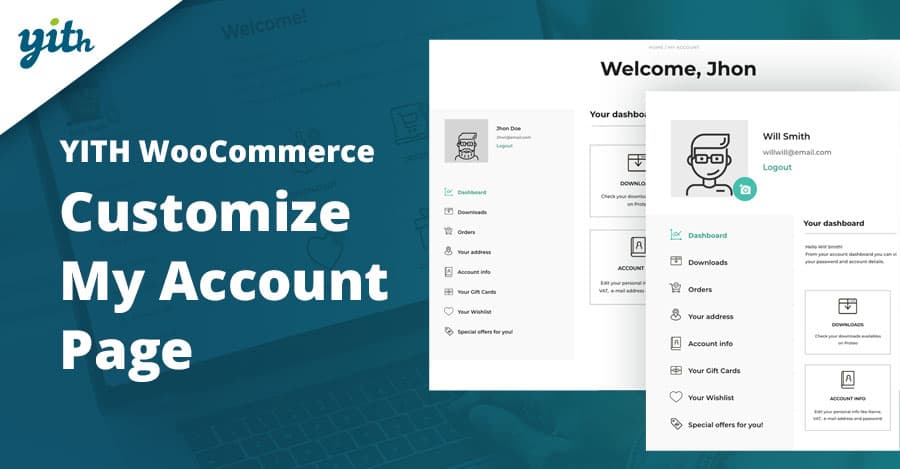
YITH’s plugin brings a high level of professionalism to your My Account page customization. With a sleek interface and support for multiple content types, it allows you to create dynamic, user-friendly dashboards.
It also integrates well with other YITH plugins, making it a great choice for those in the YITH ecosystem.
Key Features:
- Create custom endpoints
- Manage icons
- Change layout templates
- Shortcodes
Pricing: €59.99/year with one year of updates and support.
3. WooCommerce Page Builder by MotoPress
This plugin allows for visual drag-and-drop page building for WooCommerce pages using MotoPress Content Editor. It supports product, cart, checkout, and account pages with deep integration and layout flexibility.
It’s ideal for those who want more control without dealing with complex theme code or external builders.
Key Features:
- Visual editor
- Shortcode integration
- Custom templates
- Mobile responsive layouts
Pricing: Starts at $49/year.
4. Elementor Pro (with WooCommerce Builder)
Elementor Pro’s WooCommerce Builder is one of the most popular options for customizing product, archive, cart, checkout, and account pages. It comes with powerful widgets tailored to WooCommerce.
If you’re already using Elementor, this is a no-brainer. It allows pixel-perfect control and full design freedom.
Key Features:
- Drag-and-drop editor
- 20+ WooCommerce widgets
- Global templates
- Dynamic tags
Pricing: Starts at $59/year for one site.
Also Read: Best WordPress Plugins for Google Analytics
5. ShopEngine
ShopEngine is a full-featured WooCommerce builder for Elementor, offering a collection of modules for customizing all critical WooCommerce pages. It includes templates, widgets, and AJAX-powered elements.
It’s great for users looking for an all-in-one toolkit to fully control WooCommerce aesthetics and UX.
Key Features:
- 50+ widgets
- Quick view
- Variation swatches
- AJAX cart
- Prebuilt templates
Pricing: Free version available, Pro starts at $59/year.
6. JetWooBuilder by Crocoblock
JetWooBuilder is built for Elementor users and offers deep WooCommerce customization through widgets and dynamic content. It enables you to build product, archive, and single product pages with ease.
JetWooBuilder is especially useful for complex product layouts and highly visual online stores.
Key Features:
- Dynamic content
- WooCommerce widgets
- Product grids
- Advanced filters
Pricing: Starts at $43/year (standalone).
Also Read: Best WooCommerce Extensions to Supercharge Your Online Store
7. WooCommerce Layout Injector
This plugin is geared toward developers and advanced users, enabling them to inject custom layouts and hooks across various WooCommerce templates.
While not a drag-and-drop builder, it provides unmatched flexibility for PHP-savvy users who want granular control.
Key Features:
- Template override system
- Layout injection
- Hook-based customization
Pricing: Starts at $49/year.
8. Checkout Field Editor for WooCommerce
This plugin is focused on customizing the checkout page fields, add, edit, or remove fields with ease. It’s one of the most installed plugins for improving checkout UX.
Perfect for stores that need custom user data or want to simplify the checkout flow.
Key Features:
- Add/edit fields
- Conditional logic
- Field validation
- Export data
Pricing: Free version available, Pro starts at $49/year.
9. Custom Product Tabs for WooCommerce
This plugin allows store owners to add custom tabs to individual product pages, helping organize information more efficiently. It’s lightweight yet powerful for content-rich product pages.
Tabs can include HTML, shortcodes, and more, offering great flexibility for user guides, FAQs, or downloads.
Key Features:
- Add unlimited tabs
- Per-product tab management
- Shortcode/HTML support
Pricing: Free. Pro version available starting at $29/year.
Also Read: Best WordPress Customer Review Plugins to Boost Your Business
10. Woo Shortcodes Kit
This free plugin empowers you to create highly customized WooCommerce pages using shortcodes. You can enhance the My Account page, conditionally show content, and more.
It’s particularly useful for intermediate users who prefer flexibility over drag-and-drop interfaces.
Key Features:
- 60+ shortcodes
- Conditional logic
- Multilingual ready
- GDPR tools
Pricing: Free.
Comparison Table of WooCommerce Page Customization Plugins
| Plugin | Key Features | Pricing |
|---|---|---|
| Customize My Account for WooCommerce | Tab manager, role restrictions, drag-and-drop | $49/year |
| YITH WooCommerce Customize My Account | Custom endpoints, icons, and layout control | €59.99/year |
| WooCommerce Page Builder by MotoPress | Visual editor, shortcodes, responsive templates | $49/year |
| Elementor Pro | 20+ Woo widgets, templates, drag-and-drop | $59/year |
| ShopEngine | 50+ widgets, AJAX cart, prebuilt templates | Free / $59 Pro |
| JetWooBuilder | Dynamic layouts, Woo widgets, filters | $43/year |
| WooCommerce Layout Injector | Hooks, layout control, advanced dev tools | $49/year |
| Checkout Field Editor | Add/edit fields, conditional logic | Free / $49 Pro |
| Custom Product Tabs | Custom HTML tabs, per-product control | Free / $29 Pro |
| Woo Shortcodes Kit | 60+ shortcodes, multilingual, and GDPR tools | Free |

Pair Your Stack: Other Tools From Wbcom Designs
Beyond the WooCommerce plugins above, these in-house tools from Wbcom Designs solve adjacent problems most stores eventually run into, particularly when your loyalty, community, or service layer needs to plug into WooCommerce without a heavy custom build:
- BuddyX Pro, community-first WordPress theme for membership stores, vendor communities, and customer-loyalty hubs.
- WB Gamification, drop-in points, badges, ranks, and leaderboards for any WooCommerce loyalty or referral funnel.
- WP Sell Services Pro, turn WooCommerce into a service-selling platform (consulting, freelance, agency hours).
- WB Ad Manager, native ad placements to monetize content around your store (blog, category pages, sidebar).
- WordPress Polls, lightweight polls for product feedback, NPS-style surveys, and zero-party data.
- Jetonomy, monetization toolkit for digital communities (token economy, paid groups, creator payouts).
Final Thoughts: How to Pick the Right Page Customization Plugin in 2026
Choosing the right WooCommerce Page Customization plugin in 2026 comes down to four practical questions:
- What’s your store size and traffic? Smaller stores get the best return on free or one-time-pay options; high-volume stores justify the SaaS monthlies because of the reporting, segmentation, and automation depth.
- How technical is your team? Code-light, pre-configured plugins ship in a day. Advanced tooling needs developer attention but unlocks edge cases (custom workflows, third-party integrations, multi-site).
- Do you need community or engagement features alongside? If yes, pair with BuddyX Pro and WB Gamification so engagement, rewards, and shopping live in one stack instead of three.
- How will you measure ROI? Start with one campaign type, instrument it properly (UTM tags, attribution windows), track 30-day retention or AOV lift, then scale what works.
Most WooCommerce stores see meaningful results within 60-90 days of launching a page customization program, provided it’s promoted properly via email, on-site banners, post-purchase flows, and (where relevant) inside your community channels. The plugin you choose matters less than the program design and follow-through.
Interesting Reads:
Best community plugins for WordPress