

Looking for the best WooCommerce Accounting & Invoicing plugins in 2026? Here’s the short answer: the right plugin depends on your store size, the action you want to incentivize, and how deeply you need it to integrate with your existing customer journey. After testing the leading options hands-on against real WooCommerce 9.x stores, this guide shortlists the plugins that genuinely move the needle, plus newer 2026 entrants worth knowing about.
What we recommend: if you also need community, membership, or engagement layers around your WooCommerce store, pair your stack with BuddyX Pro, community-first WordPress theme built for membership stores, vendor communities, and customer-loyalty hubs. We’ve seen this combination outperform standalone accounting & invoicing plugins because retention compounds when product, content, and community live under the same roof.

What Are WooCommerce Accounting & Invoicing Plugins?
WooCommerce Accounting & Invoicing Plugins are tools designed to integrate with your online store to help you automate financial processes such as billing, invoicing, tax calculations, and syncing with third-party accounting software. These plugins reduce manual errors, save time, and ensure your finances stay in check, crucial for compliance and growth.
Related reading: 10 Best WooCommerce Search & Filters Plugins 2025, 10 Best WooCommerce Page Customization Plugins 2025, 10 Best WooCommerce Wishlist & Gift Card Plugins 2025.
They range from simple invoicing tools to full-fledged accounting systems that can connect to platforms like QuickBooks, Xero, or FreshBooks. Choosing the right plugin depends on your business size, sales volume, and accounting needs.
How to Use WooCommerce Accounting & Invoicing Plugins
Setting up and using these plugins is usually straightforward. Here’s a quick step-by-step guide you can follow:
- Choose a Plugin: Pick one based on your specific needs (e.g., tax automation, PDF invoices, full accounting sync).
- Install the Plugin: From your WordPress dashboard, go to Plugins > Add New and search for the plugin, then click “Install Now.”
- Activate the Plugin: Once installed, click “Activate.”
- Configure Settings: Navigate to the plugin settings under WooCommerce or directly in the WordPress sidebar.
- Connect to External Services: Some plugins require connecting to Xero, QuickBooks, or other services via API keys.
- Start Automating: Once configured, the plugin will automatically handle invoicing, taxes, or sync with your accounting software.
Most premium plugins offer detailed documentation, so don’t hesitate to follow their specific setup guides for optimal results.
Top 10 WooCommerce Accounting & Invoicing Plugins
Here’s our curated list of the best plugins available today, based on functionality, user feedback, and pricing.
- Xero for WooCommerce
- YITH WooCommerce PDF Invoices & Packing Slips
- WooCommerce QuickBooks Connector
- Invoice Ninja Integration
- Sprout Invoices
- Sliced Invoices
- WooCommerce PDF Invoices & Packing Slips by WebToffee
- WooCommerce Zoho Books Integration
- FreshBooks WooCommerce Integration
- WooCommerce PDF Invoices by WP Overnight
1. Xero for WooCommerce
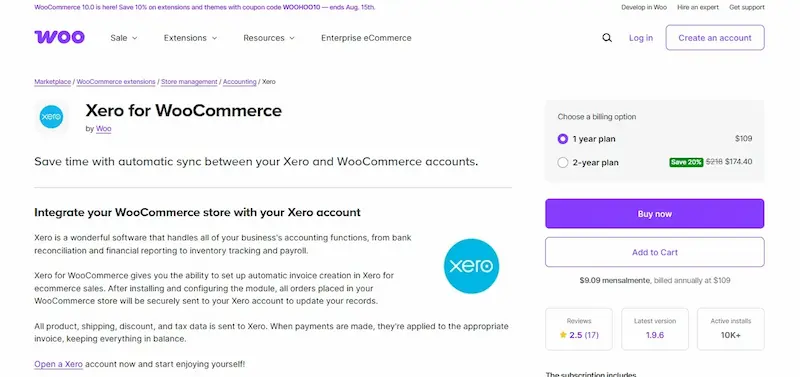
Xero for WooCommerce is a seamless integration that allows you to automatically send order data to your Xero account. It’s perfect for store owners who want real-time sync between their eCommerce platform and accounting system.
With this plugin, you no longer have to export orders manually. Every new order gets pushed into Xero, categorized correctly, and reconciled quickly.
Key Features:
- Real-time syncing with Xero
- Supports custom tax settings and inventory sync
- Map payment gateways to Xero accounts
Pricing:
Starts at $79/year for a single site license.
2. YITH WooCommerce PDF Invoices & Packing Slips

YITH WooCommerce PDF Invoices & Packing Slips is one of the most popular invoicing plugins for WooCommerce. It automatically generates professional PDF invoices and packing slips for each order.
The plugin is highly customizable and supports multilingual stores, making it ideal for international eCommerce operations.
Key Features:
- Auto-generate PDF invoices for every order
- Customizable templates and branding
- Supports bulk generation and download
Pricing:
Free version available; Pro version starts at €79.99/year.
3. WooCommerce QuickBooks Connector
This plugin connects your WooCommerce store with QuickBooks Online, enabling automatic data transfer between the two systems. From orders and customers to inventory and payments, everything is synchronized to ensure accurate bookkeeping.
It’s perfect for business owners already using QuickBooks and looking for a plug-and-play solution that eliminates manual data entry.
Key Features:
- Syncs customers, products, and orders with QuickBooks
- Supports multiple currencies and tax mappings
- Two-way sync and automatic error notifications
Pricing:
Starts at $199/year with premium plans available.
4. Invoice Ninja Integration
Invoice Ninja is a powerful open-source invoicing tool that integrates well with WooCommerce. The plugin helps generate detailed invoices, automate recurring billing, and even manage tasks and projects for service-based businesses.
Ideal for freelancers and agencies, this plugin allows complete control over your invoicing workflow, combined with elegant templates and client portals.
Key Features:
- Custom-branded invoices and quotes
- Time-tracking and task management features
- Supports multiple payment gateways
Pricing:
Free for basic features; paid plans start at $10/month.
Also Read:Landing Page Design Best Practices for Higher Conversions
5. Sprout Invoices-WooCommerce Accounting & Invoicing Plugins
Sprout Invoices is tailored for professionals and small business owners needing advanced invoice customization and client management. It supports estimates, recurring payments, and integrates with various CRMs.
The plugin also offers detailed reporting, payment tracking, and automation tools to speed up your billing workflow.
Key Features:
- Custom invoice and estimate templates
- Client portals and approval workflows
- Stripe, PayPal, and other gateway integrations
Pricing:
Starts at $39.99/year for a single site.
6. Sliced Invoices-WooCommerce Accounting & Invoicing Plugins
Sliced Invoices is a lightweight and user-friendly invoicing plugin for WooCommerce. It enables you to create invoices and quotes with ease, using customizable templates.
The plugin supports client information storage, recurring billing, and PDF invoice generation, perfect for smaller stores or service providers.
Key Features:
- Create and send invoices and quotes
- Automatic payment reminders
- PDF exports and client management
Pricing:
Free version available; Pro add-ons start at $79/year.
7. WooCommerce PDF Invoices & Packing Slips by WebToffee
This popular plugin by WebToffee helps you create and customize PDF invoices and packing slips for WooCommerce orders. It’s GDPR compliant and easy to use for any type of store.
The plugin supports multilingual sites and allows bulk generation of PDF invoices, saving time and effort for high-volume sellers.
Key Features:
- GDPR-compliant invoice templates
- Attach invoices to WooCommerce emails automatically
- Multilingual and multi-currency support
Pricing:
Free version available; Premium starts at $69/year.
Also Read:How to Create My Own Online Store (WooCommerce vs Easy Digital Downloads)
8. WooCommerce Zoho Books Integration
This integration allows WooCommerce users to automatically sync orders, customer data, and invoices with Zoho Books, Zoho’s cloud-based accounting software.
Ideal for users of the Zoho ecosystem, it ensures real-time financial data accuracy and reduces manual tasks significantly.
Key Features:
- Auto-sync orders, customers, and payments
- Inventory and tax handling features
- Multi-channel support with other Zoho apps
Pricing:
Starts at $99/year with advanced plans available.
9. FreshBooks WooCommerce Integration-WooCommerce Accounting & Invoicing Plugins
FreshBooks users can now enjoy real-time WooCommerce integration through this plugin. It simplifies your invoicing and payment tracking while offering a sleek and intuitive interface.
Best suited for freelancers and small businesses that already use FreshBooks, this plugin automates much of your financial workflow.
Key Features:
- Syncs orders and payments to FreshBooks
- Automatic invoice generation
- Tax and shipping fee mapping
Pricing:
Starts at $89/year.
10. WooCommerce PDF Invoices by WP Overnight
This powerful plugin helps WooCommerce stores generate and send professional PDF invoices automatically. WP Overnight’s plugin is a reliable option trusted by thousands of store owners globally.
It features customizable templates, multiple language support, and advanced filters for developers.
Key Features:
- Auto-email PDF invoices to customers
- Custom template support and developer-friendly
- Bulk invoice generation tools
Pricing:
Free version available; Premium starts at €59/year.

Choosing the Right Plugin for Your Business
Finding the best WooCommerce Accounting & Invoicing Plugins is all about aligning your store’s needs with the right features and integrations. Whether you’re looking for simple PDF invoices or robust accounting software integrations, there’s a solution tailored to your workflow.
Take time to evaluate the features, test the free versions where available, and consider the long-term value each plugin brings to your business. Streamlining your financial operations is not just about convenience, it’s a smart step toward sustainable growth and compliance.
Pair Your Stack: Other Tools From Wbcom Designs
Beyond the WooCommerce plugins above, these in-house tools from Wbcom Designs solve adjacent problems most stores eventually run into, particularly when your loyalty, community, or service layer needs to plug into WooCommerce without a heavy custom build:
- BuddyX Pro, community-first WordPress theme for membership stores, vendor communities, and customer-loyalty hubs.
- WB Gamification, drop-in points, badges, ranks, and leaderboards for any WooCommerce loyalty or referral funnel.
- WP Sell Services Pro, turn WooCommerce into a service-selling platform (consulting, freelance, agency hours).
- WB Ad Manager, native ad placements to monetize content around your store (blog, category pages, sidebar).
- WordPress Polls, lightweight polls for product feedback, NPS-style surveys, and zero-party data.
- Jetonomy, monetization toolkit for digital communities (token economy, paid groups, creator payouts).
Interesting Reads:
WooCommerce 10.0 Released: Here’s Everything You Need to Know
How Web Hosting Impacts Website Speed, Security, and Uptime
A Complete Guide to Using Landing Page Templates