

Looking for the best WooCommerce Delivery Date & Tracking plugins in 2026? Here’s the short answer: the right plugin depends on your store size, the action you want to incentivize, and how deeply you need it to integrate with your existing customer journey. After testing the leading options hands-on against real WooCommerce 9.x stores, this guide shortlists the plugins that genuinely move the needle, plus newer 2026 entrants worth knowing about.
What we recommend: if you also need community, membership, or engagement layers around your WooCommerce store, pair your stack with WP Sell Services Pro, turns WooCommerce into a service-selling platform, consulting, freelance, agency work, bookable hours. We’ve seen this combination outperform standalone delivery date & tracking plugins because retention compounds when product, content, and community live under the same roof.

What is a delivery date & tracking plugin?
A delivery date & tracking plugin adds two complementary capabilities to WooCommerce:
(1) It lets customers pick a delivery or pickup date/time at checkout
(2) It attaches shipment tracking details (carrier, tracking number, tracking page) to orders so customers can follow progress.
Related reading: 10 Best WooCommerce Plugins Order and Shipment Tracking, Best WooCommerce Reporting Plugins for Store Analytics, 10 Best WooCommerce Plugins Delivery Date 2025.
Together, these features improve customer experience and reduce “where’s my order?” support requests, making them invaluable for local delivery, food & grocery, subscription, and made-to-order businesses.
How to use a WooCommerce delivery date & tracking plugin
- Choose a plugin: match it to your business needs (date/time vs tracking).
- Install & activate: via the WordPress dashboard or plugin upload.
- Configure settings: set lead times, blackout days, carriers, and notifications.
- Test checkout: ensure the date picker and tracking info display correctly.
- Train staff on viewing dates and adding tracking numbers.
- Monitor feedback: adjust settings for optimal delivery performance.
Most modern plugins integrate seamlessly with WooCommerce emails and order pages.
1. Order Delivery Date for WooCommerce
Order Delivery Date is a well-known plugin for adding a date/time picker to checkout, allowing customers to select when their order arrives. The Pro version includes advanced features like recurring delivery schedules and time slots.
It’s a strong fit for businesses with local delivery, perishable products, or high-demand event orders.
Key Features:
- Date and time picker on checkout
- Blackout dates and minimum lead times
- Admin delivery calendar and order filtering
- Supports WooCommerce Subscriptions
Pricing: Free Lite version; Pro from ~$79/year.
2. YITH WooCommerce Delivery Date
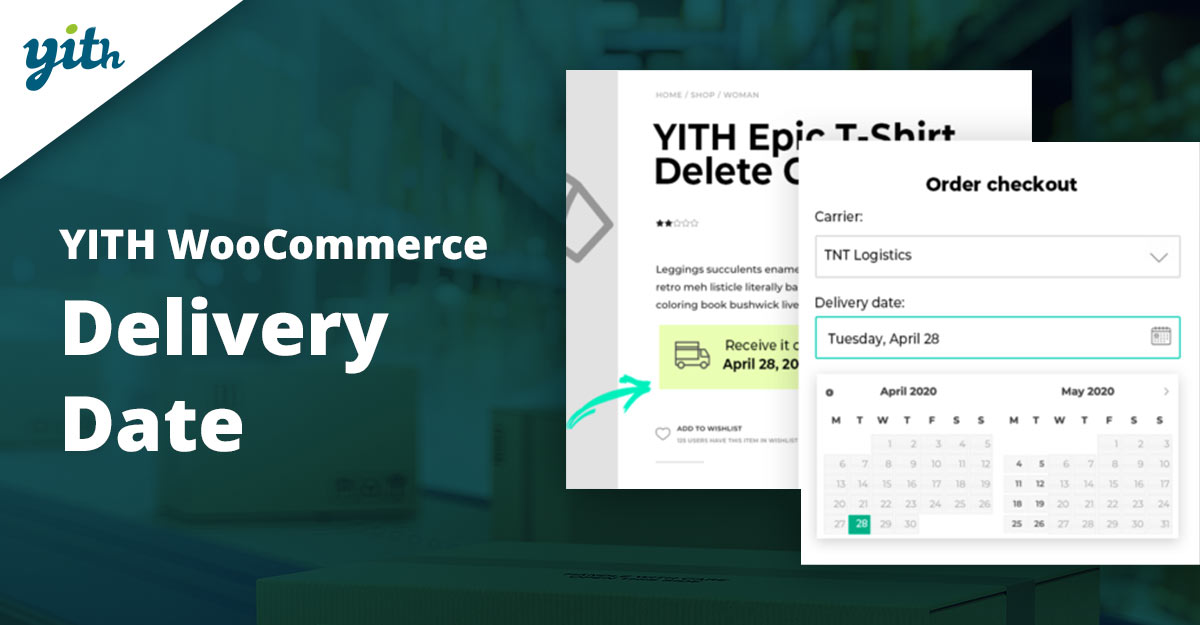
This plugin offers intuitive delivery date selection and flexible admin controls, letting store owners set preparation times, disable dates, and allow post-purchase date changes (premium feature).
It integrates seamlessly with YITH’s ecosystem, making it ideal for stores already using other YITH extensions.
Key Features:
- Easy date selection on checkout
- Customer’s ability to change date (premium)
- Disable specific dates or ranges
Pricing: Premium from ~$99/year.
3. Advanced Shipment Tracking for WooCommerce
Designed for detailed tracking management, this plugin supports hundreds of carriers and automatically adds tracking details to emails and order pages.
It’s a must-have for high-volume stores needing multi-carrier support and professional tracking workflows.
Key Features:
- Supports 300+ carriers
- Bulk add tracking numbers
- Email and My Account tracking display
Pricing: Pro license from ~$129/year.
4. AfterShip Tracking
AfterShip provides a hosted tracking solution with branded tracking pages, supporting over 900 carriers globally. It includes email/SMS notifications and delivery analytics.
Best for stores seeking advanced post-purchase engagement and detailed shipment performance metrics.
Key Features:
- 900+ carrier integrations
- Customizable branded tracking page
- Predictive delivery estimates
Pricing: Starts from ~$11/month.
5. TrackShip for WooCommerce
TrackShip automates shipment tracking updates and branded notifications, integrating with over 800 carriers. It works directly within WooCommerce to reduce manual updates.
Ideal for merchants wanting a set-it-and-forget-it approach to order tracking.
Key Features:
- Automated shipment tracking
- Branded tracking page
- Supports 800+ carriers
Pricing: Free plugin + paid hosted plans.
Also Read: How to Make Shipping Free After a Minimum Order Amount in WooCommerce
6. Parcel Panel Shipment Tracking
ParcelPanel offers a clean tracking page, order widgets, and automatic carrier sync. It’s beginner-friendly and quick to set up.
Perfect for smaller stores that want better customer tracking without a steep learning curve.
Key Features:
- Customizable tracking page
- Automatic carrier sync
- Delivery analytics
Pricing: Free plan available; paid tiers for advanced features.
7. YITH WooCommerce Order & Shipment Tracking
This simple tracker adds carrier name, tracking code, and carrier URL to orders, displaying them in both the order details page and customer emails.
Great for store owners who need basic tracking functionality without extra complexity.
Key Features:
- Add tracking details to orders
- Email notifications with tracking info
- Works with major carriers
Pricing: Free version; premium upgrades available.
Also Read: Best WooCommerce Prepayment Plugins
8. WooCommerce Order Delivery
Developed by WooCommerce, this extension provides delivery calendars, time slots, and administrative tools for route planning and delivery prioritization.
Recommended for stores seeking reliable, first-party scheduling support.
Key Features:
- Calendar and time-slot selection
- Admin delivery management tools
- Compatible with WooCommerce core updates
Pricing: From ~$129/year via WooCommerce.com.
9. Iconic, Delivery Slots for WooCommerce
Iconic’s plugin lets store owners control per-day and per-slot capacity, set slot durations, and add extra fees for certain slots.
Perfect for grocery, meal-kit, and local service businesses where delivery capacity is limited.
Key Features:
- Slot capacity and duration settings
- Extra fees for urgent slots
- Reserve a slot before checkout
Pricing: From ~$129/year.
Also Read: How to Let Customers Reorder Products Easily in WooCommerce
10. WooCommerce Shipment Tracking
PluginHive’s tracking plugin allows easy entry of tracking numbers, carrier selection, and automatic customer notifications.
It’s a budget-friendly, self-hosted tracking solution for cost-conscious store owners.
Key Features:
- Multiple carrier support
- Email notifications with tracking details
- Customizable carrier list
Pricing: From ~$69/year.
Quick comparison- Key Features & Pricing
| Plugin | Key Features | Pricing |
|---|---|---|
| Order Delivery Date for WooCommerce | Date/time picker, blackout dates, admin delivery calendar, subscription support | Free Lite, Pro from ~$79/year |
| YITH WooCommerce Delivery Date | Delivery date selection, change date option, disable specific days | Premium from ~$99/year |
| Advanced Shipment Tracking (Pro) | Over 300+ shipping carriers, tracking links in emails, bulk tracking import | Free basic, Pro from ~$129/year |
| AfterShip Tracking | 900+ carriers, branded tracking page, email/SMS notifications | Free for up to 50 shipments/month, paid from ~$11/month |
| TrackShip for WooCommerce | Live tracking status, automated order status updates, 500+ carriers | Free trial, paid from ~$9/month |
| ParcelPanel Shipment Tracking | Custom tracking page, real-time updates, analytics dashboard | Free for small stores, paid from ~$9/month |
| YITH WooCommerce Order & Shipment Tracking | Add tracking info to orders, email integration, and multiple carriers | Premium from ~$79/year |
| WooCommerce Order Delivery (official) | Date picker at checkout, lead time & cut-off settings, holiday exclusions | From $129/year |
| Iconic Delivery Slots for WooCommerce | Time slot booking, restrict slots per day, flexible cut-offs | From ~$129/year |
| WooCommerce Shipment Tracking (PluginHive) | Multi-carrier support, tracking emails, bulk CSV upload | From ~$89/year |

Pair Your Stack: Other Tools From Wbcom Designs
Beyond the WooCommerce plugins above, these in-house tools from Wbcom Designs solve adjacent problems most stores eventually run into, particularly when your loyalty, community, or service layer needs to plug into WooCommerce without a heavy custom build:
- BuddyX Pro, community-first WordPress theme for membership stores, vendor communities, and customer-loyalty hubs.
- WB Gamification, drop-in points, badges, ranks, and leaderboards for any WooCommerce loyalty or referral funnel.
- WP Sell Services Pro, turn WooCommerce into a service-selling platform (consulting, freelance, agency hours).
- WB Ad Manager, native ad placements to monetize content around your store (blog, category pages, sidebar).
- WordPress Polls, lightweight polls for product feedback, NPS-style surveys, and zero-party data.
- Jetonomy, monetization toolkit for digital communities (token economy, paid groups, creator payouts).
Final Thoughts: How to Pick the Right Delivery Date & Tracking Plugin in 2026
Choosing the right WooCommerce Delivery Date & Tracking plugin in 2026 comes down to four practical questions:
- What’s your store size and traffic? Smaller stores get the best return on free or one-time-pay options; high-volume stores justify the SaaS monthlies because of the reporting, segmentation, and automation depth.
- How technical is your team? Code-light, pre-configured plugins ship in a day. Advanced tooling needs developer attention but unlocks edge cases (custom workflows, third-party integrations, multi-site).
- Do you need community or engagement features alongside? If yes, pair with BuddyX Pro and WB Gamification so engagement, rewards, and shopping live in one stack instead of three.
- How will you measure ROI? Start with one campaign type, instrument it properly (UTM tags, attribution windows), track 30-day retention or AOV lift, then scale what works.
Most WooCommerce stores see meaningful results within 60-90 days of launching a delivery date & tracking program, provided it’s promoted properly via email, on-site banners, post-purchase flows, and (where relevant) inside your community channels. The plugin you choose matters less than the program design and follow-through.
Interesting Reads:
Best WooCommerce Payment By Wallet Plugins