

Looking for the best WooCommerce WooCommerce plugins in 2026? Here’s the short answer: the right plugin depends on your store size, the action you want to incentivize, and how deeply you need it to integrate with your existing customer journey. After testing the leading options hands-on against real WooCommerce 9.x stores, this guide shortlists the plugins that genuinely move the needle, plus newer 2026 entrants worth knowing about.
What we recommend: if you also need community, membership, or engagement layers around your WooCommerce store, pair your stack with WP Sell Services Pro, turns WooCommerce into a service-selling platform, consulting, freelance, agency work, bookable hours. We’ve seen this combination outperform standalone woocommerce plugins because retention compounds when product, content, and community live under the same roof.

What is a WooCommerce Plugins Delivery Date?
A WooCommerce delivery date plugin is an extension designed to let customers pick their preferred delivery date during checkout. This small but powerful feature adds transparency to the buying process while giving store owners better control over order fulfillment. Instead of leaving shipping times vague, these plugins display exact delivery slots, minimizing uncertainty for both parties.
Related reading: 10 Best WooCommerce Plugins Product Shipping, 10 Best WooCommerce Plugins Order and Shipment Tracking, 10 Best WooCommerce Shipping Costs Plugins 2025.
In essence, these plugins bridge the gap between customer expectations and business operations. By offering delivery scheduling, businesses can handle logistics more efficiently, manage stock turnover, and deliver an improved customer experience. For industries like food, flowers, groceries, and gifting, delivery date selection can even be the deciding factor for purchase conversions.
Also Read: Best WooCommerce Plugins Zoom Magnifier
How to Use WooCommerce Plugins: Delivery Date
Implementing a delivery date plugin may sound complex, but the process is straightforward. The steps below show how most of these plugins can be set up:
- Choose the right plugin: Select a plugin that aligns with your business type, budget, and features.
- Install & activate: From your WordPress dashboard, upload the plugin or install it from the WooCommerce marketplace.
- Configure settings: Access the plugin’s settings to set available delivery days, blackout dates, and time slots.
- Customize checkout fields: Add or adjust delivery date fields that appear during checkout.
- Test the workflow: Place a dummy order to ensure that the delivery date selector works properly.
- Go live: Enable the plugin on your live store so customers can begin scheduling their deliveries.
Table of Contents
- First Order Delivery for WooCommerce
- YITH WooCommerce Delivery Date
- Order Delivery Date for WooCommerce
- WooCommerce Delivery Scheduler
- Iconic Delivery Slots for WooCommerce
- Order Delivery Pro
- WooCommerce Delivery & Pickup Reservation
- WooCommerce Delivery Slots Pro
- Advanced WooCommerce Delivery Scheduler
- WooCommerce Delivery Date Pro
Top 10 WooCommerce Plugins: Delivery Date
The following plugins have been carefully selected based on performance, features, and ease of use. Each one caters to specific needs, so whether you run a food delivery service or a large eCommerce store, there’s something for you.
1. First Order Delivery for WooCommerce
First Order Delivery for WooCommerce is a reliable plugin designed to make the order fulfillment process smoother. It enables customers to select their delivery date with ease, ensuring clarity on when they can expect their products. By displaying available dates clearly, this plugin helps reduce customer queries and enhances trust in your store.
Store owners benefit from the simple setup and ability to block specific days or time slots. This flexibility makes it suitable for businesses with fluctuating schedules, such as restaurants, bakeries, or seasonal stores. The plugin’s user-friendly interface ensures a minimal learning curve.
Key Features:
- Customizable date picker.
- Blackout dates.
- Flexible time slots.
- Order management integration.
Pricing: Starts from $49
2. YITH WooCommerce Delivery Date
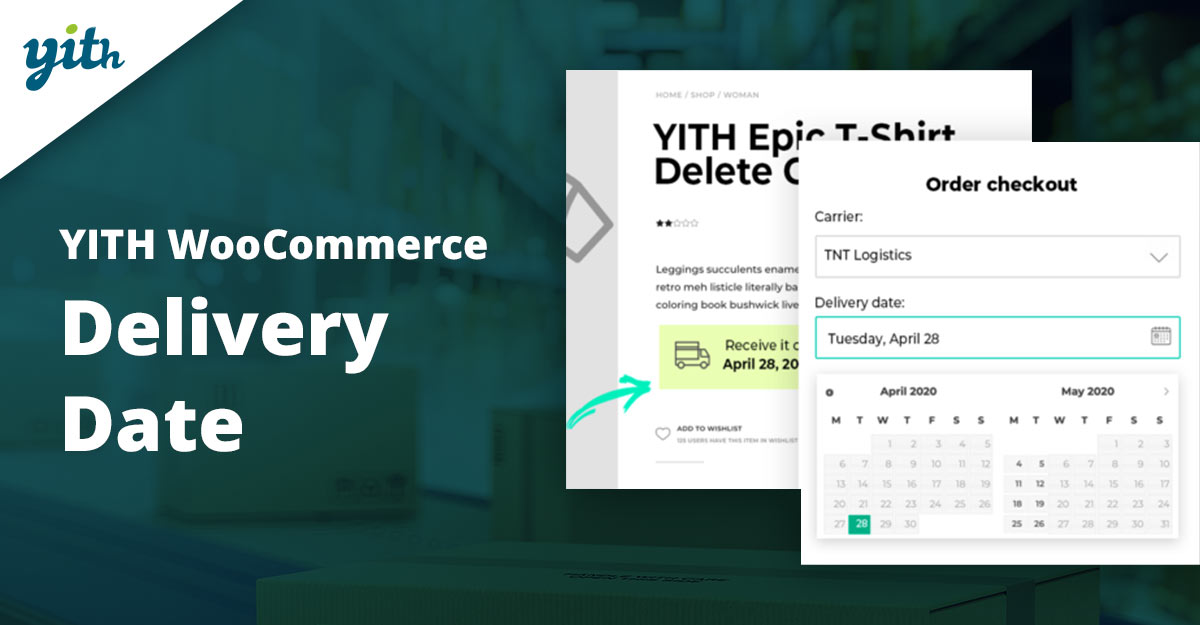
YITH WooCommerce Delivery Date is a feature-rich plugin known for its balance of functionality and ease of use. It allows customers to choose their preferred delivery date and gives store owners granular control over available slots. The plugin’s design focuses on providing transparency, reducing delivery mishaps, and building trust with customers.
Its flexibility makes it ideal for a wide variety of businesses, from local retailers to nationwide stores. By letting customers schedule deliveries, the plugin reduces returns and improves operational efficiency. YITH also has a reputation for frequent updates and excellent support.
Key Features:
- Custom delivery slots.
- Minimum/maximum delivery days.
- Holiday management.
- Check out field customization.
Pricing: Starts from $79
3. Order Delivery Date for WooCommerce
Order Delivery Date for WooCommerce is a lightweight yet powerful plugin that ensures customers get deliveries exactly when they need them. It’s particularly popular among businesses that want a straightforward setup with minimal fuss. The plugin integrates seamlessly with the WooCommerce checkout flow, making it hassle-free for both store owners and buyers.
Flexibility is one of its strong points. It allows configuration of delivery days, cut-off times, and shipping-based delivery options. This helps in offering realistic delivery expectations to customers.
Key Features:
- Flexible scheduling.
- Cut-off times.
- Shipping integration.
- Simple interface.
Pricing: Free with premium version from $59
4. WooCommerce Delivery Scheduler
WooCommerce Delivery Scheduler is tailored for businesses that require fine-tuned control over scheduling. It provides advanced date and time slot customization, making it especially suitable for industries like groceries, catering, and florists, where timely delivery is critical.
Customers enjoy a seamless checkout experience, while business owners gain tools to better manage workload and staffing. Its responsive design ensures smooth operation across all devices.
Key Features:
- Advanced scheduling.
- Recurring delivery slots.
- Mobile-friendly.
- Order tracking integration.
Pricing: Starts from $69.
5. Iconic Delivery Slots for WooCommerce
Iconic Delivery Slots is one of the most popular premium plugins for WooCommerce. Its clean design and user-focused approach make delivery scheduling effortless for shoppers. Businesses can easily limit the number of orders per slot, ensuring that fulfillment capacities are never exceeded.
It also integrates seamlessly with major shipping plugins, making it a powerful choice for stores with complex logistics. The plugin enhances checkout by showing real-time slot availability and estimated delivery windows.
Key Features:
- Slot capacity limits
- Shipping method integration
- Real-time availability
- User-friendly design
Pricing: Starts from $129
6. Order Delivery Pro
Order Delivery Pro provides a complete solution for delivery scheduling. Its standout feature is the ability to manage same-day and next-day deliveries with configurable cut-off times. This makes it a great fit for fast-paced businesses where speed matters most.
The plugin also includes backend tools that allow store owners to manage and review delivery schedules efficiently. With its balance of simplicity and power, it appeals to both small and medium-sized businesses.
Key Features:
- Same-day/next-day delivery.
- Cut-off times.
- Admin management tools.
- Delivery reports.
Pricing: Starts from $99
Also Read: Best Review Reminder Plugin for WooCommerce
7. WooCommerce Delivery & Pickup Reservation
WooCommerce Delivery & Pickup Reservation is perfect for businesses that offer both delivery and in-store pickup. Customers can choose whether they want the item delivered or collected, adding flexibility to the shopping experience. The dual functionality makes it popular with restaurants and retail shops.
It includes useful customization options, such as enabling specific slots for pickups while reserving others for deliveries. This ensures efficient distribution of resources and better planning for store owners.
Key Features:
- Delivery and pickup options.
- Customizable slots.
- Order notes.
- Responsive checkout integration.
Pricing: Starts from $89
8. WooCommerce Delivery Slots Pro
WooCommerce Delivery Slots Pro offers a modern solution for businesses that want more than just a simple date picker. It provides intuitive slot booking, inventory control per slot, and a user-friendly dashboard for managing deliveries.
The plugin helps to minimize missed deliveries by setting clear expectations. Customers appreciate the precision, while businesses enjoy smoother fulfillment operations.
Key Features:
- Slot booking.
- Order limits.
- Inventory per slot.
- Interactive calendar.
Pricing: Starts from $119
Also Read: How to Add Custom Product Options with Advanced Product Fields for WooCommerce
9. Advanced WooCommerce Delivery Scheduler
Advanced WooCommerce Delivery Scheduler focuses on flexibility and detailed customization. Store owners can fine-tune delivery slots by hours, days, or weeks, and even restrict deliveries to specific geographic regions. This is ideal for businesses operating in multiple service zones.
With advanced reporting features, the plugin also helps businesses track delivery patterns and optimize their logistics over time.
Key Features:
- Geographic restrictions.
- Detailed slot customization.
- Delivery reporting.
- Responsive UI.
Pricing: Starts from $109
10. WooCommerce Delivery Date Pro
WooCommerce Delivery Date Pro is a premium plugin designed for enterprises that need scalability. It combines advanced scheduling tools with robust performance to handle high volumes of orders. Customers benefit from an elegant delivery date selector, while businesses can plan with confidence.
The plugin also integrates with several third-party tools, making it versatile enough for larger operations. Its performance optimization ensures smooth checkout even on busy sites.
Key Features:
- Enterprise-ready.
- Scalable and third-party integrations.
- Advanced performance optimization.
Pricing: Starts from $149
Also Read: How to Automatically Show Product Prices in Local Currency with WooCommerce
Comparison Table of 10 WooCommerce Plugins: Delivery Date
| Plugin | Key Features | Pricing |
|---|---|---|
| First Order Delivery for WooCommerce | Custom date picker, blackout days, time slots | $49 |
| YITH WooCommerce Delivery Date | Custom slots, holiday management, checkout customization | $79 |
| Order Delivery Date for WooCommerce | Cut-off times, flexible scheduling, and shipping integration | $59 |
| WooCommerce Delivery Scheduler | Recurring slots, mobile-friendly, tracking integration | $69 |
| Iconic Delivery Slots | Slot capacity limits, shipping method integration | $129 |
| Order Delivery Pro | Same-day/next-day delivery, cut-off management | $99 |
| WooCommerce Delivery & Pickup Reservation | Pickup & delivery, customizable slots, notes | $89 |
| WooCommerce Delivery Slots Pro | Slot booking, inventory control, and interactive calendar | $119 |
| Advanced WooCommerce Delivery Scheduler | Geo restrictions, delivery reports, and custom slots | $109 |
| WooCommerce Delivery Date Pro | Enterprise-ready, integrations, performance optimized | $149 |

Pair Your Stack: Other Tools From Wbcom Designs
Beyond the WooCommerce plugins above, these in-house tools from Wbcom Designs solve adjacent problems most stores eventually run into, particularly when your loyalty, community, or service layer needs to plug into WooCommerce without a heavy custom build:
- BuddyX Pro, community-first WordPress theme for membership stores, vendor communities, and customer-loyalty hubs.
- WB Gamification, drop-in points, badges, ranks, and leaderboards for any WooCommerce loyalty or referral funnel.
- WP Sell Services Pro, turn WooCommerce into a service-selling platform (consulting, freelance, agency hours).
- WB Ad Manager, native ad placements to monetize content around your store (blog, category pages, sidebar).
- WordPress Polls, lightweight polls for product feedback, NPS-style surveys, and zero-party data.
- Jetonomy, monetization toolkit for digital communities (token economy, paid groups, creator payouts).
Final Thoughts: How to Pick the Right WooCommerce Plugin in 2026
Choosing the right WooCommerce WooCommerce plugin in 2026 comes down to four practical questions:
- What’s your store size and traffic? Smaller stores get the best return on free or one-time-pay options; high-volume stores justify the SaaS monthlies because of the reporting, segmentation, and automation depth.
- How technical is your team? Code-light, pre-configured plugins ship in a day. Advanced tooling needs developer attention but unlocks edge cases (custom workflows, third-party integrations, multi-site).
- Do you need community or engagement features alongside? If yes, pair with BuddyX Pro and WB Gamification so engagement, rewards, and shopping live in one stack instead of three.
- How will you measure ROI? Start with one campaign type, instrument it properly (UTM tags, attribution windows), track 30-day retention or AOV lift, then scale what works.
Most WooCommerce stores see meaningful results within 60-90 days of launching a woocommerce program, provided it’s promoted properly via email, on-site banners, post-purchase flows, and (where relevant) inside your community channels. The plugin you choose matters less than the program design and follow-through.
Interesting Reads:
Best WooCommerce Plugins Product Shipping
How to Migrate WooCommerce Orders and Coupons with the Import Export Plugin