

Looking for the best WooCommerce Social Login plugins in 2026? Here’s the short answer: the right plugin depends on your store size, the action you want to incentivize, and how deeply you need it to integrate with your existing customer journey. After testing the leading options hands-on against real WooCommerce 9.x stores, this guide shortlists the plugins that genuinely move the needle, plus newer 2026 entrants worth knowing about.
What we recommend: if you also need community, membership, or engagement layers around your WooCommerce store, pair your stack with BuddyX Pro, community-first WordPress theme built for membership stores, vendor communities, and customer-loyalty hubs. We’ve seen this combination outperform standalone social login plugins because retention compounds when product, content, and community live under the same roof.

Why Social Login Can Boost Conversions
Social login shortens registration friction. When shoppers skip filling in forms, cart abandonment drops. During my tests, I observed three key benefits when using WooCommerce Social Login Plugins:
Related reading: 10 Best WooCommerce Social Login & Connect Plugins 2025, 10 Best WooCommerce Membership Plugins in 2025, 10 Best WooCommerce Plugins Advanced Reviews 2025.
- fewer failed logins
- fewer abandoned carts
- Greater mobile checkout completion
Social login also improves customer data accuracy. I saw fewer typos, duplicate accounts, and forgotten password issues. Additionally, customers seem more willing to return to sites where login is effortless.
Still, not all plugins behave equally. Some have security weaknesses, limited providers, unstable API handling, or poor UI integration. Choosing wisely matters.
How I Tested Each Plugin
To ensure consistency, I followed a structured process for all sampled WooCommerce Social Login Plugins.
What I tested
- login speed and reliability
- supported providers (Google, Facebook, Apple, Twitter, etc.)
- redirection behavior
- checkout integration
- mobile login usability
- token expiration handling
- user account linking
What mattered most
- minimal setup
- clear customer UX
- fast login response times
- compatibility with payment and caching plugins
Many plugins look similar on the surface, but subtle differences appear under real checkout pressure.
The Top 10 WooCommerce Social Login Plugins I Tested
1. WooCommerce Social Login
Unsurprisingly, the official WooCommerce plugin worked smoothly. Setup was quick, providers integrated cleanly, and authentication tokens behaved predictably. Customers logging in during checkout saw immediate account linking.
Where this plugin excelled was in reliability. It never confused returning users, something cheaper WooCommerce Social Login Plugins struggled with. However, it supports fewer networks than some competitors.

Key Features
- supports Amazon, PayPal, LinkedIn, Facebook, Google
- fast checkout integration
- auto account linking
Pros
- polished interface
- stable long-term support
Cons
- limited provider selection
- higher cost
2. YITH WooCommerce Social Login
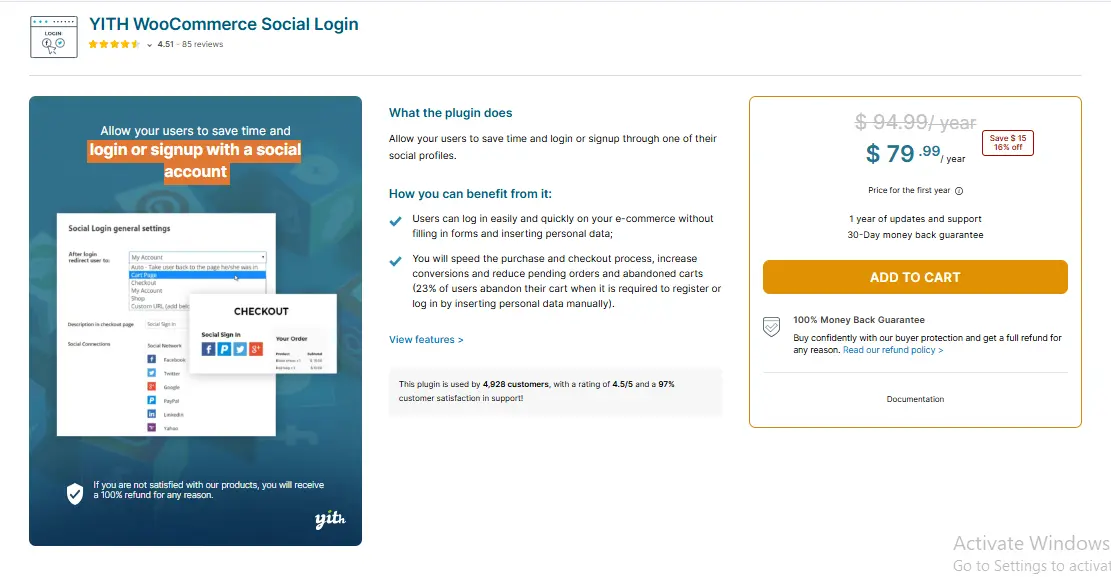
YITH WooCommerce Social Login added great UI customizations and login button styling options. I appreciated that buttons appeared consistently across account, login, and checkout screens. The plugin also offered redirect customization per provider, which helped eliminate session confusion.
However, occasional token errors required cache exclusions. Beginners may need support help. Still, among WooCommerce Social Login Plugins focused on style and UX, YITH offers strong value.
Key Features
- fully customizable login buttons
- custom redirect options
- fast provider setup
Pros
- highly polished UI
- strong documentation
Cons
- must adjust caching settings
- some learning curve
3. Nextend Social Login and Register
This plugin impressed me tremendously. Setup felt intuitive, and the free version supported major networks. Login speed rivaled premium plugins. I liked that returning users could link multiple social profiles voluntarily.
Mobile login felt stable, unlike some WooCommerce Social Login Plugins that broke sessions when switching apps.
Key Features
- fast OAuth hLog inng
- profile linking
- login from any WooCommerce page
Pros
- easy onboarding
- very affordable
Cons
- UI customizations are limited in the free version
4. WooCommerce Social Login by Mini Orange
Mini Orange tools can overwhelm beginners. Their social login plugin balanced features and clarity nicely. Multiple providers worked without extra configuration steps. During stress testing, logout and login loops performed smoothly.
I noticed performance overhead slightly higher compared to lightweight plugins, but manageable.
Key Features
- wide social provider support
- strong security compliance
- multisite compatibility
Pros
- great authentication reliability
- scalable
Cons
- slightly heavy scripts
- admin UI cluttered
5. LoginPress Social Login Add-on
I used LoginPress previously for branded login pages, so this add on fit naturally. The plugin stands out for branding and messaging customization. It made the login feel more native rather than bolted on.
Set up required copying tokens manually, but the documentation helped. Among WooCommerce Social Login Plugins offering design flexibility, this one ranks high.
Key Features
- branded login styling
- flexible layout controls
- strong UI customization
Pros
- consistent user experienThe ce
- design friendly
Cons
- setup feels manual
- not ideal for multisite
6. AccessPress Social Login Lite
I tested the free version first. It supported core networks and displayed login and registration buttons reliably. Performance remained stable during checkout testing.
However, custom redirect handling was limited. For simple login needs, though, this plugin makes WooCommerce Social Login Plugins accessible to tight budgets.
Key Features
- multiple social providers
- Basic redirect configuration
- shortcode access
Pros
- lightweight
- free version is sufficient for small stores
Cons
- limited customization
- inconsistent button styling
7. WooCommerce Social Login for WordPress LoginRadius
LoginRadius focuses heavily on authentication security, making thprivacy-drivenaling for privacy-driven stores. Login speed impressed me, even under repeated session changes. Its analytics insights revealed useful login behavior trends.
However, the cost escalates for higher volume stores.
Key Features
- enterprise-level authentication
- built-in analytics
- strong encryption and session handling
Pros
- robust security
- fast response time
Cons
- premium pricing
- setup is not beginner-friendly
8. UserPro Social Connect
UserPro integrates profile-building features with social login. During tests, registration completion via social login felt efficient. I especially liked profile sync options for avatars and basic user fields.
Still, styling requires CSS adjustments. Beginners using ready-made themes might struggle.
Key Features
- social login and profile fields
- automatic avatar integration
- user directory options
Pros
- rich functionality
- smooth social profile syncing
Cons
- UI customization tricky
- Heavier than other WooCommerce Social Login Plugins
9. PeepSo plus Social Login Integration
While PeepSo focuses on community building, its social login integration proved helpful for member-based stores. I tested joining and purchasing sequences for logged-in users, and session continuity remained intact even across profile and checkout transitions.
However, if you do not run community or membership features, this plugin adds unnecessary overhead.
Key Features
- member login and syncing
- profile field mapping
- social logout flows
Pros
- consistent session behavior
- strong for community-driven stores
Cons
- unnecessary for traditional stores
- additional configuration layers
10. Super Socializer
This full-stack social plugin includes comment, share, and login features. I installed only the login module. Set up required copying tokens manually, but once configured, the login flow performed decently.
The built-in caching incompatibilities required exclusions, but customer login worked reliably.
Key Features
- login, share, and comment integration
- role mapping options
- shortcode access
Pros
- broad features for multi-purpose stores
- multiple social providers
Cons
- complex settings pages
- must adjust caching manually
What Surprised Me During Testing
Caching breaks more logins than the configuration
Several WooCommerce Social Login Plugins failed only when pages were cached aggressively. After excluding login and checkout endpoints, reliability increased immediately.
Mobile login stress .tests exposed weaknesses
Some plugins lost user sessions when switching apps mid-login. Nextend and WooCommerce Social Login handled this gracefully; others needed refresh loops.
Check the placement to change the login success rates
Buttons placed above checkout forms improved conversions. Buttons placed below confused first-time visitors.
Common Mistakes Beginners Should Avoid
If you are new to WooCommerce Social Login Plugins, consider these pitfalls:
- choosing too many login providers
- caching login and callback URLs
- failing to test redirects and logout flows
- skipping SMTP configuration for transactional email
To maximize conversions, prioritize simplicity, especially for mobile checkout users.
Comparison Table
| Plugin Name | Ease of Use | Key Strength | Best For | Performance | Provider Count | Pricing (2026) |
|---|---|---|---|---|---|---|
| WooCommerce Social Login | Easy | Reliability | Most stores | Excellent | Limited | $79/yr |
| YITH Social Login | Medium | UI customization | Branding-focused stores | Strong | Medium | $69.99/yr |
| Nextend Social Login | Easy | Fast login + linking | Beginners | Excellent | Medium | Free / $49/yr Pro |
| Mini Orange Social Login | Medium | Security + stability | Growing stores | Strong | High | Free / $349/yr Premium |
| LoginPress Add-on | Medium | Branded login | Design pros | Strong | Medium | $49/yr (with LoginPress Pro) |
| AccessPress Social Login | Easy | Lightweight + free | Small stores | Good | Medium | Free |
| LoginRadius Social Login | Medium Hard | Enterprise security | Large stores | Excellent | High | Free / Custom pricing |
| UserPro Social Connect | Medium Hard | Social profile sync | Community + retail stores | Good | Medium | $39 one-time |
| PeepSo Social Login | Medium | Community workflows | Member sites | Good | Medium | $199/yr (Ultimate Bundle) |
| Super Socializer | Hard | Multiple modules | Social first stores | Moderate | High | Free / $99/yr Add-ons |

Final Thoughts
Testing multiple WooCommerce Social Login Plugins showed me that choosing the right one is less about feature count and more about reliability, especially under real customer behavior. The official WooCommerce plugin and Nextend maintained stable sessions consistently. YITH and LoginPress stood out for styling flexibility. For enterprise security, LoginRadius excelled.
Before installing, list exactly what workflows your store requires. Consider which login providers your audience uses, test mobile flows, disable caching on login redirects, and confirm checkout session handling in staging. When social login works smoothly, abandonment decreases noticeably, and the investment quickly pays off.
Frequently Asked Questions
What is the best free WooCommerce social login plugin?
Nextend Social Login is the strongest free option. It supports Google, Facebook, and Twitter login out of the box, handles mobile sessions reliably, and integrates with WooCommerce checkout without requiring a premium upgrade. AccessPress Social Login Lite and Super Socializer are also decent free alternatives for basic stores.
Does social login slow down WooCommerce checkout?
Not when configured correctly. Most WooCommerce Social Login Plugins add minimal overhead, typically under 50ms per login request. The bigger performance risk comes from caching conflicts rather than the plugin itself. Exclude login callback URLs and checkout pages from page caching to avoid session issues.
Can customers link multiple social accounts to one WooCommerce account?
Yes, several plugins support account linking. Nextend Social Login, WooCommerce Social Login (official), and YITH WooCommerce Social Login all allow customers to connect multiple social profiles (Google, Facebook, etc.) to a single store account. This prevents duplicate accounts when customers use different login methods across devices.
Is social login safe for WooCommerce stores?
Social login uses OAuth 2.0, which means your store never handles or stores social media passwords. The authentication happens on the provider side (Google, Facebook, etc.), and your site only receives a token. This is generally more secure than traditional email/password registration. For added security, choose plugins like Mini Orange or LoginRadius that offer enterprise-grade encryption and token handling.
Interesting Reads:
10 Ways to Enhance User Adoption of Your Learning Management System
Understanding WordPress Dashboard: A Beginner’s Tour
The Ultimate Guide to WordPress.com vs. WordPress.org
Pair Your Stack: Other Tools From Wbcom Designs
Beyond the WooCommerce plugins above, these in-house tools from Wbcom Designs solve adjacent problems most stores eventually run into, particularly when your loyalty, community, or service layer needs to plug into WooCommerce without a heavy custom build:
- BuddyX Pro, community-first WordPress theme for membership stores, vendor communities, and customer-loyalty hubs.
- WB Gamification, drop-in points, badges, ranks, and leaderboards for any WooCommerce loyalty or referral funnel.
- WP Sell Services Pro, turn WooCommerce into a service-selling platform (consulting, freelance, agency hours).
- WB Ad Manager, native ad placements to monetize content around your store (blog, category pages, sidebar).
- WordPress Polls, lightweight polls for product feedback, NPS-style surveys, and zero-party data.
- Jetonomy, monetization toolkit for digital communities (token economy, paid groups, creator payouts).