

Looking for the best WooCommerce Social Login & Connect plugins in 2026? Here’s the short answer: the right plugin depends on your store size, the action you want to incentivize, and how deeply you need it to integrate with your existing customer journey. After testing the leading options hands-on against real WooCommerce 9.x stores, this guide shortlists the plugins that genuinely move the needle, plus newer 2026 entrants worth knowing about.
What we recommend: if you also need community, membership, or engagement layers around your WooCommerce store, pair your stack with BuddyX Pro, community-first WordPress theme built for membership stores, vendor communities, and customer-loyalty hubs. We’ve seen this combination outperform standalone social login & connect plugins because retention compounds when product, content, and community live under the same roof.

Table of contents
- Social Login for WooCommerce
- YITH WooCommerce Social Login
- Nextend Social Login
- Super Socializer
- miniOrange Social Login
- WooCommerce Social Login (SkyVerge)
- OneAll Social Login
- WP Social (Login & Share)
- Auth0 (Login by Auth0)
- Social Login (OA Social Login)
Related reading: Top 10 WooCommerce Social Login Plugins I Put to the Test: Here’s What I Found, 10 Best WooCommerce Membership Plugins in 2025, 10 Best WooCommerce Plugins Advanced Reviews 2025.
What is WooCommerce Social Login?
WooCommerce social login refers to the ability for customers to create accounts and sign in using existing social accounts, Google, Facebook, X, LinkedIn, Apple, and more, instead of typing new credentials. This removes the friction of registration and shortens the path to checkout, which helps reduce abandoned carts and increases conversion rates.
Social login tools typically offer a range of integrations (OAuth providers), link social profiles to existing WordPress/WooCommerce accounts, and allow admins to control where login buttons appear: on product pages, the checkout form, or the standard WooCommerce login/registration screens.
Also Read: How to Assign Shipping by Dimensions in WooCommerce
How to use WooCommerce Social Login
1. Choose a plugin that supports WooCommerce and the social providers you need (Google, Facebook, Apple, depending on your audience). Install and activate it like any WordPress plugin. Many plugins have a free tier for basic providers and premium plans for advanced features.
2. Configure provider credentials. Most social platforms require creating an app or API key (for example, Google Cloud Console or Facebook for Developers). Copy client IDs and secrets into the plugin settings, test connections, and enable which buttons appear on the checkout/login pages. Finally, test the signup and checkout flows as a customer to confirm pre-filled billing details and account linking.
List of WooCommerce Social Login & Connect Plugins
Below are ten vetted plugins, from WooCommerce’s own Social Login to popular third-party options. Each entry includes a short overview, key features, and pricing, so comparison is quick and actionable.
The list balances ease of use, provider coverage, WooCommerce integration, and pricing flexibility, important factors when choosing a social login solution for a live store.
1. Social Login for WooCommerce

Social Login for WooCommerce (the official WooCommerce product often listed as “WooCommerce Social Login”) enables customers to sign up and check out using accounts from providers like Facebook, Google, Amazon, LinkedIn, and others. It’s built with checkout flow in mind, so account creation becomes an optional, zero-friction step.
The plugin links social identities to WordPress user accounts and can pre-fill billing/shipping fields during checkout, making it a practical choice for stores focused on reducing cart abandonment. Setup is straightforward if the right API credentials are created for each social provider.
Key features
- Multiple provider support (Facebook, Google, Twitter/X, Amazon, LinkedIn, PayPal, etc.).
- Pre-fills billing and shipping fields for faster checkout.
- Seamless account linking and guest-to-account conversion.
Pricing: Available via WooCommerce extensions, typically sold as a WooCommerce extension
2. YITH WooCommerce Social Login
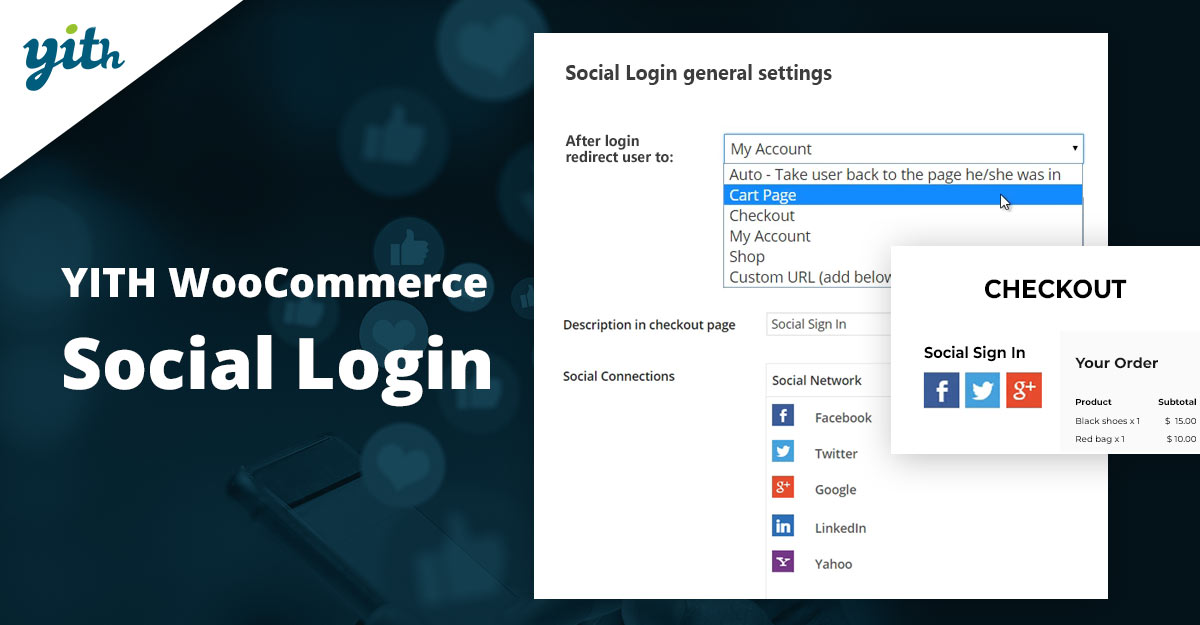
YITH WooCommerce Social Login integrates social buttons into standard login and registration forms so customers can sign in using major social providers. Unlike some popup-first implementations, YITH focuses on integrating options directly into the existing WooCommerce account flows.
The plugin is particularly attractive for stores already using YITH products since it follows YITH conventions and works well alongside other YITH WooCommerce tools. It’s useful for merchants who want social login inside the regular account page rather than a modal dialog.
Key features
- Integrates social login buttons into account and checkout forms.
- Supports Facebook, Google, and other widely used providers (check the current list on the YITH site).
- Works smoothly with other YITH WooCommerce plugins and themes.
Pricing: YITH sells social login as a premium plugin with yearly licensing.
3. Nextend Social Login
Nextend Social Login is one of the most widely used social login plugins for WordPress, offering easy integration with Google, Facebook, and X (formerly Twitter) out of the box. It also offers add-ons and a premium bundle for more providers and deeper WooCommerce or membership integration.
The plugin is known for a clean setup wizard, reliable provider connections, and sensible account linking. For sites that want predictable performance and professional support, Nextend’s premium tiers are a common choice.
Key features
- Login + registration via popular social providers, with account linking.
- WooCommerce compatible and integrates well with registration flows.
- Premium plan unlocks extra providers, priority support, and multisite licensing.
Pricing: Freemium, free core plugin with premium packages.
4. Super Socializer
Super Socializer (by Heateor) combines social login, social sharing, and social comments into a single free plugin. It’s a popular choice for budget-conscious stores that still need multiple social features from a single install. The plugin supports many providers and doesn’t require a third-party account to run.
While Super Socializer offers an impressive free feature set, stores with strict privacy or compliance requirements should review how user data is handled and whether provider consent flows meet local rules. It’s ideal for smaller shops or those experimenting with social login.
Key features
- Social login, share, and comment modules in one plugin.
- Easy setup; many icon themes and placement options.
- Free to use with no required external account for basic features.
Pricing: Core plugin is free; optional paid add-ons or custom development may be available through the vendor.
Also Read: Best WooCommerce Customer Reviews Plugins
5. MiniOrange Social Login
MiniOrange provides a robust social login solution with a dedicated WooCommerce add-on. The service emphasizes enterprise-ready security features, profile mapping to WooCommerce checkout fields, and a guided setup for popular identity providers. The vendor also offers many SSO/enterprise products beyond social login.
This option suits stores that need tighter control over identity and attribute mapping (for example, automatically filling billing name and email from social profiles). miniOrange offers more advanced SSO and directory integration for larger deployments.
Key features
- WooCommerce addon pre-fills checkout fields with social profile data.
- Enterprise-grade SSO and identity provider support are available.
- Guides for setting up provider credentials and testing flows.
Pricing: Freemium + commercial plans. miniOrange lists tiered plans, including site-based and feature-based subscriptions.
6. WooCommerce Social Login (SkyVerge)
SkyVerge’s Social Login (available on the WooCommerce marketplace) is explicitly built for WooCommerce stores, with a focus on checkout, account creation, and compatibility with WooCommerce themes and flows. It’s a straightforward extension for merchants who prefer marketplace-bought extensions and reliable support.
The extension integrates social providers into the standard WooCommerce account pages and checkout. It’s a practical pick for store owners who want a marketplace-supported extension with frequent updates and WooCommerce compatibility assurances.
Key features
- Marketplace support and regular updates via WooCommerce/SkyVerge distribution.
- Provider support for common social networks and checkout field pre-fill.
- Designed to work smoothly with WooCommerce templates and account pages.
Pricing: Typically sold as a WooCommerce extension (prices can appear as an annual license on the WooCommerce marketplace).
Also Read: How to Let Customers Reorder Products Easily in WooCommerce
7. OneAll Social Login
OneAll is a cloud-based social login platform that connects dozens of social networks and offers scalable plans for larger sites. It abstracts complexity by providing a unified API and dashboard for monitoring logins and custom mappings. For stores with broad, international audiences, OneAll’s many provider options can be a plus.
Because OneAll is a third-party cloud service, it requires an account and usually sits behind subscription tiers, but that also gives merchants centralized analytics and enterprise features that some self-hosted plugins don’t offer.
Key features
- Integrates with many social networks via a single API.
- Cloud-based dashboard, analytics, and developer tools.
- Scalable plans for sites with medium to large traffic volumes.
Pricing: Freemium to paid plans; OneAll lists personal and premium tiers.
8. WP Social (Login, Register, Share & Counter)
WP Social is an “all-in-one” social plugin that bundles login, sharing, and social counters. It’s a newer but popular entry in the WordPress repository with an emphasis on simplicity and replacing several single-purpose plugins with one package. Many merchants choose WP Social when they want share buttons and login in a single plugin.
The plugin includes templates, counters, and login features, plus customization options for where login buttons appear. It serves stores that want a compact solution rather than multiple dedicated plugins.
Key features
- Social login + share + social counter in one plugin.
- Multiple styles and templates, login redirect control.
- Good option for stores wanting both social widgets and authentication in one tool.
Pricing: Freemium model with paid plans for added features and premium support.
9. Auth0
Auth0 brings enterprise-grade authentication to WordPress with social login, SSO, passwordless options, and enterprise directory support. The “Login by Auth0” plugin connects WordPress to Auth0, allowing social provider logins as well as secure SSO setups for organizations. This is a strong fit for stores that need robust security, SSO, or high-traffic identity management.
While Auth0 can be overkill for small stores, it’s valued by sites that require centralized identity, multi-site SSO, or integration with enterprise directories. Pricing scales with monthly active users and features, so plan selection should factor in projected user volumes.
Key features
- Over 30 social providers supported, SSO, passwordless, and enterprise directory support.
- Robust security and monitoring, suitable for enterprise needs.
- Centralized identity management across multiple sites and apps.
Pricing: Auth0 offers a free developer tier and paid plans (Essentials, Professional, Enterprise) that scale with monthly active users.
Also Read: Best WooCommerce Prepayment Plugins
10. Social Login
“Social Login” (often listed as OA Social Login or Social Login plugin on WordPress.org) is a lightweight, free plugin that supports a large catalog of networks and provides comment/login integration. It’s suitable for stores that want a straightforward, low-cost way to add many provider options without a commercial account.
This plugin is a fit for smaller stores or publishers that need broad provider coverage and a plug-and-play approach. Administrators should still confirm privacy and data handling practices for the social providers they enable.
Key features
- Free and supports 40+ social networks for login/registration/comments.
- Widget and shortcode support for placement on login and comment forms.
- Autodetect/verify API connection tools in plugin settings.
Pricing: Free plugin in the WordPress repository.
Quick comparison table
| Plugin | Key features (short) | Pricing (summary) |
|---|---|---|
| Social Login for WooCommerce | Checkout-focused social sign-in, pre-fill billing, and multiple providers | WooCommerce extension, marketplace pricing (check store). |
| YITH WooCommerce Social Login | Inlined login options in account pages; YITH ecosystem | Paid plugin / yearly license via YITH. |
| Nextend Social Login | Clean wizard, Facebook/Google/X; premium for more providers | Freemium; premium tiers (example pricing on vendor site). |
| Super Socializer | Login + sharing + comments; no external account needed | Free core plugin; optional paid services. |
| miniOrange Social Login | WooCommerce addon, profile mapping, enterprise SSO options | Freemium + paid plans; site/feature-based pricing. |
| WooCommerce Social Login (SkyVerge) | WooCommerce-focused; marketplace distribution | Sold via WooCommerce marketplace (annual license). |
| OneAll Social Login | Cloud-based API, many providers, analytics dashboard | Freemium and paid tiers; check OneAll plans. |
| WP Social | Login + share + social counters in one plugin | Freemium: premium plans for advanced features. |
| Auth0 (Login by Auth0) | Enterprise SSO, social login, passwordless, directories | Free developer tier; paid plans scale with MAUs. |
| Social Login (OA Social Login) | Supports 40+ networks; login and comment integration | Free plugin; optional commercial services. |

Picking the right WooCommerce Social Login & Connect Plugin
Choose a plugin by matching provider coverage (does it include Apple or PayPal if your audience needs them?), checkout integration (pre-filling billing fields matters), and privacy/compliance needs. Freemium plugins are great for testing, while enterprise shops may prefer Auth0, OneAll, or miniOrange for SSO and deeper identity controls.
Always test the entire checkout flow after enabling social login: create a test order, check billing/shipping autopopulation, and verify how the plugin links social accounts to existing WordPress users. Lastly, keep plugin and provider credentials secure and regularly review access settings in the provider consoles.
Pair Your Stack: Other Tools From Wbcom Designs
Beyond the WooCommerce plugins above, these in-house tools from Wbcom Designs solve adjacent problems most stores eventually run into, particularly when your loyalty, community, or service layer needs to plug into WooCommerce without a heavy custom build:
- BuddyX Pro, community-first WordPress theme for membership stores, vendor communities, and customer-loyalty hubs.
- WB Gamification, drop-in points, badges, ranks, and leaderboards for any WooCommerce loyalty or referral funnel.
- WP Sell Services Pro, turn WooCommerce into a service-selling platform (consulting, freelance, agency hours).
- WB Ad Manager, native ad placements to monetize content around your store (blog, category pages, sidebar).
- WordPress Polls, lightweight polls for product feedback, NPS-style surveys, and zero-party data.
- Jetonomy, monetization toolkit for digital communities (token economy, paid groups, creator payouts).
Interesting Reads:
How to Make Shipping Free After a Minimum Order Amount in WooCommerce