

Looking for the best WooCommerce WooCommerce plugins in 2026? Here’s the short answer: the right plugin depends on your store size, the action you want to incentivize, and how deeply you need it to integrate with your existing customer journey. After testing the leading options hands-on against real WooCommerce 9.x stores, this guide shortlists the plugins that genuinely move the needle, plus newer 2026 entrants worth knowing about.
What we recommend: if you also need community, membership, or engagement layers around your WooCommerce store, pair your stack with WB Ad Manager, native ad placements so you can monetize content surrounding your store (blog, category pages, sidebar). We’ve seen this combination outperform standalone woocommerce plugins because retention compounds when product, content, and community live under the same roof.

Table of contents
- Email Customizer for WooCommerce
- YITH WooCommerce Email Templates
- Kadence WooCommerce Email Designer
- FunnelKit / WooFunnels Email Builder
- MailPoet
- Email Customizer (WooCommerce / StoreApps)
- WooCommerce Email Templates (WebToffee)
- Decorator - WooCommerce Email Customizer
- Omnisend (WooCommerce integration)
- Klaviyo for WooCommerce
What is “WooCommerce Plugins Email Templates”?
“WooCommerce Plugins Email Templates” refers to plugins and tools that let store owners design, edit, and send transactional emails generated by WooCommerce, order confirmations, invoices, shipping updates, password resets, and other automated messages. These plugins replace or extend the default WooCommerce templates so emails match brand visuals and convert better.
Related reading: 8 WooCommerce SMS Plugins I Tested to Boost Customer Notifications, 10 Best WooCommerce Email Customizer Plugins (2026 Tested), The 10 Best WooCommerce Affiliate Plugins: My Hands-On Testing Results.
Good template plugins provide drag-and-drop builders, live previews, merge tags for order data, responsive layout,s and testing features to preview how emails appear on mobile and desktop. For site owners who depend on clarity, trust signals, and consistent branding, these plugins are essential.
Also Read: Best WooCommerce Plugins Customer History
How to use a WooCommerce email template plugin
1. Install & activate the chosen plugin from the WordPress plugin directory or vendor.
2. Open the plugin’s email designer or the WooCommerce > Emails tab..
3. Choose the transactional template to edit (new order, completed order, etc.).
4. Use the drag-and-drop canvas to add logo, header, body blocks, dynamic order tags, and CTAs.
5. Preview on desktop and mobile, then send a test email to verify layout and merge tags.
Advanced steps: set conditional templates (seasonal themes or customer segments), integrate with SMTP or third-party ESP for better delivery, and document template versions for auditing. Always test with real order data and check spam filters or link tracking before rolling out changes site-wide.
Top 10 plugins to consider
Below are 10 plugins that cover a range from lightweight customizers to full email marketing integrations. Each entry includes an overview, key features, and concise pricing notes to help compare quickly.
1. Email Customizer for WooCommerce

Email Customizer for WooCommerce is a widely used tool for editing WooCommerce transactional emails with a visual template builder. It integrates directly with WooCommerce email triggers and offers a live preview so changes can be validated without switching windows. This makes it a reliable choice for stores that want polished, brand-consistent transactional messages.
The interface typically includes rows and blocks (text, images, buttons), plus merge tags for order number, customer name, and totals. Because the plugin focuses on transactional emails, it keeps the editing flow simple while providing enough controls to craft clean, mobile-friendly templates.
Key features
- Drag & drop template builder with live preview
- Unlimited rows and reusable blocks
- Merge tags for order and customer data
- Test send and responsive previews
Pricing: Free (basic) on WordPress.org; premium versions or addons typically from $29 - $99/year
2. YITH WooCommerce Email Templates
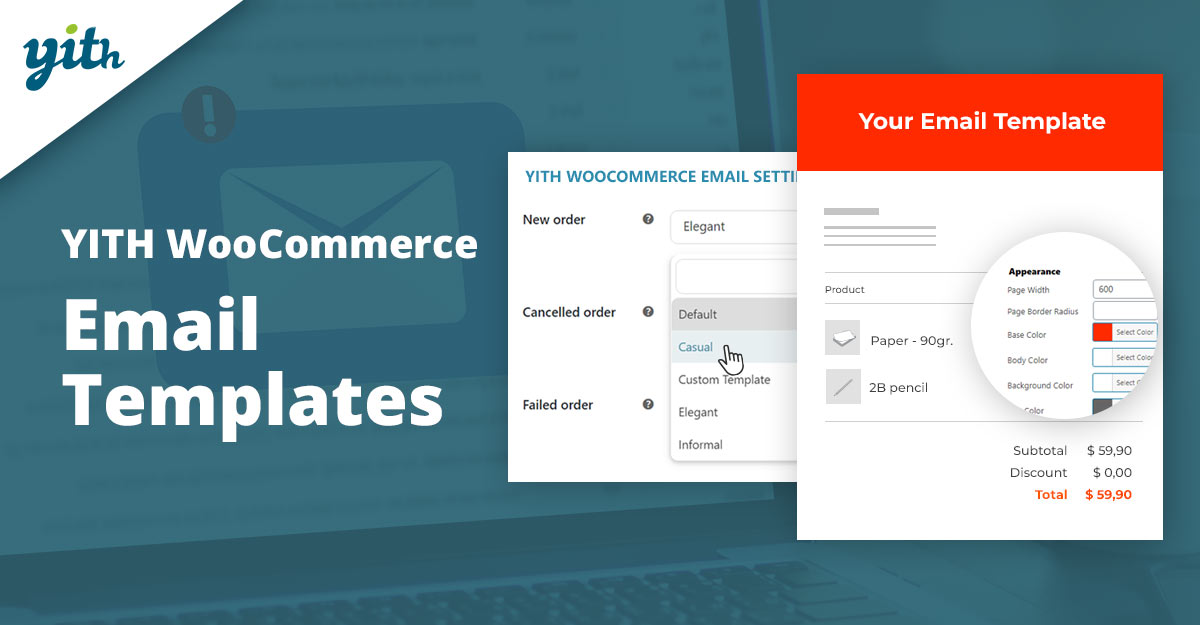
YITH’s WooCommerce Email Templates offers a template-driven approach: create multiple themed templates and switch them by date or campaign (seasonal themes for Black Friday, Christmas, etc.). That flexibility is handy for stores that want to run campaigns without touching core templates.
The plugin also supports logo and social icon placement, custom footer links, and simple visual controls. Because it’s produced by a known WooCommerce extension developer, it integrates cleanly with the WooCommerce email system and supports both free and premium options.
Key features
- Multiple templates with scheduling (apply templates by date range)
- Branding controls (logo, colors, footer, social links)
- Compatibility with WooCommerce email triggers
- Pre-built layouts for common campaigns
Pricing: Free version; premium from ≈ €79/year.
3. Kadence WooCommerce Email Designer
Kadence WooCommerce Email Designer is built for speed and clean output: a straightforward visual editor with a focus on responsive templates and modern typography. It’s especially useful for shops already using Kadence themes because styles can align with the site without heavy configuration.
The plugin prioritizes simple template controls, making it quick to brand transactional emails. It pairs well with performance-minded stores that want consistent fonts, spacing, and clear CTAs in every order email.
Key features
- Live visual editor with pre-built template options
- Responsive design and type control
- Lightweight markup for reliable deliverability
- Good compatibility with Kadence theme settings
Pricing: Free core plugin; pro features bundled in Kadence Pro or available as paid addon (pricing varies).
4. FunnelKit (WooFunnels), Email Builder
FunnelKit (formerly WooFunnels) includes an email builder designed for WooCommerce transactional and follow-up emails. It adds personalization and conditional content so messages can reflect cart contents, upsells, or dynamic recommendations. The focus is on conversion-focused emails rather than just cosmetic changes.
The product is attractive to stores that run automated flows tied to purchases and need email templates that support dynamic blocks and product recommendations without a separate ESP.
Key features
- Drag & drop email and automation builder
- Conditional blocks and dynamic product widgets
- Sequence automation for follow-ups and carts
Pricing: Premium plans from roughly $79 - $199/year.
Also Read: How Shippo Works with WooCommerce
5. MailPoet
MailPoet is an email marketing plugin built for WordPress with deep WooCommerce integration. It handles both newsletters and transactional emails, and offers template editors, automated flows, and a built-in sending service. For stores that want marketing and transactional emails in one place, MailPoet simplifies management.
Because MailPoet includes list and subscription management, it is a good fit when order emails and promotional newsletters should share template styles and audience segments.
Key features
- Template editor and automation workflows
- Built-in sending or integration with SMTP
- Subscriber and list management inside WP
Pricing: Free tier for small lists; paid plans scale by subscriber count, common starting tiers around $15 - $30/month.
6. Email Customizer (WooCommerce / StoreApps)
The official WooCommerce marketplace and StoreApps publish “Email Customizer” products that extend the native WooCommerce email system. These tend to be robust, well-supported options with guaranteed compatibility and premium support windows.
These solutions appeal to merchants who prioritize vendor support and guaranteed updates linked to WooCommerce releases; they usually include prebuilt templates and visual editors tailored to core WooCommerce emails.
Key features
- Official integration and compatibility promises
- Visual builders and template libraries
- Premium support and update cycles aligned to the core WooCommerce
Pricing: Typical pricing from $79 - $199/year, depending on feature set and licensing.
7. WooCommerce Email Templates
WebToffee’s template plugin allows customization of WooCommerce transactional emails using a visual editor and supports attachments, additional fields, and tailored copy. It’s useful when PDFs, invoices, or attachments must be part of order emails.
The product often targets stores that require minor layout changes plus specialized content like packing slips or invoice attachments directly in order emails.
Key features
- Template editing and attachment support
- Easy mapping of custom fields into emails
- Integration with invoicing/packing slip plugins
Pricing: Free basic version; premium functionality from around $49 - $119/year.
Also Read: Best WooCommerce Plugins Google Product Feed
8. Decorator, WooCommerce Email Customizer
Decorator uses the WordPress Customizer as the editing environment, which benefits stores that already rely on the native customizer flow. It’s lightweight and good for simple branding adjustments, logo, colors, basic blocks, without a heavy builder interface.
Because it’s minimal, Decorator has a small learning curve and is appropriate for merchants who do not need complex conditional content or automation sequences.
Key features
- Native WordPress Customizer interface
- Quick brand styling (colors, fonts, header/footer)
- Lightweight output for better deliverability
Pricing: Free; paid alternatives or upgrades vary by add-on vendor.
9. Omnisend (WooCommerce integration)
Omnisend is a full-featured eCommerce email marketing platform that integrates tightly with WooCommerce. While it is more marketing-focused than a pure template customizer, it also handles transactional flows, powerful automation, and templated order emails via its platform.
Stores that need strong segmentation, predictive product recommendations, and cross-channel messaging (email + SMS) will find Omnisend a good fit, though it requires an external service account rather than being a purely on-site plugin.
Key features
- Advanced automation and segmentation
- Drag & drop campaign and transactional templates
- Multi-channel messaging (email, SMS, push)
Pricing: Free tier available; paid plans commonly start around $16 - $59/month and scale by contacts and features.
10. Klaviyo for WooCommerce
Klaviyo is an industry-standard ESP with deep WooCommerce integration. It offers advanced templates, A/B testing, powerful segmentation, and data syncing of customer/order events. Using Klaviyo for transactional templates means emails can include personalized product recommendations and behaviorally-triggered flows.
While Klaviyo is more of an external marketing platform than an on-site email template plugin, its template and flow capabilities make it a top choice for merchants who prioritize revenue-focused email programs and deep analytics.
Key features
- Robust template editor and A/B testing
- Customer & order event tracking for dynamic content
- Strong analytics for LTV and revenue attribution
Pricing: Free tier for small lists; tiered pricing by contacts, commonly $20+/month as lists grow.
Quick comparison, features & pricing
| Plugin | Key features (short) | Pricing (short) |
|---|---|---|
| Email Customizer for WooCommerce | Drag & drop, merge tags, live preview. | Free / Premium $29 - $99/yr |
| YITH WooCommerce Email Templates | Multiple scheduled templates, branding. | Free / Premium ≈ €79/yr |
| Kadence Email Designer | Responsive templates, lightweight markup. | Free / Pro (varies) |
| FunnelKit (WooFunnels) | Automation, conditional blocks, product widgets. | Premium $79 - $199/yr |
| MailPoet | Newsletters + transactional, WP native. | Free / Paid by subs ~$15+/mo |
| Email Customizer (StoreApps) | Official-style compatibility, visual editor. | $79 - $199/yr |
| WebToffee Email Templates | Attachments, mapping custom fields. | Free / Premium $49 - $119/yr |
| Decorator | Customizer-based, minimal changes. | Free/small paid addons |
| Omnisend | Advanced flows, SMS + email, templates. | Free / Paid $16+/mo |
| Klaviyo | Advanced personalization & analytics. | Free / Tiered pricing by contacts |

Pair Your Stack: Other Tools From Wbcom Designs
Beyond the WooCommerce plugins above, these in-house tools from Wbcom Designs solve adjacent problems most stores eventually run into, particularly when your loyalty, community, or service layer needs to plug into WooCommerce without a heavy custom build:
- BuddyX Pro, community-first WordPress theme for membership stores, vendor communities, and customer-loyalty hubs.
- WB Gamification, drop-in points, badges, ranks, and leaderboards for any WooCommerce loyalty or referral funnel.
- WP Sell Services Pro, turn WooCommerce into a service-selling platform (consulting, freelance, agency hours).
- WB Ad Manager, native ad placements to monetize content around your store (blog, category pages, sidebar).
- WordPress Polls, lightweight polls for product feedback, NPS-style surveys, and zero-party data.
- Jetonomy, monetization toolkit for digital communities (token economy, paid groups, creator payouts).
Final Thoughts: How to Pick the Right WooCommerce Plugin in 2026
Choosing the right WooCommerce WooCommerce plugin in 2026 comes down to four practical questions:
- What’s your store size and traffic? Smaller stores get the best return on free or one-time-pay options; high-volume stores justify the SaaS monthlies because of the reporting, segmentation, and automation depth.
- How technical is your team? Code-light, pre-configured plugins ship in a day. Advanced tooling needs developer attention but unlocks edge cases (custom workflows, third-party integrations, multi-site).
- Do you need community or engagement features alongside? If yes, pair with BuddyX Pro and WB Gamification so engagement, rewards, and shopping live in one stack instead of three.
- How will you measure ROI? Start with one campaign type, instrument it properly (UTM tags, attribution windows), track 30-day retention or AOV lift, then scale what works.
Most WooCommerce stores see meaningful results within 60-90 days of launching a woocommerce program, provided it’s promoted properly via email, on-site banners, post-purchase flows, and (where relevant) inside your community channels. The plugin you choose matters less than the program design and follow-through.
Interesting Reads:
How to Create a Product Table in WooCommerce