
The best WordPress intranet setup for a social, team-style intranet is a community theme plus a community engine, not a single all-in-one theme. Reign with BuddyNext (or BuddyPress) gives you member profiles, an activity feed and spaces per team, and you add forums, events and media as separate plugins. Dedicated intranet themes also exist and suit sites that want everything packaged in one theme.
This guide explains how a WordPress intranet works, compares the two approaches, lists the themes people shortlist, and shows how to build a private company intranet step by step. For the shortest route, start with the enterprise intranet build guide.
What an intranet theme does
An intranet theme styles the pages your staff use every day: the home feed, profiles, directories, messages and group pages. The theme does not create those features by itself. A plugin supplies the data, such as the member directory or the discussion board, and the theme decides how it looks and how people move between screens.
That split matters when you choose. Some themes bundle their own intranet features, so the theme and the features are tied together. Others, like Reign, style plugins you can install and replace. You get the same working intranet, but your content is not locked to one theme.
What a good WordPress intranet needs
List what your staff will do before you look at any theme. Most intranets need the same core set.
- Member profiles and a directory so people can find a colleague.
- A feed where announcements and updates appear.
- Spaces or groups for each team, office or project.
- Discussion for questions that deserve an answer, not a chat thread.
- Events for all-hands meetings, training and social gatherings.
- Files and media for documents, photos and recordings.
- Privacy so only signed-in staff see anything.
If a theme or plugin handles six of the seven, you will fill the last gap with a plugin. That is normal on WordPress.
Option 1: A community stack on Reign
Reign is the WordPress theme for building a complete community site: social network, courses, member directory, marketplace and job board on one install. For an intranet, you use the social network part and add the pieces your company needs.
The engine is BuddyNext, our community plugin. The free version includes member profiles, an activity feed, spaces, notifications and a moderation queue, and messages when WPMediaVerse is also active. BuddyNext calls its groups spaces, so each team gets a space. If you already run BuddyPress, Reign styles that too, and you can keep your current data.
Around the engine you add plugins for the other jobs, and each installs free:
- Jetonomy for forums and Q&A. The free version includes spaces, threaded discussions, accepted answers, voting, reputation and a moderation queue, and private spaces are a free visibility option.
- Eventonomy for events. The free plugin includes listings, calendars, recurring events, RSVPs and attendee management.
- WPMediaVerse for photo and video uploads with albums, privacy levels and reporting. It also powers direct messages.
- WB Gamification if you want points and badges for activity. It has no paid edition.
Reign styles all of these with no add-on, so the intranet looks like one product. One theme licence covers a site, with no per-member fee, which matters for a staff list that grows. See pricing for the licence options.
Option 2: A dedicated intranet theme
Dedicated intranet themes package a design and a feature set into one purchase. They are marketed to agencies and companies who want a ready-made look. The names below come up often when people shortlist premium intranet and extranet themes.
A theme-first approach has a clear upside: you install one product and get a styled intranet quickly. The tradeoff is that features tied to the theme can be harder to move if you change themes later, so check how each theme stores its data before you commit. Test the demo on a phone and with a realistic number of staff before you buy.
Intranet themes people shortlist
This is a neutral list, not a ranking. Each is a premium theme, and we describe only what each is marketed for. Check the seller’s page for current features.
BuddyX Pro
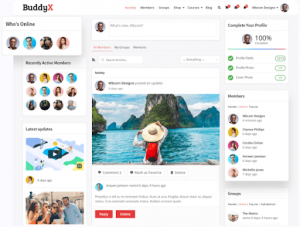
BuddyX Pro is a community theme from the same team that builds Reign. It is a lighter option for BuddyPress sites with member and group layouts, WooCommerce support and bbPress support. It suits a smaller team that wants a simple community look.
BuddySocial
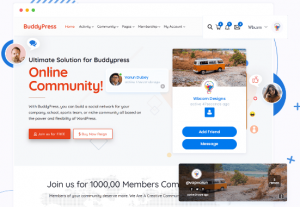
BuddySocial is a social networking theme for BuddyPress, with its own member and group directory layouts and Elementor integration. It leans toward social sites, so check that the layouts fit an internal staff site.
Reign

Reign is our theme. It supports BuddyNext and BuddyPress, plus courses, a member directory and a marketplace on the same install, so an intranet can grow into a training hub or a partner portal without a theme change. See what Reign is for the full picture.
Woffice

Woffice is marketed as an intranet and extranet theme with BuddyPress integration and bundled features such as a file manager and a calendar. It is aimed at companies who want an all-in-one package.
Alliance

Alliance is another intranet and extranet theme, aimed at agencies and firms. It is marketed with dashboards, polls and several colour schemes.
Micro Office

Micro Office is an intranet and extranet theme marketed on its feature range and compatibility with common WordPress plugins and translation tools.
Thrive
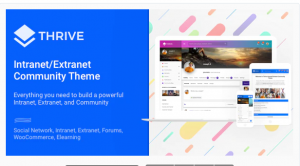
Thrive is an intranet and community theme that lists messaging, events, forums and file sharing among its features.
Cera

Cera is a BuddyPress-compatible theme for intranet and extranet sites, with private messages, member and group directories and a user dashboard.
BuddyApp
BuddyApp is a mobile-first community theme for BuddyPress sites. It suits teams who expect most staff to use phones.
WildCommunity

WildCommunity is a BuddyPress community theme with many inner page layouts for login, registration and group pages. It can serve as the base for an intranet or extranet.
Comparison: theme-first or stack-first
| Question | Dedicated intranet theme | Reign with a community stack |
|---|---|---|
| Setup speed | Fast, one package | A few plugins to install, all free to start |
| Where features live | Often inside the theme | In plugins you can keep if you change themes |
| Growth | Depends on the theme | Add forums, events, courses or a directory later |
| Per-member fees | Varies by seller | None: one theme licence per site |
| Best for | A quick, packaged intranet | A social intranet that may become a bigger community |
How to choose between them
Choose by who maintains the site and how far it needs to grow. Four questions settle most decisions.
- Who runs it? If one person will manage the site, a packaged theme reduces the number of moving parts. If a small team will, a plugin stack is easier to divide.
- What happens in a year? If you may add training, a partner area or a member directory, a stack that includes courses and directories avoids a rebuild.
- Where does your data live? Ask where profiles, posts and files are stored, and whether you could export them. Data in standard plugin tables is easier to move than data tied to a theme.
- Who supports it? Check how updates and support work for every piece you depend on.
Run the same pilot on two candidates if you are unsure. Ask five staff to complete the same five tasks: find a colleague, post an update, join a team space, ask a question and register for an event. The one that takes fewer wrong clicks wins.
Roles, moderation and who owns what
An intranet needs clear roles from day one. Decide who can create spaces, who can post to the company-wide feed, and who can moderate. In a community stack, BuddyNext includes a moderation queue in the free version and Jetonomy adds its own for forum posts, so reports from staff reach a named person instead of an inbox nobody reads.
Assign every space an owner and write one line about what the space is for. Spaces without owners are the first to go quiet. Plan a quarterly review where you archive spaces nobody uses, so the navigation stays short.
For company-wide posts, keep a small group of editors. Announcements land better when they are rare and clear, and a feed full of noise teaches staff to ignore it. Pair announcements with an event or a Q&A thread so people have somewhere to respond.
Keeping the intranet alive after launch
Launch is the easy part. The sites that stay active give people a reason to open them daily. Put things staff need there first: the holiday calendar, the policy search, the team directory and the all-hands recording. Then add social touches such as recognition posts or, if it suits your culture, points and badges with WB Gamification.
Review what is used after a month. Close spaces nobody opens, promote the ones that work, and ask a few staff what they wish was easier. Small fixes made quickly build trust in the tool.
How to build a private company intranet
Here is a practical sequence for a Reign intranet. It follows our private community build guide.
- Install WordPress and Reign. Use a staging site first, and apply the demo that is closest to an intranet.
- Install BuddyNext. Create one space per team or office and set who can join.
- Make the site private. Require sign-in for every page, so nothing is public. Test while logged out to confirm.
- Add Jetonomy. Open a Q&A space for IT and HR questions, so answers stay searchable instead of buried in chat.
- Add Eventonomy. Publish the all-hands meeting, training sessions and social events.
- Add WPMediaVerse. Give teams a place for photos and recordings. This also turns on direct messages.
- Set up sign-in. If you use single sign-on, it is configuration through established WordPress plugins, not something Reign ships.
- Invite a pilot team. Collect feedback for a few weeks before you invite everyone.
The guide to building a company intranet with BuddyPress covers the BuddyPress route in more depth.
Privacy and access: what to check
Privacy is the main reason companies choose WordPress for an intranet instead of a public social network. Plan three layers. First, the site itself: require sign-in. Second, spaces: decide which teams are open and which are invite-only. Third, media and files: set who can see uploads.
Test each layer as a normal staff member, and as a signed-out visitor. Also host the site where you control access, such as behind a company network or a VPN, if your policy demands it. Our guide to hosting a community site covers server choices.
Mistakes to avoid
- Launching to everyone at once. A pilot team finds the gaps before the whole company sees them.
- Treating the intranet as a file dump. Content that nobody owns goes stale. Give each space an owner.
- Skipping search. If staff cannot find an answer, they stop using the site.
- Ignoring mobile. Many staff will read the feed on a phone.
- Choosing by screenshots. Test the demo with real tasks before you buy.
Frequently asked questions
What is the best WordPress theme for an intranet?
For a social intranet, Reign with BuddyNext or BuddyPress is our recommendation, because it styles the community plugins your staff will use and grows with you. Dedicated intranet themes suit teams that want one packaged product.
Can I make a WordPress intranet private?
Yes. Require sign-in site wide, set each space to open or invite-only, and test while logged out. Jetonomy also supports private spaces in its free version. Follow our private community guide.
Is there a WordPress intranet plugin?
There are plugins for individual jobs, such as BuddyNext for profiles and spaces, Jetonomy for forums and Eventonomy for events. Together with a theme like Reign, they form an intranet.
Can I use BuddyPress for a company intranet?
Yes. BuddyPress provides profiles, activity and groups, and Reign styles it. BuddyNext is our newer community engine and also works with Reign. Read our guide to a BuddyPress company intranet.
Do I pay per employee?
Not with Reign. The model is one theme licence per site, with no per-member fee and no share of your sales. See pricing.
Can the intranet also serve partners or customers?
Yes. Because Reign supports courses, directories and marketplaces on the same install, you can add an external area later. Spaces control who sees what.
Does the intranet work on phones?
Yes, the theme is responsive. Still, test your own pages on a phone before launch, since long tables and large uploads are the usual trouble spots.
Try it on a real community site
Open a Reign demo to see profiles, spaces and the feed working together. Then follow the enterprise intranet build guide to set up your own.