

For many online store owners, the ability to restrict shipping and payment options in WooCommerce is not just a convenience - it’s a necessity. Studies show that 56% of shoppers abandon their carts due to unexpected shipping costs or unavailable payment methods. At the same time, offering too many options can overwhelm customers and lead to higher error rates during checkout. Whether you want to limit certain shipping methods to specific regions, block cash-on-delivery for high-value orders, or offer express delivery only for lightweight items, having control over these rules can significantly improve the buying experience.
WooCommerce’s default settings provide a strong foundation, but they lack the flexibility to set complex conditions. That’s where the WooCommerce Conditional Shipping and Payments plugin comes in. It allows you to create precise, rule-based restrictions that match your store’s policies, streamline the checkout process, and help ensure orders flow smoothly from cart to doorstep.

Why Restricting Shipping and Payment Options Matters in WooCommerce
Running an online store goes beyond listing products and accepting payments - it’s also about managing the logistics and payment workflows that keep your business efficient, cost-effective, and customer-friendly.
Compliance with Business Policies
- Some products may not qualify for certain payment methods - for example, “Cash on Delivery” might be unsuitable for high-value electronics.
- Hazardous goods or perishables often require using carriers licensed to handle such shipments.
Operational Efficiency
- Eliminating irrelevant shipping methods for specific regions helps prevent delivery errors.
- Limiting payment methods can speed up order processing, especially when some options take longer to confirm.
Cost Control
-
Premium services like same-day delivery can be expensive to offer everywhere; restricting them to local zones keeps costs manageable.
Customer Experience
-
Showing only applicable shipping and payment options reduces checkout confusion and increases conversion rates.
Bottom line: Well-planned restrictions in WooCommerce improve accuracy, maintain compliance, and create a smoother shopping experience for customers.
Common Scenarios for Restricting Shipping and Payment Methods
Before setting up restrictions, it’s worth identifying situations where these rules provide real value to your store operations and customer experience.
1. Regional Restrictions: Limit specific carriers or delivery services to certain countries, states, or postal codes. For example, you might offer same-day delivery only in urban areas within your city.
2. Product-Based Restrictions: Disable free shipping for oversized or heavy products, or hide shipping altogether for digital goods that require no delivery.
3. Order Value Restrictions: Allow “Cash on Delivery” only for orders under $200 to reduce risk and ensure smoother payment collection.
4. Customer Role Restrictions: Offer exclusive shipping rates to wholesale buyers, while providing different options for retail customers.
5. Shipping & Payment Combinations: Hide certain payment methods based on the shipping method chosen - for instance, disabling “Pay on Delivery” when express courier service is selected.
The WooCommerce Conditional Shipping and Payments plugin handles all these scenarios through flexible, rule-based conditions that adapt to your store’s needs.
What You Need to Get Started
Out of the box, WooCommerce lets you set basic shipping zones and payment methods. However, it doesn’t allow conditional restrictions - for example, “disable PayPal when order weight exceeds 20 kg” or “only offer Express Shipping for Zone 1.”
To set up these rules, you’ll need:
- A WooCommerce store with products and shipping zones already configured.
- The WooCommerce Conditional Shipping and Payments plugin.
Why choose this plugin?
- It’s built by the WooCommerce team, ensuring compatibility and support.
- It supports multiple conditions: product type, category, shipping class, weight, price, location, and more.
- You can combine restrictions for precise control.
- It works seamlessly with existing shipping methods and payment gateways.
Step-by-Step: How to Restrict Shipping and Payment Options in WooCommerce
Let’s walk through exactly how to apply restrictions using the WooCommerce Conditional Shipping and Payments plugin.
Step 1. Install and Activate the Plugin
-
Purchase and download the WooCommerce Conditional Shipping and Payments plugin from WooCommerce.com.
-
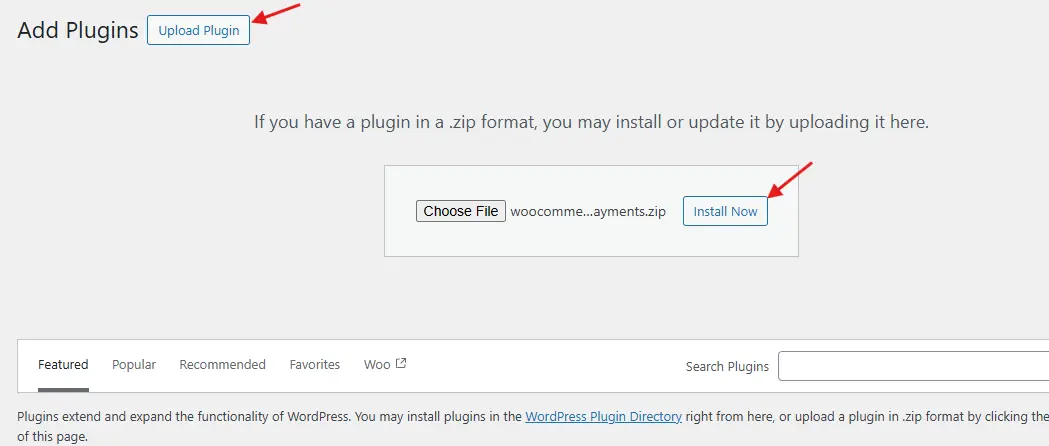
In your WordPress dashboard, navigate to Plugins → Add New → Upload Plugin.
-
Upload the ZIP file, click Install Now, and then Activate.
-
Once activated, new “Restrictions” settings will appear under WooCommerce → Settings.
Step 2. Restrict Shipping Methods
To control when shipping options appear:
-
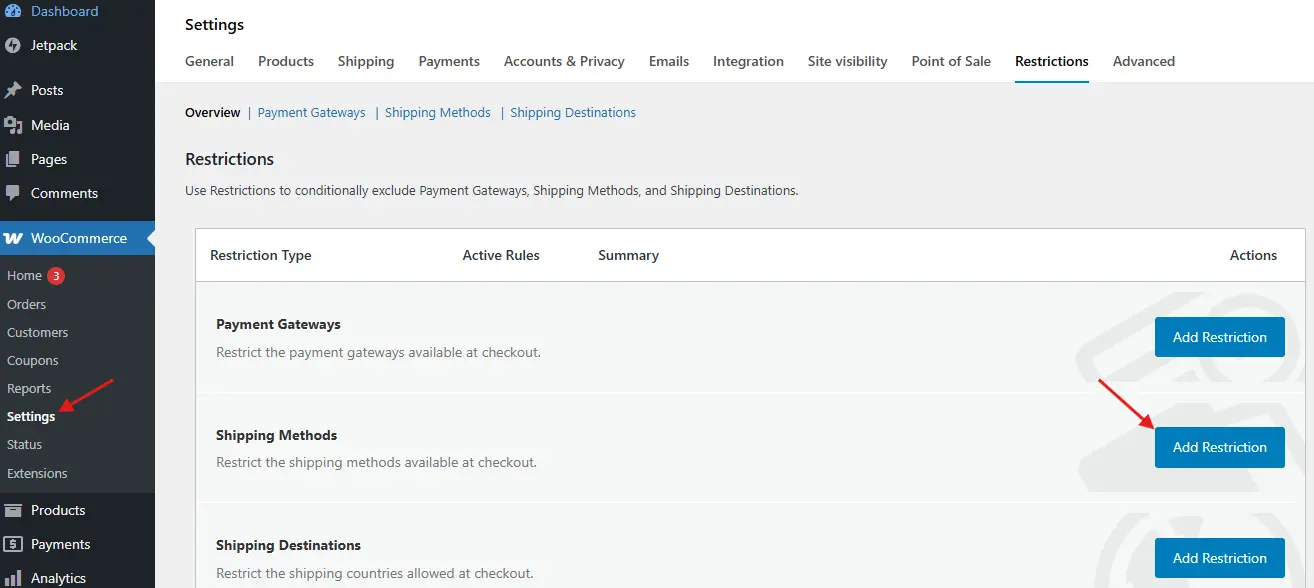
Go to WooCommerce → Settings → Restrictions → Shipping Methods.
-
Click Add Restriction.
-
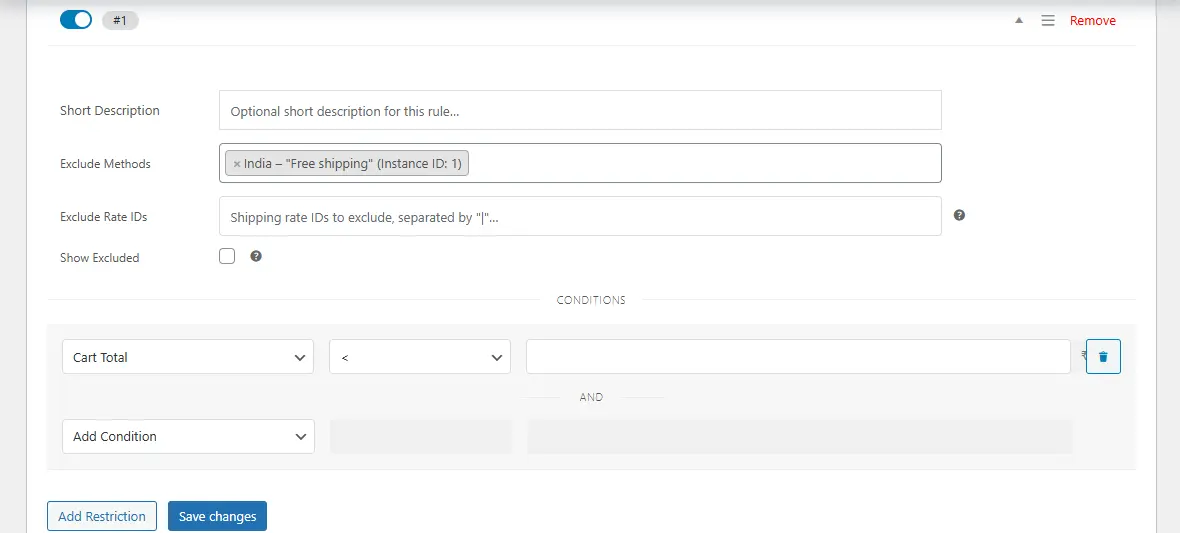
Select the Shipping Method you want to limit (e.g., Free Shipping, Flat Rate, Local Pickup).
-
Add Conditions, such as:
-
Location (country, state, or postcode)
-
Product category or shipping class
-
Cart subtotal, weight, or quantity
-
-
Click Save Changes.
Example:
If you want to disable Free Shipping for oversized items:
-
Condition Type: Shipping Class = “Oversized”
-
Action: Disable Free Shipping
Step 3. Restrict Payment Gateways
To control which payment methods are available:
-
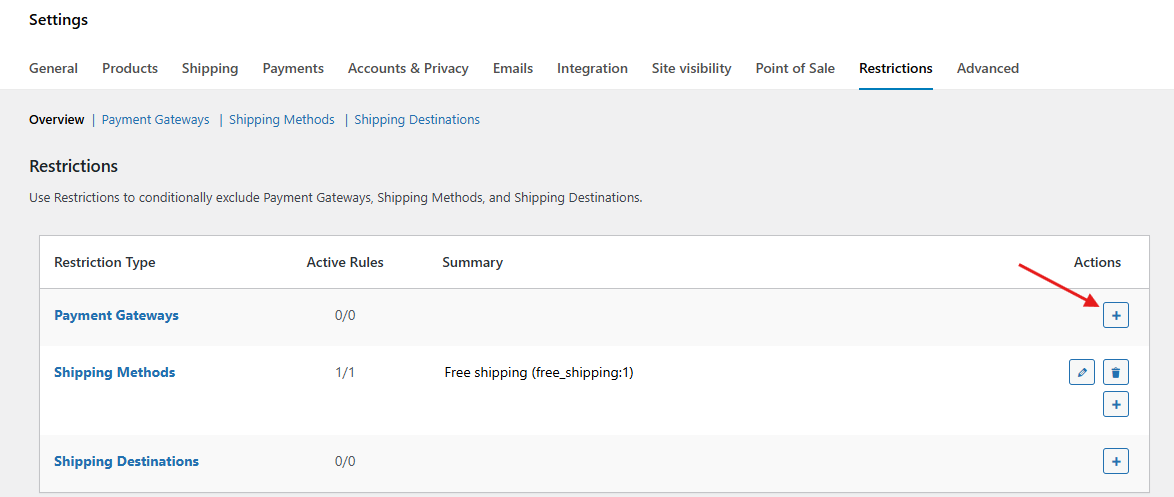
Go to WooCommerce → Settings → Restrictions → Payment Gateways.
-
Click Add Restriction.
-
Choose the Payment Method you want to limit (e.g., Cash on Delivery, PayPal, Credit Card).
-
Add relevant Conditions, such as:
-
Order total
-
Shipping method selected
-
Customer location
-
User role
-
-
Click Save Changes.
Example: To allow Cash on Delivery only for orders under $200:
-
Condition Type: Order Total > $200
-
Action: Disable COD
Step 4. Combine Shipping and Payment Restrictions
You can connect rules for even tighter control.
Example: If a customer chooses Express Shipping, you can disable Bank Transfer to ensure faster processing.
Steps:
-
Create a Payment Gateway Restriction for Bank Transfer.
-
Add condition: Shipping Method = Express Shipping.
-
Save and test.
Step 5. Test Your Restrictions
Before going live:
-
Create test products and orders that meet and don’t meet your conditions.
-
Go through the checkout process to verify that restricted methods are hidden when applicable.
-
Adjust rules if needed for accuracy.
Best Practices for Restricting Shipping and Payment in WooCommerce
1. Keep It Simple: Too many restrictions can overcomplicate the checkout process. Focus on rules that truly matter for your operations and customer experience.
2. Think Like a Customer: Put yourself in the buyer’s shoes. If a shipping or payment option disappears unexpectedly, it can feel frustrating. Make your restrictions logical and predictable.
3. Use Clear Messaging: When a method isn’t available, display a helpful note. For example: “Express Shipping is only available for orders under 5 kg.” This reduces confusion and increases trust.
4. Review Carrier Policies: Always align your store’s shipping rules with your carriers’ guidelines to avoid delivery failures or unexpected surcharges.
5. Audit Regularly: Your product catalog, pricing, or shipping options may change over time. Review and update your restrictions periodically to keep them accurate and relevant.
Common Mistakes to Avoid
Many WooCommerce store owners make the mistake of trying to restrict shipping and payment options too aggressively. Adding too many rules at once can frustrate customers - especially if they can’t figure out why certain shipping or payment methods aren’t available. Another oversight is skipping mobile testing; what looks fine on desktop might display poorly or confuse shoppers on smaller screens.
Another major pitfall is neglecting to explain restrictions at checkout. If customers don’t see a clear reason why a method is unavailable, they may assume your store is broken and abandon their cart. Finally, failing to regularly review and update your rules can leave outdated restrictions in place, which can hurt both sales and customer satisfaction. Keeping your restrictions clear, relevant, and updated is essential for creating a smooth shopping experience.

Smarter Shipping and Payment Control in WooCommerce
Mastering how to restrict shipping and payment options in WooCommerce can significantly improve order accuracy, reduce logistical headaches, and enhance customer satisfaction. By implementing smart, condition-based rules, you ensure shoppers see only the most relevant, cost-effective, and viable options during checkout.
With the WooCommerce Conditional Shipping and Payments plugin, you can create flexible restrictions tailored to your business needs - whether that’s limiting free shipping to specific regions, controlling payment methods based on cart value, or ensuring compliance with shipping regulations.
In ecommerce, control equals efficiency. By taking charge of your shipping and payment workflows, you’re not just simplifying checkout - you’re setting the stage for smoother operations, happier customers, and a healthier bottom line.
Interesting Reads:
How to Assign Shipping by Dimensions in WooCommerce
10 Best WooCommerce Cross‑selling & Product Bundles Plugins
How to Add Delivery Date Selection in WooCommerce (Step-by-Step)