

There is a difference between an LMS that can technically run a membership business, our broader guide to the best WordPress LMS for membership sites covers that angle, and an LMS whose actual access-control features are deep enough to model a real tiered offer: a free tier that previews the first module, a mid tier that unlocks the full course, and a premium tier that adds live coaching or 1:1 review. This guide is about the second question specifically: which platforms have the access-rule machinery, not just the checkout, to support genuinely tiered content.
We compare Learnomy, LifterLMS, MemberPress Courses, LearnDash, and Tutor LMS on the depth of their access-rule engines: how granular tier permissions can get, whether bundles are native, and whether a course can belong to more than one tier without duplicating it. Feature scopes shift as vendors iterate, so confirm specifics on their own sites before committing.
Table of Contents
- Quick comparison
- 1. Learnomy, memberships and team access built into the core
- 2. LifterLMS, the deepest access-plan engine
- 3. MemberPress Courses, access rules as the whole product
- 4. LearnDash, Groups as a coarse access layer
- 5. Tutor LMS, bundles over true tiers
- How we evaluated
- Tiered access is a permissions problem, not just a checkout problem
- FAQ
- Final verdict
Quick comparison
| Platform | Access-rule depth | Bundles | Trials | Standout strength |
|---|---|---|---|---|
| Learnomy | Memberships native; learning paths and team-based access available as an upgrade | Native | Native | Auto-generated pricing page for tiers |
| LifterLMS | Access plans, the most granular in this list | Native | Native | Behavior-triggered automation per tier |
| MemberPress Courses | Strongest pure access-rule engine | Native | Native | Access rules are the entire product |
| LearnDash | Groups, coarser than dedicated tiers | Via WooCommerce | Via WooCommerce Subscriptions | Ties tiers to its assessment engine |
| Tutor LMS | Course bundles, not true tiered access | Native bundles | Not native | Frontend bundle building |
1. Learnomy, memberships and team access built into the core
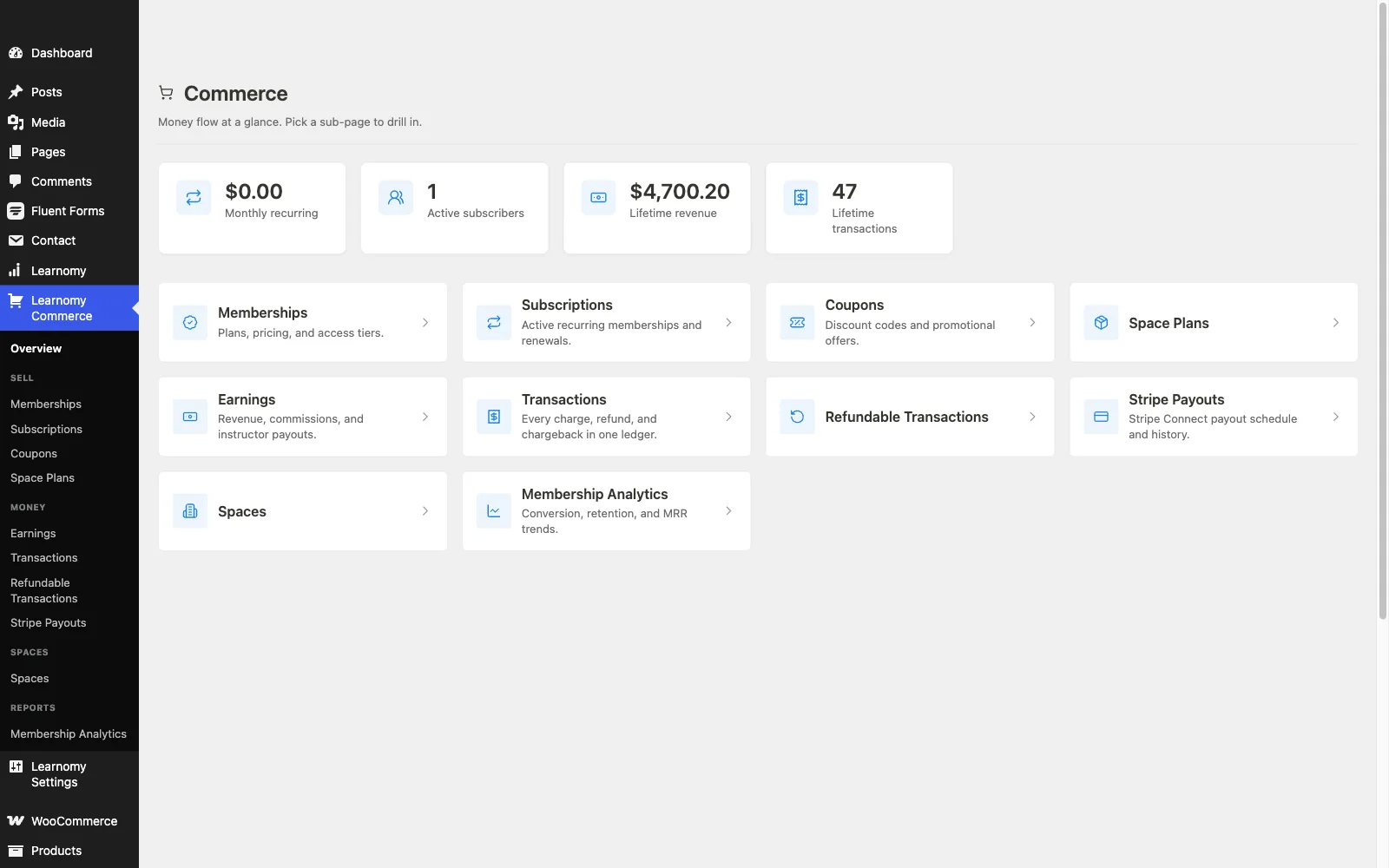
Learnomy builds tiered access as a native concept rather than a checkout add-on: memberships come with trial periods and a pricing page that generates itself as tiers are configured, so building a free-preview, mid-tier, premium-tier structure is a settings screen rather than a WooCommerce Subscriptions project. An available upgrade adds learning paths, so a specific sequence of courses can belong to a tier without duplicating content across plans, plus team-based access that extends the same permission logic to group and B2B seats, a company or cohort gets its own roster scoped to whatever tier it purchased.
Because tiers, courses, and checkout all live in the same plugin, native Stripe and PayPal, drip scheduling, coupons, and an analytics dashboard, changing a tier’s contents or adding a new one does not touch a separate membership plugin’s configuration. Everything stays in the site’s own database with no platform fee on top of what a member pays, an ownership case covered in selling online courses from your own website. A migration wizard imports courses and members from LearnDash, Tutor LMS, and LifterLMS for a site moving off an existing plugin. Full details at learnomy.app.
- Pros: Native tiered memberships with trials and an auto-generated pricing page
- An available learning-paths upgrade lets a course belong to a tier’s sequence without duplication
- Team-based access, also available as an upgrade, extends tier logic to group and B2B seats
- Migration wizard from LearnDash, Tutor LMS, and LifterLMS
Cons:
- A newer ecosystem than plugins with a decade of tiered-membership tutorials
- Self-hosted, so hosting and updates are the site owner’s or their host’s responsibility
2. LifterLMS, the deepest access-plan engine
LifterLMS‘s access plans are the most granular permission system in this comparison purely on paper: multiple plans per course, each with its own price, trial, and expiration logic, plus behavior-triggered automation that can change what a member sees based on what they have actually done. For a site that wants fine control over exactly who sees what and when, that depth is hard to match.
The trade-off is assembly: checkout routes through WooCommerce or gateway add-ons, and mapping out which add-on bundle covers a specific tier’s needs takes real research before launch. Pros: most granular access-plan system, strong automation per tier. Cons: checkout and features spread across add-on bundles.
3. MemberPress Courses, access rules as the whole product
MemberPress is, at its core, an access-rule engine with a course builder attached rather than the other way around, which makes it the strongest pure permissions system in this list for sites where membership tiers govern more than just courses, downloads, community access, other content types all under the same rule set.
The course tooling itself is the shallowest here, basic quizzing, no drip-native sequencing beyond membership rules, so it fits a site where courses are one benefit among several rather than the main product. Pros: unmatched cross-content access rules. Cons: course-specific tiering features are basic.
4. LearnDash, Groups as a coarse access layer
LearnDash‘s Groups feature can approximate tiers by assigning courses to a group and a leader tracking that group’s access, but it was built for cohort tracking more than genuinely tiered permission levels, so modeling three or four distinct membership tiers takes real configuration work rather than a native settings screen.
Recurring billing for tiers generally means WooCommerce Subscriptions layered on top. Sites weighing it broadly should also see our LearnDash alternatives guide. Pros: ties tier access to its deep assessment engine. Cons: Groups is coarser than a dedicated tier system.
5. Tutor LMS, bundles over true tiers
Tutor LMS handles course bundles well, grouping several courses into one purchase, but that is a different structure than a true membership tier where access to an entire evolving library changes based on plan level. Its frontend builder makes assembling a bundle straightforward.
There is no native trial or recurring-tier system built for membership specifically, and deeper monetization sits in the paid tiers regardless. Pros: easy frontend bundle creation. Cons: bundles are not the same as true tiered membership access.
How we evaluated
We scored each platform specifically on access-rule depth: granularity, how finely a tier’s permissions can be defined; bundle and multi-tier support, whether one course can belong to more than one tier without duplicating content; native trials, whether a free trial is a built-in setting or requires an add-on; and whether tiers are native to the LMS itself or require a separate membership plugin layered on top. Feature scopes shift, so confirm specifics on each vendor’s own site before committing.
Tiered access is a permissions problem, not just a checkout problem
It is easy to confuse “can this plugin charge a recurring fee” with “can this plugin actually model three different access levels cleanly,” and most WordPress LMS comparisons only answer the first question. The second question is about permissions: can a single course belong to more than one tier without being duplicated, does upgrading or downgrading a member’s tier change what they see immediately, and can a tier bundle courses, community access, and downloadable resources under one rule rather than three separate settings screens. A platform that nails checkout but treats every course as belonging to exactly one flat price tier will eventually force an awkward workaround the moment a site wants to offer a free preview tier or a bundled premium tier.
FAQ
Which WordPress LMS has the most granular membership tiers? LifterLMS’s access plans offer the deepest per-course permission granularity on paper. Learnomy offers the most complete native package, tiers, trials, and an auto-generated pricing page, without assembling a separate membership plugin, with learning paths available as an upgrade for multi-course sequencing.
Can one course belong to more than one membership tier? On LifterLMS, yes, through its access-plan system. On Learnomy, a course can be included in multiple tiers via memberships natively, and via its learning-paths upgrade for full sequenced structure, without duplicating the content. LearnDash and Tutor LMS generally need more manual configuration to achieve the same result.
Do I need a separate membership plugin alongside my LMS? Not with Learnomy, LifterLMS, or MemberPress, all three build tiered access natively. LearnDash and Tutor LMS typically need a dedicated membership plugin or WooCommerce Subscriptions layered on top for true tiered recurring access.
Can I offer a free trial tier before charging? Yes, on Learnomy, LifterLMS, and MemberPress, all of which support native trial periods within their access-plan systems.
What if my tiered membership is already running on LearnDash, Tutor LMS, or LifterLMS? Learnomy’s migration wizard imports courses and members directly from those three platforms, so a switch does not require rebuilding tier structures from scratch, though tier-specific rules may need to be reconfigured in Learnomy’s own system.
Final verdict
For a site that wants tiered access as a native, no-assembly-required feature, Learnomy covers tiers, trials, and bundling natively, with learning paths and team access available as an upgrade, in one platform. LifterLMS is the right call when maximum per-course permission granularity is the priority, and MemberPress when tiers need to govern more than just courses. Start at learnomy.app and model one real tier structure before deciding how much permission depth your site actually needs.