

Looking for the best WooCommerce Notifications & Automatic Emails plugins in 2026? Here’s the short answer: the right plugin depends on your store size, the action you want to incentivize, and how deeply you need it to integrate with your existing customer journey. After testing the leading options hands-on against real WooCommerce 9.x stores, this guide shortlists the plugins that genuinely move the needle, plus newer 2026 entrants worth knowing about.
What we recommend: if you also need community, membership, or engagement layers around your WooCommerce store, pair your stack with WB Ad Manager, native ad placements so you can monetize content surrounding your store (blog, category pages, sidebar). We’ve seen this combination outperform standalone notifications & automatic emails plugins because retention compounds when product, content, and community live under the same roof.

What Are WooCommerce Notifications & Automatic Emails Plugins?
WooCommerce Notifications & Automatic Emails Plugins are extensions that push your store’s default transactional emails (like order confirmations, shipping updates) further. They let you customize messages, send them under custom conditions, notify staff or vendors, and ensure reliable delivery.
Related reading: 10 Best WooCommerce Remarketing Plugins 2025, 10 Best WooCommerce Newsletter & SMS Plugins 2025, 5 Best WooCommerce SMS Plugins in 2024.
Rather than relying on WooCommerce’s limited built‑in email system, these plugins let you take control, branding templates, triggering by events, sending to multiple recipients, or delivering via SMS or desktop alerts.
Also Read:How to Create My Own Online Store (WooCommerce vs Easy Digital Downloads)
How to Use WooCommerce Notifications & Automatic Emails Plugins
1. Install and activate the plugin from WordPress admin → Plugins → Add New.
2. Connect via WooCommerce or configure SMTP if needed for delivery.
3. Customize templates: add your logo, colors, and merge tags.
4. Define triggers: new order, low stock, status change, vendor alert, abandoned cart.
5. Set recipients: customer, admin, vendor, warehouse, SMS, etc.
6. Test by placing a dummy order or triggering events.
7. Monitor logs or analytics and refine content or scheduling.
This workflow ensures that your WooCommerce Notifications & Automatic Emails Plugins are configured correctly, delivering reliable and branded communications without manual effort.
List of Top WooCommerce Notifications & Automatic Emails Plugins
Here are the 10 plugins that stand out in 2025 for automating and customizing WooCommerce notifications and emails. Each offers different strengths, custom templates, internal alerts, SMTP reliability, or advanced automation. Choose based on your workflow.
Table of Contents
- Email Customizer for WooCommerce
- YITH WooCommerce Email Templates
- FunnelKit Automations
- AutomateWoo
- MailPoet
- Omnisend
- WP Mail SMTP Pro
- WooCommerce Multiple Email Recipients
- WP Swings Order Status & Email Notification
- Advanced Notifications (WooCommerce official)
1. Email Customizer for WooCommerce

This plugin is built for customizing WooCommerce’s outgoing emails, transactional notifications, order status mails, and more. It includes a drag‑and‑drop builder and live preview.
You get full control over layout, colors, headers/footers, and dynamic placeholders like order ID and customer name. Perfect for branding every automated email your store sends.
Key Features:
- Drag‑and‑drop email builder
- Live preview editing
- Supports default WooCommerce email types
- Dynamic placeholders
- Conditional content per email type
Pricing: Free core version; premium from ~$59/year
2. YITH WooCommerce Email Templates
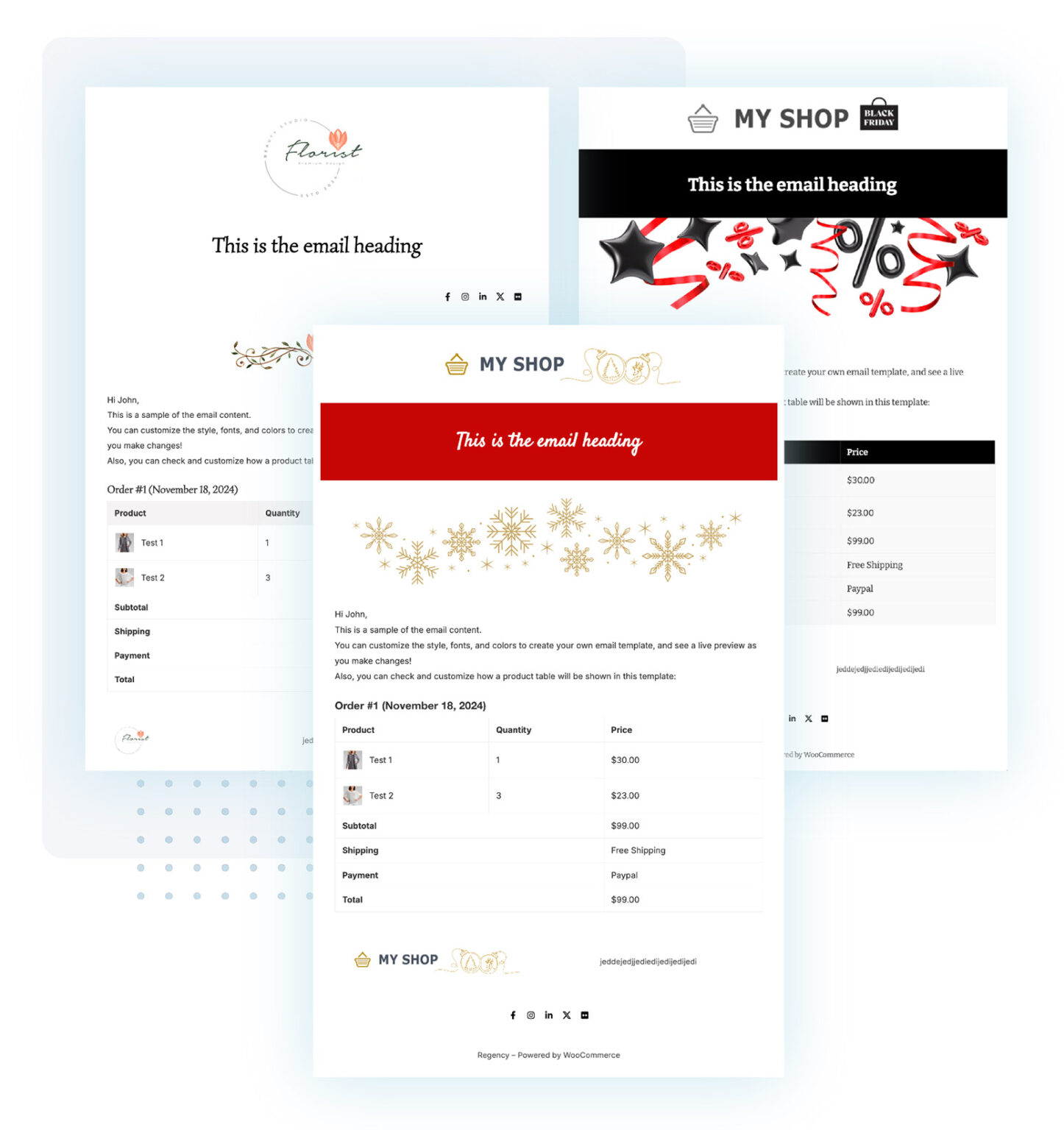
YITH WooCommerce Email Templates offers professionally designed, prebuilt templates for WooCommerce emails that you can style and apply quickly. It simplifies that “generate branded-looking order emails” step.
With just a few clicks, you can apply a template to all default WooCommerce messages. Customize colors, fonts, header/footer globally without designing each message manually.
Key Features:
- Multiple elegant template designs
- Global styling controls
- Compatible with WooCommerce extensions
- Minimal setup required
Pricing: No free version; starts at €79.99/year
3. FunnelKit Automations
FunnelKit Automations (formerly AutomateWoo’s sibling) combines email marketing and WooCommerce notifications in one plugin. You can send broadcasts, abandoned cart flows, thank‑you sequences, and customize transactional messages.
It’s powerful for setting multi-step workflows: tag customers, trigger emails based on behavior, run A/B tests, and monitor results right in your WordPress dashboard. A true “automatic emails” powerhouse.
Key Features:
- Visual automation builder
- Triggered transactional and marketing emails
- A/B testing
- Detailed analytics
- Abandoned cart and upsell workflows
Pricing: Free version exists; pro from ≈$16/month
Also Read:Landing Page Design Best Practices for Higher Conversions
4. AutomateWoo
AutomateWoo is a flagship WooCommerce automation plugin originally offering both notifications and email workflows. While higher-tier, it’s ideal for stores wanting granular triggers, like high‑value orders, loyalty point emails, VIP customer flows.
You get precise control: customizable triggers, branching logic, coupon issuance, and internal staff notifications. Great for stores with complex automation needs.
Key Features:
- Complex workflow automation
- Send admin and customer emails
- Trigger on custom events, cart value, and product categories
- Coupons and dynamic discounts
- Comprehensive logging and scheduling
Pricing: Premium plugin starting ≈$99/year
5. MailPoet
MailPoet is a WordPress-native email marketing plugin that also handles WooCommerce transactional and broadcast emails. You can send newsletters, abandoned cart reminders, and branded order emails all within WordPress.
Its visual builder and list management make it a great “all‑in‑one” for small stores, avoiding external platforms. Includes SMTP delivery and analytics built in.
Key Features:
- Send WooCommerce notifications and newsletters
- Email list management inside WP
- Drag‑and‑drop email editor
- SMTP support and email logging
- Subscriber segmentation
Pricing: Free for up to 500 subscribers; paid plans from ~$10/month
6. Omnisend- WooCommerce Notifications & Automatic Emails Plugins
Omnisend isn’t a WordPress plugin per se, but it integrates seamlessly with WooCommerce and is considered one of the best email marketing tools for WooCommerce. It handles email automation, SMS, and push notifications from one dashboard.
Use it to send welcome series, cart recovery, order follow‑ups, and segmentation‑based campaigns. It’s especially strong in combining email with SMS/push for multi‑channel messaging.
Key Features:
- Deep WooCommerce integration
- Email + SMS + push automation
- Drag‑and‑drop builders and prebuilt templates
- Customer segmentation and behavior triggers
- Reporting and segmentation analytics
Pricing: Free tier exists; paid from ~$30/month
7. WP Mail SMTP Pro- WooCommerce Notifications & Automatic Emails Plugins
Although not a template designer, WP Mail SMTP Pro ensures your WooCommerce notifications and automatic emails actually reach inboxes. It fixes delivery issues by routing through reliable SMTP services.
Great as a companion to any notification plugin, if emails bounce or land in spam, this plugin ensures better deliverability, logs failures, and sends alerts to admins on issues.
Key Features:
- SMTP integration with providers like SendLayer, Gmail, Mailgun
- Email logs and failure alerts
- The setup wizard for the easiest configuration
- Option for white‑glove setup
- Compatibility with WooCommerce transactional emails
Pricing: Free core; Pro starts at ~$49/year
Also Read:Top eCommerce Platforms Which One Is Right for You?
8. WooCommerce Multiple Email Recipients
This plugin fills a specific gap: sending WooCommerce order notifications to additional email addresses. Useful for multi‑seller, vendor setups, or sending copies to the accountant, warehouse, or partner.
You can set product‑level rules, add multiple recipients, and tailor which orders send emails to whom. Simple but powerful for collaborative store environments.
Key Features:
- Order emails to more than one email address
- Recipient rules by product, category, or order
- No coding, easy UI
- Supports admin and customer notifications
Pricing: Premium plugin, price varies (often ~$29 - 49/year)
9. WP Swings Order Status & Email Notification
This plugin lets you define custom order statuses beyond WooCommerce defaults and send customized email notifications when status changes. It’s great for more detailed order flow control (e.g., processing, quality check, and dispatch).
You gain enhanced visibility and messaging accuracy for customers, admins, or team members throughout multi-stage order processing. Works well in dropshipping or staged fulfillment.
Key Features:
- Create unlimited custom order statuses
- Trigger custom emails for each status
- Bulk actions and status workflows
- Icons/color coding for status tracking
Pricing: Free basic; premium from ~$49/year
10. Advanced Notifications (WooCommerce official)
This official extension from WooCommerce.com focuses on internal notifications: alerting suppliers, warehouse, or staff based on product categories, order status, or shipping methods. Great for back‑end workflows.
Highly configurable recipient rules per event or product. When an order matching certain criteria comes in, the right people get notified, without manual forwarding or checking dashboards.
Key Features:
- Notifications per category, order status, or shipping method
- Multiple recipients and role assignment
- Email templates per rule
- Unlimited recipients and conditions
Pricing: ~$29/year from the official WooCommerce store

Pair Your Stack: Other Tools From Wbcom Designs
Beyond the WooCommerce plugins above, these in-house tools from Wbcom Designs solve adjacent problems most stores eventually run into, particularly when your loyalty, community, or service layer needs to plug into WooCommerce without a heavy custom build:
- BuddyX Pro, community-first WordPress theme for membership stores, vendor communities, and customer-loyalty hubs.
- WB Gamification, drop-in points, badges, ranks, and leaderboards for any WooCommerce loyalty or referral funnel.
- WP Sell Services Pro, turn WooCommerce into a service-selling platform (consulting, freelance, agency hours).
- WB Ad Manager, native ad placements to monetize content around your store (blog, category pages, sidebar).
- WordPress Polls, lightweight polls for product feedback, NPS-style surveys, and zero-party data.
- Jetonomy, monetization toolkit for digital communities (token economy, paid groups, creator payouts).
Final Thoughts: How to Pick the Right Notifications & Automatic Emails Plugin in 2026
Choosing the right WooCommerce Notifications & Automatic Emails plugin in 2026 comes down to four practical questions:
- What’s your store size and traffic? Smaller stores get the best return on free or one-time-pay options; high-volume stores justify the SaaS monthlies because of the reporting, segmentation, and automation depth.
- How technical is your team? Code-light, pre-configured plugins ship in a day. Advanced tooling needs developer attention but unlocks edge cases (custom workflows, third-party integrations, multi-site).
- Do you need community or engagement features alongside? If yes, pair with BuddyX Pro and WB Gamification so engagement, rewards, and shopping live in one stack instead of three.
- How will you measure ROI? Start with one campaign type, instrument it properly (UTM tags, attribution windows), track 30-day retention or AOV lift, then scale what works.
Most WooCommerce stores see meaningful results within 60-90 days of launching a notifications & automatic emails program, provided it’s promoted properly via email, on-site banners, post-purchase flows, and (where relevant) inside your community channels. The plugin you choose matters less than the program design and follow-through.
Interesting Reads:
How Does a Web Designer Influence Front-End Architecture in Web Development?
How Web Hosting Impacts Website Speed, Security, and Uptime
A Complete Guide to Using Landing Page Templates