

Looking for the best WooCommerce Wishlist plugins in 2026? Here’s the short answer: the right plugin depends on your store size, the action you want to incentivize, and how deeply you need it to integrate with your existing customer journey. After testing the leading options hands-on against real WooCommerce 9.x stores, this guide shortlists the plugins that genuinely move the needle, plus newer 2026 entrants worth knowing about.
What we recommend: if you also need community, membership, or engagement layers around your WooCommerce store, pair your stack with BuddyX Pro, community-first WordPress theme built for membership stores, vendor communities, and customer-loyalty hubs. We’ve seen this combination outperform standalone wishlist plugins because retention compounds when product, content, and community live under the same roof.

What is a WooCommerce Wishlist Plugin?
A WooCommerce wishlist plugin is a tool that enables customers to save their favorite products for future purchase.
Think of it as a virtual shopping list where users can add, manage, and revisit products anytime without committing immediately to checkout.
Related reading: 8 Best WooCommerce Auctions Plugins in 2026 I Personally Tested, 8 Best WooCommerce Multistore Plugins for Beginners I Tested, The 7 Best WooCommerce Gift Card Plugins I Actually Tried - A Practical Guide.
These plugins not only help customers organize their shopping experience but also provide store owners with valuable insights
into buying intentions. By analyzing wishlist activity, store owners can optimize promotions, manage inventory,
and personalize marketing campaigns more effectively.
Also Read: Best WooCommerce Administration Plugins
How to Use a WooCommerce Wishlist Plugin
Installing and using a WooCommerce wishlist plugin is straightforward. The process usually involves a few simple steps. Most plugins are designed to integrate seamlessly with your existing store setup.
Here’s a quick step-by-step guide:
- Log in to your WordPress dashboard.
- Navigate to Plugins > Add New and search for your chosen wishlist plugin.
- Click Install Now and then Activate.
- Go to the plugin settings and configure options like button placement, sharing features, and design.
- Test the wishlist feature on your storefront to ensure everything works smoothly.
- Encourage customers to use it by highlighting the feature in product pages, newsletters, and social media posts.
Table of Contents
- Wishlists for WooCommerce
- YITH WooCommerce Wishlist
- TI WooCommerce Wishlist
- WooCommerce Wishlist Plugin by TemplateInvaders
- Everest Wishlist for WooCommerce
- Wishlist Member Integration
- WishSuite
- WPC Smart Wishlist
- Premio WooCommerce Wishlist
- Elsner WooCommerce Wishlist
10 Best WooCommerce Wishlist Plugins
The following are ten of the most reliable, feature-rich, and user-friendly wishlist plugins for WooCommerce.
Each plugin is unique in what it offers, making it easier to choose one that aligns with your store’s needs.
1. Wishlists for WooCommerce
Wishlists for WooCommerce is a lightweight yet powerful plugin that helps customers save products for later purchases. It is designed with simplicity in mind and provides a smooth, intuitive experience for both store owners and customers.
This plugin supports unlimited wishlists, making it ideal for customers who like to organize items into different categories. It also allows easy sharing of wishlists across email and social platforms, encouraging social-driven sales.
Key Features:
- Unlimited wishlists.
- Social sharing.
- Responsive design.
- Customizable buttons.
Pricing: Free & Premium options available.
2. YITH WooCommerce Wishlist
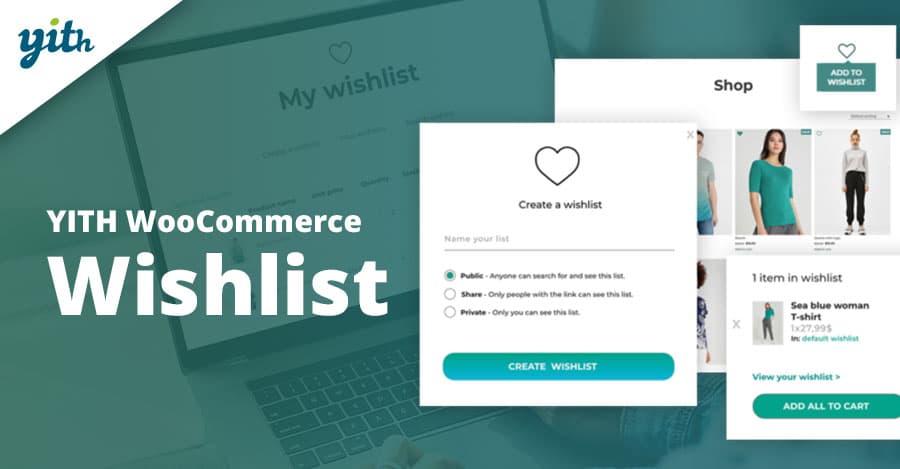
YITH WooCommerce Wishlist is one of the most popular and widely used wishlist plugins.
It provides a robust set of features that allow customers to save, manage, and share their favorite products with ease.
The plugin integrates seamlessly into WooCommerce and supports advanced features like wishlist analytics,
promotional emails, and customizable wishlist layouts. Its flexibility makes it suitable for both small stores
and large eCommerce businesses.
Key Features:
- Wishlist analytics.
- Shareable links.
- Customizable design.
- Marketing integrations.
Pricing: Free & Premium starting from $94.99/year.
3. TI WooCommerce Wishlist
TI WooCommerce Wishlist is a user-friendly plugin that allows shoppers to add items to their wishlist with just one click.
The plugin offers an elegant design and supports multiple customization options to match your store’s branding.
With features like AJAX support, social sharing, and multi-wishlist functionality, TI WooCommerce Wishlist is a solid choice
for store owners who want to maximize conversions while keeping the experience smooth.
Key Features:
- Multi-wishlist support.
- AJAX loading.
- Shareable wishlists.
- Responsive layout.
Pricing: Free & Premium starting from $79/year.
4. WooCommerce Wishlist Plugin by TemplateInvaders
This plugin offers an easy-to-use wishlist functionality with a clean interface.
It helps customers save products while giving store owners valuable data on what items are most often wishlisted.
Its simplicity and lightweight design make it perfect for stores looking to add wishlist functionality
without slowing down their site performance.
Key Features:
- Wishlist data insights.
- Customizable wishlist buttons.
- Email reminders.
Pricing: Premium starting from $49/year.
Also Read: Best WooCommerce Plugins Quick Order Forms
5. Everest Wishlist for WooCommerce
Everest Wishlist for WooCommerce is a versatile plugin with an intuitive design.
It offers drag-and-drop customization and integrates smoothly with WooCommerce’s checkout flow.
The plugin also supports product variation selection, which is perfect for stores selling configurable products.
Sharing and responsive layouts are included by default.
Key Features:
- Drag-and-drop wishlist design.
- Variation support.
- Sharing options.
Pricing: Premium from $39/year.
6. Wishlist Member Integration
Wishlist Member Integration is ideal for membership-based stores that want to connect wishlist functionality with exclusive content. It lets members create and manage wishlists as part of their account experience.
This plugin works well for digital product stores, subscription-based platforms, or educational sites that want to boost engagement.
Key Features:
- Membership integration.
- Account-based wishlists.
- Content access control.
Pricing: Premium starting at $147/year.
Also Read: Best WooCommerce Plugins Minimum Maximum Quantity
7. WishSuite
WishSuite offers a straightforward approach to wishlist creation. It integrates seamlessly with WooCommerce,
allowing users to add products to their wishlist without creating an account.
It’s lightweight, beginner-friendly, and works smoothly with most themes. A great choice for small and medium-sized stores.
Key Features:
- Guest wishlists.
- Lightweight design.
- AJAX add-to-wishlist.
Pricing: Free.
8. WPC Smart Wishlist
WPC Smart Wishlist is designed to deliver a fast, responsive wishlist experience.
With a sleek user interface, it ensures customers can add and manage their favorite products easily.
It also supports compatibility with other WPC plugins, offering greater flexibility for advanced WooCommerce setups.
Key Features:
- Responsive UI.
- Compatibility with WPC plugins.
- AJAX-powered actions.
Pricing: Free & Premium from $29/year.
Also Read: How to Migrate WooCommerce Orders and Coupons with the Import Export Plugin
9. Premio WooCommerce Wishlist
Premio WooCommerce Wishlist focuses on simplicity and ease of use.
It allows customers to save items directly from the product and shop pages.
With a clean design and reliable performance, it’s particularly suited for stores that prioritize user experience over complexity.
Key Features:
- Shop page integration.
- Customizable wishlist icons.
- Responsive design.
Pricing: Premium from $49/year.
10. Elsner WooCommerce Wishlist
Elsner WooCommerce Wishlist is a feature-rich plugin that provides an engaging experience for customers.
It allows detailed wishlist management and provides admin-side reports for better marketing strategies.
Its professional design and compatibility with various themes make it an excellent choice for growth-oriented businesses.
Key Features:
- Admin reports.
- Customer management.
- Customizable design.
Pricing: Premium from $59/year.
Also Read: Best WooCommerce Plugins Product Size Charts
WooCommerce Wishlist Plugins Pricing Comparison
| Plugin | Key Features | Pricing |
|---|---|---|
| Wishlists for WooCommerce | Unlimited wishlists, social sharing | Free / Premium |
| YITH WooCommerce Wishlist | Analytics, marketing tools | Free / From $94.99/yr |
| TI WooCommerce Wishlist | Multi-wishlist, AJAX support | Free / From $79/yr |
| WooCommerce Wishlist by TemplateInvaders | Insights, customizable buttons | From $49/yr |
| Everest Wishlist | Drag-and-drop, variation support | From $39/yr |
| Wishlist Member Integration | Membership-based features | From $147/yr |
| WishSuite | Guest wishlist, lightweight | Free |
| WPC Smart Wishlist | Responsive UI, AJAX | Free / From $29/yr |
| Premio Wishlist | Shop page integration | From $49/yr |
| Elsner Wishlist | Admin reports, customization | From $59/yr |

Pair Your Stack: Other Tools From Wbcom Designs
Beyond the WooCommerce plugins above, these in-house tools from Wbcom Designs solve adjacent problems most stores eventually run into, particularly when your loyalty, community, or service layer needs to plug into WooCommerce without a heavy custom build:
- BuddyX Pro, community-first WordPress theme for membership stores, vendor communities, and customer-loyalty hubs.
- WB Gamification, drop-in points, badges, ranks, and leaderboards for any WooCommerce loyalty or referral funnel.
- WP Sell Services Pro, turn WooCommerce into a service-selling platform (consulting, freelance, agency hours).
- WB Ad Manager, native ad placements to monetize content around your store (blog, category pages, sidebar).
- WordPress Polls, lightweight polls for product feedback, NPS-style surveys, and zero-party data.
- Jetonomy, monetization toolkit for digital communities (token economy, paid groups, creator payouts).
Final Thoughts: How to Pick the Right Wishlist Plugin in 2026
Choosing the right WooCommerce Wishlist plugin in 2026 comes down to four practical questions:
- What’s your store size and traffic? Smaller stores get the best return on free or one-time-pay options; high-volume stores justify the SaaS monthlies because of the reporting, segmentation, and automation depth.
- How technical is your team? Code-light, pre-configured plugins ship in a day. Advanced tooling needs developer attention but unlocks edge cases (custom workflows, third-party integrations, multi-site).
- Do you need community or engagement features alongside? If yes, pair with BuddyX Pro and WB Gamification so engagement, rewards, and shopping live in one stack instead of three.
- How will you measure ROI? Start with one campaign type, instrument it properly (UTM tags, attribution windows), track 30-day retention or AOV lift, then scale what works.
Most WooCommerce stores see meaningful results within 60-90 days of launching a wishlist program, provided it’s promoted properly via email, on-site banners, post-purchase flows, and (where relevant) inside your community channels. The plugin you choose matters less than the program design and follow-through.
Interesting Reads:
Best WooCommerce Plugins Name Your Price
How to Translate Products, Categories, and Checkout with WooCommerce Multilingual