
You have people who care about the same thing you do, and right now they are scattered across a Facebook group, a Discord server, and a couple of chat threads you do not control. This guide shows you how to build a community website that is actually yours, on WordPress, where you keep the members, the conversations, and the money, instead of renting all three from a platform that can change the rules tomorrow. You do not need to be a developer to follow it, and by the end you will know exactly what to set up, what it costs, and how to get your first members talking.
The reason to do this yourself is simple. On a rented platform, your community is a tenant. The platform owns the member list, decides what your people see, takes a cut or charges per head, and can shut you down or change the terms whenever it likes. When you build a community website of your own, you are the owner. Your members are yours, your data is yours, and what you earn stays with you. That shift, from tenant to owner, is the whole point, and it is more within reach than most people think.
Table of contents
- What owning your community actually gets you
- What a community website is actually made of
- Which kind of community are you building?
- How to build a community website, step by step
- Every module BuddyNext gives you, out of the box
- Pick your setup: which combination fits your community
- How people actually make money with a BuddyNext community
- What it actually costs to run your own community
- What you are really leaving behind on a rented platform
- Why this matters more now than it did a few years ago
- A realistic plan for your first month
- Keeping your community alive after launch
- Common mistakes to avoid
- Questions people ask before they start
- Your community, on your terms
What owning your community actually gets you
Before the how, it helps to be clear on what you are gaining, because it is easy to underestimate until you have felt the difference. Owning your community website changes four things that a rented platform quietly keeps from you.
You keep the relationship with your members. Their contact details, their activity, and the ability to reach them directly all live on your site, not behind a platform that decides how many of your own people see your posts. You keep the money. Instead of a monthly fee per member or a cut of every sale, you pay for hosting and your tools, and the rest is yours. You keep control of the experience. The site looks like you, works the way your community needs, and is not covered in someone else’s branding or ads. And you keep the site itself. Nobody can suspend your account or change the pricing out from under you, because it is yours.
On a rented platform your community is a tenant. When you build a community website of your own, you become the owner: your members, your data, your revenue, your rules.
What a community website is actually made of
A community website sounds complicated until you see that it is really a handful of familiar pieces working together. Once you know the pieces, the building part stops being scary.
At the centre is a place for people to be members, with profiles that are theirs, so your community is made of real people rather than anonymous accounts. Around that sits an activity feed, the stream of what is happening that gives members a reason to come back and see what they missed. Then come spaces, the smaller rooms organised around topics or groups, so a large community does not turn into one loud, unusable room. Add messaging so members can talk privately, and you have the social core of any community.
On top of that core, you add whatever your particular community needs. That might be events, if you gather people at set times. It might be courses, if you teach. It might be a paid membership, if access is your business model. The point of building it yourself is that you add only the pieces you need, when you need them, instead of paying for a bloated platform full of features you will never touch.
Which kind of community are you building?
The pieces are the same, but the emphasis changes depending on who you are and who your people are. Seeing yourself in one of these will tell you which parts to get right first.
If you are an instructor or coach, your community is the place your students keep learning between lessons and keep each other accountable. The parts that matter most are spaces per cohort or topic, member profiles so people feel known, and a way to add courses or sessions when you are ready. Your community is what turns a one-off course sale into people who stay, renew, and refer others.
If you are a creator or influencer, your community is where you finally own the audience you have been building on someone else’s platform. The feed and messaging matter most here, because your people want to be close to you and to each other, and you want to reach them without an algorithm deciding who sees your post. Owning this relationship is the difference between renting attention and keeping it.
If you are an organiser or run a club, your community is the home base between your gatherings. Spaces, a shared feed, and events are your core, so members have somewhere to plan, share, and stay connected when you are not all in the same room. The site becomes the thread that holds the group together across the year.
If you are building a professional or interest network, your community is where members find each other and trade knowledge. Strong profiles, a member directory, and well-organised spaces carry the value, because the point is the connections between members, not just between you and them. You are building something that keeps working even when you step back.
Whichever of these is you, notice that none of them is about a plugin. It is about your people and what they need from you, and the site is simply the home you give them.
How to build a community website, step by step
Here is the actual path, in the order you should take it. None of these steps requires code, and you can do the whole thing in a weekend if you stay focused.
Step 1: Get your own home on the web
Start with a domain name and hosting, because owning your community begins with owning the address. Pick a domain that is your community’s name, choose a hosting plan built for WordPress, and install WordPress, which most hosts do for you in a couple of clicks. This is the foundation that makes the site yours rather than a page on someone else’s platform, and it costs far less than most people expect.
Step 2: Make it look like yours, not like a stack of plugins
This is the step people skip, and it is the one that decides whether your community feels like a real place or a jumble of parts. The plugins that create community features do not, on their own, look like anything coherent. You need a theme built for community screens, so profiles, feeds, and spaces all look designed and match each other. This is where Reign comes in: it is the shell that makes your community look like yours instead of like a pile of plugins bolted together. You buy the theme once, and it is built specifically to make community screens look intentional. If you want to see the range of what people build on it, the guide to what you can build with Reign walks through the possibilities. To install it, download the theme file after purchase, then in your WordPress dashboard go to Appearance > Themes > Add New Theme > Upload Theme, choose the file, and activate it.
Step 3: Add the community engine
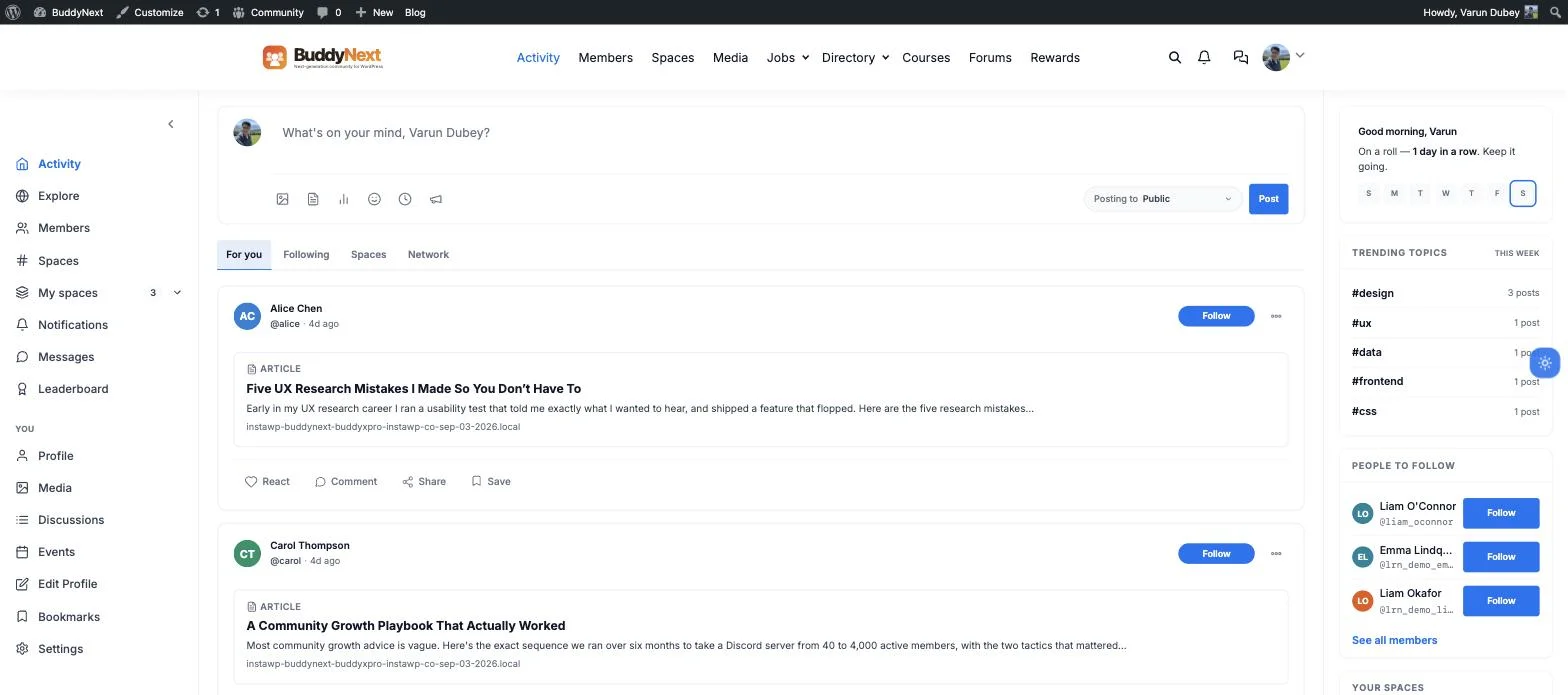
Now add the piece that actually creates members, feeds, and spaces. Reign is built to work with BuddyNext, a single, self-hosted community engine that runs on your own site so the data stays yours. Out of the box it gives you the activity feed, member profiles, spaces, and messaging, and underneath that same install sits everything else this guide covers below: courses, a business directory, a job board, events, media, member blogging, and gamification, all built to work together instead of arriving as a dozen separate plugins you have to wire up yourself. This is the step that turns a good-looking website into a living community.
To install it, download BuddyNext after purchase, then in your dashboard go to Plugins > Add New Plugin > Upload Plugin, choose the file, click Install Now, and activate it once it finishes. The same screen installs any of the module add-ons the same way, one .zip file at a time.

Step 4: Set up your first spaces and profiles
With the engine in place, create a few spaces around the topics your members actually care about, so there is somewhere to go on day one, and set up member profiles so people can introduce themselves and find each other. Do not create a dozen empty rooms; start with two or three and let them fill before you add more. An empty community with many rooms feels deader than a small one with a couple of active spaces.
Step 5: Add only the extra pieces you need
Now, and only now, add the pieces specific to your community. If you charge for access, add a membership layer so people pay to join. If you teach, add courses, the way you would if you were turning your course site into a real academy. If you gather people at set times, add events, the way you would to run your own class-booking site. Add these one at a time, as your community grows into needing them, rather than all at once.
Step 6: Invite your first members and start the conversation
A community website with no people is just software, so the last build step is to bring your people in and give them something to do. Invite a first small group, welcome each one yourself, and start the first few conversations so nobody arrives to silence. This early effort is what turns an empty site into a place with a pulse, and it matters more than any feature you could add.
Every module BuddyNext gives you, out of the box
“Community plugin” undersells what you are actually installing. BuddyNext works more like a small operating system for a community site: the social core, plus a full set of modules that used to mean stitching together five or six separate plugins from five or six different companies, each with its own settings screen and its own idea of what a member profile looks like. Here is what is actually inside, and how each piece looks once it is running.
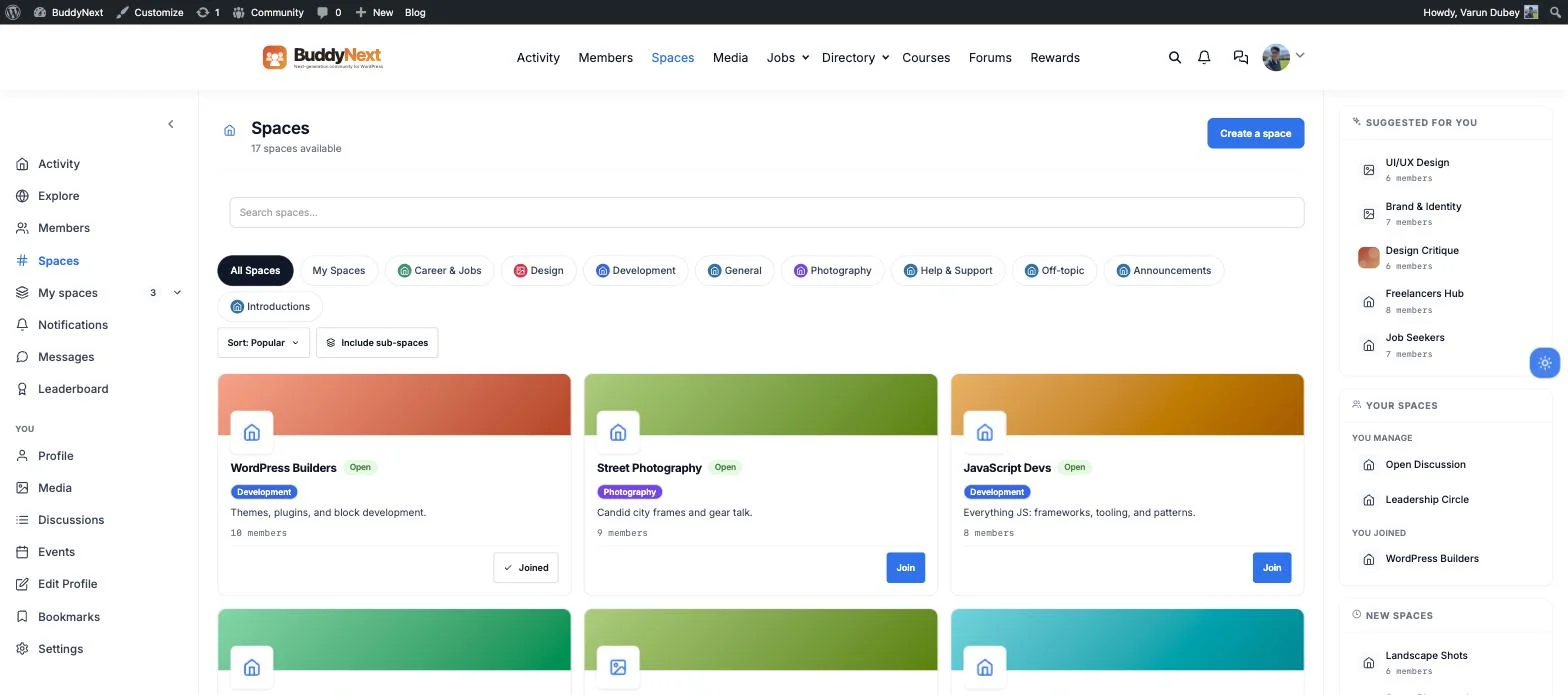
Spaces: the rooms your community actually lives in
Spaces are the groups your members join around a topic, a cohort, or a shared interest, each with its own membership, its own feed, and its own rules. A design community might run separate spaces for design, development, and photography; a course might run one space per cohort. Members browse, search, and join the ones that matter to them instead of drowning in one giant feed.
Discussions and forums, for the conversations a feed loses
An activity feed is good for quick updates, but it is a bad place for a real question-and-answer thread or a feature request that needs to stay findable for months. BuddyNext’s discussions module gives every space proper forum threads, Q&A, and idea boards with voting, so the “how do I fix this” question your members asked in March is still there and still answerable in September, instead of scrolled into oblivion.

Member blogging, so your members can publish too
Not every good post fits in an activity update. BuddyNext lets members write and publish longer articles from a frontend dashboard, no admin access required, which then surface in the activity feed alongside the shorter updates. It is a small feature with an outsized effect: a member who has written something for your community is a member who is invested in it, and a stream of member-written articles gives you real, original content that keeps bringing new people in through search, long after any single post was written.
Courses, if you teach
The built-in course module handles lessons, quizzes, certificates, and enrolment, priced individually, bundled into a membership, or offered free, sitting inside the same site as the rest of your community rather than a separate course platform your students have to log into again. A student who finishes a course lands right back in your activity feed and your spaces, not on a different website you do not control.

A business directory, if your community is built around local or niche listings
The directory module turns your site into a searchable listings site with a map, categories, filters, and submission forms, the kind of thing communities built around a city, an industry, or a niche keep asking for. Businesses, restaurants, hotels, real estate, classifieds, and more can all list themselves, with featured and paid placements as a real revenue line of their own, on top of whatever your community itself charges for.

A job board, for professional and industry communities
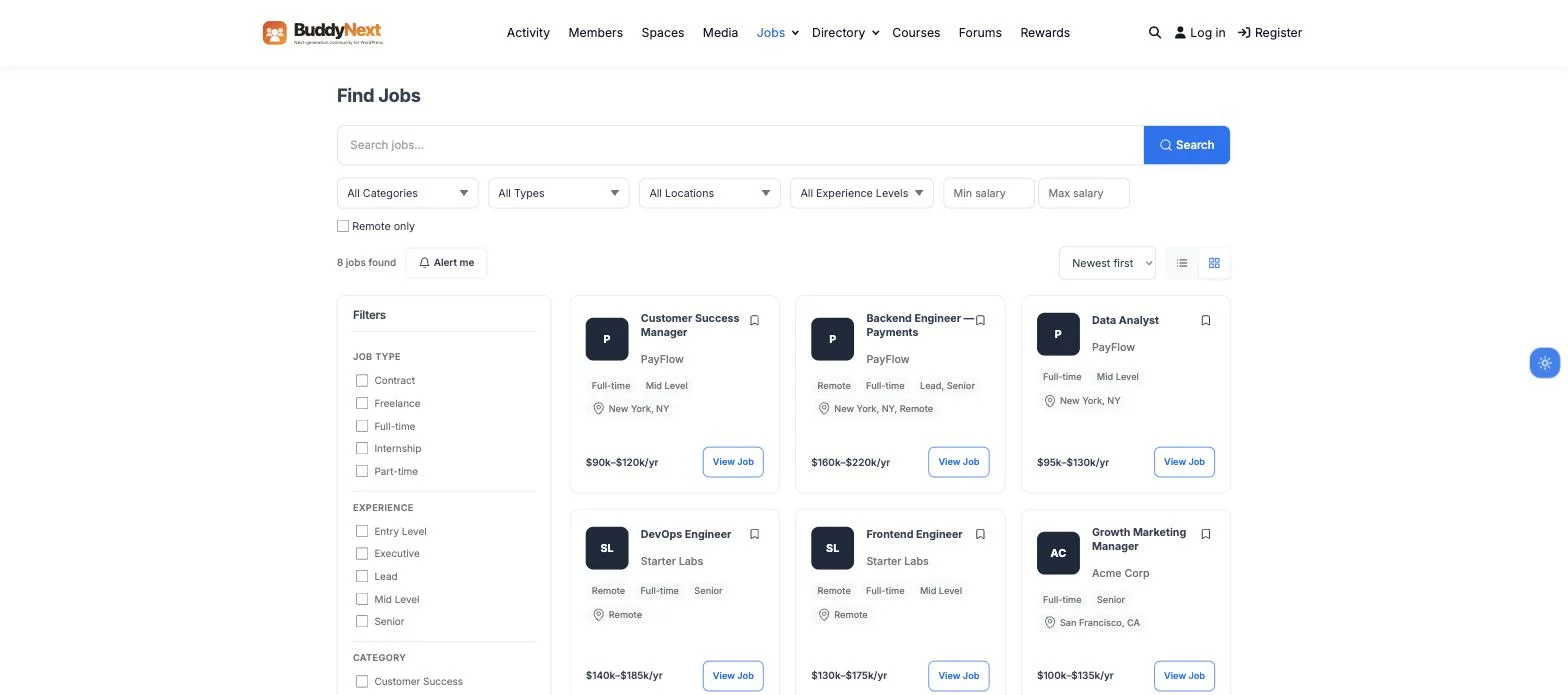
If your community sits inside an industry or a profession, the job board module lets employers post roles with salary ranges, remote filters, and application tracking, and lets your members search and apply without leaving your site. Employers pay to post through a credit system, which makes a job board one of the more direct ways a professional community earns money on top of membership itself.
Events, if you gather people at set times
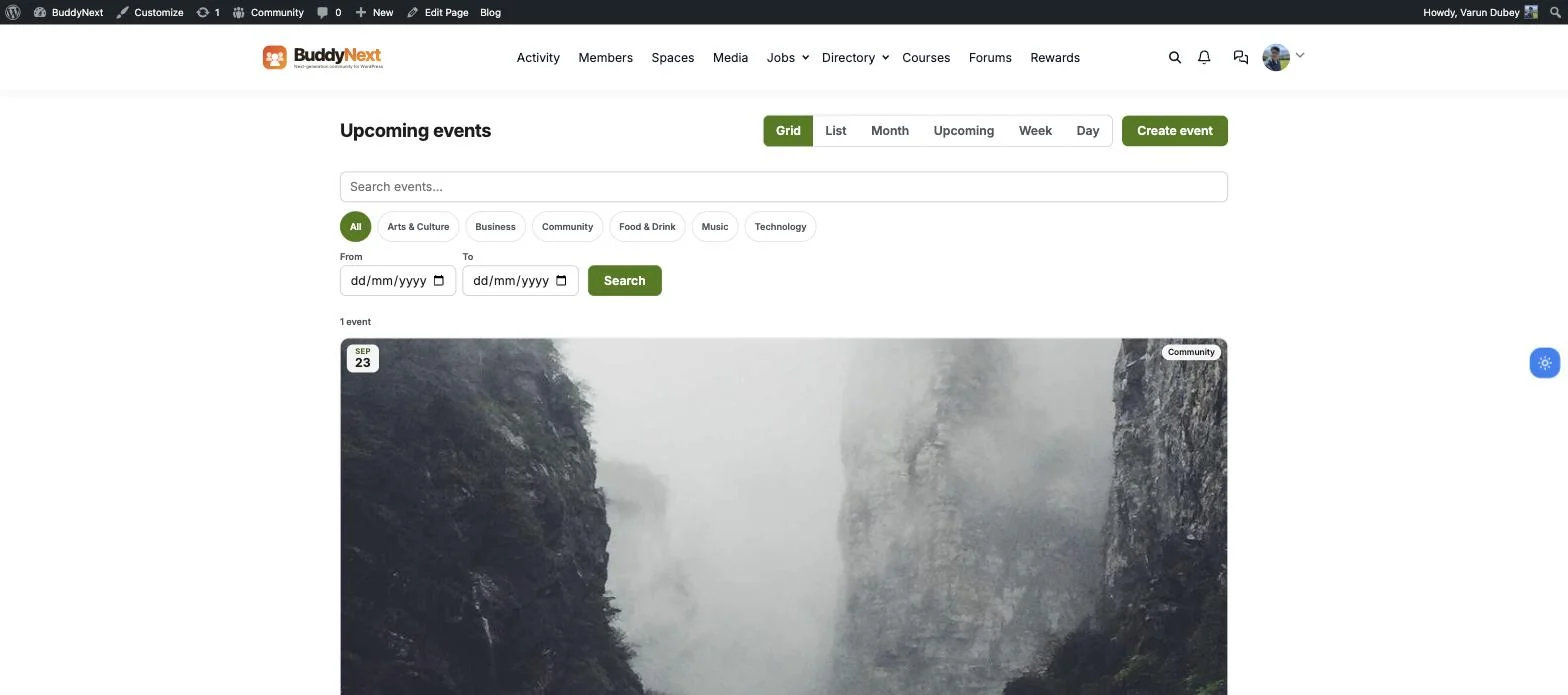
The events module gives your community a real calendar: grid, list, month, and week views, categories, RSVPs, and a “Create event” button any member can use, scoped to the spaces they belong to rather than blasted to everyone. It is the piece that turns a community from something people scroll into something people show up for, whether that is a monthly meetup, a workshop, or a recurring office hours session.
Media, for communities built around photos and video
Beyond the odd photo dropped into an activity post, the media module gives members a proper searchable gallery, tagged, filterable, and organised into albums, along with the moderation tools you need once a community starts uploading in volume. Photography, fitness, food, and hobby communities lean on this hardest, but any community with a visual side benefits from members having somewhere better than a feed to browse each other’s work.

Gamification, to keep people coming back
Points, levels, badges, streaks, and a leaderboard reward the members who show up, post, comment, and help others, and give quieter members a reason to do more than lurk. None of this needs configuring; it works out of the box and updates as your community’s actual activity happens. It will not replace you showing up in the early weeks, but once a community has some life in it, gamification is what keeps people opening the site the next day instead of drifting off.

Pick your setup: which combination fits your community
You do not need every module. You need the two or three that match what you are actually building. Here is the real combination people use for each type of community, and how ready each one is today, honestly, including the pieces that are still separate tools rather than deeply wired together.
Community-based setups
| Setup | What it combines | Best for | Status |
|---|---|---|---|
| Paid membership community | Membership access on its own | Coaches, creators, newsletter operators charging for entry | Ready |
| Alumni or school network | Spaces and profiles, plus discussions and member blogging | Schools, colleges, alumni associations | Ready |
| Brand or customer community | Discussions for support Q&A, plus gamification | SaaS and product companies running their own support hub | Ready |
| Photo or creative community | The media module | Photographers, artists, visual creators | Ready |
| Local or interest group | Events plus the business directory | Clubs, meetups, city-based groups | Ready |
| Modernising an old forum | The discussions module, with import tools from bbPress and wpForo | Long-running forum sites moving to something current | Ready |
Learning setups
| Setup | What it combines | Best for | Status |
|---|---|---|---|
| Online academy | The course module on its own, with quizzes and certificates | Solo instructors and course creators | Ready |
| Community-led course | The course module plus spaces, so students talk to each other | Cohort-based educators and coaching programs | Partial - certificates already surface on the member profile; deeper space-to-course integration is still developing |
| Cohort or bootcamp | The course module’s cohort and content-drip features, plus spaces | Bootcamp operators running structured, timed programs | Partial - core scheduling works, tighter space integration is still developing |
| Multi-instructor marketplace | The course module’s revenue-share and instructor payout tools | Training companies with more than one teacher | Ready |
| Corporate or B2B training | The course module’s seat-based B2B spaces | Companies training their own staff or clients | Ready |
| Migrating an existing LMS | Built-in importers from LearnDash, Tutor LMS, and LifterLMS | Site owners moving off another course plugin | Ready |
Commerce and marketplace setups
| Setup | What it combines | Best for | Status |
|---|---|---|---|
| Job board | The job board module, tied to member accounts | Professional communities and niche industries | Ready |
| Business or niche directory | The directory module, across ten listing types | Local business associations and industry directories | Ready |
| Freelance or services marketplace | WP Sell Services, a separate Fiverr-style marketplace plugin | Agencies and freelancer communities | Partial - runs as its own standalone plugin and is not yet connected to BuddyNext member accounts |
| Events and ticketing | The events module | Meetup organisers and conference hosts | Ready |
| Classifieds or on-site ads | WB Ad Manager, a separate ad-management plugin | Content sites planning to sell ad space | Partial - installs alongside BuddyNext but is not yet integrated with it |
| Protecting paid video | MediaShield, a separate video-protection plugin (watermarking, a concurrent-stream cap) that runs alongside the course module | Course creators selling premium video lessons | Ready as a general video protector; not a confirmed deep integration with the course module specifically |
Engagement and content setups
| Setup | What it combines | Best for | Status |
|---|---|---|---|
| Keeping members active | Gamification, with a long list of module-level integrations | Any community worried about members drifting off | Ready |
| Member blogging | The member blog module | Communities that want member-written content, not just updates | Ready |
| Polls and surveys | A lightweight polls add-on, usable in the feed or in spaces | Communities that want quick, low-effort feedback | Partial - a separate, lighter add-on rather than a full module |
| Knowledge base or wiki | WB Member Wiki, a separate member-editable wiki plugin | Support-heavy or documentation-heavy communities | Partial - a real, separate plugin, but not yet listed as BuddyNext-compatible |
| Stories | A short-form, ephemeral stories add-on | Visual and social communities | Partial - earliest-stage of this group, still catching up to BuddyNext in its own setup copy |
The pattern across all four tables is the same one from earlier in this guide: start with the module that matches your primary need, get that working and populated with real people first, and only add the next piece once your community is actually asking for it. Most of what is marked “partial” above still works, it is just newer, or it is a separate plugin that runs alongside BuddyNext rather than one that reads and writes to the same member accounts yet. Build for what you need today rather than waiting for every box to say “ready.”
How people actually make money with a BuddyNext community
Membership access is the obvious one: gate spaces, content, or the whole site behind a paid tier, and you keep what members pay you instead of handing a cut to a platform. But because the modules above all sit inside the same site, a BuddyNext community usually earns from more than one of them at once, and each one supports the others instead of competing for attention.
- Paid membership tiers. The core access model: members pay to join, renew, or unlock specific spaces and content, and every renewal is revenue a rented platform would have taken a cut of.
- Course sales. Sell individual courses, bundle them into a membership tier, or both. A course sale that turns into an active community member is worth far more than a one-off purchase.
- Featured and paid directory listings. If your community runs a business or local directory, businesses pay to list and to be featured, a second revenue line that runs alongside membership rather than instead of it.
- Job postings. A professional community’s job board earns through employer-paid, credit-based postings, on top of whatever members pay to belong.
- Member-written content. The member blog is not a direct sale, but it compounds: original articles written by real members bring in search traffic for free, and some of those readers become paying members.
- Retention, via gamification. Points, badges, and a leaderboard are not something you sell, but they are what keeps a paying member renewing instead of quietly cancelling three months in.
- On-site advertising, as a separate add-on. If you want dedicated ad placements on top of everything above, WB Ad Manager installs alongside BuddyNext on the same WordPress site as its own ad-management layer. It is not part of the BuddyNext install itself, but it is built by the same team and is worth adding once your community has enough traffic to make ad space worth selling.
None of this requires a separate payment processor’s worth of setup for each piece. It requires deciding which of these fits your community, turning it on, and letting the modules that are already installed do the rest.
What it actually costs to run your own community
The number that keeps people on rented platforms is a fear of cost, and it is usually backwards. Let us break down where the money actually goes, because owning your community is almost always cheaper than renting it once you have more than a handful of members.
To run your own, you pay for hosting, which is a modest yearly or monthly cost, a domain, which is small, and your theme. Reign is a one-time or yearly cost rather than a per-member fee, and the community engine that powers the members, feeds, and every module above runs on your own hosting rather than a recurring per-member bill. That is close to the whole cost, and it does not go up as your community grows.
Now compare that to a rented community platform, which typically charges a monthly fee that climbs with your member count, or takes a percentage of everything you earn. At a small size the rented option can look convenient. As your community grows, the per-member or percentage model quietly becomes the most expensive line in your budget, while your own site’s cost barely moves. The larger and more successful your community becomes, the more owning it saves you, which is the opposite of how rented platforms are priced. You are trading a small, flat, predictable cost for freedom from a fee that grows with your success.
What you are really leaving behind on a rented platform
The monthly fee is the cost you can see. The costs you cannot see on the invoice are usually the ones that hurt more, and naming them makes the decision clearer.
You are leaving behind the risk of losing everything overnight. On a rented platform, a policy change, a billing problem, or a wrong-headed report can lock you out of your own community with no warning and no appeal, and every member relationship goes with it. You are leaving behind the algorithm that decides how many of your own people see what you post, so that reaching the audience you built starts to cost extra. You are leaving behind the slow creep of fees that rise as you grow, and the quiet reality that your member list, the most valuable thing you have, was never actually yours to keep. Owning your community website ends all of that. The people are yours, the reach is direct, and no one can switch it off. That security is worth as much as the money you save, and often more.
Why this matters more now than it did a few years ago
Every rented platform’s feed is filling up with AI-generated posts, AI-written comments, and recommendation algorithms tuned to keep you scrolling rather than to connect you with anyone real. Telling a genuine member from a bot account is getting harder everywhere you do not control the room. A community you own is the opposite of that by default: real membership, real profiles, moderation you set the rules for, and a feed that shows your people what is actually happening in your community instead of whatever an algorithm elsewhere decided would keep them scrolling. That is worth more now than it was a few years ago, not less, and it will keep being worth more as the noise on rented platforms keeps rising.
A realistic plan for your first month
You do not have to do everything at once, and you should not try. Here is a gentle first month that gets you from nothing to a community with a pulse, without burning yourself out.
In week one, set up the foundation: hosting, WordPress, the theme, and the community engine, then create two or three spaces and your own profile. In week two, invite a small first group of your most engaged people, welcome each of them personally, and post a few things to get the feed moving, so the place is not empty when they arrive. In week three, add one recurring reason to return, a weekly question, a simple event, or a regular share, and start asking members to invite others. In week four, look at what people actually used, add or adjust spaces based on that, and only then consider adding an extra piece like courses or paid membership if your community is asking for it.
That is a month of small, doable steps, and at the end of it you have a living community that is genuinely yours, built on a foundation you can grow for years. Steady beats rushed here, every time.
Keeping your community alive after launch
Building the site is the part everyone focuses on, but keeping it active is what actually decides whether it works. A community does not run itself, especially early, and the good news is that the work is mostly attention rather than money.
Show up regularly, especially in the first weeks, and post, ask questions, and reply, so that anyone who visits finds something happening. Welcome every new member personally, because a person who feels noticed comes back. Give people a reason to return, whether that is a weekly thread, an event, or simply a lively feed. And reply to what people post, because silence teaches members to stop bothering. None of this needs a plugin. It needs you to treat the community as a place you tend, not a machine you switch on. Do that for the first few months, and members start carrying the conversation themselves, which is when a community truly comes alive.
Common mistakes to avoid
People who struggle to get a community website going usually hit the same few snags, and every one of them is easy to sidestep once you know it is coming.
- Building on rented land anyway. If the community lives inside a platform you do not control, you have not solved the ownership problem. The point of building your own is that it is actually yours.
- Skipping the theme. Community plugins with no proper theme look like a pile of parts, and members feel it. The theme is what makes the place feel real.
- Opening with a dozen empty rooms. Too many spaces before you have members makes the community feel abandoned. Start small and grow the rooms as the people arrive.
- Adding every feature at once. Courses, events, memberships, and more, all on day one, is a way to overwhelm yourself and your members. Add each piece when you actually need it.
- Launching and walking away. A community needs tending, especially early. Plan to show up daily for the first stretch, or the site will go quiet no matter how well built it is.
Questions people ask before they start
Do I need to know how to code? No. To build a community website on WordPress today, you work through settings and visual tools, not code. If you can set up a social profile and follow a checklist, you can do this.
How long does it take? A focused weekend gets you a working community site with profiles, a feed, and your first spaces. Adding extras like courses or paid membership takes a little longer, but you can launch the core first and grow from there.
Can I move my community over from a rented platform? Yes. You can invite your existing members to your new home, and depending on where you are coming from, you can often bring content across too. The sooner you own the relationship, the less you are at the mercy of the platform you are leaving.
What if my community is small right now? That is the best time to start, because setting up while you are small means your home is ready and yours as you grow, instead of scrambling to escape a rented platform’s rising fees later. Small is a reason to own, not a reason to wait.
Can I make money from it? Yes, usually from more than one place at once. Paid membership tiers are the core model, and courses, featured directory listings, and paid job postings all run alongside it on the same site, so you are not limited to a single revenue line. Because you are not paying a per-member fee or giving up a percentage to a platform, more of what you earn on each of these stays with you.
Do I have to move everything at once? No, and you should not. Many people run their new community alongside their old rented one for a while, move their most engaged people first, and wind the old one down once the new home feels alive. A gradual move is less stressful and rarely loses anyone who truly cares.
What if I am not technical at all? You can still do this, and if a step feels beyond you, the pieces are common enough that help is easy to find. The theme and engine are made for non-technical owners, and you can always bring in someone for the initial setup and then run it yourself day to day.
Your community, on your terms
The choice underneath all of this is straightforward. You can keep renting a home for your community on a platform that owns your members and charges for the privilege, or you can build a community website that is genuinely yours, where the people, the data, and the revenue stay with you. The second option used to be hard and expensive. It is neither anymore.
You get your own hosting, you use a theme like Reign to make it look like a real place rather than a stack of plugins, you add a self-hosted community engine like BuddyNext to bring it to life, complete with courses, a directory, a job board, events, media, and gamification already built in, and you show up for your people while it finds its feet. That is a community you own, built in a weekend, running on a cost that does not punish you for growing. When you are ready to start, you do not need permission from anyone, because the whole point is that it is yours.
See the modules from this guide running on a real site before you install anything, or go get BuddyNext and start building today.