
Type “best WordPress gallery plugin” into Google and you get the same five names in a different order every time: Envira, NextGEN, Modula, FooGallery, Photo Gallery by 10Web. Every one of them is built around the same assumption, that one person, the site owner, uploads pictures from the WordPress dashboard and arranges them into a gallery for visitors to look at. That assumption is correct for a photographer’s portfolio, a restaurant’s menu page, or a real estate listing. It falls apart the moment the site is a community and the people uploading photos are the members, not the admin.
A community gallery has to answer questions a portfolio gallery never faces. Who is allowed to upload? Does a new member’s photo go live immediately or sit in a queue first? Can a member make an album visible to friends only, or is it public-or-nothing? Does the photo show up in the activity feed where other members will actually see it, or does it sit alone on a gallery page nobody visits? None of the five plugins above were built to answer those questions, because none of them were built with more than one uploader in mind. We checked each product’s own site in October 2026 for this comparison, pricing included, because plugin pricing and feature sets change often enough that an older roundup is not a safe source.
This is not another “10 best gallery plugins” list. We already published a wider roundup of gallery plugins for portfolios and business sites, and if that is your use case, read that one instead. This comparison is narrower on purpose: Envira Gallery, NextGEN Gallery, Modula, and FooGallery, the four names every “best gallery plugin” list leads with, measured specifically against what a BuddyPress or community site needs, alongside WPMediaVerse, the one plugin on this list actually built for members uploading their own photos.
In this comparison
- What a community gallery actually needs
- Five plugins compared at a glance
- Envira Gallery
- NextGEN Gallery (Imagely)
- Modula
- FooGallery
- WPMediaVerse
- The scenario: hitting the wall with Envira
- The bottom line
- FAQs
- Which one to pick
What a community gallery actually needs
Strip away the marketing copy and a community photo feature needs four things a portfolio gallery can ignore completely.
- Front-end upload. Members add photos from their profile or the activity stream, not from wp-admin. If uploading requires dashboard access, it is not a member feature, it is an admin feature with extra steps.
- Per-item and per-album privacy. A single global “this gallery is public” toggle is not privacy, it is a light switch. Members need to choose who sees which photo: everyone, members only, connections only, or just themselves.
- A moderation queue. The moment strangers can upload, someone needs a way to report a photo and someone else needs a queue to review it in. Without this, your options are pre-approve everything by hand or hope nothing goes wrong.
- A place other members actually see the photo. A gallery page members have to go looking for gets ignored. A photo that shows up in the activity stream, on a group page, or on the uploader’s profile gets seen, reacted to, and commented on, which is the entire point of a community feature.
Keep that list in mind through the five plugins below. Three of the four big names handle zero of these four things. The fourth, FooGallery, gets partway there. Only one plugin on this list was designed around all four from the start.
Five plugins compared at a glance
| Plugin | Member upload | Moderation queue | BuddyPress / activity feed | Pricing (checked Oct 2026) |
|---|---|---|---|---|
| Envira Gallery | No | No | No | Elite Bundle, yearly licence (5 sites), currently discounted |
| NextGEN Gallery (Imagely) | No | No | No | Yearly licences, Starter (1 site) to Ultra (25 sites) |
| Modula | No | No | No | Yearly licences, Starter (1 site) to Business (5 sites) |
| FooGallery | No (display only) | No | No | Free, or yearly licences from PRO Starter to PRO Commerce |
| WPMediaVerse | Yes | Yes, review queue + action log | Yes, native | Free, or a yearly Pro licence (lifetime also available) |
That “No” column running down the middle is not a knock against Envira, NextGEN, Modula, or FooGallery. None of them claim to do member uploads, and none of their marketing pages promise it. They are gallery display plugins, built to take pictures the site owner already has and show them off well. The problem only shows up when someone tries to stretch one of them into a job it was never built for, which is exactly what the next five sections, and the scenario after them, walk through.
Envira Gallery
Envira is the plugin most “best gallery plugin” articles put first, and the reputation is earned on its own terms. It is a drag-and-drop gallery builder aimed at photographers and businesses that want gallery pages to look finished without touching code: masonry and justified layouts, a built-in lightbox, watermarking to protect images from being lifted, and deep integration with Soliloquy, its sister slider plugin.
Checked directly on enviragallery.com in October 2026, the flagship offer is the Elite Bundle, a yearly licence currently discounted from its listed price, covering five sites with unlimited galleries, unlimited users in the admin sense (meaning multiple site editors, not member uploaders), 2,500 AI credits, WordPress Multisite support, and client management tools. It also bundles Soliloquy Pro, including unlimited sliders and WooCommerce support. Lower Envira tiers exist below the Elite Bundle for smaller single-site needs, but the Elite Bundle is what Envira leads with on its own pricing page, aimed squarely at agencies and media-heavy sites.
None of that reaches a community use case. “Unlimited users” in Envira’s pricing means people with WordPress admin or editor accounts who can log into the dashboard and build galleries, the same small circle who could always touch the site. There is no front-end upload form for a regular member, no privacy control finer than publishing a gallery or not, and no concept of a report or a review queue, because Envira was never asked to handle content from people who are not trusted site editors. If your plan was to point 200 community members at Envira and let them build their own albums, there is no mechanism in the product that does that.
NextGEN Gallery (Imagely)
NextGEN Gallery is the oldest name on this list and the one with the most installs behind it, now sold under its parent company’s name, Imagely. Where Envira leans toward a polished drag-and-drop builder, NextGEN leans toward depth: Film, Mosaic, Thumbnail, Slideshow, and Image Browser layouts in its entry tier, with more layouts, image protection, animations, and front-end search unlocked as you move up the plans.
Checked on imagely.com in October 2026, pricing runs four tiers, all yearly licences. Starter covers one site with the basic layout set, watermarking, and standard support. Plus covers three sites, adding six more gallery layouts, image protection, social sharing, image commenting, and front-end search. Pro covers five sites and is where NextGEN gets interesting for a very different audience: full ecommerce, meaning print sales, digital downloads, and automated order fulfillment, plus 96-plus theme designs and Adobe Lightroom integration. Ultra tops out at 25 sites with multisite support and priority service.
That ecommerce layer is worth pausing on, because it shows exactly who NextGEN is built for: a working photographer selling prints through their own site. The “image commenting” feature in the Plus tier is the closest thing to community interaction anywhere in NextGEN’s lineup, and it is commenting on the admin’s own curated galleries, not albums members created and own themselves. There is still no upload form for site visitors, no privacy setting per photo, and no moderation queue. A photographer’s client-proofing workflow and a community’s “members post their own vacation photos” workflow are not the same problem, and NextGEN was built to solve the first one.
Modula
Modula is the youngest of the big four and leans hardest into visual polish for the price: grid and masonry layouts with heavy customization, lightbox with slideshow, filtering and sorting, and in recent versions, built-in AI tools and image optimization bundled directly into the plugin rather than sold as a separate add-on.
Checked on wp-modula.com in October 2026, Modula’s annual pricing starts at Starter, for one site with 250 AI credits and the basic gallery and lightbox feature set. Trio covers three sites, adding unlimited image optimization, CDN delivery, albums, password protection, Instagram feed imports, and image licensing. Business covers five sites, adding watermarking, EXIF data display, lightbox zoom, image downloads, role management, pagination, comments, and white-label options. Lifetime pricing is also available for the same three tiers, and an Agency plan is priced per site for 10 to 100-plus sites at Business-tier features.
Modula’s “albums” and “role management,” on the surface, sound closer to a community fit than anything in Envira or NextGEN. They are not. Albums in Modula are a way for the site owner to organize their own galleries into folders, not a feature members use to create their own collections. Role management controls which WordPress admin roles can edit galleries in the dashboard, which is an access-control feature for staff, not a visibility setting for member-uploaded photos. Comments, in the Business tier, let visitors comment on a photo the admin posted, which is useful, but it is a long way from a member uploading, tagging, and setting the privacy on their own picture.
FooGallery
FooGallery is the one plugin in the big four that gets partway toward a community-friendly shape, which is why it gets its own screenshot below rather than a quick dismissal. The free version on WordPress.org is genuinely capable: seven gallery layouts, unlimited galleries and albums, a built-in lightbox, lazy loading, and block and shortcode support, all with no expiry.
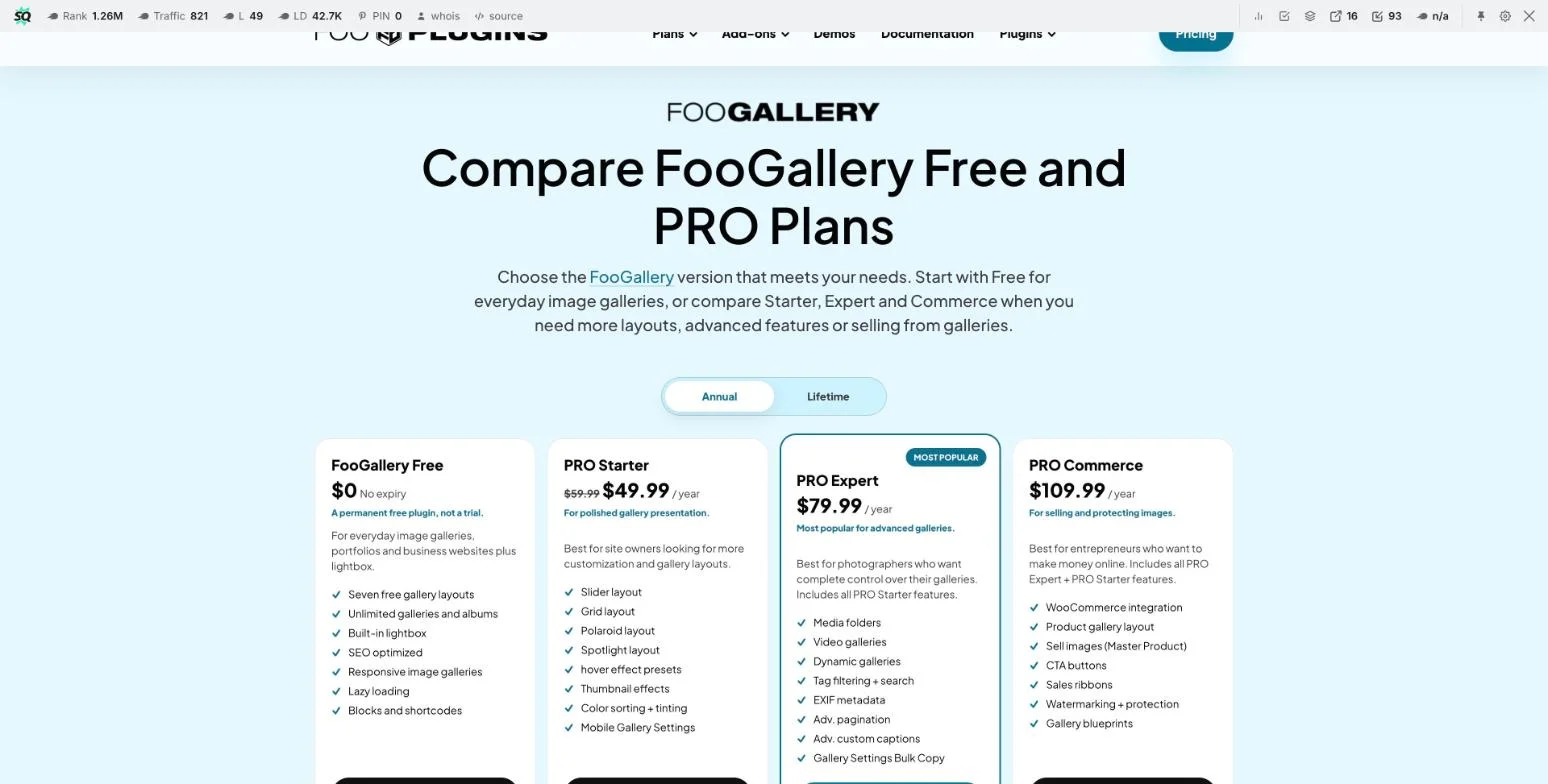
Paid tiers, screenshotted directly from fooplugins.com in October 2026, run three deep, all yearly licences. PRO Starter is the entry tier, currently discounted, adding slider, grid, Polaroid, and Spotlight layouts, hover effects, thumbnail effects, and mobile-specific gallery settings. PRO Expert, FooGallery’s own “most popular” tier, is the middle step and adds media folders, video galleries, dynamic galleries, tag filtering with search, EXIF metadata, advanced pagination, and advanced custom captions. PRO Commerce is the top tier, adding WooCommerce integration, product galleries, the ability to sell images as a master product, CTA buttons, sales ribbons, and watermarking.
Media folders and tag filtering in the Expert tier are the closest any of the big four comes to community infrastructure, and if your site genuinely just needs the admin to organize a large existing library, that is a real advantage. But organizing is still the operative word. A media folder in FooGallery is created and populated by whoever has access to the WordPress media library, which on almost every community site is the admin and nobody else. There is no front-end submission form, no per-member privacy setting, and no report-and-review workflow anywhere in FooGallery’s three paid tiers. FooGallery is a better-organized admin-curated gallery, not a member-upload system, and that distinction is the whole argument of this article.
WPMediaVerse
WPMediaVerse starts from a different brief entirely: “a photo community your members build,” in the product’s own words on wpmediaverse.com. Instead of a dashboard tool for arranging pictures the admin already has, it is a front-end system for members to upload, organize, and control their own photos, video, and audio, built by Wbcom Designs to run standalone or alongside BuddyPress and BuddyNext.

Run the checklist from earlier in this article against it directly. Front-end upload: members post photos, video, and audio from their own profile or the activity stream, no dashboard access needed. Privacy: set per item and per album, not one site-wide switch, covering public, members-only, and private tiers. Moderation: members report an item, it lands in a review queue, and every action a moderator takes is logged, which is a materially different promise than “comments are enabled.” Visibility: albums are filterable by tag, category, media type, or member through a grid block you drop on any page, and on a BuddyPress or BuddyNext site the photos surface in the activity feed itself, where members are already looking, not on a separate gallery page they have to remember exists. Direct messages are built in too, with each member controlling who can contact them, which is the natural next step once people start reacting to each other’s photos.
Pricing, checked on wpmediaverse.com in October 2026, starts free: unlimited sites, no license key, no member cap, nothing that expires. Paid tiers are Personal for one site, Developer for five sites, and Agency for unlimited sites, each sold as a yearly or one-time licence. All three paid tiers share the same core feature set; Agency adds named feed layouts styled after Instagram, Pinterest, Flickr, and Dribbble, cloud storage for the library, photo competitions with entries and voting, AI provider integrations, and deeper video tooling. For a community that already runs BuddyPress or Reign’s own BuddyNext, WPMediaVerse plugs directly into the activity stream and member profiles; see our fuller walkthrough on building a media-rich Reign community with WPMediaVerse for the setup steps.
The honest limitation runs the other direction from the big four. WPMediaVerse is not chasing Envira’s drag-and-drop layout polish or NextGEN’s print-sale ecommerce workflow, and if your site is a single photographer’s portfolio with zero members uploading anything, WPMediaVerse is solving a problem you do not have. It earns its place the moment more than one person is adding photos to the site, which is precisely the moment the big four stop being useful.
The scenario: hitting the wall with Envira
Here is how this plays out in practice, because it is a pattern we see repeated across community builds. A site owner starts a hobby club, a local photography group, a fan community, and needs a gallery fast. They search “best WordPress gallery plugin,” land on one of the big roundups, and pick Envira: good reviews, a drag-and-drop builder that looks easy, a reasonable price. They upload the club’s own event photos, arrange a masonry gallery, and the homepage looks sharp in a single afternoon. For that first use case, pure admin-curated display, Envira does exactly what it promised.
Then members start asking the obvious question: can I post my own photos? The honest answer inside Envira is no, not without giving every member a WordPress login with gallery-editing rights, which is a security problem, not a feature. The site owner’s real options from here are three, and none of them are free. Build a custom front-end upload form by hand, wiring it to Envira’s galleries and maintaining it through every WordPress and plugin update. Tell members to email or message their photos for the admin to upload manually, which does not scale past a handful of active members before it becomes a part-time job. Or accept that photo-sharing stops at “stuff the admin posts” and the community loses the one feature members actually asked for.
None of this is a flaw in Envira. It did the job it was sold to do, display a gallery of photos the admin already had, extremely well. The mismatch happened one step earlier, when “I need a gallery” got answered with “I need a gallery plugin” instead of “I need members to be able to post their own photos,” which is a different product question with a different correct answer. The cheapest fix is picking the right tool before members start asking, which is the whole point of running this comparison before you install anything.
The bottom line
Envira, NextGEN, Modula, and FooGallery are not weak plugins. Judged on the job they were actually built for, admin-curated display of photos the site owner already controls, all four are mature, well-reviewed products worth the money, and our separate roundup of gallery plugins for portfolios and business sites covers that comparison on its own terms. The problem only shows up when a community site, where members are the ones with the photos, tries to use a tool built for a single curator.
On price alone, the big four look cheaper than WPMediaVerse at the entry tier: Modula’s Starter plan undercuts the eventual Personal upgrade from WPMediaVerse’s free tier. That comparison only holds if you never need a member to upload anything, because none of those four plans include upload, privacy, or moderation at any price. The moment you add the custom development a front-end upload workflow actually requires on top of one of them, the math flips, and WPMediaVerse’s free tier, with no license key and no member cap, is already ahead before a single dollar changes hands.
- Pick Envira, NextGEN, Modula, or FooGallery if you are the only one adding photos: a portfolio, a business’s own image library, a photographer selling prints. FooGallery’s media folders and tag filtering are worth a look if you specifically need to organize a large existing library well.
- Pick WPMediaVerse if members are the ones with the camera: a hobby club, a photography community, a fitness group sharing progress photos, any BuddyPress or BuddyNext site where “can I post my own picture” is a question members will actually ask.
FAQs
Can I just add a front-end upload form to Envira, NextGEN, Modula, or FooGallery myself?
Technically yes, with custom development. None of the four ship a member-facing upload form, privacy setting, or moderation queue, so you would be building that layer from scratch and maintaining it through every plugin and WordPress update. Budget real developer time and an ongoing maintenance cost, not a weekend project.
Does WPMediaVerse replace Envira, NextGEN, Modula, or FooGallery, or run alongside them?
It depends on what each one is doing on your site. If the big-four plugin is handling the admin’s own curated gallery, say, a homepage showcase, there is no conflict running it next to WPMediaVerse, which handles the member-upload side. If you were trying to stretch the big-four plugin into member uploads, WPMediaVerse replaces that attempt outright.
Do I need BuddyPress for WPMediaVerse to work?
No. WPMediaVerse’s own site states it can run standalone, with its own member library and profiles. BuddyPress or BuddyNext adds activity-feed integration and ties photos into the profiles and groups you already have, which is where it fits most naturally on a Reign community site, but it is not a hard requirement.
Which of the five plugins is cheapest for a single site?
On sticker price, Modula’s Starter tier is the cheapest paid option, with WPMediaVerse’s free tier underneath all of them at no cost. The cheap paid tiers buy layout and display features only; none include member upload, privacy controls, or moderation at any price point among the big four.
Can members set their own privacy on a photo in FooGallery, since it has albums?
No. FooGallery’s albums are an organizational tool for whoever has access to the WordPress media library, almost always the site admin. There is no per-member account that creates its own album with its own privacy setting anywhere in FooGallery’s free or paid tiers.
What happens to reported photos in WPMediaVerse?
A member reports an item, it lands in a review queue a moderator checks, and the action taken is logged. That is a materially different workflow than relying on comments or manual reports sent by email, which is the closest the big four get, and only FooGallery and NextGEN even offer comments at all.
Does moving from one of the big four to WPMediaVerse mean losing existing galleries?
Your existing admin-curated galleries do not need to move at all if they are still doing their job, a homepage showcase or an about-page portfolio. WPMediaVerse is additive: install it for the member-facing side and keep the existing plugin for whatever admin-curated display it was already handling well.
Is a photographer’s portfolio site better off with WPMediaVerse too?
No. A single-photographer portfolio with no members uploading anything gets nothing from WPMediaVerse’s member-upload, privacy, and moderation layer, since there is only ever one uploader. Envira or NextGEN’s layout polish and, for NextGEN specifically, print-sale ecommerce tools are the better fit for that exact use case.
Does WPMediaVerse handle video, or only photos?
Members can upload photos, video, and audio from the front end, per WPMediaVerse’s own product page. The Agency tier adds deeper video tooling beyond a plain upload. None of Envira, Modula, or the lower FooGallery tiers handle member video at all; NextGEN and FooGallery’s higher tiers support video display, but again only for content the admin uploaded.
What is the real cost difference once development time is counted?
For a site that genuinely needs member uploads, the big four’s lower sticker price is misleading, because none of them include the feature at any tier. Once you add the cost of custom-building front-end upload, privacy, and moderation on top of one of them, and maintaining that custom code through every update, WPMediaVerse’s free tier, with no license key and no member cap, is typically the cheaper total from day one.
Which one to pick
The decision comes down to one question: who is holding the camera? If it is only ever the site owner, Envira, NextGEN, Modula, and FooGallery are mature, well-built tools, and our wider gallery plugin roundup for portfolios and business sites covers how to choose between them on display quality alone. If it is members, which is the whole premise of a community site, none of the big four were built to let them, and WPMediaVerse is the one plugin on this list that was. Our guide on building a full photo-sharing community on WordPress goes further, covering upload limits, storage, CDN, and the legal basics of moderation and copyright once members start posting at scale.
Reign Theme styles WPMediaVerse’s albums, grids, and member profiles natively, the same way it styles BuddyPress and BuddyNext, so the photo layer looks like part of the community rather than a plugin bolted on top. See the Reign theme page for the full feature set, or try the BuddyNext live demo to see a working community, photos included, before installing anything.