

Managing a busy schedule can feel overwhelming, but what if you had an assistant to handle it all? AI scheduling assistants are transforming the way we organize our lives, ensuring you never miss a meeting, deadline, or event. From syncing calendars to sending reminders, these tools are lifesavers. Let’s explore the 10 best AI scheduling assistant that can help you stay on top of everything.

Why You Need an AI Scheduling Assistant
In today’s fast-paced world, multitasking is inevitable. Juggling meetings, appointments, and personal time can easily slip through the cracks. AI scheduling assistants are here to solve this problem by streamlining tasks and automating reminders.
Imagine never having to worry about coordinating time zones or double-booking your calendar. These smart tools learn your preferences, anticipate your needs, and even handle rescheduling conflicts. It’s like having a personal assistant - minus the hefty salary.
1.Clara: The Human-Like Scheduler

Clara is a conversational AI scheduling assistant designed to mimic human interactions.
Key Features
- Natural language understanding: Clara handles email conversations as if it’s a real person.
- Automatic follow-ups: Clara ensures meetings are confirmed without requiring your intervention.
Pros:
- Professional and human-like communication.
- Saves time by managing scheduling autonomously.
Cons:
- Pricing can be steep for small teams.
2.Calendly: Effortless Appointment Setting
Calendly is a favorite among professionals for its intuitive interface and seamless integrations.
Key Features
- Customizable availability: Set rules for when and how people can book with you.
- Team scheduling: Perfect for group meetings and collaboration.
Pros:
- User-friendly for both the scheduler and invitees.
- Free version available with basic features.
Cons:
- Limited advanced features in the free plan.
3.Microsoft Bookings: Enterprise-Grade Scheduling
If you’re in the Microsoft ecosystem, Bookings is a no-brainer for managing appointments.
Key Features
- Office 365 integration: Syncs seamlessly with your existing tools.
- Custom booking pages: Professionalize your scheduling process.
Pros:
- Excellent for small to mid-sized businesses.
- Integrates with Microsoft Teams for remote meetings.
Cons:
- Best suited for those already using Microsoft products.
4. x.ai: Your Scheduling Powerhouse
x.ai is a powerful AI tool that takes care of scheduling without the hassle.
Key Features
- Meeting polls: Helps find a time that works for everyone.
- Time zone management: Automatically adjusts for participants in different zones.
Pros:
- Easy to use and highly efficient.
- Great for teams and individuals alike.
Cons:
- Limited customizations in the basic plan.
5. Google Calendar’s Smart Scheduling
Google Calendar’s AI features are a hidden gem for simple scheduling needs.
Key Features
- AI suggestions: Recommends meeting times based on availability.
- Event smart tracking: Adds event details directly from emails.
Pros:
- Free and familiar interface.
- Excellent for personal and small business use.
Cons:
- Lacks advanced AI capabilities compared to competitors.
6.Motion: All-in-One Productivity Assistant
Motion combines scheduling with task and project management, making it a multitasking pro.
Key Features
- AI time blocking: Automatically schedules tasks into your calendar.
- Daily planner: Provides an overview of your day in one glance.
Pros:
- Great for productivity-focused users.
- Helps prioritize tasks alongside meetings.
Cons:
- Slight learning curve for beginners.
7. Reclaim.ai: Optimize Every Minute
Reclaim.ai focuses on balancing work and personal life by finding time for everything.
Key Features
- Smart task scheduling: Finds gaps in your calendar to fit tasks.
- Focus time: Blocks time for deep work without interruptions.
Pros:
- Excellent for time management.
- Flexible and adaptable to changing schedules.
Cons:
- Requires a clear understanding of priorities for maximum benefit.
8. Zoom.ai: A Meeting Pro’s Best Friend
Zoom.ai specializes in automating meeting workflows, from scheduling to preparing for calls.
Key Features
- Pre-meeting prep: Sends summaries and documents ahead of time.
- Integrated notes: Keep track of action items post-meeting.
Pros:
- Ideal for professionals in meeting-heavy roles.
- Reduces manual effort significantly.
Cons:
- Limited free features.
9.Doodle: The Polling Master
Doodle makes it easy to coordinate with large groups and find common meeting times.
Key Features
- Group polling: Let participants vote on their preferred time slots.
- Calendar sync: Integrates with major calendar platforms.
Pros:
- Perfect for scheduling with multiple stakeholders.
- Free tier available for basic needs.
Cons:
- Advanced features require a premium subscription.
10. TidyCal: Budget-Friendly Scheduling
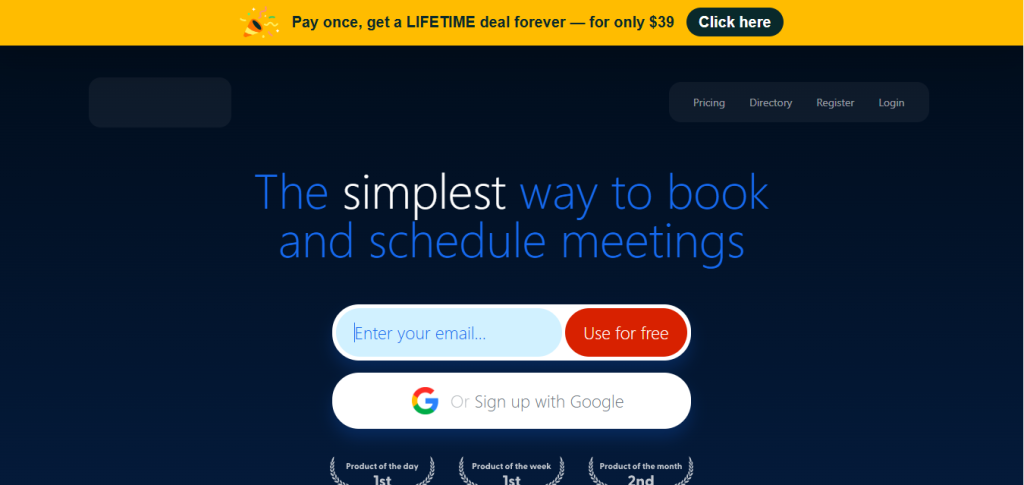
TidyCal is an affordable alternative for those needing a simple yet powerful scheduling tool.
Key Features
- One-time fee: Offers lifetime access without recurring costs.
- Integrated payments: Clients can pay directly when booking.
Pros:
- Highly cost-effective.
- Simple and straightforward interface.
Cons:
- Lacks the advanced AI features of competitors.
Comparison Table: 10 Best AI Scheduling Assistant
| Tool | Key Features | Pros | Cons |
| Clara | Human-like scheduling | Professional communication | Expensive for small teams |
| Calendly | Customizable availability | User-friendly | Limited free features |
| Microsoft Bookings | Office 365 integration | Great for businesses | Best for Microsoft users |
| x.ai | Meeting polls, time zone management | Easy to use | Limited customization in basic plan |
| Google Calendar | AI scheduling and smart tracking | Free and familiar | Lacks advanced AI |
| Motion | AI time blocking | Productivity-focused | Steeper learning curve |
| Reclaim.ai | Smart task scheduling | Flexible and efficient | Needs clear priorities |
| Zoom.ai | Pre-meeting prep | Reduces manual effort | Limited free features |
| Doodle | Group polling for scheduling | Free tier for basic use | Advanced features require premium |
| TidyCal | Affordable one-time payment | Budget-friendly | Lacks advanced AI |

Final Thoughts
The 10 best AI scheduling assistant we’ve explored cater to a range of needs, from managing personal calendars to coordinating complex team meetings. Whether you’re a solo entrepreneur, a busy professional, or a team leader, there’s an AI tool tailored for you.
Try one (or a few!) and discover how these assistants can save time, reduce stress, and keep your schedule in check. With AI on your side, you’ll never miss a beat - or a meeting.
Interesting Reads: